It is currently Mon Sep 21, 2026 8:32 am


All times are UTC - 5 hours [ DST ]


Post new topic Reply to topic  [ 14 posts ] 
Author Message
 Post subject: Mobius-Strip Challenge
PostPosted: Wed Apr 08, 2015 8:26 pm  (#1) 
Offline
Administrator
User avatar

Joined: Aug 10, 2012
Posts: 14206
Location: Native to NYC living in Arizona, Gimp 2.8 - 3.0, Win 11 PC.
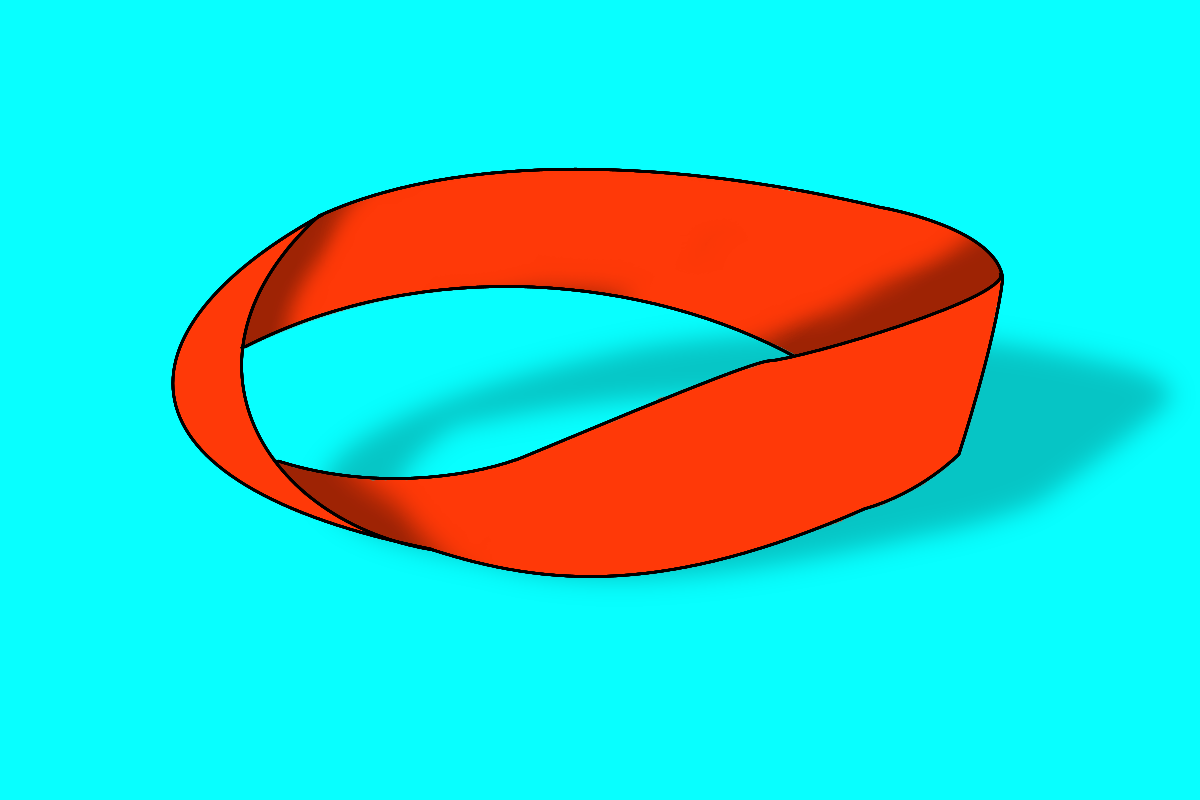
I had a heck of a time making this image.
Anyone willing to take on this challenge, to create their version of this image?
Image

_________________
Image
"A wise man learns more from a foolish question than a fool can learn from a wise answer"
Image


Last edited by Wallace on Thu Apr 09, 2015 12:40 am, edited 1 time in total.

Share on Facebook Share on Twitter Share on Orkut Share on Digg Share on MySpace Share on Delicious Share on Technorati
Top
 Post subject: Re: Mobius-Strip Challenge
PostPosted: Wed Apr 08, 2015 9:56 pm  (#2) 
Offline
Global Moderator
User avatar

Joined: Oct 02, 2014
Posts: 5050
Location: Sydney Australia
Hi Wallace - does this count? Thought I would try a different loop.

Image

_________________
Image

Respect should be offered freely but hard earned


Top
 Post subject: Re: Mobius-Strip Challenge
PostPosted: Wed Apr 08, 2015 11:18 pm  (#3) 
Offline
Administrator
User avatar

Joined: Aug 10, 2012
Posts: 14206
Location: Native to NYC living in Arizona, Gimp 2.8 - 3.0, Win 11 PC.
oldmangrumpy wrote:
Hi Wallace - does this count? Thought I would try a different loop.

Image

Sure it counts, I can't see why it wouldn't. :bigthup

_________________
Image
"A wise man learns more from a foolish question than a fool can learn from a wise answer"
Image


Top
 Post subject: Re: Mobius-Strip Challenge
PostPosted: Thu Apr 09, 2015 12:17 am  (#4) 
Offline
GimpChat Member
User avatar

Joined: Aug 28, 2012
Posts: 3060
Location: Idk where I am.
That looks like a pain in the neck. But very effective.

_________________
Image
Reality is a lovely place...But I wouldn't wanna live there.


Top
 Post subject: Re: Mobius-Strip Challenge
PostPosted: Thu Apr 09, 2015 2:16 am  (#5) 
Offline
GimpChat Member
User avatar

Joined: Mar 18, 2011
Posts: 283
Location: Lusaka, Zambia
Hi,

Here is mine.

Cheers.


Attachments:
logo.png
logo.png [ 88.63 KiB | Viewed 4849 times ]
Top
 Post subject: Re: Mobius-Strip Challenge
PostPosted: Thu Apr 09, 2015 2:30 am  (#6) 
Offline
Administrator
User avatar

Joined: Aug 10, 2012
Posts: 14206
Location: Native to NYC living in Arizona, Gimp 2.8 - 3.0, Win 11 PC.
josephbupe wrote:
Hi,

Here is mine.

Cheers.

:jumpclap

_________________
Image
"A wise man learns more from a foolish question than a fool can learn from a wise answer"
Image


Top
 Post subject: Re: Mobius-Strip Challenge
PostPosted: Thu Apr 09, 2015 5:28 am  (#7) 
Offline
GimpChat Member
User avatar

Joined: Mar 18, 2011
Posts: 283
Location: Lusaka, Zambia
And now, the Mobius-Strip.

It was a tricky one, especially that there is no way to rotate paths. So, I did stroke-path and then rotate the stroked lines. Unfortunately, that did not give smooth lines as seen in my image.

Cheers !

Joseph


Attachments:
LOGO-3.png
LOGO-3.png [ 194.16 KiB | Viewed 4809 times ]
Top
 Post subject: Re: Mobius-Strip Challenge
PostPosted: Thu Apr 09, 2015 5:49 am  (#8) 
Offline
Global Moderator
User avatar

Joined: Oct 02, 2014
Posts: 5050
Location: Sydney Australia
Hi Josephbupe - just thought I would assist, because my original mobius strip above was actually generated by rotating the initial path, twice in fact. If you display the path, enter the rotate function then select the third mode option (i.e the path symbol), then you can rotate the path and of course also subsequently move it into the desired position.

Cheers and happy Gimping ;)

_________________
Image

Respect should be offered freely but hard earned


Top
 Post subject: Re: Mobius-Strip Challenge
PostPosted: Thu Apr 09, 2015 6:05 am  (#9) 
Offline
GimpChat Member
User avatar

Joined: Mar 18, 2011
Posts: 283
Location: Lusaka, Zambia
oldmangrumpy wrote:
Hi Josephbupe - just thought I would assist, because my original mobius strip above was actually generated by rotating the initial path, twice in fact. If you display the path, enter the rotate function then select the third mode option (i.e the path symbol), then you can rotate the path and of course also subsequently move it into the desired position.

Cheers and happy Gimping ;)


Je...sus ! Thanx for the tip.

:gimp


Top
 Post subject: Re: Mobius-Strip Challenge
PostPosted: Thu Apr 09, 2015 6:31 am  (#10) 
Offline
GimpChat Member
User avatar

Joined: Apr 26, 2014
Posts: 3824
Location: belgium
Image

this is what I made of it


Top
 Post subject: Re: Mobius-Strip Challenge
PostPosted: Thu Apr 09, 2015 3:24 pm  (#11) 
Offline
Script Coder
User avatar

Joined: Jun 22, 2010
Posts: 1171
Location: Here and there
Of course I had to go photographic with it:
Attachment:
IMGP6437_from_raw_sml.jpg
IMGP6437_from_raw_sml.jpg [ 171.92 KiB | Viewed 1869 times ]


And the G'MIC>>Deformations>>Random has a nice look to it:
Attachment:
IMGP6437_from_raw_sml2.jpg
IMGP6437_from_raw_sml2.jpg [ 136.46 KiB | Viewed 1869 times ]


Kevin


Top
 Post subject: Re: Mobius-Strip Challenge
PostPosted: Thu Apr 09, 2015 4:00 pm  (#12) 
Offline
Administrator
User avatar

Joined: Aug 10, 2012
Posts: 14206
Location: Native to NYC living in Arizona, Gimp 2.8 - 3.0, Win 11 PC.
Nice work you guys. :bigthup

Here as some examples I recently made.
Image
Doing these images is great path work exercise/practice.
I encourage anyone having difficulty using the path tool to try this out.

_________________
Image
"A wise man learns more from a foolish question than a fool can learn from a wise answer"
Image


Top
 Post subject: Re: Mobius-Strip Challenge
PostPosted: Thu Apr 09, 2015 7:02 pm  (#13) 
Offline
GimpChat Member
User avatar

Joined: Apr 07, 2010
Posts: 14182
I'll bet you mean me huh? :oops: :oops: :oops:

_________________
Image


Top
 Post subject: Re: Mobius-Strip Challenge
PostPosted: Thu Apr 09, 2015 7:14 pm  (#14) 
Offline
Administrator
User avatar

Joined: Aug 10, 2012
Posts: 14206
Location: Native to NYC living in Arizona, Gimp 2.8 - 3.0, Win 11 PC.
molly wrote:
I'll bet you mean me huh? :oops: :oops: :oops:

I didn't really have you in mind when I wrote that, but if you're having issues when using the path tool, then yes this challenge is especially for you.

_________________
Image
"A wise man learns more from a foolish question than a fool can learn from a wise answer"
Image


Top
Post new topic Reply to topic  [ 14 posts ] 

All times are UTC - 5 hours [ DST ]


* Login  


Powered by phpBB3 © phpBB Group