It is currently Sat Oct 03, 2026 11:41 am


All times are UTC - 5 hours [ DST ]


Post new topic Reply to topic  [ 17 posts ] 
Author Message
 Post subject: My Brushes are Broken
PostPosted: Sat Apr 11, 2015 11:32 am  (#1) 
Offline
GimpChat Member
User avatar

Joined: Apr 07, 2010
Posts: 14182
GIMP Version: 2.8.14
Operating System: Linux
GIMP Experience: Intermediate Level


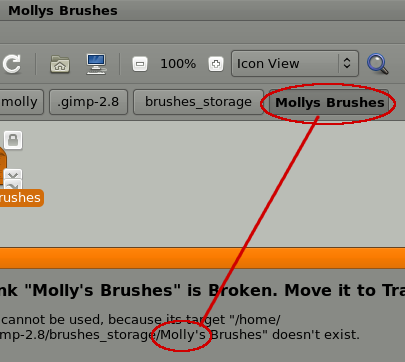
Some of my brush folders are broken. Can anyone tell me if they can be fixed? This happened last night when they wouldn't transfer over from my alternate brush folder. I am using ofnuts brush set script addon.
The broken brush shows up in this screen shot below and the message I get when I try to open it.
Image

_________________
Image


Share on Facebook Share on Twitter Share on Orkut Share on Digg Share on MySpace Share on Delicious Share on Technorati
Top
 Post subject: Re: My Brushes are Broken
PostPosted: Sat Apr 11, 2015 12:05 pm  (#2) 
Offline
Retired Staff
User avatar

Joined: May 22, 2008
Posts: 6946
Location: Somewhere in GIMP
Could be that Molly's is a typo. Your folder doesn't have an apostrophe between Molly and the s, while the path has one. Remove the apostrophe from your path to the folder.

Image

_________________
Image
World War IV will be fought with sticks and stones. - Albert Einstein


Top
 Post subject: Re: My Brushes are Broken
PostPosted: Sat Apr 11, 2015 12:17 pm  (#3) 
Offline
GimpChat Member
User avatar

Joined: Apr 07, 2010
Posts: 14182
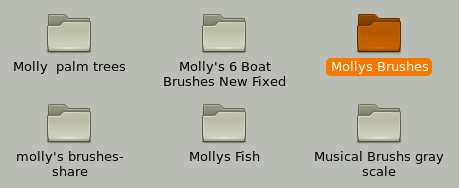
Thanks, but this happened in about six of my folders and the folder shows up but all they had in them was a broken file, instead of the whole folder. I have never seen this before. I did remove the apostrophe and that didn't work either. I didn't want to lose those brushes especial because they are ones I have collected over the years and ones I made and got from GC.
This shows the folder, and inside should be all my Mollys brushes but there is just the one broken file in there
Image

_________________
Image


Top
 Post subject: Re: My Brushes are Broken
PostPosted: Sat Apr 11, 2015 2:11 pm  (#4) 
Offline
GimpChat Member
User avatar

Joined: Apr 07, 2010
Posts: 14182
Thanks conbagui... I didn't get anywhere there but maybe I could try the Fedora forum. The codes and installs have different instructions

_________________
Image


Top
 Post subject: Re: My Brushes are Broken
PostPosted: Sat Apr 11, 2015 4:08 pm  (#5) 
Offline
GimpChat Member
User avatar

Joined: Jan 31, 2015
Posts: 146
I can only offer a few suggestions, not guaranteed solutions:

Other than your home directory, Gimp uses another directory for brushes:

usr/share/gimp/

Might be worth checking there first.

My second suggestion is to do a full system file search, that should determine if your brushes still exist somewhere. I typically use pfind, so I don't know if you have a file searcher. But typically most Linux OS's should have one by default.

Failing that, then it sounds like your files got somehow wiped in the transfer process. For that you could try out some file recovery software such as this:

http://extundelete.sourceforge.net/


Top
 Post subject: Re: My Brushes are Broken
PostPosted: Sat Apr 11, 2015 4:10 pm  (#6) 
Offline
GimpChat Member
User avatar

Joined: Apr 07, 2010
Posts: 14182
Thanks you David-C... I will look at this

_________________
Image


Top
 Post subject: Re: My Brushes are Broken
PostPosted: Sat Apr 11, 2015 4:32 pm  (#7) 
Offline
GimpChat Member
User avatar

Joined: Nov 16, 2011
Posts: 5127
Location: Metro Vancouver, BC
It looks like your files are locked so it's a permission issue. Sign into your file manager as admin (root) to change access.

_________________
Image
Gimp 2.8.18, Linux, median user
Gimp Chat Tutorials Index
Spirit Bear (Kermode)


Top
 Post subject: Re: My Brushes are Broken
PostPosted: Sat Apr 11, 2015 4:46 pm  (#8) 
Offline
GimpChat Member
User avatar

Joined: Apr 07, 2010
Posts: 14182
odin i can't find file manager in fedora MATE desktop

_________________
Image


Top
 Post subject: Re: My Brushes are Broken
PostPosted: Sat Apr 11, 2015 5:10 pm  (#9) 
Offline
GimpChat Founder
User avatar

Joined: May 22, 2008
Posts: 5241
Location: Gimpville
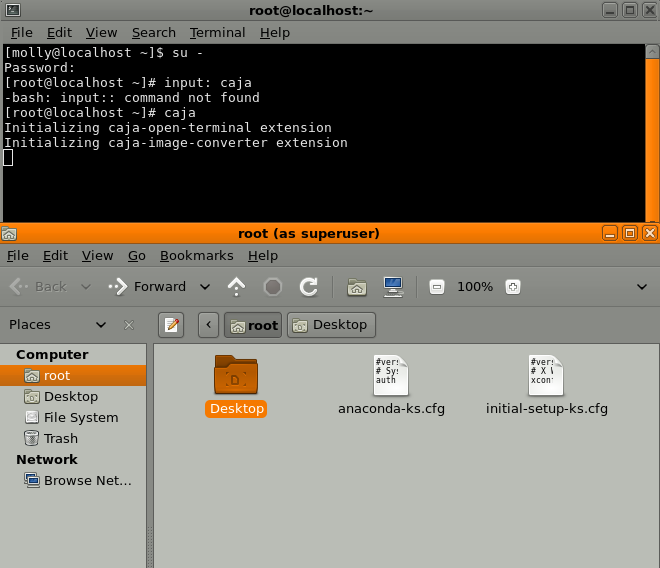
In MATE DE, login into a terminal session as root and input: caja <enter>

That will bring up your file manager as root.

_________________
“If you reach for the stars, you just might land on a decently sized hill.” - Stuart Hill


Top
 Post subject: Re: My Brushes are Broken
PostPosted: Sat Apr 11, 2015 5:19 pm  (#10) 
Offline
GimpChat Member
User avatar

Joined: Apr 07, 2010
Posts: 14182
ok thanks don't know what I will do when I get there though :oops:
This is what came up.
Image

_________________
Image


Top
 Post subject: Re: My Brushes are Broken
PostPosted: Sat Apr 11, 2015 5:31 pm  (#11) 
Offline
GimpChat Founder
User avatar

Joined: May 22, 2008
Posts: 5241
Location: Gimpville
You will need t browse to

File System/Home/Molly/gimp-2.8

Then to your brushes folder with the locked files. You can then right click on the file, select properties, then permissions tab. From there, you can change the files permissions to read/write.

_________________
“If you reach for the stars, you just might land on a decently sized hill.” - Stuart Hill


Top
 Post subject: Re: My Brushes are Broken
PostPosted: Sat Apr 11, 2015 5:38 pm  (#12) 
Offline
GimpChat Member
User avatar

Joined: Apr 07, 2010
Posts: 14182
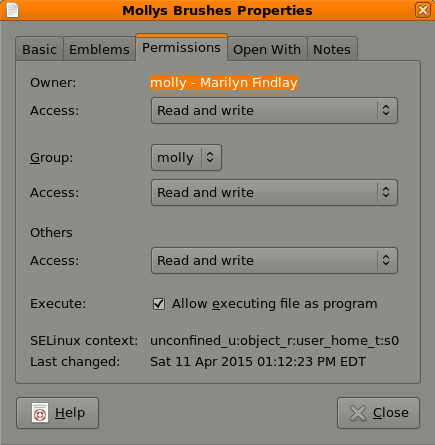
Image
They are already at read and write
This is what is says for file type... link (broken) (inode/symlink)

_________________
Image


Top
 Post subject: Re: My Brushes are Broken
PostPosted: Sat Apr 11, 2015 7:42 pm  (#13) 
Offline
Script Coder
User avatar

Joined: Oct 25, 2010
Posts: 4812
molly wrote:
GIMP Version: 2.8.14
Operating System: Linux
GIMP Experience: Intermediate Level


Some of my brush folders are broken. Can anyone tell me if they can be fixed? This happened last night when they wouldn't transfer over from my alternate brush folder. I am using ofnuts brush set script addon.
The broken brush shows up in this screen shot below and the message I get when I try to open it.
[ Image ]

It looks like you removed/renamed a directory of brushes in "brushes_storage" while it was marked active. Brushes are likely not lost (and you do backups, right?). To reset the plugin:
1) remove all the links in the directory "brushes"
2) In "brushes_storage", delete the ".active" file (since it has a leading dot, it will not be visible by default in your file explorer, you have to tell it to show hidden files).

Then you can re-activate the brushes in Gimp.

_________________
Image


Top
 Post subject: Re: My Brushes are Broken
PostPosted: Sat Apr 11, 2015 7:51 pm  (#14) 
Offline
GimpChat Founder
User avatar

Joined: May 22, 2008
Posts: 5241
Location: Gimpville
:ninja

The information I gave was instructions on how to use your file manager, as root, to change the permissions on a file/folder, which is what I thought you were wanting to do.

Looking back though this thread, I see now that you are looking at a broken symbolic link. You can think of a symbolic link as a pointer to a file or folder, not the actual file or folder itself. In your case, it appears your symbolic link is pointing to a folder that no longer exists, so it's broken. A symbolic link can become broken if the file or folder the link is pointing to has been moved, deleted or renamed.

As to why you would be using symbolic links in the first place, I wouldn't know. However, to correct a broken symbolic link, you would need to restore the file or folder the link is pointing to. In your case, the symbolic link is looking for a folder named /home/molly/.gimp-2.8/brushes_storage/Molly's Brushes. To fix the link, you would need to restore that folder.

What I find odd is that you have a symbolic link pointing back to the folder the symbolic link itself resides in. (Well, minus the apostrophe. I assumed you renamed the folder and removed the apostrophe, for some reason?)

In any event, that folder does not contain any brushes, which is what I think you are assuming. Perhaps there is another folder somewhere that actually contains the brushes and the symbolic link is supposed to be pointing to it. That's about all I can tell you without knowing more about what you are trying to do here.

_________________
“If you reach for the stars, you just might land on a decently sized hill.” - Stuart Hill


Top
 Post subject: Re: My Brushes are Broken
PostPosted: Sat Apr 11, 2015 8:40 pm  (#15) 
Offline
GimpChat Member
User avatar

Joined: Nov 16, 2011
Posts: 5127
Location: Metro Vancouver, BC
molly wrote:
[ Image ]
They are already at read and write
This is what is says for file type... link (broken) (inode/symlink)

Run the following command in your brushes folder(s), it will list any broken symlinks. You could run it on Gimp global and user folders which might be easier. If a symlink is broken you can safely delete it (you may need root access to delete).
find -L . -type l
I don't recommend running this command system wide, only on specific groups of files and folders. The reason being the list could be too long to manage.
The Linux terminal should look like this.
cd .gimp-2.8
~/.gimp-2.8$ find -L . -type l
cd .gimp-2.8 [enter] then add, find -L . -type l [enter]

_________________
Image
Gimp 2.8.18, Linux, median user
Gimp Chat Tutorials Index
Spirit Bear (Kermode)


Top
 Post subject: Re: My Brushes are Broken
PostPosted: Sun Apr 12, 2015 3:44 am  (#16) 
Offline
Script Coder
User avatar

Joined: Oct 25, 2010
Posts: 4812
GnuTux wrote:
As to why you would be using symbolic links in the first place, I wouldn't know.

This is the normal behavior of my add-on manager on Linux. To activate a directory of resources, it creates a soft link to it in the directory Gimp uses (much more efficient than copying the files, and safer than moving them).

_________________
Image


Top
 Post subject: Re: My Brushes are Broken
PostPosted: Mon Apr 13, 2015 4:12 am  (#17) 
Offline
GimpChat Member
User avatar

Joined: Apr 07, 2010
Posts: 14182
Thanks, I have them all straightened around now, I did lose my one folder though. I was unable to fix or repair that one.

_________________
Image


Top
Post new topic Reply to topic  [ 17 posts ] 

All times are UTC - 5 hours [ DST ]


* Login  


Powered by phpBB3 © phpBB Group