It is currently Wed Nov 25, 2026 2:28 pm


All times are UTC - 5 hours [ DST ]


Post new topic Reply to topic  [ 23 posts ]  Go to page Previous  1, 2
Author Message
 Post subject: Re: Wisteria
PostPosted: Sun Apr 26, 2015 6:48 pm  (#21) 
Offline
GimpChat Member
User avatar

Joined: Mar 10, 2014
Posts: 845
Issabella wrote:
Thank you Marcello for your nice photo and sharing it with us. :)
Great improvement made for all of you. :clap
Here it's mine. ;)


Issabella you made a nice work!!!


Top
 Post subject: Re: Wisteria
PostPosted: Tue Apr 28, 2015 6:16 am  (#22) 
Offline
GimpChat Member

Joined: Jan 20, 2014
Posts: 66
Marcello wrote:
Okyl168 - for me was difficult select by color ( did you set select by Hue? with threshhold 45 ?); other question : did you use MathMap>Colors>local contrast enhancement?


Set add mode in select by color, then just click click click all the colors on the blossoms, then create a new layer mask with selection. Then right click on the mask and show layer mask, you can now use black paintbrush to remove the non blossoms area. Don't forget to set selection to none. Then disable show layer mask and adjust the color level of the blossoms. The top layer will only affect the blossoms, the bottom/original layer you may dim a bit before merge them together.

Local contrast enhancement can achieved by using unsharp mask filter with radius 50 amount 0.2. I wrote python scripts for this standard enhancement.
Attachment:
EnhanceCCSS.zip [1.67 KiB]
Downloaded 159 times


Attachment:
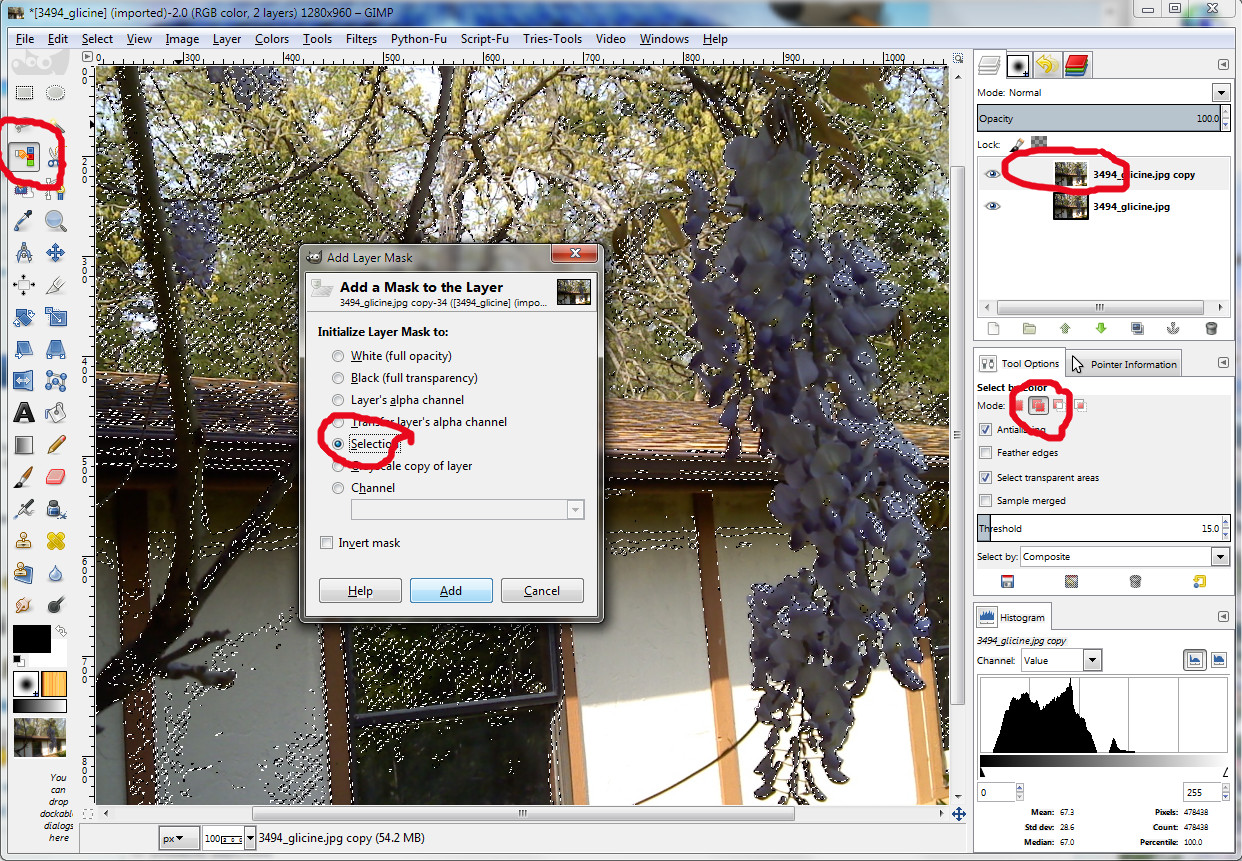
ShowHow.jpg
ShowHow.jpg [ 481.21 KiB | Viewed 2926 times ]


Top
 Post subject: Re: Wisteria
PostPosted: Tue Apr 28, 2015 8:15 pm  (#23) 
Offline
GimpChat Member
User avatar

Joined: Mar 10, 2014
Posts: 845
thank you Okyl168 for the extra-info
as you can see at the beginning I used your filter enhanceCCSS already!


Top
Post new topic Reply to topic  [ 23 posts ]  Go to page Previous  1, 2

All times are UTC - 5 hours [ DST ]


* Login  


Powered by phpBB3 © phpBB Group