It is currently Wed Aug 26, 2026 10:23 pm


All times are UTC - 5 hours [ DST ]


Post new topic Reply to topic  [ 5 posts ] 
Author Message
 Post subject: Name That Script or Plugin [Question Answered]
PostPosted: Sat May 02, 2015 4:24 pm  (#1) 
Offline
Administrator
User avatar

Joined: Aug 10, 2012
Posts: 14176
Location: Native to NYC living in Arizona, Gimp 2.8 - 3.0, Win 11 PC.
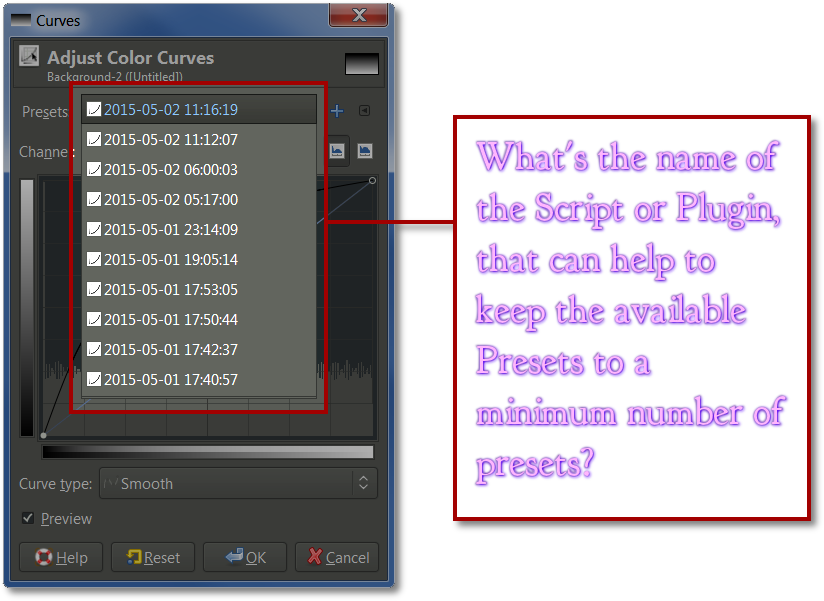
This is more of a question then any kind of actual challenge.
Does anyone have the answer?
:puzzled
Image

_________________
Image
"A wise man learns more from a foolish question than a fool can learn from a wise answer"
Image


Last edited by Wallace on Sun May 03, 2015 3:47 pm, edited 1 time in total.

Share on Facebook Share on Twitter Share on Orkut Share on Digg Share on MySpace Share on Delicious Share on Technorati
Top
 Post subject: Re: Name That Script or Plugin
PostPosted: Sat May 02, 2015 5:42 pm  (#2) 
Offline
Script Coder
User avatar

Joined: May 07, 2014
Posts: 4528
Location: Canada
Is there such a script?
I would call it "presets limitor".

But i don't know what you'd use it for since you already can export and import these settings to/from files.

Edit: my mistake, i tried importing/exporting and it didn't seem to do anything to my settings as if the import and export doesn't work at all

_________________
TinT


Top
 Post subject: Re: Name That Script or Plugin
PostPosted: Sat May 02, 2015 7:43 pm  (#3) 
Offline
Administrator
User avatar

Joined: Aug 10, 2012
Posts: 14176
Location: Native to NYC living in Arizona, Gimp 2.8 - 3.0, Win 11 PC.
trandoductin wrote:
Is there such a script?
I would call it "presets limitor".

But i don't know what you'd use it for since you already can export and import these settings to/from files.

Edit: my mistake, i tried importing/exporting and it didn't seem to do anything to my settings as if the import and export doesn't work at all

I was employing a script a while ago with an earlier version of Gimp, which would remove built up presets in some of the color and filter dialog's.
Over time these presets would build up and slow down cretin color dialogs and filter functions that use presets. When I looked at some of my presets, in a more recent Gimp Version. I noticed there seem to be only a hand full of presets available at any time. When before using an older version of Gimp. There presets would build up as you used the dialogs.
I was thinking that I had this script installed in my newer version of Gimp, but I don't remember what it called. I have many scripts and I don't really want to start look through them all. In hopes of stumbling upon it.

_________________
Image
"A wise man learns more from a foolish question than a fool can learn from a wise answer"
Image


Top
 Post subject: Re: Name That Script or Plugin
PostPosted: Sun May 03, 2015 3:13 am  (#4) 
Offline
Global Moderator
User avatar

Joined: May 16, 2010
Posts: 16168
settings-cleaner.py
Ofnuts. :)

More info here - viewtopic.php?f=9&t=7299

_________________
Image


Top
 Post subject: Re: Name That Script or Plugin
PostPosted: Sun May 03, 2015 3:45 pm  (#5) 
Offline
Administrator
User avatar

Joined: Aug 10, 2012
Posts: 14176
Location: Native to NYC living in Arizona, Gimp 2.8 - 3.0, Win 11 PC.
Rod wrote:
settings-cleaner.py
Ofnuts. :)

More info here - viewtopic.php?f=9&t=7299

You're The Man Rod, Thanks!

Just so happens I have that plugin installed.

_________________
Image
"A wise man learns more from a foolish question than a fool can learn from a wise answer"
Image


Top
Post new topic Reply to topic  [ 5 posts ] 

All times are UTC - 5 hours [ DST ]


* Login  


Powered by phpBB3 © phpBB Group