It is currently Wed Sep 23, 2026 11:47 pm


All times are UTC - 5 hours [ DST ]


Post new topic Reply to topic  [ 20 posts ] 
Author Message
 Post subject: Theme Issues. [Partha's 2.8.14 Removed, Issue Resolved]
PostPosted: Mon Jun 01, 2015 9:09 am  (#1) 
Offline
Administrator
User avatar

Joined: Aug 10, 2012
Posts: 14207
Location: Native to NYC living in Arizona, Gimp 2.8 - 3.0, Win 11 PC.
GIMP Version: 2.8.14
Operating System: Windows
OS Version: 8.1
GIMP Experience: Experienced User

List any relevant plug-ins or scripts:
N/A

List any ERROR messages you received:
N/A


I found this nice looking theme named, Woodoo Dark and Blue and installed it.
This is how it is suppose to look. As you can see, the theme has some nicely colored tool.
Image

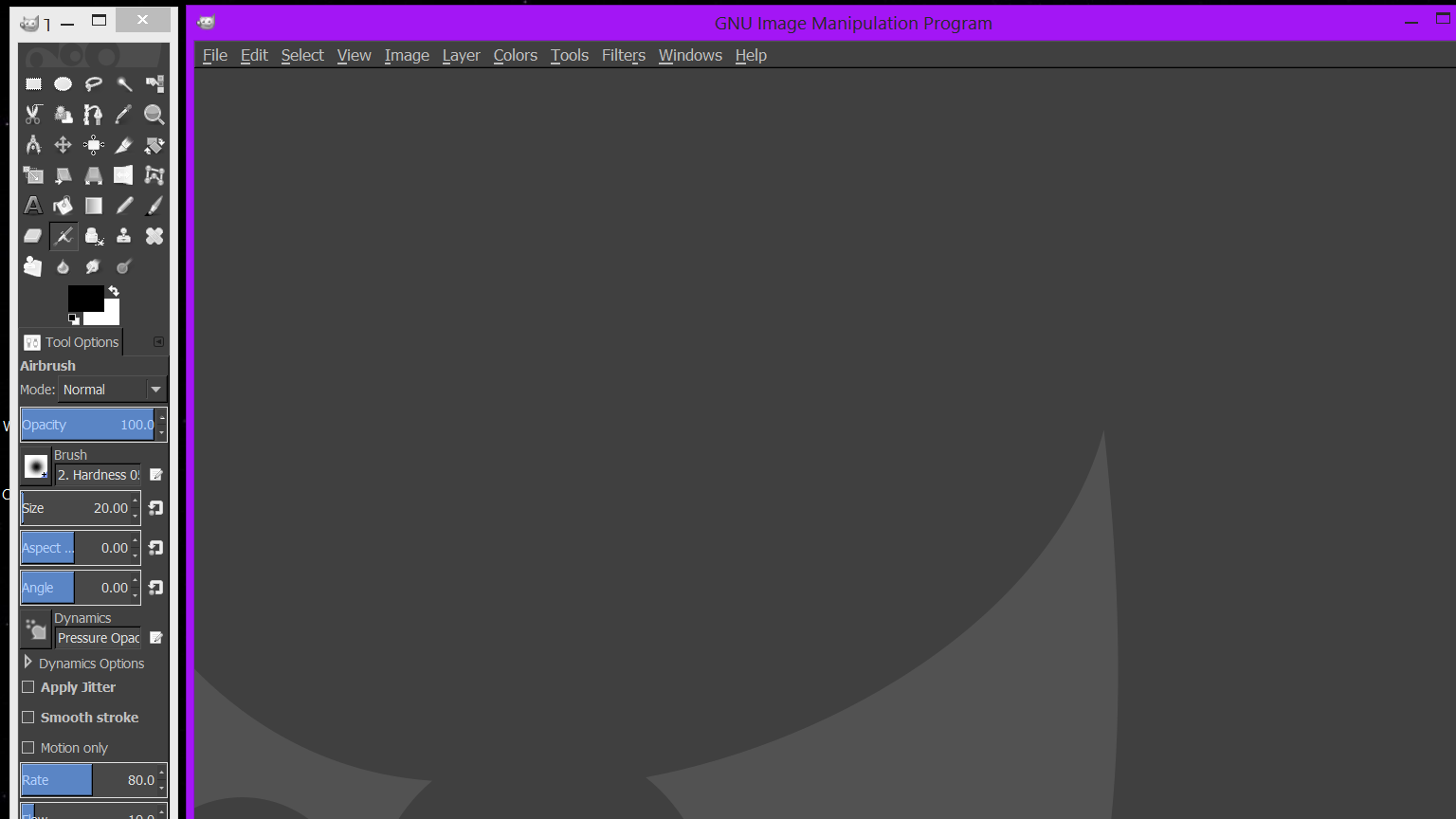
When I open Gimp, there are no nicely colored tools.
I've also tried other themes that also are suppose to have these colored tools.
Is there something I need to change, in order for my tools to also be nicely colored, as the themes I've installed would suggest?

This is what the Woodoo Dark and Blue theme looks on my machine. Can anyone help me out with this?
Image

_________________
Image
"A wise man learns more from a foolish question than a fool can learn from a wise answer"
Image


Last edited by Wallace on Mon Jun 01, 2015 8:59 pm, edited 1 time in total.

Share on Facebook Share on Twitter Share on Orkut Share on Digg Share on MySpace Share on Delicious Share on Technorati
Top
 Post subject: Re: Theme Issues, Need Help!
PostPosted: Mon Jun 01, 2015 9:41 am  (#2) 
Offline
Script Coder
User avatar

Joined: Jun 22, 2010
Posts: 1171
Location: Here and there
Firstly a complaint... Why do you leave us to search for the theme files? - you know where you got them from so please point us at them.

I found something here: http://gimpstuff.org/content/show.php/W ... D=oaarumzs

Now the strange thing is that the theme doesn't change the icons, so you should be left with the default, coloured icons.

So what files are you putting where?

Kevin


Top
 Post subject: Re: Theme Issues, Need Help!
PostPosted: Mon Jun 01, 2015 9:58 am  (#3) 
Offline
Administrator
User avatar

Joined: Aug 10, 2012
Posts: 14207
Location: Native to NYC living in Arizona, Gimp 2.8 - 3.0, Win 11 PC.
paynekj wrote:
Firstly a complaint... Why do you leave us to search for the theme files? - you know where you got them from so please point us at them.

I found something here: http://gimpstuff.org/content/show.php/W ... D=oaarumzs

Now the strange thing is that the theme doesn't change the icons, so you should be left with the default, coloured icons.

So what files are you putting where?

Kevin

That is the exact theme file and it's also where I happened to get it as well.
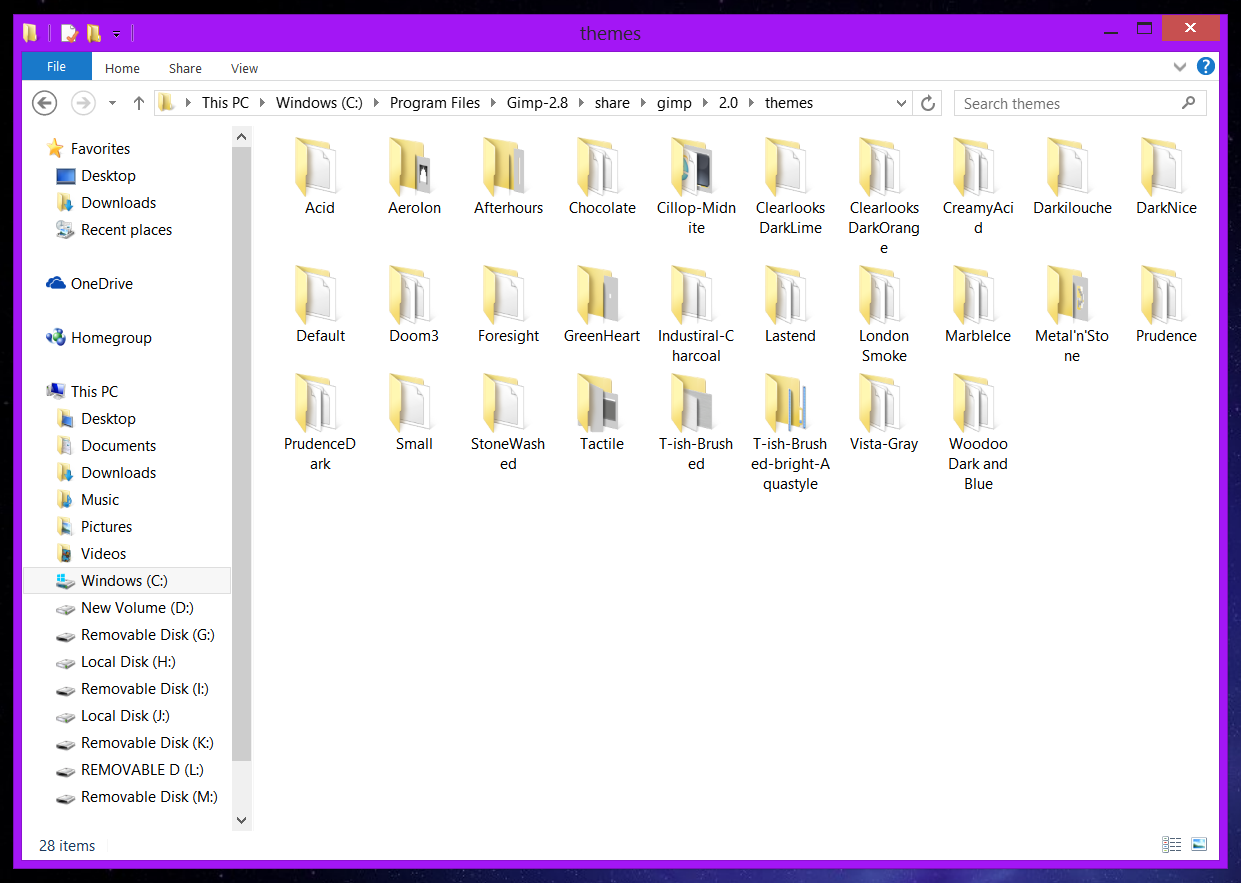
Sorry about not providing the theme file. I've placed all my themes into, C:\Program Files\Gimp-2.8\share\gimp\2.0\themes.
There is also a theme folder at, C:\Users\User-Name\.gimp-2.8\themes.

Here is a look at the folders I have in, C:\Program Files\Gimp-2.8\share\gimp\2.0\themes...
Image

_________________
Image
"A wise man learns more from a foolish question than a fool can learn from a wise answer"
Image


Top
 Post subject: Re: Theme Issues, Need Help!
PostPosted: Mon Jun 01, 2015 10:10 am  (#4) 
Offline
Script Coder
User avatar

Joined: Jun 22, 2010
Posts: 1171
Location: Here and there
Thanks... it's good to know we're looking at the same thing. :)

Just as a general thing, it's a bad idea for you to put anything into the system folders, stick to using your personal folders, especially on Windows.

Can you please show us what's in the Woodoo Dark and Blue folder.

Kevin


Top
 Post subject: Re: Theme Issues, Need Help!
PostPosted: Mon Jun 01, 2015 10:17 am  (#5) 
Offline
Administrator
User avatar

Joined: Aug 10, 2012
Posts: 14207
Location: Native to NYC living in Arizona, Gimp 2.8 - 3.0, Win 11 PC.
paynekj wrote:
Thanks... it's good to know we're looking at the same thing. :)

Just as a general thing, it's a bad idea for you to put anything into the system folders, stick to using your personal folders, especially on Windows.

Can you please show us what's in the Woodoo Dark and Blue folder.

Kevin

Sure thing.
Image
Attachment:
Zip Woodoo Dark and Blue.zip [1.88 KiB]
Downloaded 106 times

_________________
Image
"A wise man learns more from a foolish question than a fool can learn from a wise answer"
Image


Top
 Post subject: Re: Theme Issues, Need Help!
PostPosted: Mon Jun 01, 2015 10:26 am  (#6) 
Offline
GimpChat Member
User avatar

Joined: Nov 16, 2011
Posts: 5127
Location: Metro Vancouver, BC
Woodoo Dark and Blue theme
Linux, Gimp 2.8.14, user themes folder.

Image

_________________
Image
Gimp 2.8.18, Linux, median user
Gimp Chat Tutorials Index
Spirit Bear (Kermode)


Top
 Post subject: Re: Theme Issues, Need Help!
PostPosted: Mon Jun 01, 2015 10:30 am  (#7) 
Offline
Script Coder
User avatar

Joined: Jun 22, 2010
Posts: 1171
Location: Here and there
You have me mystified.

I am trying it on GIMP 2.8.10 with Windows 7, so I'll try it at home on 2.8.14/Windows 8.1 later today.

Just to prove a point can you move the folder to your GIMP personal theme folder.

Kevin


Top
 Post subject: Re: Theme Issues, Need Help!
PostPosted: Mon Jun 01, 2015 10:36 am  (#8) 
Offline
Administrator
User avatar

Joined: Aug 10, 2012
Posts: 14207
Location: Native to NYC living in Arizona, Gimp 2.8 - 3.0, Win 11 PC.
paynekj wrote:
You have me mystified.

I am trying it on GIMP 2.8.10 with Windows 7, so I'll try it at home on 2.8.14/Windows 8.1 later today.

Just to prove a point can you move the folder to your GIMP personal theme folder.

Kevin

Same here... :puzzled
My OS is "brand spanking new", as well as my Parth's Gimp installation.
I moved all my theme folders/files to my Gimp user theme folder, but got the same results, no nicely colored tools appeared using any of the themes I have.
Maybe I should try single window mode and see what happens then.

_________________
Image
"A wise man learns more from a foolish question than a fool can learn from a wise answer"
Image


Top
 Post subject: Re: Theme Issues, Need Help!
PostPosted: Mon Jun 01, 2015 10:44 am  (#9) 
Offline
Script Coder
User avatar

Joined: Jun 22, 2010
Posts: 1171
Location: Here and there
Wallace wrote:
as well as my Parth's Gimp installation.


And that's the point at which I have to say - you need ask Partha for help. His installations have changed the default theme and who-knows what else, so I'm not able to help any further - that's a support issue he brings upon himself.

Kevin


Top
 Post subject: Re: Theme Issues, Need Help!
PostPosted: Mon Jun 01, 2015 10:47 am  (#10) 
Offline
GimpChat Member
User avatar

Joined: Nov 16, 2011
Posts: 5127
Location: Metro Vancouver, BC
Your system theme seems to override parts of the Woodoo Dark and Blue, could that be the issue?
Have you checked Windows 8 theme options for a way to use individual program themes or tried to change a theme in another program to test?

_________________
Image
Gimp 2.8.18, Linux, median user
Gimp Chat Tutorials Index
Spirit Bear (Kermode)


Top
 Post subject: Re: Theme Issues, Need Help!
PostPosted: Mon Jun 01, 2015 10:50 am  (#11) 
Offline
Administrator
User avatar

Joined: Aug 10, 2012
Posts: 14207
Location: Native to NYC living in Arizona, Gimp 2.8 - 3.0, Win 11 PC.
Odinbc wrote:
Your system theme seems to override parts of the Woodoo Dark and Blue, could that be the issue?
Have you checked Windows 8 theme options for a way to use individual program themes or tried to change a theme in another program to test?

I haven't tried that, but I'll look into it.


I couldn't find any windows theme options related to what you described, that would have any effect with this issue, but that doesn't exactly mean that there aren't any. :puzzled

_________________
Image
"A wise man learns more from a foolish question than a fool can learn from a wise answer"
Image


Top
 Post subject: Re: Theme Issues, Need Help!
PostPosted: Mon Jun 01, 2015 8:39 pm  (#12) 
Offline
Administrator
User avatar

Joined: Aug 10, 2012
Posts: 14207
Location: Native to NYC living in Arizona, Gimp 2.8 - 3.0, Win 11 PC.
I uninstalled Partha's 2.8.14 build and removed everything associated with Gimp. I then install the 2.8.14 build by Jernej Simončič via gimp.org and all the themes I have now work properly.
I don't know what Partha has done to his 2.8.14 build, but if it doesn't support GTK2 themes for GIMP... then he's created a large can of worms for himself.
I've always use Partha's builds in the past and never ran into this issue until now.
If he has made changes to the way Gimp themes are installed, there should be some kind of documentation of this on his site.
I could be wrong, but I didn't see anything mentioned about this when downloading his build.

Anyway, all's well that ends well. At least for me, but not for other that might encounter this issue.

_________________
Image
"A wise man learns more from a foolish question than a fool can learn from a wise answer"
Image


Top
 Post subject: Re: Theme Issues. [Partha's 2.8.14 Removed, Issue Resolved]
PostPosted: Mon Jun 01, 2015 11:09 pm  (#13) 
Offline
Administrator
User avatar

Joined: Aug 10, 2012
Posts: 14207
Location: Native to NYC living in Arizona, Gimp 2.8 - 3.0, Win 11 PC.
conbagui wrote:
I had Partha's 2.8.10 once and I could not get Astronomy plugin and others plugins to work. So I went back to the Original Gimp build by Jernej Simončič and everything started working the way It supposed to. Sorry Partha.

Yeah I hear you conbagui... I'm sorry too. :(

_________________
Image
"A wise man learns more from a foolish question than a fool can learn from a wise answer"
Image


Top
 Post subject: Re: Theme Issues. [Partha's 2.8.14 Removed, Issue Resolved]
PostPosted: Tue Jun 02, 2015 1:45 am  (#14) 
Offline
GimpChat Member
User avatar

Joined: Dec 22, 2011
Posts: 399
conbagui wrote:
I had Partha's 2.8.10 once and I could not get Astronomy plugin and others plugins to work. So I went back to the Original Gimp build by Jernej Simončič and everything started working the way It supposed to. Sorry Partha.
p build by

Where do I get the orig Gimp build by Jernej Simončič please?

_________________
Image


Top
 Post subject: Re: Theme Issues. [Partha's 2.8.14 Removed, Issue Resolved]
PostPosted: Tue Jun 02, 2015 2:14 am  (#15) 
Offline
Script Coder
User avatar

Joined: Oct 25, 2010
Posts: 4812
Deblk wrote:
Where do I get the orig Gimp build by Jernej Simončič please?


http://www.gimp.org/downloads/

_________________
Image


Top
 Post subject: Re: Theme Issues. [Partha's 2.8.14 Removed, Issue Resolved]
PostPosted: Wed Jun 03, 2015 1:39 am  (#16) 
Offline
GimpChat Member
User avatar

Joined: Dec 22, 2011
Posts: 399
ofnuts wrote:
Deblk wrote:
Where do I get the orig Gimp build by Jernej Simončič please?


http://www.gimp.org/downloads/

Thanks :)

_________________
Image


Top
 Post subject: Re: Theme Issues. [Partha's 2.8.14 Removed, Issue Resolved]
PostPosted: Wed Jun 03, 2015 3:22 pm  (#17) 
Offline
Administrator
User avatar

Joined: Aug 10, 2012
Posts: 14207
Location: Native to NYC living in Arizona, Gimp 2.8 - 3.0, Win 11 PC.
Deblk wrote:
ofnuts wrote:
Deblk wrote:
Where do I get the orig Gimp build by Jernej Simončič please?


http://www.gimp.org/downloads/

Thanks :)


Just wondering, where you also having issues with a Partha build?

_________________
Image
"A wise man learns more from a foolish question than a fool can learn from a wise answer"
Image


Top
 Post subject: Re: Theme Issues. [Partha's 2.8.14 Removed, Issue Resolved]
PostPosted: Thu Jun 04, 2015 8:24 am  (#18) 
Offline
GimpChat Member

Joined: Sep 09, 2012
Posts: 143
Hey gang & Wallace. :)
I had this problem myself with the Partha version, so i started experimenting by replacing .dlls and i boiled it down to libgimpwidgets-2.0-0 as the 'criminal' :)
I think this is intentional anyway from Partha, some like it, some don't, anyway.. :)
Just copy from the official or the Dark Refraction ones for ex and you should be back in business. :)

Edit:
The one in the Bin folder.


Top
 Post subject: Re: Theme Issues. [Partha's 2.8.14 Removed, Issue Resolved]
PostPosted: Thu Jun 04, 2015 9:34 am  (#19) 
Offline
Administrator
User avatar

Joined: Aug 10, 2012
Posts: 14207
Location: Native to NYC living in Arizona, Gimp 2.8 - 3.0, Win 11 PC.
Ludde wrote:
Hey gang & Wallace. :)
I had this problem myself with the Partha version, so i started experimenting by replacing .dlls and i boiled it down to libgimpwidgets-2.0-0 as the 'criminal' :)
I think this is intentional anyway from Partha, some like it, some don't, anyway.. :)
Just copy from the official or the Dark Refraction ones for ex and you should be back in business. :)

Edit:
The one in the Bin folder.


Thanks Ludde. :bigthup
I'm sure others might benefit from this information. As for myself, I'm no longer using the Partha build.

_________________
Image
"A wise man learns more from a foolish question than a fool can learn from a wise answer"
Image


Top
 Post subject: Re: Theme Issues. [Partha's 2.8.14 Removed, Issue Resolved]
PostPosted: Thu Jun 04, 2015 10:06 am  (#20) 
Offline
GimpChat Member

Joined: Sep 09, 2012
Posts: 143
You are welcome! and i'm sure you are right about that. :)
That said :) is that one can also take the text from the small gtkrc and add that text on top of your favourite one, copy paste so one gets the small icons.
If one likes Greenheart, you can do a very quick colormod with the David's Batch Processor, just copy the img folder to the desktop or something first so you don't get the can't write thingie.
Rename the folder something else also just because you can. :)

Here is my recolor for Greenheart sofar if someone want to try.
fg[NORMAL] = "#cbcbcb"
fg[PRELIGHT] = "#ffffff"
fg[ACTIVE] = "#e5e5e5"
fg[SELECTED] = "#ffffff"
fg[INSENSITIVE] = "#303030"

bg[NORMAL] = "#333333"
bg[PRELIGHT] = "#4b4b4b"
bg[ACTIVE] = "#4b4b4b"
bg[SELECTED] = "#ffffff"
bg[INSENSITIVE] = "#4b4b4b"

base[NORMAL] = "#262626"
base[PRELIGHT] = "#4b6983"
base[ACTIVE] = "#4b6983"
base[SELECTED] = "#548e4f"
base[INSENSITIVE] = "#4b4b4b"

text[NORMAL] = "#e5e5e5"
text[PRELIGHT] = "#cacaca"
text[ACTIVE] = "#e5e5e5"
text[SELECTED] = "#ffffff"
text[INSENSITIVE] = "#303030"

engine "pixmap"

Think that's all i can contribute with for now about themeing, sure helped my workflow though and nope, i'm no expert. :)
Have fun ;)


Top
Post new topic Reply to topic  [ 20 posts ] 

All times are UTC - 5 hours [ DST ]


* Login  


Powered by phpBB3 © phpBB Group