It is currently Wed Sep 30, 2026 8:06 am


All times are UTC - 5 hours [ DST ]


Post new topic Reply to topic  [ 5 posts ] 
Author Message
 Post subject: Install 2.8.14 without losing 2.6.11
PostPosted: Thu Jun 25, 2015 10:52 am  (#1) 
Offline
GimpChat Member
User avatar

Joined: Jun 24, 2010
Posts: 504
Location: Western Vic Australia
GIMP Version: 2.6.11
Operating System: Windows
GIMP Experience: Experienced User


Hi, I am trying to install 2.8.14 AND save 2.6.11 as a backup in case I do not like 2.8.14. I, no longer have the 2.6.11 install exe and any 2.6.11 (win) install files are no longer available to download. When I try to install 2.8.14 I am advised that I must delete all prior Gimp versions. I have renamed my gimp program files, so I imagine that the 2.8.14 install process checks the registry for 2.6.11 entries. I can purge the registry of all 2.6.11 entries but I think that will also render my current 2.6.11 Gimp useless as a "go back to" possibility as I no longer have the install files.

Is there a simple way to install 2.8.14 and leave 2.6.11 as a backup ??
Thanks John

_________________
Image


Share on Facebook Share on Twitter Share on Orkut Share on Digg Share on MySpace Share on Delicious Share on Technorati
Top
 Post subject: Re: Install 2.8.14 without losing 2.6.11
PostPosted: Thu Jun 25, 2015 11:16 am  (#2) 
Offline
GimpChat Member

Joined: Mar 04, 2011
Posts: 2615
As you say, installing Gimp 2.8.14 will uninstall Gimp 2.6.x and try and migrate your profile from \.gimp-2.6 to \.gimp-2.8

However the reverse is not true, so once Gimp 2.8.x is up and running you can re-install Gimp 2.6.x

No Oz mirrors ;( try
ftp://ftp.mirrorservice.org/sites/ftp.g ... etup-1.exe

The files go in different folders 2.8 is C:\Program Files\GIMP 2 (note the space and 2.6 is C:\Program Files\GIMP-2.0

I have not tried this but I would rename C:\Program Files\GIMP-2.0 to maybe GIMP-bak before installing 2.8. That should save it. I would also rename your 2.6 profile so that Gimp 2.8 starts off with a clean one.

Gimp writes very few registry entries, mostly associations and a bit of uninstalling data. It is almost portable so you should be able to change the name back and probably have to make a new shortcut.


Top
 Post subject: Re: Install 2.8.14 without losing 2.6.11
PostPosted: Thu Jun 25, 2015 11:38 am  (#3) 
Offline
Script Coder
User avatar

Joined: Jun 22, 2010
Posts: 1171
Location: Here and there
I can confirm Rich's instructions will work.

I've just upgraded from 2.8.10 to 2.8.14 and re-naming both the Program files (x86)/gimp-2.6.7 and my .gimp-2.6 folders meant that the overly hostile installer didn't realise I had 2.6.7, and left it alone.

Kevin


Top
 Post subject: Re: Install 2.8.14 without losing 2.6.11
PostPosted: Thu Jun 25, 2015 4:31 pm  (#4) 
Offline
GimpChat Member

Joined: Apr 29, 2012
Posts: 110
What i did personnally is making use of a portable version of Gimp 2.6.12 so that annoying "gimp will uninstall your older gimp despite you don't want" couldn't happen, and then i have 2.6.12 and 2.8.10 co-existing happily


Top
 Post subject: Re: Install 2.8.14 without losing 2.6.11
PostPosted: Fri Jun 26, 2015 10:42 am  (#5) 
Offline
GimpChat Member
User avatar

Joined: Jun 24, 2010
Posts: 504
Location: Western Vic Australia
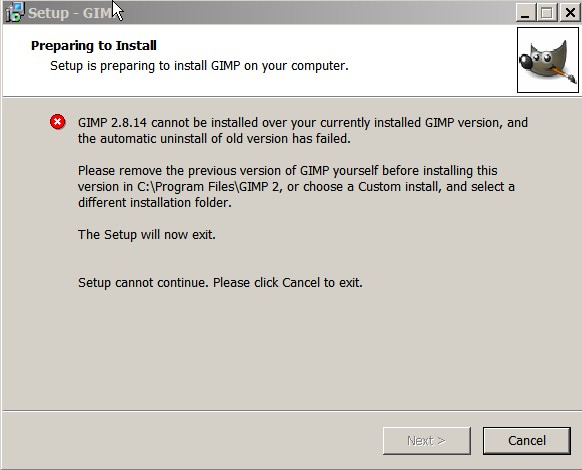
Hi, thanks for all your help especially the link to 2.6.11. I renamed the personal file and the exec file as I said in my opening problem description. I got this message when I tried to install 2.8. Tried custom installing to other directories but the error remained.

Image

In the end I hid the renamed files under a different directory so there was no "gimp" visible anywhere. I still got the same message. So I loaded the Richy link (which is 2.6.11) and it loaded successfully. I then tried loading 2.8 and of course it gave me the same message, as expected. I then uninstalled that new link and tried to install 2.8 . That worked . I then un-hid the 2.6.11 files and got both my old 2.6. and new 2.8 running. I do not pretend to understand what was wrong!!

_________________
Image


Top
Post new topic Reply to topic  [ 5 posts ] 

All times are UTC - 5 hours [ DST ]


* Login  


Powered by phpBB3 © phpBB Group