It is currently Sat Nov 14, 2026 12:05 am


All times are UTC - 5 hours [ DST ]


Post new topic Reply to topic  [ 25 posts ]  Go to page 1, 2  Next
Author Message
 Post subject: Making Photos Manga-Style
PostPosted: Thu Mar 31, 2011 4:26 pm  (#1) 
Offline
GimpChat Member

Joined: Mar 31, 2011
Posts: 6
Hey all. :)
I am new to gimp and I wanted to know how I can give normal Photos a manga like look.
That means. Not changing the original Picture a lot, just adding a cell shade like look and maybe Speedlines and such things. Is there a plug in/filter for that. what colour settings should i take ect.
As example I have a picture of the Prince of persia game which delivers the style I want
http://www.inside-360.de/wp-content/upl ... imself.jpg


Share on Facebook Share on Twitter Share on Orkut Share on Digg Share on MySpace Share on Delicious Share on Technorati
Top
 Post subject: Re: Making Photos Manga-Style
PostPosted: Thu Mar 31, 2011 6:34 pm  (#2) 
Offline
GimpChat Member
User avatar

Joined: Apr 30, 2010
Posts: 1937
Location: Missouri
http://www.youtube.com/watch?v=SNBDcUUDGLM
As far as i know there really isn't a really easy good way to do it,The youtube I pasted is one of the better that I've seen and the guy that made it is also one of the best. You can also try a script called cartoonize but even that needs to be fooled with to get it perfect.

_________________
Image
The last time I kept an open mind,
my brain fell out and the dog grabbed it.
Now it's full of dirt, toothmarks, and dog slobber.
No more open minds or dogs for me.


Top
 Post subject: Re: Making Photos Manga-Style
PostPosted: Thu Mar 31, 2011 7:15 pm  (#3) 
Offline
GimpChat Member
User avatar

Joined: Oct 06, 2010
Posts: 4050
This is the result using CarTOONize script:

Image

Original:

Image

My thoughts is you would need more of a lineart rendering as a modified layer, using hard light, perhaps?

_________________
"In order to attain the impossible, one must attempt the absurd."
~ Miguel de Cervantes


Top
 Post subject: Re: Making Photos Manga-Style
PostPosted: Thu Mar 31, 2011 7:32 pm  (#4) 
Offline
GimpChat Member

Joined: Apr 12, 2010
Posts: 5870
i think i know, i made 2 filters for gmic to automatize the process

but you have to post a example of the the pic you want transform, even more then 1 if you wish .

and we have to clear the termilogy:

you wrote manga but your example looks as taken from Image or Marvel comics,
it is much easier edit a photo to look as from a Image comics or Marvel Graphic Novel then to get a japonise Manga look,( at least for faces and characters)

Manga usually dramatically enlarge eyes and mouth (just to point the most evident difference) and that would require additional and mostly manual work

,

_________________
My 3D Gallery on Deviantart http://photocomix2.deviantart.com/
Main gallery http://www.flickriver.com/photos/photocomix-mandala/
Mandala and simmetry http://www.flickriver.com/photos/photocomix_mandala/

Image

Mrs Wilbress


Top
 Post subject: Re: Making Photos Manga-Style
PostPosted: Thu Mar 31, 2011 7:58 pm  (#5) 
Offline
GimpChat Member
User avatar

Joined: Oct 06, 2010
Posts: 4050
Image

This is a result of manual manipulation, involving turning the original to a sketch (lineart), darkening the lines, and then using layers on different modes.

It's more detailed than the cartoonize script, but was obtained manually using no scripts.

_________________
"In order to attain the impossible, one must attempt the absurd."
~ Miguel de Cervantes


Top
 Post subject: Re: Making Photos Manga-Style
PostPosted: Thu Mar 31, 2011 8:21 pm  (#6) 
Offline
GimpChat Member

Joined: Apr 12, 2010
Posts: 5870
That is very cool Mahvin as your first, only the original was already a comics, that why asked Luke to provide 1 example of real case, a photo he wish to cartoonize

_________________
My 3D Gallery on Deviantart http://photocomix2.deviantart.com/
Main gallery http://www.flickriver.com/photos/photocomix-mandala/
Mandala and simmetry http://www.flickriver.com/photos/photocomix_mandala/

Image

Mrs Wilbress


Top
 Post subject: Re: Making Photos Manga-Style
PostPosted: Thu Mar 31, 2011 8:30 pm  (#7) 
Offline
GimpChat Member

Joined: Apr 12, 2010
Posts: 5870
LuKe what kind of photo you plan to use ?

Maybe something as

ImageWar and Peace 2008 by gluemoon, on Flickr

or maybe

ImageGrrrrr by gluemoon, on Flickr

OR ?

_________________
My 3D Gallery on Deviantart http://photocomix2.deviantart.com/
Main gallery http://www.flickriver.com/photos/photocomix-mandala/
Mandala and simmetry http://www.flickriver.com/photos/photocomix_mandala/

Image

Mrs Wilbress


Top
 Post subject: Re: Making Photos Manga-Style
PostPosted: Thu Mar 31, 2011 9:51 pm  (#8) 
Offline
GimpChat Member
User avatar

Joined: Oct 06, 2010
Posts: 4050
PC: I was just showing the results of the first suggested cartoonize script. which at first, I thought would work, myself. The lines just aren't dark enough or isolated enough, without first manipulating it somehow to create a more lineart rendering.

Which G'MIC filters are you referring to, by the way?

_________________
"In order to attain the impossible, one must attempt the absurd."
~ Miguel de Cervantes


Top
 Post subject: Re: Making Photos Manga-Style
PostPosted: Thu Mar 31, 2011 10:38 pm  (#9) 
Offline
GimpChat Member

Joined: Apr 12, 2010
Posts: 5870
Quote:
I was just showing the results of the first suggested cartoonize script


I know , my point was the source image not adapt because was already a comic
Quote:


Mostly to Graphic Novel and Graphic Boost ,( also Inkwash may be useful see soldier and dragon viewtopic.php?f=10&t=914&hilit=Ink+wash, just the colors should be recovered manally , while GB and GN may do out of the box)

Cartoonize script give very good result , but for a Vintage comics stile as from comics from 60 - 70...hum maybe i may post a example on the fly

here i ran cartoonize with different setting on 2 duplicated of the soldier and merged in multiply mode

Attachment:
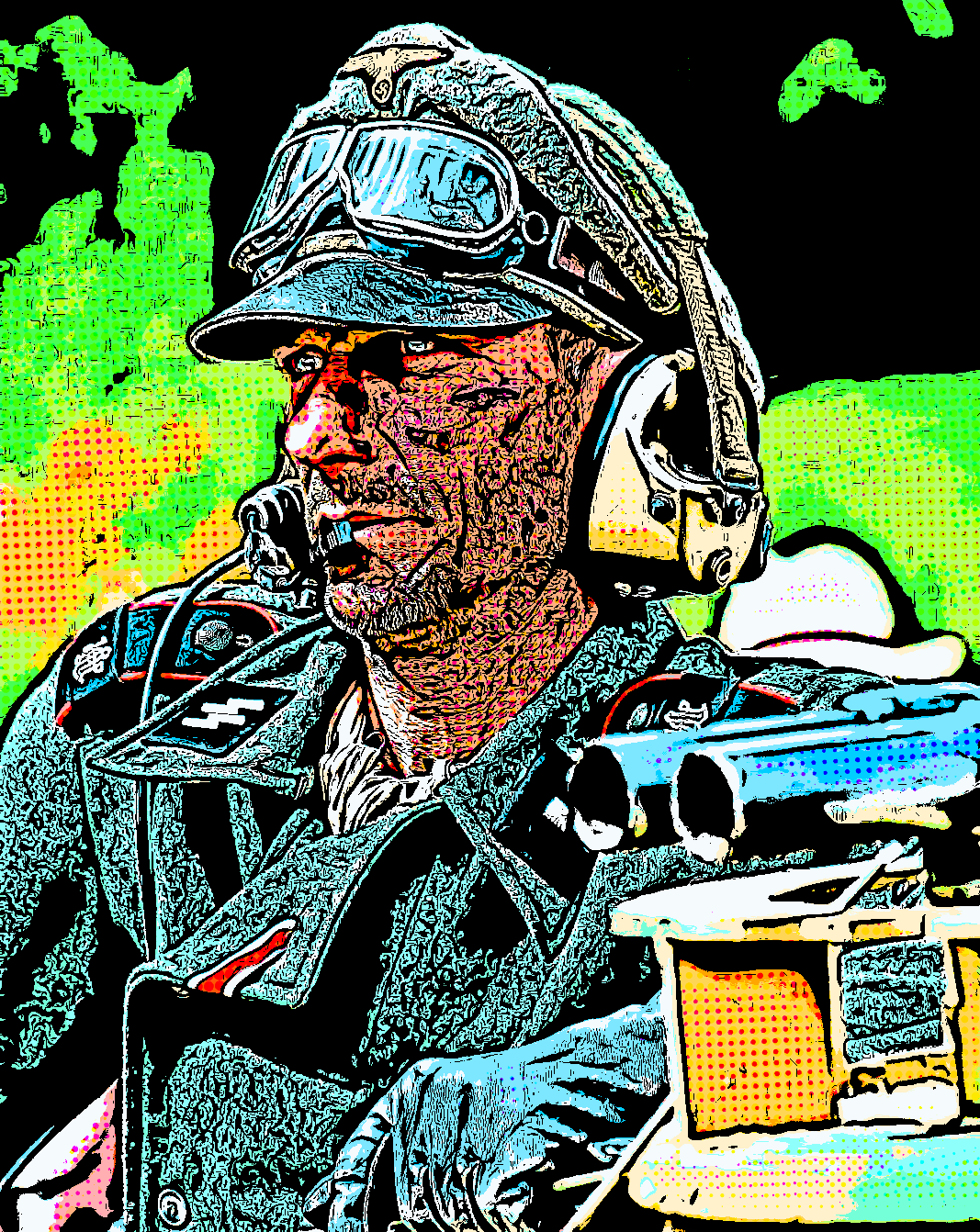
miltart-4.png
miltart-4.png [ 540.67 KiB | Viewed 13672 times ]


with only one result maybe even more simplicistic and too vintage (cheap comics of the 60.. )

Attachment:
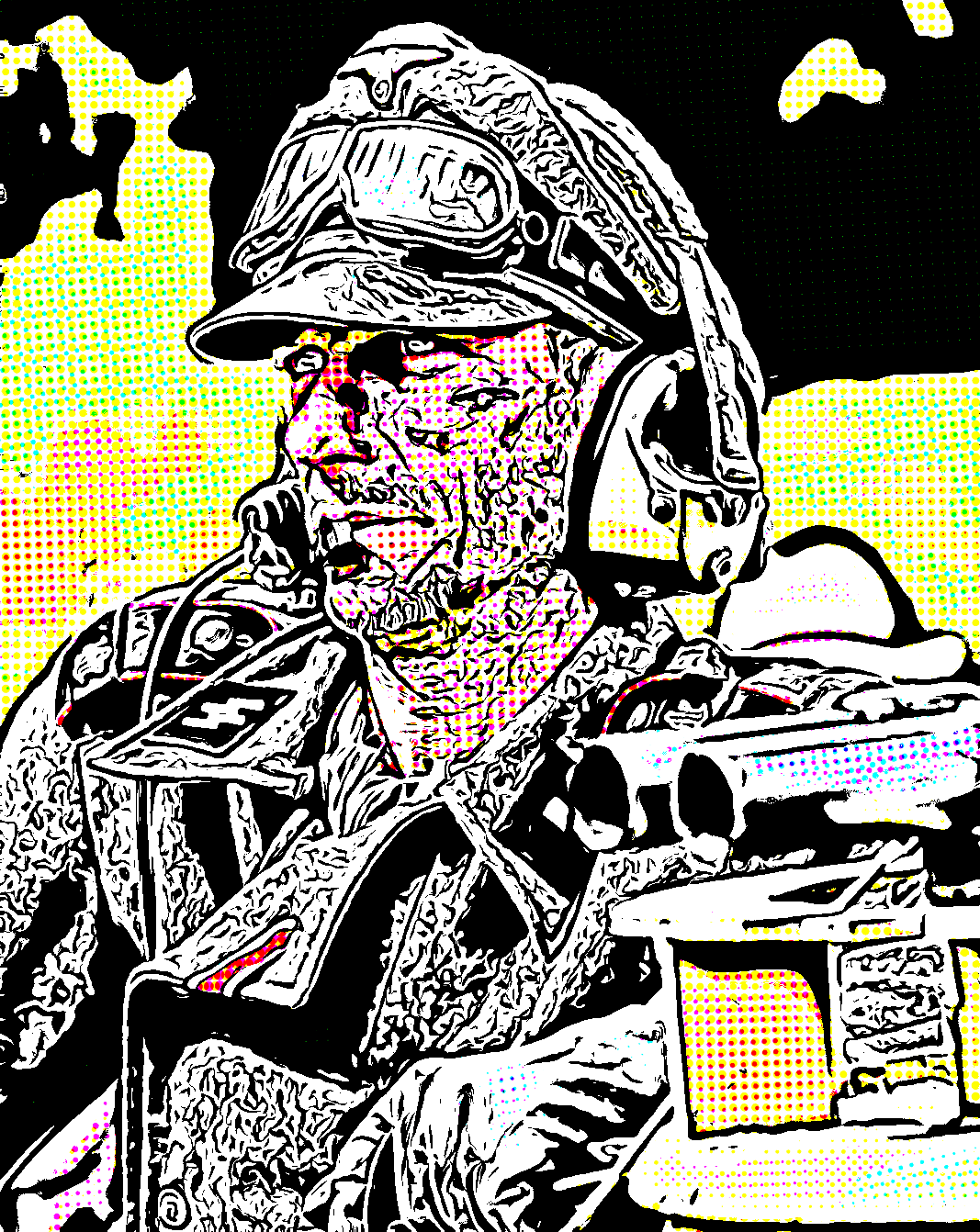
miltart-5.png
miltart-5.png [ 255.44 KiB | Viewed 13672 times ]


Hopefully closer to what Luke may wish with graphic novel and a touch of cartoonize

Attachment:
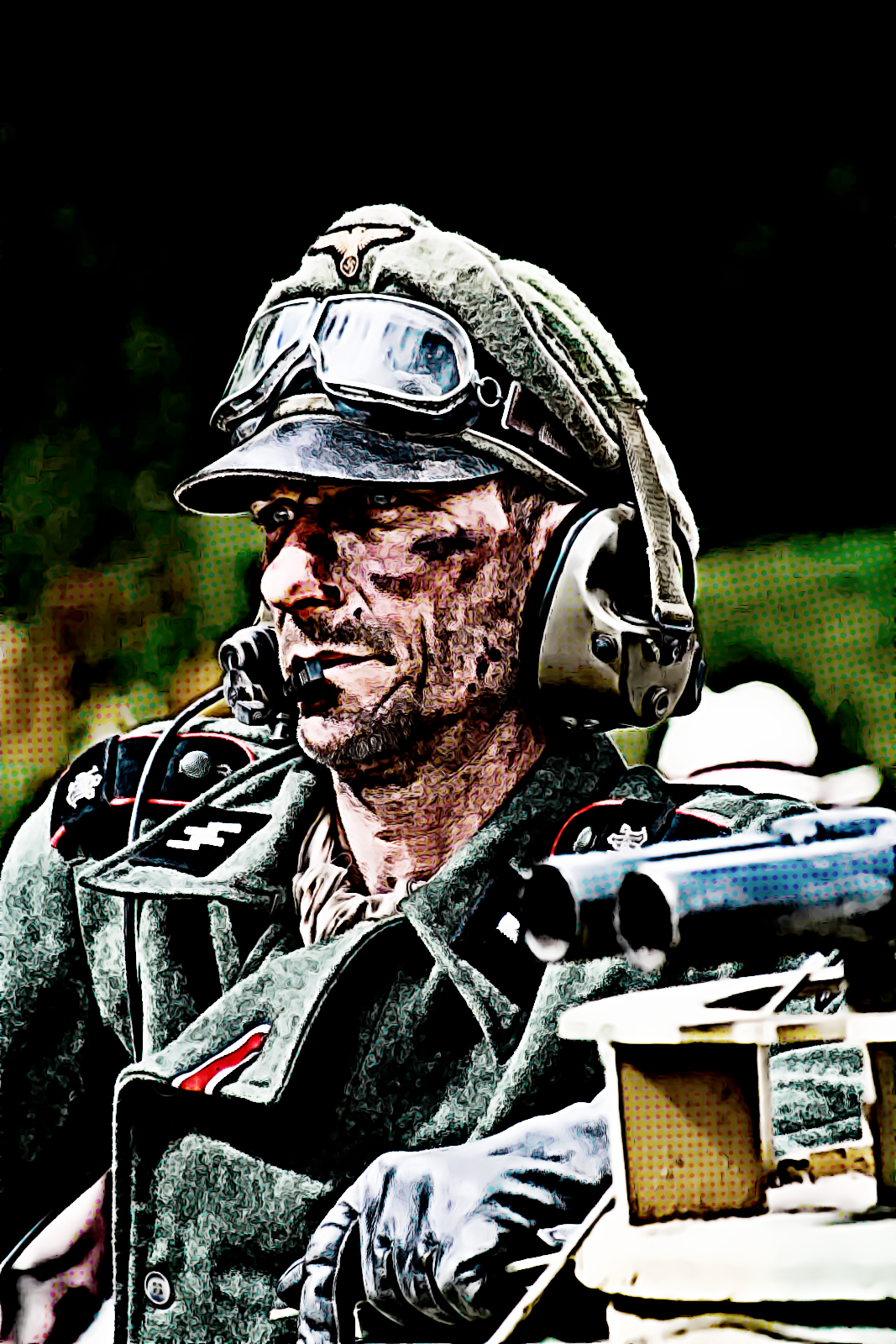
soldier2a.png
soldier2a.png [ 1.98 MiB | Viewed 13672 times ]


opss i hit attachment limits!!

_________________
My 3D Gallery on Deviantart http://photocomix2.deviantart.com/
Main gallery http://www.flickriver.com/photos/photocomix-mandala/
Mandala and simmetry http://www.flickriver.com/photos/photocomix_mandala/

Image

Mrs Wilbress


Top
 Post subject: Re: Making Photos Manga-Style
PostPosted: Thu Mar 31, 2011 11:05 pm  (#10) 
Offline
GimpChat Member

Joined: Apr 12, 2010
Posts: 5870
but so much variants are possible as bleached

Attachment:
soldier2bbb.png
soldier2bbb.png [ 1.76 MiB | Viewed 13668 times ]


Smoothed and desatureted

Attachment:
soldier2bbb.png
soldier2bbb.png [ 1.76 MiB | Viewed 13668 times ]


uff again attachment limit..


Attachments:
soldier2b.png
soldier2b.png [ 2.06 MiB | Viewed 13668 times ]

_________________
My 3D Gallery on Deviantart http://photocomix2.deviantart.com/
Main gallery http://www.flickriver.com/photos/photocomix-mandala/
Mandala and simmetry http://www.flickriver.com/photos/photocomix_mandala/

Image

Mrs Wilbress
Top
 Post subject: Re: Making Photos Manga-Style
PostPosted: Thu Mar 31, 2011 11:08 pm  (#11) 
Offline
GimpChat Member
User avatar

Joined: Oct 06, 2010
Posts: 4050
Sweet. I like that last result, from the post before! Did you use a specific filter for Graphic Novel?

_________________
"In order to attain the impossible, one must attempt the absurd."
~ Miguel de Cervantes


Top
 Post subject: Re: Making Photos Manga-Style
PostPosted: Thu Mar 31, 2011 11:13 pm  (#12) 
Offline
GimpChat Member
User avatar

Joined: Oct 06, 2010
Posts: 4050
This is the result of the manual lineart, which in my opinion beats any script I have used thus far.

Image

I'm going to test your GN approach with your second image.

_________________
"In order to attain the impossible, one must attempt the absurd."
~ Miguel de Cervantes


Top
 Post subject: Re: Making Photos Manga-Style
PostPosted: Thu Mar 31, 2011 11:28 pm  (#13) 
Offline
GimpChat Member

Joined: Apr 12, 2010
Posts: 5870
there are too much changes going on in gmic just in last 48h so now i cannot easily use preset
(and maybe you and other too)

I may anyway solve tomorrow for all presets in the while i just found the setting manually.

going to sleep now, sun is already raising...

PS yes that is very close to a preset i did.
But after last Gmic update (including filter update ) i must do same changes to restore all presets (will be quite quick, but first i need 8h rest )

_________________
My 3D Gallery on Deviantart http://photocomix2.deviantart.com/
Main gallery http://www.flickriver.com/photos/photocomix-mandala/
Mandala and simmetry http://www.flickriver.com/photos/photocomix_mandala/

Image

Mrs Wilbress


Top
 Post subject: Re: Making Photos Manga-Style
PostPosted: Fri Apr 01, 2011 7:49 am  (#14) 
Offline
Global Moderator
User avatar

Joined: May 16, 2010
Posts: 16262
I snatched your war and peace image PC.Hope you do not mind.
First i duplicated the layer
On the original i ran Contrast Swiss mask 3

Then i ran CarToonIze on the duplicate in halftone mode with defaults for everything.
I then deleted the top Cartoonize layer with the halftone newspress dots.
Then i aligned the layers and set the top layer in Multiply mode.
Results
Image

_________________
Image


Top
 Post subject: Re: Making Photos Manga-Style
PostPosted: Fri Apr 01, 2011 8:58 am  (#15) 
Offline
GimpChat Member

Joined: Mar 31, 2011
Posts: 6
First of all thank you for your answers :bigthup
The photo I want to use is a normal picture of me taken with a system-camera. Generally I want to add this over the top cartoon style for normal photography and persons. Just like in my example I don't want to change the looks of a person. I know it may be confusing because I've used the word Manga, but I meant more the looking of the colours, speedlines ect like in many modern Animes(z.b. Dragon Ball, Naruto) not the character proportions(big head/eyes ect.)
Another example:
http://www.videogamesblogger.com/wp-con ... st-big.jpg
PS: Sorry for my bad engtlish Iam Austrian :|


Top
 Post subject: Re: Making Photos Manga-Style
PostPosted: Fri Apr 01, 2011 9:18 am  (#16) 
Offline
Global Moderator
User avatar

Joined: May 16, 2010
Posts: 16262
You can get some great results with G'MICs many new features Luke. :)
Open up the Artistic menu and go to town.

_________________
Image


Top
 Post subject: Re: Making Photos Manga-Style
PostPosted: Fri Apr 01, 2011 10:42 am  (#17) 
Offline
GimpChat Member

Joined: Mar 31, 2011
Posts: 6
Thanks a Lot. This program is great :tyspin :bigthup


Top
 Post subject: Re: Making Photos Manga-Style
PostPosted: Fri Apr 01, 2011 1:51 pm  (#18) 
Offline
GimpChat Member

Joined: Mar 31, 2011
Posts: 6
Ok. I got another problem. It doesn't matter which setting i use with G'MIC Cartoon the filtered picture always looks the same. Maybe because I use VIsta 64bit?


Top
 Post subject: Re: Making Photos Manga-Style
PostPosted: Fri Apr 01, 2011 7:20 pm  (#19) 
Offline
Global Moderator
User avatar

Joined: May 16, 2010
Posts: 16262
We were using the CarToonize script with the other Graphic Novel filters Luke. :)
You can download the SCM here.
http://registry.gimp.org/node/24930
Just place it in your scripts folder, and then go to Filters/Script-Fu/Refresh Scripts
Then open your image - duplicate it - run Cartoonize (Filters/Artistic/CarToonize) on the top layer

Select the bottom layer
Then open GMIC and find Graphic Novel under the Artistic Menu.
Run that with it's default settings - select apply/ok
Now change the layer mode for the top layer to Multiply.

This is just an example to get close to what i think you want.You can change the settings however you wish. :)

_________________
Image


Top
 Post subject: Re: Making Photos Manga-Style
PostPosted: Sat Apr 02, 2011 3:35 am  (#20) 
Offline
GimpChat Member

Joined: Mar 31, 2011
Posts: 6
Well I have tried it with G'MIC--->Cartoon filter and in the preview it shows exactly the finish that I want but when I confirm it, the picture looks everytime the same, even if I change settings


Top
Post new topic Reply to topic  [ 25 posts ]  Go to page 1, 2  Next

All times are UTC - 5 hours [ DST ]


* Login  


Powered by phpBB3 © phpBB Group