It is currently Tue Nov 10, 2026 8:07 pm


All times are UTC - 5 hours [ DST ]


Post new topic Reply to topic  [ 83 posts ]  Go to page Previous  1, 2, 3, 4, 5  Next
Author Message
 Post subject: Re: Post Your Gradients here
PostPosted: Thu Sep 03, 2015 1:50 am  (#61) 
Offline
Administrator
User avatar

Joined: Aug 10, 2012
Posts: 14268
Location: Native to NYC living in Arizona, Gimp 2.8 - 3.0, Win 11 PC.
oldmangrumpy wrote:
Anmal - tried again but got the same results.

Dinasset - first rule of error analysis ... check the error message content :hehe ... the image I posted says 7Zip Diagnostic messages. But thanks anyway, its good to hear from you again!!
Jazzon - thank you for providing an alternative ... but guess what, I still got exactly the same error messages; so I got really grumpy :gaah and persevered, copied them into GIMP (yes, same error messages again), then opened a new canvas, located each gradient and tried them out ... and THEY WORKED OK???


Its a good thing I have only worked in the IT industry since 1968 or I might get a complex about this ... !

Thank you all again for your assistance.

Somethings not right with your machine. "There's something fishy in Denmark"

_________________
Image
"A wise man learns more from a foolish question than a fool can learn from a wise answer"
Image


Top
 Post subject: Re: Post Your Gradients here
PostPosted: Thu Sep 03, 2015 1:51 am  (#62) 
Offline
GimpChat Member
User avatar

Joined: Aug 13, 2015
Posts: 312
Location: Somewhere between lost and found.
:rofl

_________________
The answer was 42. The question is long forgotten. The computer that solved it is now destroyed.
The MK-2 has been built. Should this be the next question?
(Solve if you can ... ;) )
Image


Top
 Post subject: Re: Post Your Gradients here
PostPosted: Thu Sep 03, 2015 6:16 am  (#63) 
Offline
GimpChat Member
User avatar

Joined: Jan 20, 2013
Posts: 14835
Location: roma, italy
OMG
may I update my previous post so that you can read it as such:
do you have and use THE MOST RECENT VERSION OF 7z to unzip it?
7z has a quite recent release (August), and I use that one

_________________
"Where am I ?"


Top
 Post subject: Re: Post Your Gradients here
PostPosted: Thu Sep 03, 2015 7:58 am  (#64) 
Offline
Global Moderator
User avatar

Joined: Oct 02, 2014
Posts: 5090
Location: Sydney Australia
Dinasset - thank you for alerting me; I have now downloaded and installed 7Zip 15.06 beta 64 bit. I will try it out tomorrow.

_________________
Image

Respect should be offered freely but hard earned


Top
 Post subject: Re: Post Your Gradients here
PostPosted: Thu Sep 03, 2015 8:51 am  (#65) 
Offline
GimpChat Member
User avatar

Joined: Mar 23, 2012
Posts: 7388
Location: Göteborg at last!
I unpacked AnMal's second attachment with an old version of 7-zip (9.20 I believe) and it worked fine and the gradients work in Gimp too.


Top
 Post subject: Re: Post Your Gradients here
PostPosted: Thu Sep 03, 2015 3:20 pm  (#66) 
Offline
GimpChat Member
User avatar

Joined: Aug 13, 2015
Posts: 312
Location: Somewhere between lost and found.
Hmmmmm ..... puzzle ..... FUN!
OMG, are You running some kind of *nix? Maybe there is lib incompatibility ...
If all else fails you could try a 3kilo maul.... Computer woudl co-operate to the fullest of it's ability after that. Although that ability might be slightly reduced...

_________________
The answer was 42. The question is long forgotten. The computer that solved it is now destroyed.
The MK-2 has been built. Should this be the next question?
(Solve if you can ... ;) )
Image


Top
 Post subject: Re: Post Your Gradients here
PostPosted: Fri Sep 04, 2015 2:16 pm  (#67) 
Offline
GimpChat Member
User avatar

Joined: Jul 08, 2015
Posts: 33
Location: Ottawa ON Canada
Attachment:
DiagStripedGreens Radial.png
DiagStripedGreens Radial.png [ 2.7 KiB | Viewed 20604 times ]


One of my first gradients. How would I make the transitions more blended and not as sharp?


Top
 Post subject: Re: Post Your Gradients here
PostPosted: Fri Sep 04, 2015 2:35 pm  (#68) 
Offline
GimpChat Member
User avatar

Joined: Jan 20, 2013
Posts: 14835
Location: roma, italy
see my post on the specific topic you created...

_________________
"Where am I ?"


Top
 Post subject: Re: Post Your Gradients Here
PostPosted: Mon Jun 19, 2017 2:39 am  (#69) 
Offline
GimpChat Member

Joined: Jun 17, 2017
Posts: 15
I hope this post isn't aganst the rules....

I made a set of rainbow gradients based on what I considered the to be the brightest hues (though the chartreuse colors were the result of mimicking highlighter colors. And Fluorescence is not something that's easily replicated in digital form.) The gradients are called "Luminescence"

I made two with the same colors, the second of which is designed with the colors position to contrast with the counterpart (Purples/Pinks in place of Yellow/Green, Oranges in place of Blue, yadda yadda)

Image

I have several derivations of both gradients, but this is more to ensure compatibility with the Conical type gradients. And I noticed that my Contrast Gradient seems to well, contrast when the placement is the reverse of the other gradient (Like if one goes Up to down, the other must go down to up). The one used for the image is one such derivation, having an extra Pink Band to ensure the asymmetrical gradients maintain their smoothness.

Attachment:
`Luminesence.ggr [569 Bytes]
Downloaded 826 times
Attachment:
`Luminesence-(contrast).ggr [580 Bytes]
Downloaded 1393 times


Last edited by Hesperius on Mon Jun 19, 2017 3:59 am, edited 1 time in total.

Top
 Post subject: Re: Post Your Gradients Here
PostPosted: Mon Jun 19, 2017 3:20 am  (#70) 
Offline
Administrator
User avatar

Joined: Aug 10, 2012
Posts: 14268
Location: Native to NYC living in Arizona, Gimp 2.8 - 3.0, Win 11 PC.
Hesperius wrote:
I hope this post isn't aganst the rules....

I made a set of rainbow gradients based on what I considered the to be the brightest hues (though the chartreuse colors were the result of mimicking highlighter colors. And Fluorescence is not something that's easily replicated in digital form.) The gradients are called "Luminescence"

I made two with the same colors, the second of which is designed with the colors position to contrast with the counterpart (Purples/Pinks in place of Yellow/Green, Oranges in place of Blue, yadda yadda)

[ Image ]

I have several derivations of both gradients, but this is more to ensure compatibility with the Conical type gradients. And I noticed that my Contrast Gradient seems to well, contrast when the placement is the reverse of the other gradient (Like if one goes Up to down, the other must go down to up). The one used for the image is one such derivation, have an extra Pink Band to ensure asymmetrical gradients maintain its smoothness.

Attachment:
`Luminesence.ggr
Attachment:
`Luminesence-(contrast).ggr

I think your rainbow gradients are really nice.
Thanks!
:bigthup

_________________
Image
"A wise man learns more from a foolish question than a fool can learn from a wise answer"
Image


Top
 Post subject: Re: Post Your Gradients Here
PostPosted: Mon Jun 19, 2017 3:57 am  (#71) 
Offline
GimpChat Member

Joined: Jun 17, 2017
Posts: 15
Wallace wrote:
I think your rainbow gradients are really nice.
Thanks!
:bigthup
[/align]


Your welcome. :) Just one last thing. I tend to use them to color effects and backgrounds mostly with the Overlay layer effect.

Top
 Post subject: Re: Post Your Gradients Here
PostPosted: Thu Jan 03, 2019 7:56 am  (#72) 
Offline
Global Moderator
User avatar

Joined: Apr 01, 2012
Posts: 8502
Location: On the other side of your screen
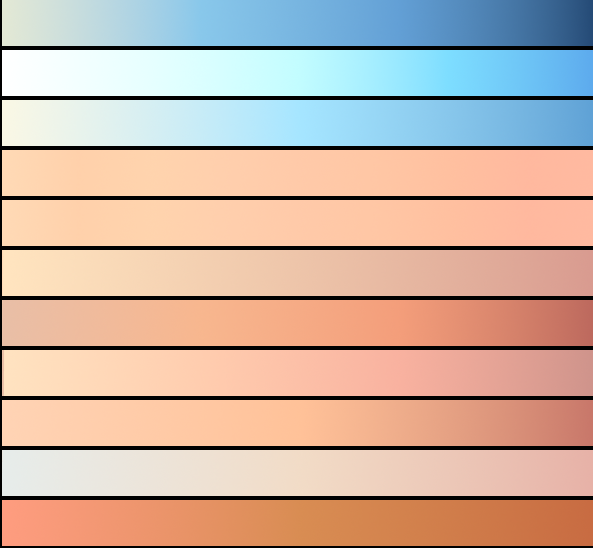
Here are some sky gradients
Image


Attachments:
gimp, sky gradients.7z [1.27 KiB]
Downloaded 775 times

_________________
Image
Free Fun Photo Editing & resources
Poems from the Lord
Gimp Newby
Gimp version 3.2.8 and GMIC-Qt 4.0.2 OS :- Windows 10 Home 64
Top
 Post subject: Re: Post Your Gradients Here
PostPosted: Thu Jan 03, 2019 9:52 am  (#73) 
Offline
Administrator
User avatar

Joined: Aug 10, 2012
Posts: 14268
Location: Native to NYC living in Arizona, Gimp 2.8 - 3.0, Win 11 PC.
sallyanne wrote:
Here are some sky gradients
[ Image ]

Thanks sallyanne,
those look like really nice gradients.
Very authentic appearing sky colors as well.

_________________
Image
"A wise man learns more from a foolish question than a fool can learn from a wise answer"
Image


Top
 Post subject: Re: Post Your Gradients Here
PostPosted: Thu Jan 03, 2019 4:22 pm  (#74) 
Offline
GimpChat Member
User avatar

Joined: Mar 01, 2014
Posts: 14237
Location: Spain, Aragón
Thanks a lot Sallyanne. Nice and useful gradients. :)

_________________
Image

Gimp 2.10.36 (samj) portable _ OS Windows 10 Home_ 64bits
Don’t be afraid to start over. It’s a new chance to rebuild what you want.


Top
 Post subject: Re: Post Your Gradients Here
PostPosted: Fri Jan 04, 2019 4:08 am  (#75) 
Offline
Global Moderator
User avatar

Joined: Apr 01, 2012
Posts: 8502
Location: On the other side of your screen
Thanks guys.

Wallace, The gradients are from photos ;) So, I hope they look authentic.
There was blue at the bottom of the sky but I did not add it as I'm sure there were no clouds on the horizon. There was sea however.

The whole thread has some very useful gradients Isabella. Which I downloaded all last night (must remember to unzip them all and add them to the correct folder)
I think I have had a few of there before but lost them over time.

_________________
Image
Free Fun Photo Editing & resources
Poems from the Lord
Gimp Newby
Gimp version 3.2.8 and GMIC-Qt 4.0.2 OS :- Windows 10 Home 64


Top
 Post subject: Re: Post Your Gradients Here
PostPosted: Sat Jul 09, 2022 8:04 pm  (#76) 
Offline
GimpChat Member
User avatar

Joined: Oct 31, 2020
Posts: 2025
I want everyone who makes third party gradients to know that technically you are creating new GEGL Filters; like me! This is because GEGL is the one that controls the gradients. So keep it up as these gradients are awesome.


Top
 Post subject: Re: Post Your Gradients Here
PostPosted: Thu Aug 18, 2022 1:01 pm  (#77) 
Offline
GimpChat Member
User avatar

Joined: Jan 06, 2020
Posts: 404
Location: The Netherlands
What's the easiest way to create a gradient in Gimp. And can I save it as a GGR. file?


Top
 Post subject: Re: Post Your Gradients Here
PostPosted: Thu Aug 18, 2022 11:48 pm  (#78) 
Offline
Global Moderator
User avatar

Joined: May 16, 2010
Posts: 16252
There is a program called "Change Image" Developed by MalyszKZ.
Attachment:
ChangeImage-2022-08-19_003604.jpg
ChangeImage-2022-08-19_003604.jpg [ 207.27 KiB | Viewed 13425 times ]


More info here. :bigthup
viewtopic.php?f=22&t=4226&hilit=ChangeImage#p52024

_________________
Image


Top
 Post subject: Re: Post Your Gradients Here
PostPosted: Fri Aug 19, 2022 2:42 am  (#79) 
Offline
GimpChat Member

Joined: Mar 04, 2011
Posts: 2629
some alternatives for making a gradient

gmic plugin viewtopic.php?f=8&t=19199#p261766

RobA script viewtopic.php?f=8&t=17125#p234947


Top
 Post subject: Re: Post Your Gradients Here
PostPosted: Fri Aug 19, 2022 2:56 am  (#80) 
Offline
GimpChat Member
User avatar

Joined: Jan 06, 2020
Posts: 404
Location: The Netherlands
Thank you Rich2005... the 2nd one works great!


Top
Post new topic Reply to topic  [ 83 posts ]  Go to page Previous  1, 2, 3, 4, 5  Next

All times are UTC - 5 hours [ DST ]


* Login  


Powered by phpBB3 © phpBB Group