It is currently Wed Nov 18, 2026 9:52 am


All times are UTC - 5 hours [ DST ]


Post new topic Reply to topic  [ 33 posts ]  Go to page Previous  1, 2
Author Message
 Post subject: Re: GAP
PostPosted: Wed Oct 07, 2015 2:15 am  (#21) 
Offline
GimpChat Member
User avatar

Joined: Jul 06, 2013
Posts: 2667
Location: California
Odinbc wrote:
I'm still trying to figure out what list/dialog and what file format(s) your talking about? GAP has too many plugs-ins and options to guess. If you can access your main drive it's not a GAP problem and you can always use it or are your short on space? To troubleshoot your issue this basic information is important.


When I call up the the Split Video into Frames>Extract Videorange option, I then go into the file browser to select my input file; all of the drives I have are listed except (I have 6 but only 5 are listed..C,D,E,F, Q(not accessible)) for my external flashdrive which is my G drive and that's the one I use to save files on.


Top
 Post subject: Re: GAP
PostPosted: Wed Oct 07, 2015 2:36 am  (#22) 
Offline
Script Coder
User avatar

Joined: Apr 23, 2010
Posts: 1553
Location: not from Guildford after all
mackenzieh wrote:
When I call up the the Split Video into Frames>Extract Videorange option, I then go into the file browser to select my input file; all of the drives I have are listed except (I have 6 but only 5 are listed..C,D,E,F, Q(not accessible)) for my external flashdrive which is my G drive and that's the one I use to save files on.

Please post a screenshot of the file browser dialog. Also, if the dialog is similar to the one below, please report what you see if you click on the button circled in red.

Attachment:
SS-file-open.png
SS-file-open.png [ 31.65 KiB | Viewed 1577 times ]

_________________
Any sufficiently primitive technology is indistinguishable from a rock.


Top
 Post subject: Re: GAP
PostPosted: Wed Oct 07, 2015 3:29 am  (#23) 
Offline
GimpChat Member
User avatar

Joined: Jul 06, 2013
Posts: 2667
Location: California
saulgoode wrote:
mackenzieh wrote:
When I call up the the Split Video into Frames>Extract Videorange option, I then go into the file browser to select my input file; all of the drives I have are listed except (I have 6 but only 5 are listed..C,D,E,F, Q(not accessible)) for my external flashdrive which is my G drive and that's the one I use to save files on.

Please post a screenshot of the file browser dialog. Also, if the dialog is similar to the one below, please report what you see if you click on the button circled in red.

Attachment:
SS-file-open.png

I will do just that. :)


Top
 Post subject: Re: GAP
PostPosted: Wed Oct 07, 2015 10:25 am  (#24) 
Offline
GimpChat Member
User avatar

Joined: Nov 16, 2011
Posts: 5127
Location: Metro Vancouver, BC
It might be the a file system on the USB drive: What File System Should I Use for My USB Drive?

_________________
Image
Gimp 2.8.18, Linux, median user
Gimp Chat Tutorials Index
Spirit Bear (Kermode)


Top
 Post subject: Re: GAP
PostPosted: Wed Oct 07, 2015 12:19 pm  (#25) 
Offline
GimpChat Member
User avatar

Joined: Jul 06, 2013
Posts: 2667
Location: California
Odinbc wrote:
It might be the a file system on the USB drive: What File System Should I Use for My USB Drive?


I've formatted it more than once and I've had to scan and fix sectors, so I'm not sure. It might be that. My file system is FAT32


Top
 Post subject: Re: GAP
PostPosted: Wed Oct 07, 2015 12:44 pm  (#26) 
Offline
GimpChat Member
User avatar

Joined: Jul 06, 2013
Posts: 2667
Location: California
saulgoode wrote:
mackenzieh wrote:
When I call up the the Split Video into Frames>Extract Videorange option, I then go into the file browser to select my input file; all of the drives I have are listed except (I have 6 but only 5 are listed..C,D,E,F, Q(not accessible)) for my external flashdrive which is my G drive and that's the one I use to save files on.

Please post a screenshot of the file browser dialog. Also, if the dialog is similar to the one below, please report what you see if you click on the button circled in red.

Attachment:
SS-file-open.png


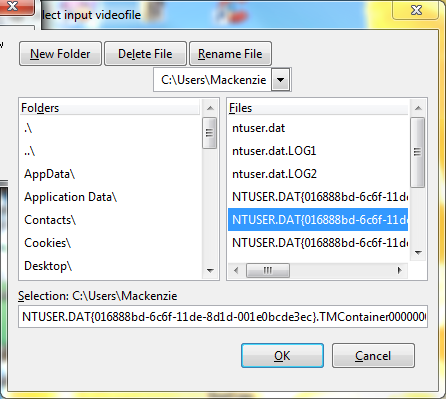
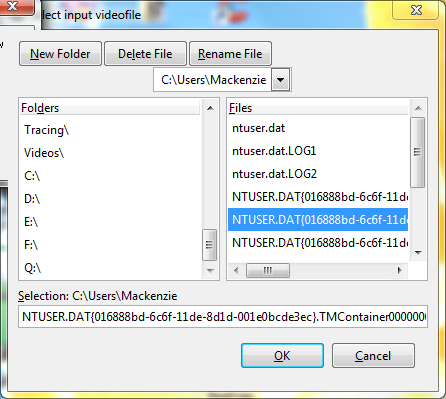
Here are my screenshots:
Image
Image

When I click on the button that you have in red, all I see is C:/Users/Mackenzie, C:/Users, & C:/


Top
 Post subject: Re: GAP
PostPosted: Wed Oct 07, 2015 1:23 pm  (#27) 
Offline
GimpChat Member
User avatar

Joined: Nov 16, 2011
Posts: 5127
Location: Metro Vancouver, BC
On the left under Folders, what do you see when you select Q:\?

_________________
Image
Gimp 2.8.18, Linux, median user
Gimp Chat Tutorials Index
Spirit Bear (Kermode)


Top
 Post subject: Re: GAP
PostPosted: Wed Oct 07, 2015 1:36 pm  (#28) 
Offline
GimpChat Member
User avatar

Joined: Jul 06, 2013
Posts: 2667
Location: California
Odinbc wrote:
On the left under Folders, what do you see when you select Q:\?

The Q drive is not accessible. It says Folder unreadable: Interrupted function call.


Top
 Post subject: Re: GAP
PostPosted: Wed Oct 07, 2015 5:02 pm  (#29) 
Offline
GimpChat Member
User avatar

Joined: Nov 16, 2011
Posts: 5127
Location: Metro Vancouver, BC
OK, one more thing to try because I believe Windows is blocking GAP. It's complicated.* :roll:
This work-around will create a second (path) access point on your computer for your external USB drive. Do not worry this fix will not modify the normal way you access the drive it only added a new option. You can easily reverse these steps.
How to Access Files From SD Cards and USB Drives in Modern Windows 8 Apps
FYI, 'Disk Management' is on all Windows versions.

* If you're curious; Microsoft Patents the Crippling of Operating Systems. (Link: Patent 7,536,726)

_________________
Image
Gimp 2.8.18, Linux, median user
Gimp Chat Tutorials Index
Spirit Bear (Kermode)


Top
 Post subject: Re: GAP
PostPosted: Wed Oct 07, 2015 6:20 pm  (#30) 
Offline
GimpChat Member
User avatar

Joined: Jul 06, 2013
Posts: 2667
Location: California
Odinbc wrote:
OK, one more thing to try because I believe Windows is blocking GAP. It's complicated.* :roll:
This work-around will create a second (path) access point on your computer for your external USB drive. Do not worry this fix will not modify the normal way you access the drive it only added a new option. You can easily reverse these steps.
How to Access Files From SD Cards and USB Drives in Modern Windows 8 Apps
FYI, 'Disk Management' is on all Windows versions.

* If you're curious; Microsoft Patents the Crippling of Operating Systems. (Link: Patent 7,536,726)


I don't have windows 8. I have windows 7. Sorry about not clarifying beforehand. I forgot.

That's the thing, my external is readable on my computer just not when I try to run GAP ...Extract Videorange to be exact.


Top
 Post subject: Re: GAP
PostPosted: Wed Oct 07, 2015 6:34 pm  (#31) 
Offline
GimpChat Member
User avatar

Joined: Nov 16, 2011
Posts: 5127
Location: Metro Vancouver, BC
Windows 7 has a Disk Management Console.
In Windows 7, choose System and Security and then choose Administrative Tools.

This will either fix or eliminate a source of the problem.

_________________
Image
Gimp 2.8.18, Linux, median user
Gimp Chat Tutorials Index
Spirit Bear (Kermode)


Top
 Post subject: Re: GAP
PostPosted: Wed Oct 07, 2015 6:42 pm  (#32) 
Offline
GimpChat Member
User avatar

Joined: Jul 06, 2013
Posts: 2667
Location: California
This all sounds complicated.


Top
 Post subject: Re: GAP
PostPosted: Sat Oct 10, 2015 12:20 pm  (#33) 
Offline
GimpChat Member
User avatar

Joined: Jul 06, 2013
Posts: 2667
Location: California
If anyone is having trouble with GAP getting it to recognize your USB or hard drive, here's how I did it: Same thread.. just post number 26.
#26
I finally got it work with much persistence and with the help of Odinbc. :)


Top
Post new topic Reply to topic  [ 33 posts ]  Go to page Previous  1, 2

All times are UTC - 5 hours [ DST ]


* Login  


Powered by phpBB3 © phpBB Group