It is currently Wed Nov 11, 2026 10:38 pm


All times are UTC - 5 hours [ DST ]


Post new topic Reply to topic  [ 12 posts ] 
Author Message
 Post subject: Jagged edges on Text
PostPosted: Mon Oct 12, 2015 9:31 am  (#1) 
Offline
Global Moderator
User avatar

Joined: Apr 01, 2012
Posts: 8502
Location: On the other side of your screen
GIMP Version: 2.8.10
Operating System: Windows
OS Version: 10
GIMP Experience: New User


When creating a logo in the create - text circle I get jagged edges even though antialising is on. How do I remove them after? I tried blurring and the whole text got blurred, not just the outside.

_________________
Image
Free Fun Photo Editing & resources
Poems from the Lord
Gimp Newby
Gimp version 3.2.8 and GMIC-Qt 4.0.2 OS :- Windows 10 Home 64


Share on Facebook Share on Twitter Share on Orkut Share on Digg Share on MySpace Share on Delicious Share on Technorati
Top
 Post subject: Re: Jagged edges on Text
PostPosted: Mon Oct 12, 2015 11:09 am  (#2) 
Offline
Administrator
User avatar

Joined: Aug 10, 2012
Posts: 14268
Location: Native to NYC living in Arizona, Gimp 2.8 - 3.0, Win 11 PC.
sallyanne wrote:
GIMP Version: 2.8.10
Operating System: Windows
OS Version: 10
GIMP Experience: New User


When creating a logo in the create - text circle I get jagged edges even though antialising is on. How do I remove them after? I tried blurring and the whole text got blurred, not just the outside.

I'm trying to reproduce this, but can't. Some fonts work better then other.
Maybe you can show the setting you're using. Then I could go through the steps it would take, to get rid of the jagged edges of the font you used.

_________________
Image
"A wise man learns more from a foolish question than a fool can learn from a wise answer"
Image


Top
 Post subject: Re: Jagged edges on Text
PostPosted: Mon Oct 12, 2015 9:51 pm  (#3) 
Offline
Global Moderator
User avatar

Joined: Apr 01, 2012
Posts: 8502
Location: On the other side of your screen
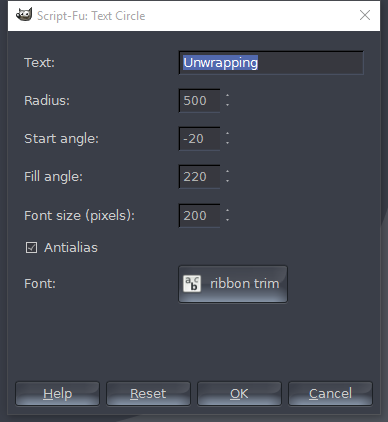
What I did Wallace was

First of all I used create - logo text circle
Radius 500
Start -20, Fill 220 and font size 250
10 letters - I used 'unwrapping'
font - Ribbon Trim http://www.dafont.com/ribbon-trim.font

Then I did a 90 degrees anti-clockwise turn. Alpha to selection the text. Selection to path. Stroke path 6px
I need to make it big because it will be made quite large as well as small.

Am I not making it big enough???
Image

_________________
Image
Free Fun Photo Editing & resources
Poems from the Lord
Gimp Newby
Gimp version 3.2.8 and GMIC-Qt 4.0.2 OS :- Windows 10 Home 64


Top
 Post subject: Re: Jagged edges on Text
PostPosted: Mon Oct 12, 2015 10:37 pm  (#4) 
Offline
Global Moderator
User avatar

Joined: Apr 01, 2012
Posts: 8502
Location: On the other side of your screen
Think I fixed the problem. - blur before stroking?
I also doubled radius and font size and it looks much better.

_________________
Image
Free Fun Photo Editing & resources
Poems from the Lord
Gimp Newby
Gimp version 3.2.8 and GMIC-Qt 4.0.2 OS :- Windows 10 Home 64


Top
 Post subject: Re: Jagged edges on Text
PostPosted: Mon Oct 12, 2015 10:57 pm  (#5) 
Offline
Administrator
User avatar

Joined: Aug 10, 2012
Posts: 14268
Location: Native to NYC living in Arizona, Gimp 2.8 - 3.0, Win 11 PC.
sallyanne wrote:
Think I fixed the problem. - blur before stroking?
I also doubled radius and font size and it looks much better.

You're way ahead of me Sallyanne.
I was going to suggest what you already did. :hehe

_________________
Image
"A wise man learns more from a foolish question than a fool can learn from a wise answer"
Image


Top
 Post subject: Re: Jagged edges on Text
PostPosted: Tue Oct 13, 2015 6:04 am  (#6) 
Offline
Script Coder
User avatar

Joined: Oct 25, 2010
Posts: 4812
That script made the unfortunate decision to work on layers and rotating layer blurs them. There are also some visible interpolation artifacts. Better use the usual text-along-path technique.

_________________
Image


Top
 Post subject: Re: Jagged edges on Text
PostPosted: Tue Oct 13, 2015 12:14 pm  (#7) 
Offline
Administrator
User avatar

Joined: Aug 10, 2012
Posts: 14268
Location: Native to NYC living in Arizona, Gimp 2.8 - 3.0, Win 11 PC.
ofnuts wrote:
That script made the unfortunate decision to work on layers and rotating layer blurs them. There are also some visible interpolation artifacts. Better use the usual text-along-path technique.

I agree with Ofnuts, Text-Along-Path would be the cleanest way to create text along an arc or circle.
It's just a matter of creating the proper path or paths and sizing the text to fit within the path, or vise versa.

Attachment:
Screenshot (128).png
Screenshot (128).png [ 354.32 KiB | Viewed 4585 times ]

_________________
Image
"A wise man learns more from a foolish question than a fool can learn from a wise answer"
Image


Top
 Post subject: Re: Jagged edges on Text
PostPosted: Tue Oct 13, 2015 12:38 pm  (#8) 
Offline
GimpChat Member
User avatar

Joined: Mar 01, 2014
Posts: 14237
Location: Spain, Aragón
Thanks Ofnuts for your indication to the best script for that particular outcome. Wallace you help a lot with the shot and your tip. :) :bigthup

_________________
Image

Gimp 2.10.36 (samj) portable _ OS Windows 10 Home_ 64bits
Don’t be afraid to start over. It’s a new chance to rebuild what you want.


Top
 Post subject: Re: Jagged edges on Text
PostPosted: Tue Oct 13, 2015 3:33 pm  (#9) 
Offline
Administrator
User avatar

Joined: Aug 10, 2012
Posts: 14268
Location: Native to NYC living in Arizona, Gimp 2.8 - 3.0, Win 11 PC.
Issabella wrote:
Wallace you help a lot with the shot and your tip. :) :bigthup

Thanks Issabella. :bigthup
Here's another tip when using Text Along Path.

In most cases, the path used for the text to follow, always distributes the text along the center of the path.

Attachment:
Screenshot (129).png
Screenshot (129).png [ 493.29 KiB | Viewed 4556 times ]

_________________
Image
"A wise man learns more from a foolish question than a fool can learn from a wise answer"
Image


Top
 Post subject: Re: Jagged edges on Text
PostPosted: Wed Oct 14, 2015 4:08 am  (#10) 
Offline
GimpChat Member
User avatar

Joined: Mar 01, 2014
Posts: 14237
Location: Spain, Aragón
Thanks Wallace :) :clap

_________________
Image

Gimp 2.10.36 (samj) portable _ OS Windows 10 Home_ 64bits
Don’t be afraid to start over. It’s a new chance to rebuild what you want.


Top
 Post subject: Re: Jagged edges on Text
PostPosted: Wed Oct 14, 2015 11:09 am  (#11) 
Offline
Administrator
User avatar

Joined: Aug 10, 2012
Posts: 14268
Location: Native to NYC living in Arizona, Gimp 2.8 - 3.0, Win 11 PC.
Issabella wrote:
Thanks Wallace :) :clap

No problem Issabella. ;)

What I was trying to say is, when using Text to Path.
The path usually goes through the center of the text.

I may have worded it differently,
but my screenshot makes this kind of obvious, I think.
:puzzled

:mrgreen:

_________________
Image
"A wise man learns more from a foolish question than a fool can learn from a wise answer"
Image


Top
 Post subject: Re: Jagged edges on Text
PostPosted: Wed Oct 14, 2015 11:29 am  (#12) 
Offline
GimpChat Member
User avatar

Joined: Mar 01, 2014
Posts: 14237
Location: Spain, Aragón
:hi5 , understood. :)

_________________
Image

Gimp 2.10.36 (samj) portable _ OS Windows 10 Home_ 64bits
Don’t be afraid to start over. It’s a new chance to rebuild what you want.


Top
Post new topic Reply to topic  [ 12 posts ] 

All times are UTC - 5 hours [ DST ]


* Login  


Powered by phpBB3 © phpBB Group