It is currently Thu Sep 24, 2026 4:00 am


All times are UTC - 5 hours [ DST ]


Post new topic Reply to topic  [ 35 posts ]  Go to page Previous  1, 2
Author Message
 Post subject: Re: getting colors from the image
PostPosted: Mon Nov 30, 2015 2:22 am  (#21) 
Offline
GimpChat Member
User avatar

Joined: Jan 20, 2013
Posts: 14835
Location: roma, italy
Odin,
did you try it embedded into a script?
I forgot to say that almost all my "help" requests come from trying to use a gimp filter from inside a script, not interactively; anyhow thanks, I will try again.

_________________
"Where am I ?"


Top
 Post subject: Re: getting colors from the image
PostPosted: Mon Nov 30, 2015 3:09 am  (#22) 
Offline
GimpChat Member
User avatar

Joined: Jan 20, 2013
Posts: 14835
Location: roma, italy
Odinbc wrote:
The Border Average Filter works fine. The Border Size and Number of Colors choices can give radically different results, especially Bucket Size.

I wanted to see how Border Average filter behaves interactively.
I got some "surprising" results:
- create a new image
- filled with ONLY PURE GREEN
- launched Border Average with default values (3,16): result = color with 8red+248green+8blue (!?)
- changed the bucket size to 64: result = color with 32red+224green+32blue (!?)
- changed the bucket size to 256: result = color with 128red+128green+128blue (!?)

So it seems that the filter:
- takes half the bucket size as a "distributed" value all over R,G,B
- then takes the same value and "deducts" it from the real value found (the real color is 0 255 0)

To double check I changed the color of the image to PURE RED (255 0 0)
Results confirm my hypothesis.

Could someone check my results?
and, if confirmed:
does someone know what is wrong with the filter?

I'm running Win 10 with Gimp 2.8.16

Thanks

_________________
"Where am I ?"


Top
 Post subject: Re: getting colors from the image
PostPosted: Mon Nov 30, 2015 10:58 am  (#23) 
Offline
Script Coder
User avatar

Joined: Oct 25, 2010
Posts: 4812
dinasset wrote:
Odinbc wrote:
The Border Average Filter works fine. The Border Size and Number of Colors choices can give radically different results, especially Bucket Size.

I wanted to see how Border Average filter behaves interactively.
I got some "surprising" results:
- create a new image
- filled with ONLY PURE GREEN
- launched Border Average with default values (3,16): result = color with 8red+248green+8blue (!?)
- changed the bucket size to 64: result = color with 32red+224green+32blue (!?)
- changed the bucket size to 256: result = color with 128red+128green+128blue (!?)

So it seems that the filter:
- takes half the bucket size as a "distributed" value all over R,G,B
- then takes the same value and "deducts" it from the real value found (the real color is 0 255 0)

To double check I changed the color of the image to PURE RED (255 0 0)
Results confirm my hypothesis.

Could someone check my results?
and, if confirmed:
does someone know what is wrong with the filter?

I'm running Win 10 with Gimp 2.8.16

Thanks

Why don't you check the source code? After all this is the great benefit of Open Source Software.

_________________
Image


Top
 Post subject: Re: getting colors from the image
PostPosted: Mon Nov 30, 2015 11:39 am  (#24) 
Offline
GimpChat Member
User avatar

Joined: Jan 20, 2013
Posts: 14835
Location: roma, italy
where do I find it? and -even more important!- is it written in C? in this case I cannot "inspect" nor amend the code

_________________
"Where am I ?"


Top
 Post subject: Re: getting colors from the image
PostPosted: Mon Nov 30, 2015 11:40 am  (#25) 
Offline
GimpChat Member
User avatar

Joined: Jan 20, 2013
Posts: 14835
Location: roma, italy
BTW I wrote my own filter, to use until the "official" is not checked/updated

_________________
"Where am I ?"


Top
 Post subject: Re: getting colors from the image
PostPosted: Mon Nov 30, 2015 12:08 pm  (#26) 
Offline
GimpChat Member
User avatar

Joined: Nov 16, 2011
Posts: 5127
Location: Metro Vancouver, BC
dinasset wrote:
Odin,
did you try it embedded into a script?
I forgot to say that almost all my "help" requests come from trying to use a gimp filter from inside a script, not interactively; anyhow thanks, I will try again.
I didn't try it within a script; I meant the option choice(s) can change the output exponentially.

_________________
Image
Gimp 2.8.18, Linux, median user
Gimp Chat Tutorials Index
Spirit Bear (Kermode)


Top
 Post subject: Re: getting colors from the image
PostPosted: Mon Nov 30, 2015 12:17 pm  (#27) 
Offline
GimpChat Member
User avatar

Joined: Jan 20, 2013
Posts: 14835
Location: roma, italy
Odin
did you now try to double-check what I noticed also in the INTERACTIVE use?
that "strange" calculation....

_________________
"Where am I ?"


Top
 Post subject: Re: getting colors from the image
PostPosted: Tue Dec 01, 2015 9:57 am  (#28) 
Offline
Script Coder
User avatar

Joined: Oct 25, 2010
Posts: 4812
dinasset wrote:
where do I find it? and -even more important!- is it written in C? in this case I cannot "inspect" nor amend the code

You can read the doc, it's fairly explicit about how it works and why results can be surprising.

_________________
Image


Top
 Post subject: Re: getting colors from the image
PostPosted: Tue Dec 01, 2015 10:42 am  (#29) 
Offline
GimpChat Member
User avatar

Joined: Jan 20, 2013
Posts: 14835
Location: roma, italy
The doc can't explain how a TOTALLY GREN or a TOTALLY RED layer returns that strange value.
It explain how the results can look strange having MORE than one colour in the layer.
But, in any case, I keep my own filter which works perfectly IMHO (returning the REAL average of the border size selected)

_________________
"Where am I ?"


Top
 Post subject: Re: getting colors from the image
PostPosted: Wed Dec 02, 2015 7:49 am  (#30) 
Offline
Global Moderator
User avatar

Joined: May 16, 2010
Posts: 16174
dinasset wrote:
The doc can't explain how a TOTALLY GREN or a TOTALLY RED layer returns that strange value.
It explain how the results can look strange having MORE than one colour in the layer.
But, in any case, I keep my own filter which works perfectly IMHO (returning the REAL average of the border size selected)

I used a 400x400 solid color 215eb8.
Every number of colors i selected resulted in the fg being changed to 215eb8. 3 px border btw.


Top
 Post subject: Re: getting colors from the image
PostPosted: Wed Dec 02, 2015 9:32 am  (#31) 
Offline
GimpChat Member
User avatar

Joined: Jan 20, 2013
Posts: 14835
Location: roma, italy
thanks Rod!
Thus it's my PC.

edit: anyone else would like to contribute with this experiment?

_________________
"Where am I ?"


Top
 Post subject: Re: getting colors from the image
PostPosted: Wed Dec 02, 2015 11:47 am  (#32) 
Offline
Script Coder
User avatar

Joined: Apr 23, 2010
Posts: 1553
Location: not from Guildford after all
dinasset

Firstly, you have three channels of color red, green, and blue that are individually treated as grayscale values (0 to 255). For each channel, all the values existent in the border region are collected in groups of the specified bucket size.

For example, if the bucket size is "8" then there will be 32 different bins which hold the pixel value counts in the ranges:
0-7 # First bin
8-15 # Second bin
16-23 # Third bin
:
:
240- 247 # 31st bin
248- 255 # 32nd bin

For your "pure green" color, all of the red values would appear in the first bin, since the red component of a pure green is "0". Likewise for the blue values. All of the green values would get collected in the 32nd bin, since they'd be "255".

Now for your example it's pretty obvious that the first bin has only counted the "0"s and thus it'd seem strange to use the midpoint value of the bin (i.e., "4") as the bin's associated value -- but what if the color was not pure and the first bin for the red component contained an assortment of values in the 0-7 range? Then it would make it entirely reasonable to use the midpoint.

Likewise for your case of the green channel. All values actually equal "255" and get counted into the 32nd bin, but once placed there the original values are "forgotten" (presumably to simplify calculations and reduce storage) and there's little recourse but to use the midpoint value of the 32nd bin (i.e., "252") as the computed channel value.

Hopefully, you see through my obfuscated explanation to the basic idea of the cause of your anomalous colors. Sorry I did not explain it well but I'm in a bit of a hurry.

_________________
Any sufficiently primitive technology is indistinguishable from a rock.


Top
 Post subject: Re: getting colors from the image
PostPosted: Wed Dec 02, 2015 12:23 pm  (#33) 
Offline
GimpChat Member
User avatar

Joined: Jan 20, 2013
Posts: 14835
Location: roma, italy
Thanks, Saulgoode, you explained it perfectly!
Now it's clear.
So, I will never try to use it and will stay on my script, which calculates the exact mean values.

_________________
"Where am I ?"


Top
 Post subject: Re: getting colors from the image
PostPosted: Wed Dec 02, 2015 10:12 pm  (#34) 
Offline
Script Coder
User avatar

Joined: Jul 14, 2010
Posts: 697
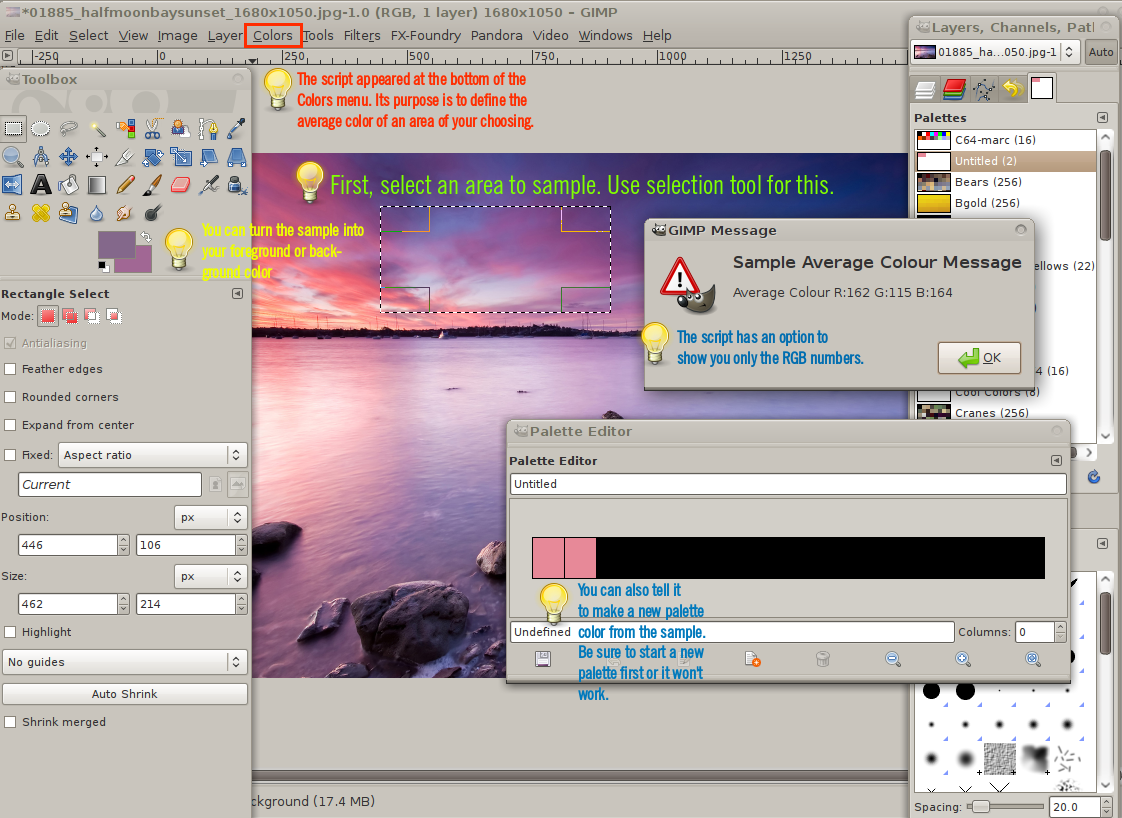
While discussing average colour sampling, I wrote this script a way back: http://registry.gimp.org/node/16678 or download from my site here: http://www.silent9.com/incoming/scripts ... colour.scm


It simply samples the entire image or active selection colour, and allows you to either:
- Display the RGB or grey values
- Set the foregound colour
- Set the background colour
- Add it to the current palette (if editable)

There is a toggle to sample just the layer, or the merged image.

It registers in the Colour menu as "Sample Average Colour..." and should work for RGB, indexed, or greyscale images.
Here is a quick pictorial explanation:
Image

-Rob A>

_________________
Image
Fantasy Cartography and Mapping by RobA


Top
 Post subject: Re: getting colors from the image
PostPosted: Thu Dec 03, 2015 12:55 am  (#35) 
Offline
GimpChat Member
User avatar

Joined: Jan 20, 2013
Posts: 14835
Location: roma, italy
Thanks Rob, I know (and use regularly) your script, very nice!
My "question" was about the Border Average filter, which IMHO is conceptually wrong, I don't understand why it has been kept as it is for so many years: it should have been rewritten with a more tightening logic.

_________________
"Where am I ?"


Top
Post new topic Reply to topic  [ 35 posts ]  Go to page Previous  1, 2

All times are UTC - 5 hours [ DST ]


* Login  


Powered by phpBB3 © phpBB Group