It is currently Tue Sep 15, 2026 1:20 pm


All times are UTC - 5 hours [ DST ]


Post new topic Reply to topic  [ 19 posts ] 
Author Message
 Post subject: DosBox
PostPosted: Thu Mar 10, 2016 2:56 pm  (#1) 
Offline
Administrator
User avatar

Joined: Aug 10, 2012
Posts: 14204
Location: Native to NYC living in Arizona, Gimp 2.8 - 3.0, Win 11 PC.
I was wondering if anyone had any experience using DosBox to run old dos games?

I'm trying to run this old game from 1995 that I have on disk,
but every time I set it up to run.
The game goes through a,
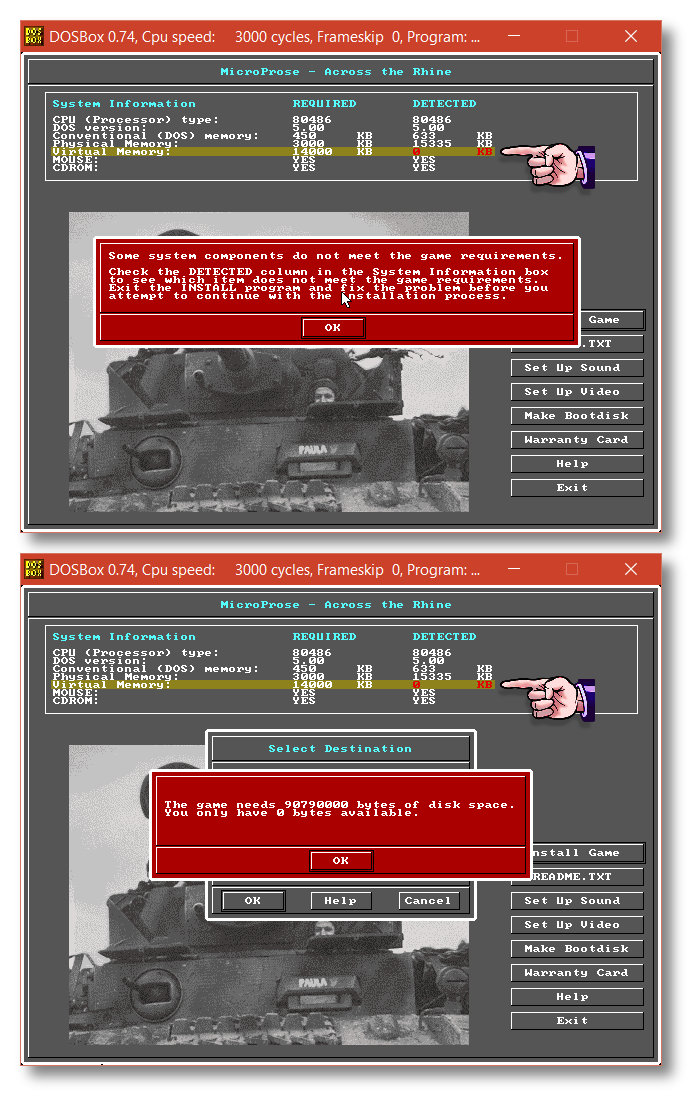
"Game Requirements Detection" and states it has detected that I have 0 (zero) Virtual Memory.

I've tried using the "Freesize" dos command to set the size of the VM for the drive,
but even after doing this it still detects zero virtual memory and I'm unable to install the game.

Here's a screenshot of the games splash screens.
Showing the virtual memory requirements and what's been detected.

Image
Any suggestions?
:puzzled

_________________
Image
"A wise man learns more from a foolish question than a fool can learn from a wise answer"
Image


Share on Facebook Share on Twitter Share on Orkut Share on Digg Share on MySpace Share on Delicious Share on Technorati
Top
 Post subject: Re: DosBox
PostPosted: Thu Mar 10, 2016 4:46 pm  (#2) 
Offline
GimpChat Member

Joined: Mar 04, 2011
Posts: 2614
Only ever used dosbox for this old scrabble and then only in linux

For the memory I have a dosbox-0.74.conf file which contains the section.
-------
[dos]
# xms: Enable XMS support.
# ems: Enable EMS support.
# umb: Enable UMB support.
# keyboardlayout: Language code of the keyboard layout (or none).

xms=true
ems=true
umb=true
--------

That gives memory and file values as:

Attachment:
dosbox-1.jpg
dosbox-1.jpg [ 89.85 KiB | Viewed 2587 times ]


Zero disk space? Are you trying to run off a CD?
Have you mounted the game folder as per the very sparce dosbox help?

Attachment:
dosbox-2.jpg
dosbox-2.jpg [ 67.75 KiB | Viewed 2587 times ]


best of luck ;)


Top
 Post subject: Re: DosBox
PostPosted: Thu Mar 10, 2016 5:05 pm  (#3) 
Offline
Administrator
User avatar

Joined: Aug 10, 2012
Posts: 14204
Location: Native to NYC living in Arizona, Gimp 2.8 - 3.0, Win 11 PC.
rich2005 wrote:
Only ever used dosbox for this old scrabble and then only in linux

For the memory I have a dosbox-0.74.conf file which contains the section.
-------
[dos]
# xms: Enable XMS support.
# ems: Enable EMS support.
# umb: Enable UMB support.
# keyboardlayout: Language code of the keyboard layout (or none).

xms=true
ems=true
umb=true
--------

That gives memory and file values as:

Attachment:
dosbox-1.jpg


Zero disk space? Are you trying to run off a CD?
Have you mounted the game folder as per the very sparce dosbox help?

Attachment:
dosbox-2.jpg


best of luck ;)


This is what I've managed to do thus far...

1. Added all the files from the CD, to a folder, mounting the C drive and folder as, C C:\folder name.
2. Run command "dir" for the "C: drive", showing the list of files within this drive.
3. Running the command, Install.exe from the c drive folder.

Doing this opened the game's splash screen.
Displaying a message that the game needed to be installed for the disk.

4. placed disk into cdrom drive and mounted the cdrom drive in dosbox.

The same results appear every time without exception, zero virtual memory.
I'm at a loss as to why the drive shows up with zero Virtual Memory, no mater how I run it?
Making the game uninstallable, due to lack of the required virtual memory needed to run the game.

_________________
Image
"A wise man learns more from a foolish question than a fool can learn from a wise answer"
Image


Top
 Post subject: Re: DosBox
PostPosted: Thu Mar 10, 2016 5:25 pm  (#4) 
Offline
GimpChat Member
User avatar

Joined: Sep 24, 2010
Posts: 12845
I have a Win98se VM and, if needed, would run any DOS game in that OS. lol

:)

_________________
Lyle

Psalm 109:8

Image


Top
 Post subject: Re: DosBox
PostPosted: Thu Mar 10, 2016 5:42 pm  (#5) 
Offline
Administrator
User avatar

Joined: Aug 10, 2012
Posts: 14204
Location: Native to NYC living in Arizona, Gimp 2.8 - 3.0, Win 11 PC.
lylejk wrote:
I have a Win98se VM and,
if needed,
would run any DOS game in that OS. lol

:)

I've tried to run the game from it's files and the game want's me to install the game using it's disk.
Nonetheless,
here's a link to all the game files for this game.
The game in question is called,
Across the Rhine
All the files are in a zip-folder named ATR and can be downloaded for the link below..

https://www.dropbox.com/s/a6naef4ffpswey4/ATR.zip?dl=0

Note:
Use the "DOWNLOAD" button at the upper right.

_________________
Image
"A wise man learns more from a foolish question than a fool can learn from a wise answer"
Image


Top
 Post subject: Re: DosBox
PostPosted: Thu Mar 10, 2016 6:24 pm  (#6) 
Offline
GimpChat Member
User avatar

Joined: Sep 24, 2010
Posts: 12845
I get an error stating that you can only install the game from the original disks, Wallace (in my Win98se VM that is). :)

_________________
Lyle

Psalm 109:8

Image


Top
 Post subject: Re: DosBox
PostPosted: Thu Mar 10, 2016 6:25 pm  (#7) 
Offline
GimpChat Member
User avatar

Joined: Sep 24, 2010
Posts: 12845
OK; found out you had to install it from the CD rom so installing it now. :)

_________________
Lyle

Psalm 109:8

Image


Top
 Post subject: Re: DosBox
PostPosted: Thu Mar 10, 2016 6:29 pm  (#8) 
Offline
Administrator
User avatar

Joined: Aug 10, 2012
Posts: 14204
Location: Native to NYC living in Arizona, Gimp 2.8 - 3.0, Win 11 PC.
lylejk wrote:
OK; found out you had to install it from the CD rom so installing it now. :)

You were able to download the files?

You can create a disk from the files.
So that you might be able to run it from disk.
However, I don't know if you're willing to do this.

_________________
Image
"A wise man learns more from a foolish question than a fool can learn from a wise answer"
Image


Top
 Post subject: Re: DosBox
PostPosted: Thu Mar 10, 2016 6:38 pm  (#9) 
Offline
GimpChat Member
User avatar

Joined: Sep 24, 2010
Posts: 12845
OK; was able to install the program but not run since it requires 3000K of EMS memory and I cannot remember how to do the page memory crap nor do I have the desire to re-learn. lol

:)

_________________
Lyle

Psalm 109:8

Image


Top
 Post subject: Re: DosBox
PostPosted: Thu Mar 10, 2016 6:43 pm  (#10) 
Offline
Administrator
User avatar

Joined: Aug 10, 2012
Posts: 14204
Location: Native to NYC living in Arizona, Gimp 2.8 - 3.0, Win 11 PC.
lylejk wrote:
OK; was able to install the program but not run since it requires 3000K of EMS memory and I cannot remember how to do the page memory crap nor do I have the desire to re-learn. lol

:)

What you have experienced is the same thing I'm going through and I can't run this game.
Thanks Lyle for checking it out nonetheless.

_________________
Image
"A wise man learns more from a foolish question than a fool can learn from a wise answer"
Image


Top
 Post subject: Re: DosBox
PostPosted: Thu Mar 10, 2016 6:51 pm  (#11) 
Offline
GimpChat Member
User avatar

Joined: Sep 24, 2010
Posts: 12845
If you know the right switches to enable Expanded memory (it did say it can also use Extended memory which is what Win98 uses, but it wouldn't run in my Win98 VM regardless) in DOSBox and enable CDRom support (apparently, the game still requires that it is in a CDRom), then possibly you can get it to run. Good luck, Wallace. :)

_________________
Lyle

Psalm 109:8

Image


Top
 Post subject: Re: DosBox
PostPosted: Thu Mar 10, 2016 7:31 pm  (#12) 
Offline
Administrator
User avatar

Joined: Aug 10, 2012
Posts: 14204
Location: Native to NYC living in Arizona, Gimp 2.8 - 3.0, Win 11 PC.
lylejk wrote:
If you know the right switches to enable Expanded memory
(it did say it can also use Extended memory which is what Win98 uses,
but it wouldn't run in my Win98 VM regardless)
in DOSBox and enable CDRom support
(apparently, the game still requires that it is in a CDRom),
then possibly you can get it to run. Good luck, Wallace. :)

Thanks Lyle!
:bigthup

_________________
Image
"A wise man learns more from a foolish question than a fool can learn from a wise answer"
Image


Top
 Post subject: Re: DosBox
PostPosted: Fri Mar 11, 2016 10:40 am  (#13) 
Offline
GimpChat Member

Joined: Jul 11, 2010
Posts: 349
Wallace
I downloaded the file and will take a look at it later today. I use to be good with that stuff back in the day. I will see what I can remember.

Can you run VirtualBox? If I am able to get it running in VB, I could just transfer the whole pkg.


Top
 Post subject: Re: DosBox
PostPosted: Fri Mar 11, 2016 1:03 pm  (#14) 
Offline
GimpChat Member
User avatar

Joined: Jan 31, 2015
Posts: 146
I use DOSbox and am downloading your game to see how far I can get with it. Will comment again soon with my results.

I use a frontend for DOSbox. If you don't use one. then I highly recommend one, as it help you configure everything via a GUI and save your games settings individually. There's quite a few frontends out there for DOSbox. The one I use is called DOSbox Game Launcher:

http://members.quicknet.nl/blankendaalr/dbgl/


Top
 Post subject: Re: DosBox
PostPosted: Fri Mar 11, 2016 1:35 pm  (#15) 
Offline
Administrator
User avatar

Joined: Aug 10, 2012
Posts: 14204
Location: Native to NYC living in Arizona, Gimp 2.8 - 3.0, Win 11 PC.
bilbo9955 wrote:
Wallace
I downloaded the file and will take a look at it later today. I use to be good with that stuff back in the day. I will see what I can remember.

Can you run VirtualBox? If I am able to get it running in VB, I could just transfer the whole pkg.

Thanks for your help.
I've used VB a while ago and only just started using DosBox.
Good luck.

David-C wrote:
I use DOSbox and am downloading your game to see how far I can get with it. Will comment again soon with my results.

I use a frontend for DOSbox. If you don't use one. then I highly recommend one, as it help you configure everything via a GUI and save your games settings individually. There's quite a few frontends out there for DOSbox. The one I use is called DOSbox Game Launcher:

http://members.quicknet.nl/blankendaalr/dbgl/

I don't know what a frontend is.
All this stuff is new to me.

_________________
Image
"A wise man learns more from a foolish question than a fool can learn from a wise answer"
Image


Top
 Post subject: Re: DosBox
PostPosted: Fri Mar 11, 2016 4:08 pm  (#16) 
Offline
GimpChat Member
User avatar

Joined: Jan 31, 2015
Posts: 146
Wallace wrote:
bilbo9955 wrote:
Wallace
I downloaded the file and will take a look at it later today. I use to be good with that stuff back in the day. I will see what I can remember.

Can you run VirtualBox? If I am able to get it running in VB, I could just transfer the whole pkg.

Thanks for your help.
I've used VB a while ago and only just started using DosBox.
Good luck.

David-C wrote:
I use DOSbox and am downloading your game to see how far I can get with it. Will comment again soon with my results.

I use a frontend for DOSbox. If you don't use one. then I highly recommend one, as it help you configure everything via a GUI and save your games settings individually. There's quite a few frontends out there for DOSbox. The one I use is called DOSbox Game Launcher:

http://members.quicknet.nl/blankendaalr/dbgl/

I don't know what a frontend is.
All this stuff is new to me.


Managed to get it working. Would you like me to upload the file with the fully working installation?


Top
 Post subject: Re: DosBox
PostPosted: Fri Mar 11, 2016 4:41 pm  (#17) 
Offline
Administrator
User avatar

Joined: Aug 10, 2012
Posts: 14204
Location: Native to NYC living in Arizona, Gimp 2.8 - 3.0, Win 11 PC.
David-C wrote:
Wallace wrote:
bilbo9955 wrote:
Wallace
I downloaded the file and will take a look at it later today. I use to be good with that stuff back in the day. I will see what I can remember.

Can you run VirtualBox? If I am able to get it running in VB, I could just transfer the whole pkg.

Thanks for your help.
I've used VB a while ago and only just started using DosBox.
Good luck.

David-C wrote:
I use DOSbox and am downloading your game to see how far I can get with it. Will comment again soon with my results.

I use a frontend for DOSbox. If you don't use one. then I highly recommend one, as it help you configure everything via a GUI and save your games settings individually. There's quite a few frontends out there for DOSbox. The one I use is called DOSbox Game Launcher:

http://members.quicknet.nl/blankendaalr/dbgl/

I don't know what a frontend is.
All this stuff is new to me.


Managed to get it working. Would you like me to upload the file with the fully working installation?

Would I?!
Heck yeah!!!
I'm not sure if you can upload all the files here to Gimp Chat, but go for it and let me know if all the files were able to be uploaded.

_________________
Image
"A wise man learns more from a foolish question than a fool can learn from a wise answer"
Image


Top
 Post subject: Re: DosBox
PostPosted: Fri Mar 11, 2016 5:23 pm  (#18) 
Offline
GimpChat Member
User avatar

Joined: Jan 31, 2015
Posts: 146
Quote:
Would I?!
Heck yeah!!!
I'm not sure if you can upload all the files here to Gimp Chat, but go for it and let me know if all the files were able to be uploaded.


http://www.megafileupload.com/at3x/ATR.tar.gz

To play the game run "game.exe". If you get no sound then exit the game, run "install.exe" and configure your sound from there. Your sound card info is in your DOSbox .config file, so use it as reference when configuring. You will still see the error about no virtual ram, but it doesn't matter.

I'm not familiar with the game, but it just seems to generate a map and automatically start up. There's no menus to choose any missions etc...


Top
 Post subject: Re: DosBox
PostPosted: Fri Mar 11, 2016 5:42 pm  (#19) 
Offline
Administrator
User avatar

Joined: Aug 10, 2012
Posts: 14204
Location: Native to NYC living in Arizona, Gimp 2.8 - 3.0, Win 11 PC.
David-C wrote:
Quote:
Would I?!
Heck yeah!!!
I'm not sure if you can upload all the files here to Gimp Chat, but go for it and let me know if all the files were able to be uploaded.


http://www.megafileupload.com/at3x/ATR.tar.gz

To play the game run "game.exe". If you get no sound then exit the game, run "install.exe" and configure your sound from there. Your sound card info is in your DOSbox .config file, so use it as reference when configuring. You will still see the error about no virtual ram, but it doesn't matter.

I'm not familiar with the game, but it just seems to generate a map and automatically start up. There's no menus to choose any missions etc...

Thanks David-C for taking the time to put this together for me.
I'll give it a try to see how it goes.
Thanks again. :bigthup

_________________
Image
"A wise man learns more from a foolish question than a fool can learn from a wise answer"
Image


Top
Post new topic Reply to topic  [ 19 posts ] 

All times are UTC - 5 hours [ DST ]


* Login  


Powered by phpBB3 © phpBB Group