It is currently Mon Sep 28, 2026 3:49 am


All times are UTC - 5 hours [ DST ]


Post new topic Reply to topic  [ 7 posts ] 
Author Message
 Post subject: Rotating tool
PostPosted: Sun Mar 13, 2016 3:10 am  (#1) 
Offline
Global Moderator
User avatar

Joined: Apr 01, 2012
Posts: 8472
Location: On the other side of your screen
GIMP Version: 2.8.10
Operating System: Windows
OS Version: 10, 32 bit
GIMP Experience: New User

List any ERROR messages you received:
NA


Is not working / doing anything. Could I have something turned on or off? I can still use the arbitrary rotate but not the shortcut?

_________________
Image
Free Fun Photo Editing & resources
Poems from the Lord
Gimp Newby
Gimp version 3.2.4 and GMIC-Qt 4.0.2 OS :- Windows 10 Home 64


Share on Facebook Share on Twitter Share on Orkut Share on Digg Share on MySpace Share on Delicious Share on Technorati
Top
 Post subject: Re: Rotating tool
PostPosted: Sun Mar 13, 2016 4:04 am  (#2) 
Offline
Administrator
User avatar

Joined: Aug 10, 2012
Posts: 14217
Location: Native to NYC living in Arizona, Gimp 2.8 - 3.0, Win 11 PC.
sallyanne wrote:
GIMP Version: 2.8.10
Operating System: Windows
OS Version: 10, 32 bit
GIMP Experience: New User

List any ERROR messages you received:
NA


Is not working / doing anything. Could I have something turned on or off? I can still use the arbitrary rotate but not the shortcut?

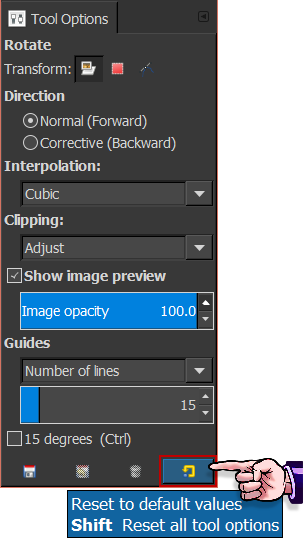
Have you checked to see if you have the correct Transform Icon selected such as; Layer, Selection or Path?
The setting you see in the Rotation Tool Options image below, are what the default setting should be.

Image

_________________
Image
"A wise man learns more from a foolish question than a fool can learn from a wise answer"
Image


Top
 Post subject: Re: Rotating tool
PostPosted: Sun Mar 13, 2016 4:57 am  (#3) 
Offline
GimpChat Member
User avatar

Joined: Mar 01, 2014
Posts: 14198
Location: Spain, Aragón
Thanks Wallace, I have had sometimes that error. Thanks for remind it. :)

_________________
Image

Gimp 2.10.36 (samj) portable _ OS Windows 10 Home_ 64bits
Don’t be afraid to start over. It’s a new chance to rebuild what you want.


Top
 Post subject: Re: Rotating tool
PostPosted: Sun Mar 13, 2016 5:24 am  (#4) 
Offline
Administrator
User avatar

Joined: Aug 10, 2012
Posts: 14217
Location: Native to NYC living in Arizona, Gimp 2.8 - 3.0, Win 11 PC.
Issabella wrote:
Thanks Wallace,
I have had sometimes that error.
Thanks for remind it. :)

Sure thing Issabella.

Also if you find that the tool options are not working correctly.
You can click the reset button and set the tool options back to the default setting.
Image

_________________
Image
"A wise man learns more from a foolish question than a fool can learn from a wise answer"
Image


Top
 Post subject: Re: Rotating tool
PostPosted: Sun Mar 13, 2016 5:35 am  (#5) 
Offline
GimpChat Member
User avatar

Joined: Mar 01, 2014
Posts: 14198
Location: Spain, Aragón
Good teaching Wallace. Thank you so much. :tyspin :)

_________________
Image

Gimp 2.10.36 (samj) portable _ OS Windows 10 Home_ 64bits
Don’t be afraid to start over. It’s a new chance to rebuild what you want.


Top
 Post subject: Re: Rotating tool
PostPosted: Sun Mar 13, 2016 9:00 am  (#6) 
Offline
Global Moderator
User avatar

Joined: Apr 01, 2012
Posts: 8472
Location: On the other side of your screen
Thanks Wallace. Everything was as per your picture this time, and worked. I will check in future too...weird, I don't recall changing anything there.

_________________
Image
Free Fun Photo Editing & resources
Poems from the Lord
Gimp Newby
Gimp version 3.2.4 and GMIC-Qt 4.0.2 OS :- Windows 10 Home 64


Top
 Post subject: Re: Rotating tool
PostPosted: Sun Mar 13, 2016 12:31 pm  (#7) 
Offline
Administrator
User avatar

Joined: Aug 10, 2012
Posts: 14217
Location: Native to NYC living in Arizona, Gimp 2.8 - 3.0, Win 11 PC.
sallyanne wrote:
Thanks Wallace. Everything was as per your picture this time, and worked. I will check in future too...weird, I don't recall changing anything there.

No problem Sallyanne.
It could be a reported 2.8.10 bug, that has been worked out in 2.8.14, or the more recent stable versions of 2.8.16.
You might want to consider installing one of these more recent stable versions of Gimp, if this issue persists.
Good luck and happy Gimping. :bigthup

_________________
Image
"A wise man learns more from a foolish question than a fool can learn from a wise answer"
Image


Top
Post new topic Reply to topic  [ 7 posts ] 

All times are UTC - 5 hours [ DST ]


* Login  


Powered by phpBB3 © phpBB Group