It is currently Tue Aug 18, 2026 6:09 pm


All times are UTC - 5 hours [ DST ]


Post new topic Reply to topic  [ 5 posts ] 
Author Message
 Post subject: GMIC binary floating point output file format
PostPosted: Mon Mar 21, 2016 4:05 am  (#1) 
Offline
New Member

Joined: Mar 21, 2016
Posts: 3
Hi!
I'm trying to work with binary output from GMIC, but cannot find any information about its format. My researches led me to following conclusions ↓
File consists of main header and data blocks which consist of block header and block data. Main header is
N <pixel type> <byte order>\0x0A
where N is a number of block entries (as I suppose), <pixel type> is float and <byte order> is little_endian.
Next to it is a block header
W H BpC NoC #S\0x0A
where W is a picture width, H is a picture height, BpC is byte-per-channel, NoC is a number of channels, and S is the size of data which follows this header. But what I see then cannot be described!

As written in GMIC documentation, calculations and data storage is made using 32-bit floats. Ok, let's assume the following command line
GMIC RGB.png -luminance --fft -append[-2,-1] c -norm. -log. -shift. 50%,50%,0,0,2 -o Float
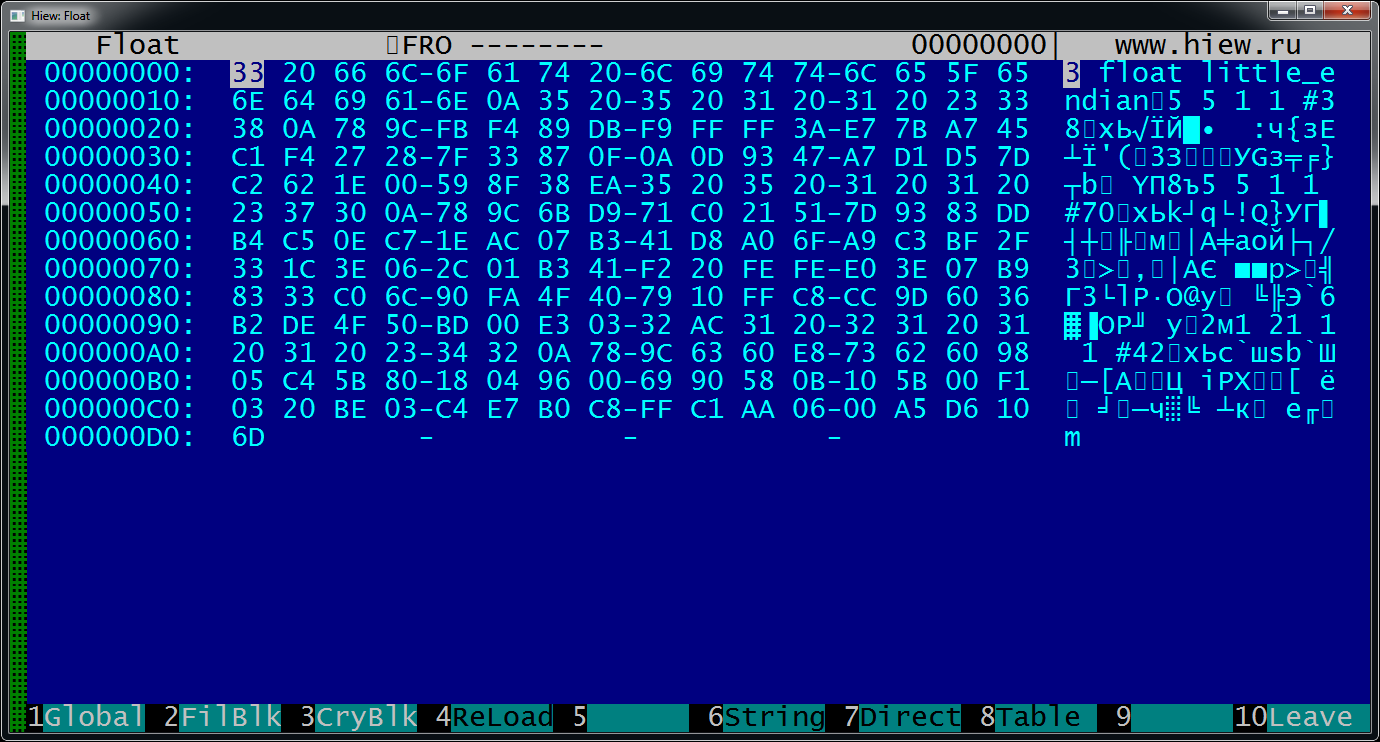
for 5×5 RGB image. On output we have this ↓
Image
There are 3 image blocks: two 5x5 1-channel 8-bit images and strange 1×21 1-channel 8-bit image. But data sizes of 38 and 70 cannot be divided to 5×5=25! For 32-bit float data size must be 5×5×4=100 bytes.

What is a magical format used to store pixel data?


Share on Facebook Share on Twitter Share on Orkut Share on Digg Share on MySpace Share on Delicious Share on Technorati
Top
 Post subject: Re: GMIC binary floating point output file format
PostPosted: Mon Mar 21, 2016 6:32 am  (#2) 
Offline
GimpChat Member
User avatar

Joined: Jan 03, 2011
Posts: 1656
Hi,

G'MIC uses by default the .cimgz file format, which is basically a file format defined specifically to store data in the CImg Library
(C++ template image processing library : http://cimg.eu).
The format is not that simple to read, as the image data are compressed (but in a non-destructive way). It uses the zlib functions to
compress/uncompress pixel buffers.
If you want more details about how it can be read/saved, you should look at the CImg source code, specifically the methods
CImgList<T>::_load_cimg() and CImgList<T>::_save_cimg() in file CImg.h where all the details of the implementation can be found.
CImg.h can be found online here : https://raw.githubusercontent.com/dtsch ... ter/CImg.h

If you are allowed to write C++ code, then of course, I'd recommend to directly use CImg, it becomes very simple to use, for instance :
#define cimg_use_zlib
#include "CImg.h"
using namespace cimg_library;
int main() {
  CImg<> img("file.cimgz);
  img.blur(10);
  img.save("foo.cimgz");
  return 0;
}


Top
 Post subject: Re: GMIC binary floating point output file format
PostPosted: Mon Mar 21, 2016 6:45 am  (#3) 
Offline
New Member

Joined: Mar 21, 2016
Posts: 3
So the data is compressed, I should supposet it…
Ok, thanks. If I won't find another way to export NORMAL pictures I use that library. BTW, how to make GMIC to export pictures like in preview screen? When specifying .png as an export extension, it exports almost black picture (because it saves colors rounded to integer, not scaling its values to 255). Just compare pictures below (you'll need to move the white point on "black" image according to histogram).


Attachments:
Normal.png
Normal.png [ 185.25 KiB | Viewed 4207 times ]
Abnormal.png
Abnormal.png [ 34.59 KiB | Viewed 4207 times ]
Top
 Post subject: Re: GMIC binary floating point output file format
PostPosted: Mon Mar 21, 2016 9:42 am  (#4) 
Offline
GimpChat Member
User avatar

Joined: Jan 03, 2011
Posts: 1656
See https://discuss.pixls.us/t/exporting-ff ... gin/1076/2 for additional info :)


Top
 Post subject: Re: GMIC binary floating point output file format
PostPosted: Mon Mar 21, 2016 9:54 am  (#5) 
Offline
New Member

Joined: Mar 21, 2016
Posts: 3
TYVM for a link to my topic :D I already have got an answer.


Top
Post new topic Reply to topic  [ 5 posts ] 

All times are UTC - 5 hours [ DST ]


* Login  


Powered by phpBB3 © phpBB Group
