It is currently Mon Sep 21, 2026 2:29 pm


All times are UTC - 5 hours [ DST ]


Post new topic Reply to topic  [ 6 posts ] 
Author Message
 Post subject: how to add an object to "perfect" center???
PostPosted: Mon Apr 18, 2016 1:07 pm  (#1) 
Offline
GimpChat Member

Joined: Dec 10, 2013
Posts: 106
GIMP Version: 2.8.14
Operating System: Windows
GIMP Experience: New User


Hi

How to add something, for example, a word or a line of text
to the "perfect" center of an image?
If I drag the text with mouse to the center of an image, it 's always an "estimated" center of the image but not "perfect" center

I hope you guy know what I mean. I don't actually speak English very well. Sorry


Share on Facebook Share on Twitter Share on Orkut Share on Digg Share on MySpace Share on Delicious Share on Technorati
Top
 Post subject: Re: how to add an object to "perfect" center???
PostPosted: Mon Apr 18, 2016 1:45 pm  (#2) 
Offline
GimpChat Member
User avatar

Joined: Sep 24, 2010
Posts: 12845
If your target is the image and the source is what you want pasted into your target, the easiest way to do this is to reduce the view of your target until all of it can be seen on your screen, then copy the source and paste into the target. GIMP will auto-magically past your target to the center of the image then. If your target shows too big on the screen, it won't. :)

_________________
Lyle

Psalm 109:8

Image


Top
 Post subject: Re: how to add an object to "perfect" center???
PostPosted: Mon Apr 18, 2016 3:39 pm  (#3) 
Offline
Administrator
User avatar

Joined: Aug 10, 2012
Posts: 14206
Location: Native to NYC living in Arizona, Gimp 2.8 - 3.0, Win 11 PC.
In addition to what lylejk has discribed.
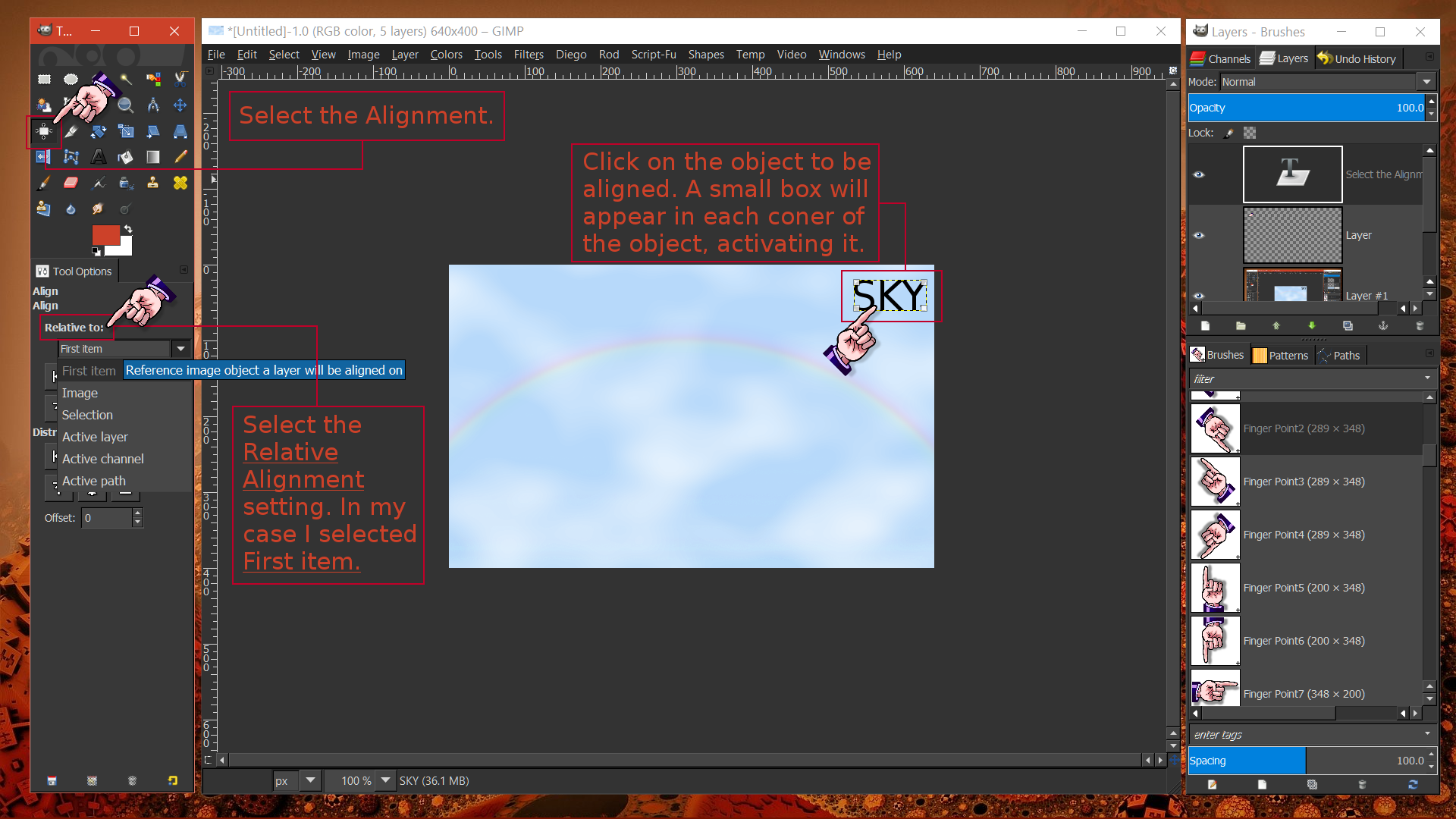
You can also use the Alignment Tool.
Image

Image

Image

Image

_________________
Image
"A wise man learns more from a foolish question than a fool can learn from a wise answer"
Image


Top
 Post subject: Re: how to add an object to "perfect" center???
PostPosted: Mon Apr 18, 2016 3:44 pm  (#4) 
Offline
Script Coder
User avatar

Joined: Oct 25, 2010
Posts: 4812
kenny1999 wrote:
GIMP Version: 2.8.14
Operating System: Windows
GIMP Experience: New User


Hi

How to add something, for example, a word or a line of text
to the "perfect" center of an image?
If I drag the text with mouse to the center of an image, it 's always an "estimated" center of the image but not "perfect" center

I hope you guy know what I mean. I don't actually speak English very well. Sorry


Either:

1) Use the "Align" tool
2) Position a guide, and move the object until its center snaps on the guide.

_________________
Image


Top
 Post subject: Re: how to add an object to "perfect" center???
PostPosted: Mon Apr 18, 2016 3:46 pm  (#5) 
Offline
Script Coder
User avatar

Joined: Oct 25, 2010
Posts: 4812
lylejk wrote:
GIMP will auto-magically past your target to the center of the image then.


It will actually center it on the current selection (more accurately, to its "bounding box").

_________________
Image


Top
 Post subject: Re: how to add an object to "perfect" center???
PostPosted: Mon Apr 18, 2016 4:17 pm  (#6) 
Offline
GimpChat Member
User avatar

Joined: Sep 24, 2010
Posts: 12845
ofnuts wrote:
lylejk wrote:
GIMP will auto-magically past your target to the center of the image then.


It will actually center it on the current selection (more accurately, to its "bounding box").


True; but didn't want to complicate things for the guy. :)

_________________
Lyle

Psalm 109:8

Image


Top
Post new topic Reply to topic  [ 6 posts ] 

All times are UTC - 5 hours [ DST ]


* Login  


Powered by phpBB3 © phpBB Group