It is currently Tue Sep 22, 2026 2:05 pm


All times are UTC - 5 hours [ DST ]


Post new topic Reply to topic  [ 9 posts ] 
Author Message
 Post subject: Transparant text underneth each other
PostPosted: Fri May 13, 2016 4:30 pm  (#1) 
Offline
GimpChat Member
User avatar

Joined: Feb 14, 2013
Posts: 462
Location: Stockholm
GIMP Version: 2.8.14
Operating System: Mac OS
GIMP Experience: Basic Level


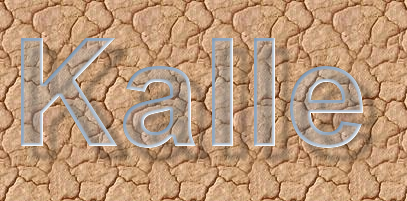
Hello. Many times I have made glass text on corkbotton, like this.
Image

This time I need glass text under each other

Hemtjänst

Butiken

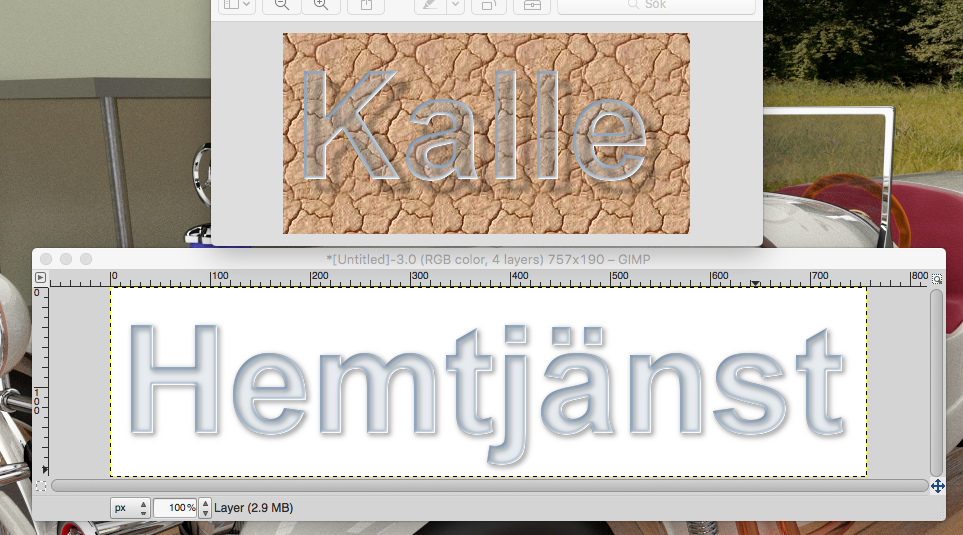
with white background. But when I try, the text dont look like glass

Image

Do you know how to fix this.

Thanks in advance.

_________________
Late 2017 iMac Retina 4K 21,5 inch Mac OS High Sierra version 10.13.4
3,6 GHz Intel Core i7
16 GB Ram 2400 MHz DDR4
Graphic card Radeon Pro 560 4096 MB
Affinity Photo and Affinity Designers.


Share on Facebook Share on Twitter Share on Orkut Share on Digg Share on MySpace Share on Delicious Share on Technorati
Top
 Post subject: Re: Transparant text underneth each other
PostPosted: Fri May 13, 2016 9:23 pm  (#2) 
Offline
Script Coder
User avatar

Joined: May 07, 2014
Posts: 4554
Location: Canada
not sure i think the one on cork has shadows that are offset from the glass words and you can see shadows through the glass so it's more convincing than on white...try moving the shadow see if it looks better

_________________
Image
Visualize your and others dreams coming true.


Top
 Post subject: Re: Transparant text underneth each other
PostPosted: Fri May 13, 2016 10:11 pm  (#3) 
Offline
Administrator
User avatar

Joined: Aug 10, 2012
Posts: 14206
Location: Native to NYC living in Arizona, Gimp 2.8 - 3.0, Win 11 PC.
Maybe adding subtle streaks/glare or a reflection of some kind,
would help to make it more convincing?

_________________
Image
"A wise man learns more from a foolish question than a fool can learn from a wise answer"
Image


Top
 Post subject: Re: Transparant text underneth each other
PostPosted: Sat May 14, 2016 12:50 am  (#4) 
Offline
Global Moderator
User avatar

Joined: Apr 01, 2012
Posts: 8471
Location: On the other side of your screen
Even if you drop your opacity in the first layer it goes back to 100% when you add the 'white layer' - background. You can make subsequent ones see through.
Image
Using the glass script and dropping the tint layer opacity. I also dropped the opacity on subsequent layers after merging all layers of the script. On the first duplicate after that then duplicated it a couple times more.

_________________
Image
Free Fun Photo Editing & resources
Poems from the Lord
Gimp Newby
Gimp version 3.2.4 and GMIC-Qt 4.0.2 OS :- Windows 10 Home 64


Top
 Post subject: Re: Transparant text underneth each other
PostPosted: Sat May 14, 2016 1:30 am  (#5) 
Offline
GimpChat Member
User avatar

Joined: Feb 14, 2013
Posts: 462
Location: Stockholm
God morning everybody and thanks for helping.

OK I try once more and got this.

Image

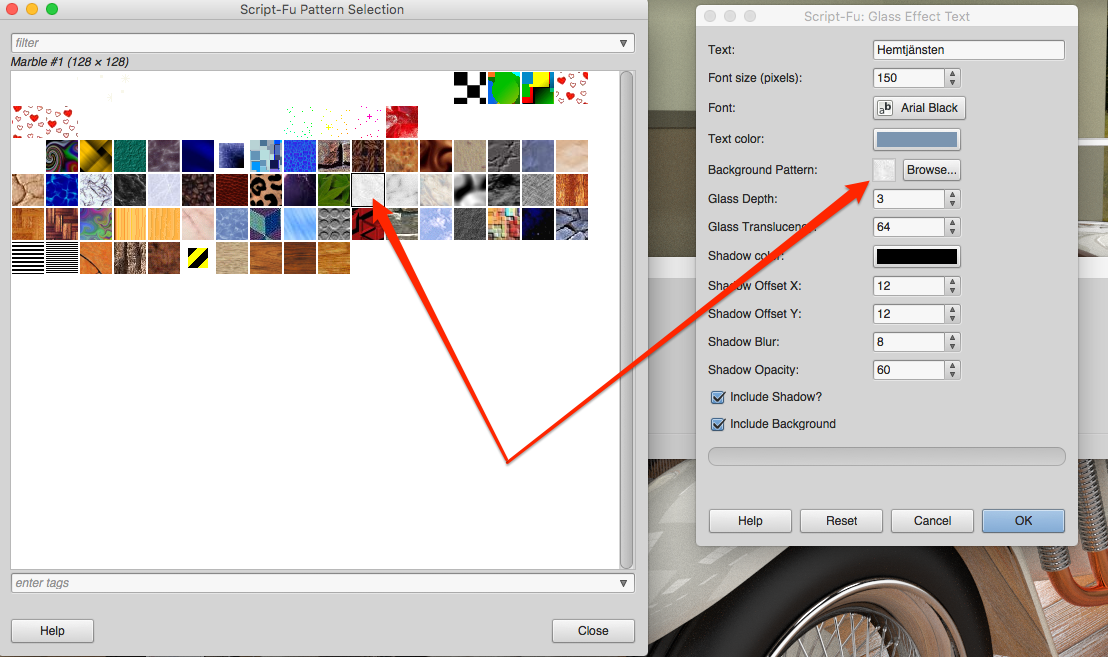
Not bad but I can not find plane white background. I look all over the place. May I need to add one more layer I only use one layer.

Image


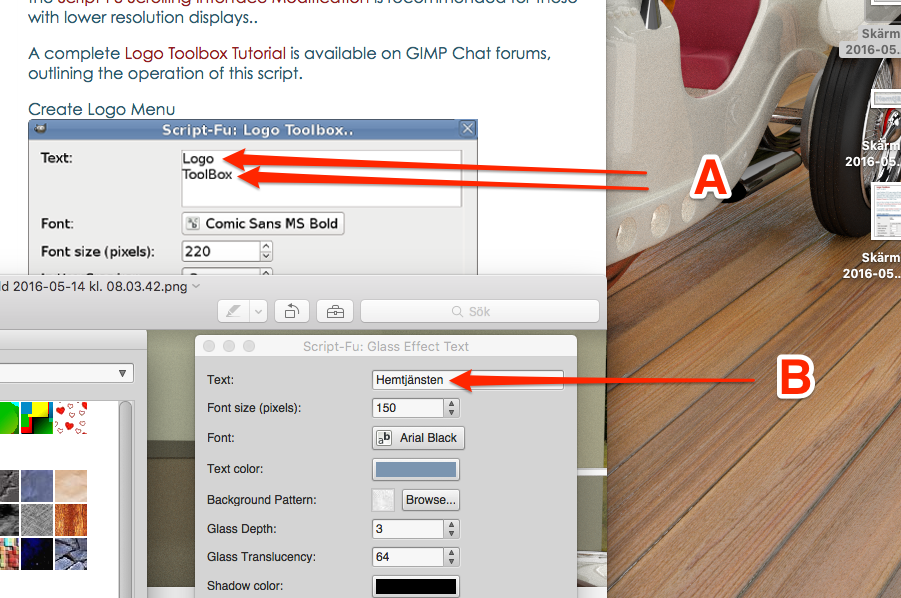
I ned text underneth each other, but Glass script dont let me type 2 line under each other See B
Image

Image


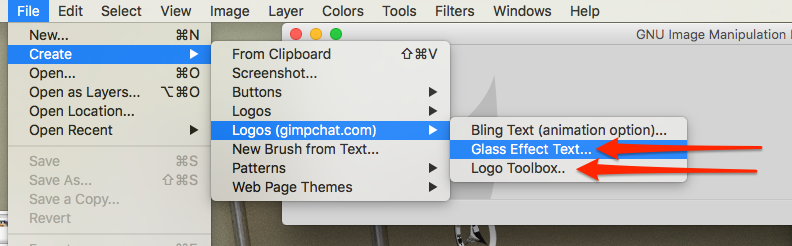
Can I combine both Glass Effect Text script and Logo Toolbox on same project.I think that solve the problem.
Image


OK.
I try with script Logo Toolbox with this result and 2 layer.

Image

I still need text to look like glass. How can I do that.

_________________
Late 2017 iMac Retina 4K 21,5 inch Mac OS High Sierra version 10.13.4
3,6 GHz Intel Core i7
16 GB Ram 2400 MHz DDR4
Graphic card Radeon Pro 560 4096 MB
Affinity Photo and Affinity Designers.


Last edited by Lurifax73 on Sat May 14, 2016 4:26 am, edited 1 time in total.

Top
 Post subject: Re: Transparant text underneth each other
PostPosted: Sat May 14, 2016 2:01 am  (#6) 
Offline
Global Moderator
User avatar

Joined: Apr 01, 2012
Posts: 8471
Location: On the other side of your screen
Sorry Lurifax I didn't add a pattern layer. Just another 'white' layer.
When adding layers you have the option of background colour, foreground colour, white or transparent. So I did the script with a transparent background and then added a layer after just to see if I was getting there.
As for your other questions you may have to wait for the others to give you an answer.

_________________
Image
Free Fun Photo Editing & resources
Poems from the Lord
Gimp Newby
Gimp version 3.2.4 and GMIC-Qt 4.0.2 OS :- Windows 10 Home 64


Top
 Post subject: Re: Transparant text underneth each other
PostPosted: Sat May 14, 2016 7:15 am  (#7) 
Offline
Global Moderator
User avatar

Joined: Apr 01, 2012
Posts: 8471
Location: On the other side of your screen
Trying again. I don't have the particular font to do the a like that for you
Image

_________________
Image
Free Fun Photo Editing & resources
Poems from the Lord
Gimp Newby
Gimp version 3.2.4 and GMIC-Qt 4.0.2 OS :- Windows 10 Home 64


Top
 Post subject: Re: Transparant text underneth each other
PostPosted: Sat May 14, 2016 7:37 am  (#8) 
Offline
GimpChat Member
User avatar

Joined: Feb 14, 2013
Posts: 462
Location: Stockholm
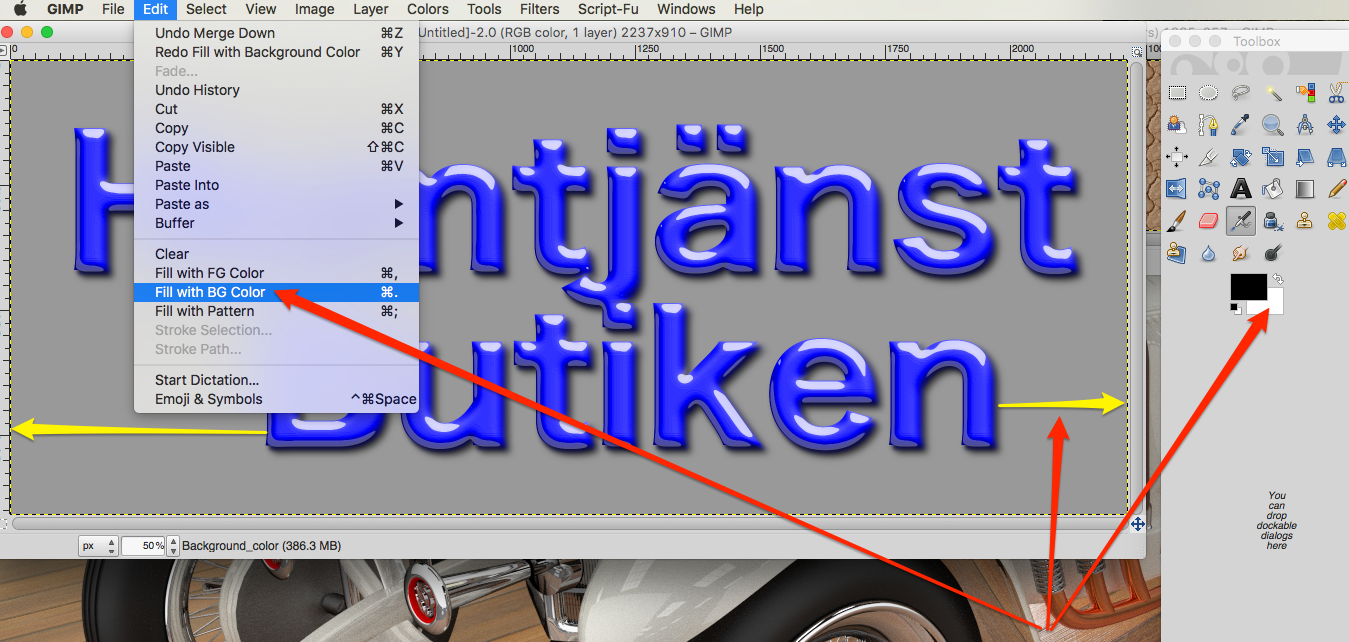
Thank you Sallyanne, that script did what I need, but why the background color dont turn white and why "Butiken" ar not in center.


Image

Thanks.

_________________
Late 2017 iMac Retina 4K 21,5 inch Mac OS High Sierra version 10.13.4
3,6 GHz Intel Core i7
16 GB Ram 2400 MHz DDR4
Graphic card Radeon Pro 560 4096 MB
Affinity Photo and Affinity Designers.


Top
 Post subject: Re: Transparant text underneth each other
PostPosted: Sat May 14, 2016 8:27 am  (#9) 
Offline
Global Moderator
User avatar

Joined: Apr 01, 2012
Posts: 8471
Location: On the other side of your screen
Lurifax73 wrote:
Thank you Sallyanne, that script did what I need, but why the background color dont turn white and why "Butiken" ar not in center.


[ [url=http://gimpchat.com/files/2596_Skärmavbild_2016-05-14_kl__14_29_58.png]Image[/url] ]

Thanks.


Pick your background colour within the script (looks like you didn't change it) as with text colour. I'm not sure about the centreing. I thought it was automatically centreing.
It doesn't matter if it doesn't look centred in the script - leave it in two lines like you want. Hopefully it will centre then.

I was using a different script before. With this one you don't have to do all the extra bits I mentioned earlier. This one should do it all for you.
Oh and don't forget it does plastic or glass. You need to choose the one you want.

_________________
Image
Free Fun Photo Editing & resources
Poems from the Lord
Gimp Newby
Gimp version 3.2.4 and GMIC-Qt 4.0.2 OS :- Windows 10 Home 64


Top
Post new topic Reply to topic  [ 9 posts ] 

All times are UTC - 5 hours [ DST ]


* Login  


Powered by phpBB3 © phpBB Group