It is currently Thu Nov 05, 2026 9:13 am


All times are UTC - 5 hours [ DST ]


Post new topic Reply to topic  [ 79 posts ]  Go to page 1, 2, 3, 4  Next
Author Message
 Post subject: Just experimenting with height maps/bump mapping/dropshadow
PostPosted: Sat May 14, 2016 8:57 pm  (#1) 
Offline
Script Coder
User avatar

Joined: May 07, 2014
Posts: 4561
Location: Canada
Image

_________________
Image
Visualize your and others dreams coming true.


Share on Facebook Share on Twitter Share on Orkut Share on Digg Share on MySpace Share on Delicious Share on Technorati
Top
 Post subject: Re: Just experimenting with height maps/bump mapping/dropshadow
PostPosted: Sat May 14, 2016 11:04 pm  (#2) 
Offline
Administrator
User avatar

Joined: Aug 10, 2012
Posts: 14259
Location: Native to NYC living in Arizona, Gimp 2.8 - 3.0, Win 11 PC.
trandoductin wrote:
[ Image ]

You think you could make maps like this of jpg or png images.

_________________
Image
"A wise man learns more from a foolish question than a fool can learn from a wise answer"
Image


Top
 Post subject: Re: Just experimenting with height maps/bump mapping/dropshadow
PostPosted: Sun May 15, 2016 1:04 am  (#3) 
Offline
Script Coder
User avatar

Joined: May 07, 2014
Posts: 4561
Location: Canada
not sure what you mean.
I just selected those shapes, used my script to create height maps image.
I just used the height maps as bump map layer and then dropped shadow.

_________________
Image
Visualize your and others dreams coming true.


Top
 Post subject: Re: Just experimenting with height maps/bump mapping/dropshadow
PostPosted: Sun May 15, 2016 1:11 am  (#4) 
Offline
Administrator
User avatar

Joined: Aug 10, 2012
Posts: 14259
Location: Native to NYC living in Arizona, Gimp 2.8 - 3.0, Win 11 PC.
trandoductin wrote:
not sure what you mean.
I just used the height maps as bump map layer and then dropped shadow.

I'm interested in making depth-maps of images,
to be used as reference to help create 3D red cyan anaglph images.

_________________
Image
"A wise man learns more from a foolish question than a fool can learn from a wise answer"
Image


Top
 Post subject: Re: Just experimenting with height maps/bump mapping/dropshadow
PostPosted: Sun May 15, 2016 1:31 am  (#5) 
Offline
Script Coder
User avatar

Joined: May 07, 2014
Posts: 4561
Location: Canada
Wallace wrote:
trandoductin wrote:
not sure what you mean.
I just used the height maps as bump map layer and then dropped shadow.

I'm interested in making depth-maps of images,
to be used as reference to help create 3D red cyan anaglph images.

But what/where is the depth information coming from?
my script (according to PegLeg44 can be achieved by using different blending modes) but i was unable to reproduce the result of my script with blending modes :oops:
but my script basically tries to make round curves with any shapes, it does it by looking at all pixels within a selection, for each pixel it looks for the nearest border pixel, then it looks at all these distances between pixels and border pixels and finds the maximum, this is then considered the the maximum radius, then from there it creates a height map based on how far each pixel is from a nearest border and take a percentage of that distance/maximum radius and that's how i get the height map produced.
It's this script found here -->http://gimpchat.com/viewtopic.php?f=9&t=14078&start=10#p192438 It's really slow on large images because it has to look at all pixels within a selection and compare them and do a lot of thinking heheh

_________________
Image
Visualize your and others dreams coming true.


Top
 Post subject: Re: Just experimenting with height maps/bump mapping/dropshadow
PostPosted: Sun May 15, 2016 1:40 am  (#6) 
Offline
Script Coder
User avatar

Joined: May 07, 2014
Posts: 4561
Location: Canada
woh I just looked up 3D red cyan anaglph images,
Those look hard to produce from a single image...
since on each depth the red and cyan are shifted different.
We could always try to experiment though...
If we have a height map and separated the image into 2 layers, one red and one cyan, we can always try to shift pixels left / right depending on the height map values...but with a single image that might come out distorted because as we shift left or shift right there might be space between what's shifted and what's not ...
we can always try to to draw from furthest to closest so that closest objects are top of background and put that over original and see if our effect is close....
I have no clue how separate an image into red and cyan layers though

_________________
Image
Visualize your and others dreams coming true.


Top
 Post subject: Re: Just experimenting with height maps/bump mapping/dropshadow
PostPosted: Sun May 15, 2016 1:50 am  (#7) 
Offline
Administrator
User avatar

Joined: Aug 10, 2012
Posts: 14259
Location: Native to NYC living in Arizona, Gimp 2.8 - 3.0, Win 11 PC.
trandoductin wrote:
woh I just looked up 3D red cyan anaglph images,
Those look hard to produce from a single image...
since on each depth the red and cyan are shifted different.
We could always try to experiment though...
If we have a height map and separated the image into 2 layers, one red and one cyan,
we can always try to shift pixels left / right depending on the height map values...
but with a single image
that might come out distorted
because as we shift left or shift right there might be space between what's shifted and what's not ...

Well... the idea behind the kind of depth-map I'm looking to create,
is based on Black being far away and White being up front or the closest to the viewer.
Such as the colors seen in this image below.
Image
So far I haven't found anything that would do this.
I have to create the depth-maps manually.

Such as this depth-map made for the image below it...
Image
Image
This is a 2D to 3D conversion created using Gimp.
If you wear a pair of "Red/Cyan" 3-D glasses,
you'll be able to see the 3D effect in this image.

_________________
Image
"A wise man learns more from a foolish question than a fool can learn from a wise answer"
Image


Top
 Post subject: Re: Just experimenting with height maps/bump mapping/dropshadow
PostPosted: Sun May 15, 2016 2:17 am  (#8) 
Offline
Script Coder
User avatar

Joined: May 07, 2014
Posts: 4561
Location: Canada
so there's already a plugin that takes a height map and an image as inputs and converts an image into red cyan 3D? Where is this plug in i want to try it with my height maps...
i don't have 3d glasses though. I might have to buy a pair.

if so then I don't know what else we can do since the height map needs our intelligence to tell it if it's far away or close to us.

_________________
Image
Visualize your and others dreams coming true.


Top
 Post subject: Re: Just experimenting with height maps/bump mapping/dropshadow
PostPosted: Sun May 15, 2016 2:27 am  (#9) 
Offline
Administrator
User avatar

Joined: Aug 10, 2012
Posts: 14259
Location: Native to NYC living in Arizona, Gimp 2.8 - 3.0, Win 11 PC.
trandoductin wrote:
so there's already a plugin that takes a height map and an image as inputs and converts an image into red cyan 3D?
Where is this plug in i want to try it with my height maps...
i don't have 3d glasses though. I might have to buy a pair.

if so then I don't know what else we can do since the height map needs our intelligence to tell it if it's far away or close to us.

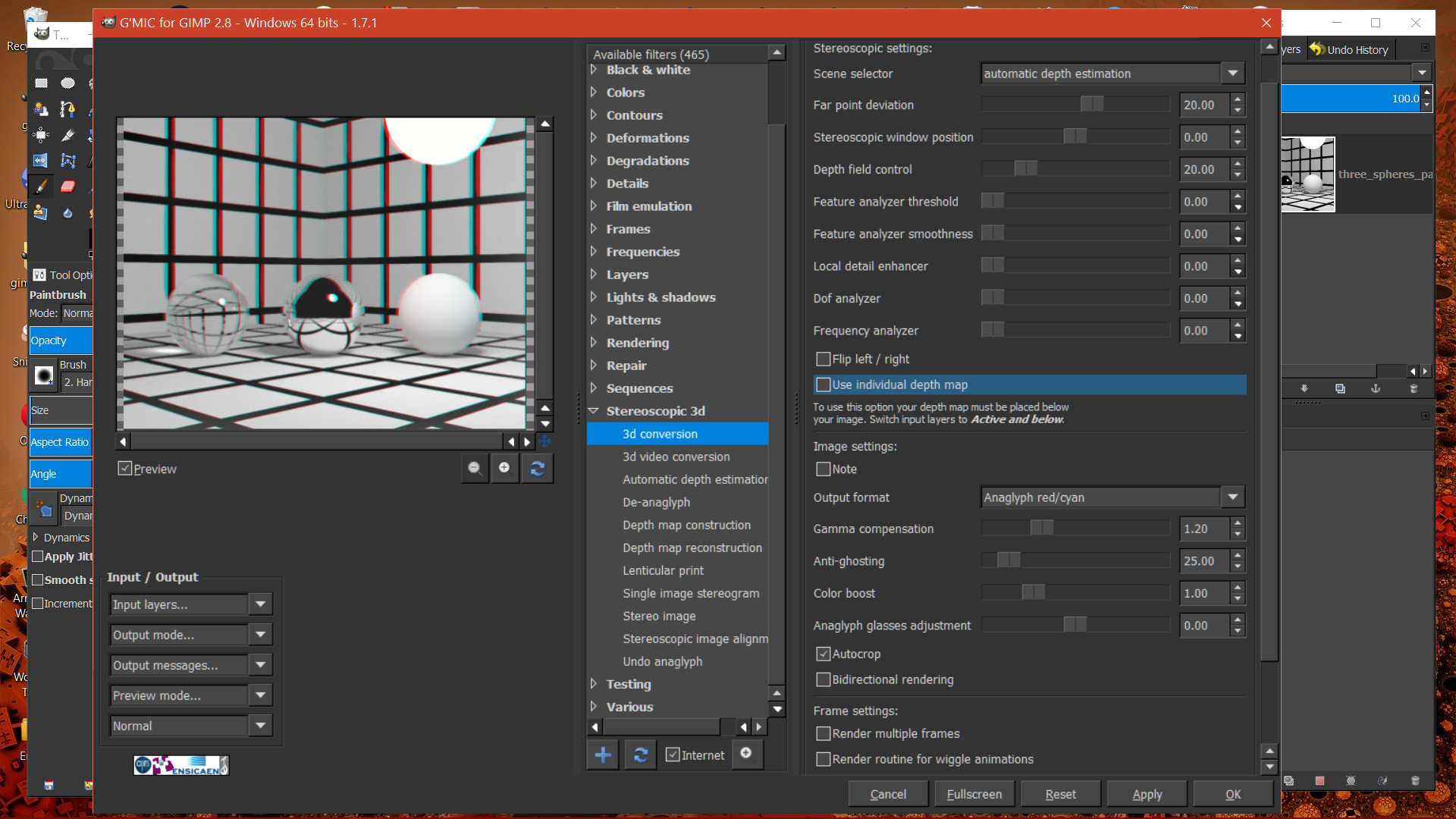
You can find it in G'MIC...

Notice the option, use individual depth map.


Image

_________________
Image
"A wise man learns more from a foolish question than a fool can learn from a wise answer"
Image


Top
 Post subject: Re: Just experimenting with height maps/bump mapping/dropshadow
PostPosted: Sun May 15, 2016 2:48 am  (#10) 
Offline
Script Coder
User avatar

Joined: May 07, 2014
Posts: 4561
Location: Canada
i don't have 3d glasses right now but
i wonder how this looks with them.
Image

_________________
Image
Visualize your and others dreams coming true.


Top
 Post subject: Re: Just experimenting with height maps/bump mapping/dropshadow
PostPosted: Sun May 15, 2016 2:58 am  (#11) 
Offline
Administrator
User avatar

Joined: Aug 10, 2012
Posts: 14259
Location: Native to NYC living in Arizona, Gimp 2.8 - 3.0, Win 11 PC.
trandoductin wrote:
i don't have 3d glasses right now but
i wonder how this looks with them.
[ Image ]

I have a pair of those glasses.
It doesn't look very "3D" looking.
I looked at your image and it might be better if you started that image off in black & white, instead of in color.

_________________
Image
"A wise man learns more from a foolish question than a fool can learn from a wise answer"
Image


Top
 Post subject: Re: Just experimenting with height maps/bump mapping/dropshadow
PostPosted: Sun May 15, 2016 9:49 am  (#12) 
Offline
Script Coder
User avatar

Joined: May 07, 2014
Posts: 4561
Location: Canada
Wallace wrote:
trandoductin wrote:
i don't have 3d glasses right now but
i wonder how this looks with them.
[ Image ]

I have a pair of those glasses.
It doesn't look very "3D" looking.
I looked at your image and it might be better if you started that image off in black & white, instead of in color.

well i would need a pair of 3d glasses if i want to play more with these. maybe i'll search and see where i can order one online.

UPDATE: Just ordered a pair on amazon for like $2.79 CAD or something. excited to see your 3d images Wallace.

_________________
Image
Visualize your and others dreams coming true.


Top
 Post subject: Re: Just experimenting with height maps/bump mapping/dropshadow
PostPosted: Sun May 15, 2016 10:44 am  (#13) 
Offline
Administrator
User avatar

Joined: Aug 10, 2012
Posts: 14259
Location: Native to NYC living in Arizona, Gimp 2.8 - 3.0, Win 11 PC.
trandoductin wrote:
well i would need a pair of 3d glasses if i want to play more with these. maybe i'll search and see where i can order one online.

UPDATE: Just ordered a pair on amazon for like $2.79 CAD or something. excited to see your 3d images Wallace.

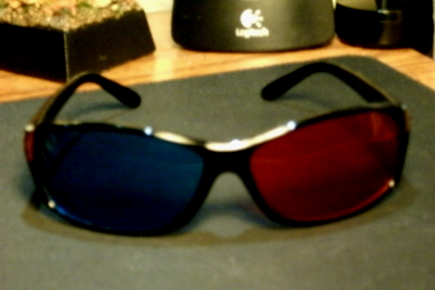
These are the glasses I have.
Image

_________________
Image
"A wise man learns more from a foolish question than a fool can learn from a wise answer"
Image


Top
 Post subject: Re: Just experimenting with height maps/bump mapping/dropshadow
PostPosted: Sun May 15, 2016 10:49 am  (#14) 
Offline
Script Coder
User avatar

Joined: May 07, 2014
Posts: 4561
Location: Canada
i order this pair
Image

https://www.amazon.ca/gp/product/B004HN2U7W/ref=od_aui_detailpages00?ie=UTF8&psc=1

_________________
Image
Visualize your and others dreams coming true.


Last edited by trandoductin on Sun May 15, 2016 11:00 am, edited 1 time in total.

Top
 Post subject: Re: Just experimenting with height maps/bump mapping/dropshadow
PostPosted: Sun May 15, 2016 10:59 am  (#15) 
Offline
Administrator
User avatar

Joined: Aug 10, 2012
Posts: 14259
Location: Native to NYC living in Arizona, Gimp 2.8 - 3.0, Win 11 PC.
trandoductin wrote:
i order this pair

Those Look like the same glasses I'm using.
Image

_________________
Image
"A wise man learns more from a foolish question than a fool can learn from a wise answer"
Image


Top
 Post subject: Re: Just experimenting with height maps/bump mapping/dropshadow
PostPosted: Sun May 15, 2016 11:01 am  (#16) 
Offline
Script Coder
User avatar

Joined: May 07, 2014
Posts: 4561
Location: Canada
I made a mistake, i updated my post to show actual picture of the pair i ordered


NVIDIA 3D Game / Movie Vision Discover Glasses
Red/Cyan anaglyph configuration


why does yours look more blue than they are cyan?

_________________
Image
Visualize your and others dreams coming true.


Top
 Post subject: Re: Just experimenting with height maps/bump mapping/dropshadow
PostPosted: Sun May 15, 2016 11:06 am  (#17) 
Offline
Administrator
User avatar

Joined: Aug 10, 2012
Posts: 14259
Location: Native to NYC living in Arizona, Gimp 2.8 - 3.0, Win 11 PC.
trandoductin wrote:
why does yours look more blue than they are cyan?

Poor lighting and cheap camera... :oops:

_________________
Image
"A wise man learns more from a foolish question than a fool can learn from a wise answer"
Image


Top
 Post subject: Re: Just experimenting with height maps/bump mapping/dropshadow
PostPosted: Sun May 15, 2016 11:17 am  (#18) 
Offline
Script Coder
User avatar

Joined: May 07, 2014
Posts: 4561
Location: Canada
you should try this one and see if i have achieved anything at all.
Image
because my face is not taken straight on, i tried to flip the red channel to trick the eye into seeing a different angle.... might work, might not i don't know


I am thinking of taking 2 photos of a scene, aiming at some point but from positions about 5 or 6 inches apart to get different angles and composing these RGB values and see if i can make 3d images..


can't wait for these glasses to arrive

_________________
Image
Visualize your and others dreams coming true.


Top
 Post subject: Re: Just experimenting with height maps/bump mapping/dropshadow
PostPosted: Sun May 15, 2016 11:24 am  (#19) 
Offline
Administrator
User avatar

Joined: Aug 10, 2012
Posts: 14259
Location: Native to NYC living in Arizona, Gimp 2.8 - 3.0, Win 11 PC.
trandoductin wrote:
you should try this one and see if i have achieved anything at all.
[ Image ]
because my face is not taken straight on, i tried to flip the red channel to trick the eye into seeing a different angle.... might work, might not i don't know


I am thinking of taking 2 photos of a scene, aiming at some point but from positions about 5 or 6 inches apart to get different angles and composing these RGB values and see if i can make 3d images..


can't wait for these glasses to arrive

Nope... it's a mess.
Are you using a depth map?

_________________
Image
"A wise man learns more from a foolish question than a fool can learn from a wise answer"
Image


Top
 Post subject: Re: Just experimenting with height maps/bump mapping/dropshadow
PostPosted: Sun May 15, 2016 11:50 am  (#20) 
Offline
Script Coder
User avatar

Joined: May 07, 2014
Posts: 4561
Location: Canada
nope i didn't :hehe

this one i am trying 2 version since i don't know which is which right now without the glasses.
red from right eye
Image

red from left eye
Image

so which one looks right ... if at all?

_________________
Image
Visualize your and others dreams coming true.


Top
Post new topic Reply to topic  [ 79 posts ]  Go to page 1, 2, 3, 4  Next

All times are UTC - 5 hours [ DST ]


* Login  


Powered by phpBB3 © phpBB Group