It is currently Wed Nov 18, 2026 6:18 pm


All times are UTC - 5 hours [ DST ]


Post new topic Reply to topic  [ 317 posts ]  Go to page Previous  1 ... 9, 10, 11, 12, 13, 14, 15, 16  Next
Author Message
 Post subject: Re: Ive got Wood!
PostPosted: Sun May 15, 2016 11:51 pm  (#221) 
Offline
GimpChat Member
User avatar

Joined: Jan 20, 2013
Posts: 14835
Location: roma, italy
@Pat
Using your source and enlarging the image I got this one (increasing the saturation of the BG)

Attachment:
Castle-dn1.JPG
Castle-dn1.JPG [ 1010.39 KiB | Viewed 1574 times ]

_________________
"Where am I ?"


Top
 Post subject: Re: Ive got Wood!
PostPosted: Mon May 16, 2016 12:30 am  (#222) 
Offline
Script Coder
User avatar

Joined: Feb 18, 2011
Posts: 4826
Location: Bendigo Vic. Australia
before 'Image Shine' was written, there was a script called 'Shine'. That was able to use the existing colors e.t.c.
Image

letter 'A' with font Salina used with 'Inlay' then shine
Image

_________________
Image
No matter how much you push the envelope, it'll still be stationery.


Top
 Post subject: Re: Ive got Wood!
PostPosted: Mon May 16, 2016 12:33 am  (#223) 
Offline
GimpChat Member

Joined: May 12, 2015
Posts: 4693
That is much better, Dinasset. Thank you. One problem I had was the program crashing until I scaled the picture down dramatically. BTW when you do the chisel effect, you get a lot of black/white images. Do we discard all of those or are they needed?


Top
 Post subject: Re: Ive got Wood!
PostPosted: Mon May 16, 2016 1:07 am  (#224) 
Offline
GimpChat Member
User avatar

Joined: Mar 01, 2014
Posts: 14253
Location: Spain, Aragón
Very nice results, Dalia and Pat. :bigthup But it's Dinasset who is leading this method in wood. I'm trying to get good results but not so far. My problem it is that I don't get clean selections, I always have little additions that then spoil the bevel, I think. So I have to practise much more. :)
Here leave the current tutorial by Dinasset.


Attachments:
Tutorial to get wood image by Dinasset.zip [44.39 KiB]
Downloaded 62 times

_________________
Image

Gimp 2.10.36 (samj) portable _ OS Windows 10 Home_ 64bits
Don’t be afraid to start over. It’s a new chance to rebuild what you want.
Top
 Post subject: Re: Ive got Wood!
PostPosted: Mon May 16, 2016 5:14 am  (#225) 
Offline
GimpChat Member
User avatar

Joined: Jan 20, 2013
Posts: 14835
Location: roma, italy
Pat625 wrote:
That is much better, Dinasset. Thank you. One problem I had was the program crashing until I scaled the picture down dramatically. BTW when you do the chisel effect, you get a lot of black/white images. Do we discard all of those or are they needed?

Yes, chisel produces a new layer (each time you execute it. hence per colour area); you have to merge it into the quantized layer (I do it at each colour-area step)

this is my .xcf after chisel on first colour area
Attachment:
castle-aftyer-1-chiselxcf.xcf [2.12 MiB]
Downloaded 65 times


merge the top layer into the below one and you get
Attachment:
castle-after-1-merge.xcf [1.85 MiB]
Downloaded 67 times

_________________
"Where am I ?"


Top
 Post subject: Re: Ive got Wood!
PostPosted: Mon May 16, 2016 5:18 am  (#226) 
Offline
GimpChat Member
User avatar

Joined: Jan 20, 2013
Posts: 14835
Location: roma, italy
Graechan wrote:
before 'Image Shine' was written, there was a script called 'Shine'. That was able to use the existing colors e.t.c.
[ Image ]

letter 'A' with font Salina used with 'Inlay' then shine
[ Image ]

thanks, Graechan, I may try it; where do I find it?

_________________
"Where am I ?"


Top
 Post subject: Re: Ive got Wood!
PostPosted: Mon May 16, 2016 10:34 am  (#227) 
Offline
GimpChat Member

Joined: May 12, 2015
Posts: 4693
Dinasset: Thank you for the two .xcf files. They show what I thought you meant. I tried a more simpler image until I figure out how to do this and get better results. I changed some of the opacities and blend layers for this image. I found that some of them lessen the "chisel" effect. Tried to keep that. Also, some change the background. Here is my attempt:
Attachment:
Phoenix.png
Phoenix.png [ 595.21 KiB | Viewed 1548 times ]


Top
 Post subject: Re: Ive got Wood!
PostPosted: Mon May 16, 2016 12:40 pm  (#228) 
Offline
GimpChat Member
User avatar

Joined: Dec 10, 2013
Posts: 1004
Pat I really like your first version of the castle - you were able to achieve what I couldn't; it was still recognizable. dinasset you refined both Pat's and my own. I re-tried applying the chisel/carve on a "fresh enlarged" copy because I wanted to ensure that it would come out similar to yours. The next one I try I should know what I'm doing.

Image

_________________
Image
Macbook Air - MacOS Sierra 10.12
McGimp 2.8.14
G'mic 1.6.5


Top
 Post subject: Re: Ive got Wood!
PostPosted: Mon May 16, 2016 11:21 pm  (#229) 
Offline
GimpChat Member

Joined: May 12, 2015
Posts: 4693
Dalia. I like your images also. Last one is really perfect! There is a learning curve to everything, isn't there?


Top
 Post subject: Re: Ive got Wood!
PostPosted: Tue May 17, 2016 1:22 am  (#230) 
Offline
GimpChat Member
User avatar

Joined: Mar 01, 2014
Posts: 14253
Location: Spain, Aragón
Pat, I see your outcome to be good. you are getting the right way. :) :bigthup
Dalia, much better your last outcome. Wood texture is clear and the whole outcome is very good. :bigthup :)

_________________
Image

Gimp 2.10.36 (samj) portable _ OS Windows 10 Home_ 64bits
Don’t be afraid to start over. It’s a new chance to rebuild what you want.


Top
 Post subject: Re: Ive got Wood!
PostPosted: Tue May 17, 2016 3:09 am  (#231) 
Offline
GimpChat Member
User avatar

Joined: Mar 01, 2014
Posts: 14253
Location: Spain, Aragón
I had to do one more. :)


Attachments:
peacock-wood-Issa.png
peacock-wood-Issa.png [ 1.31 MiB | Viewed 1659 times ]

_________________
Image

Gimp 2.10.36 (samj) portable _ OS Windows 10 Home_ 64bits
Don’t be afraid to start over. It’s a new chance to rebuild what you want.
Top
 Post subject: Re: Ive got Wood!
PostPosted: Tue May 17, 2016 7:31 am  (#232) 
Offline
GimpChat Member
User avatar

Joined: Jan 20, 2013
Posts: 14835
Location: roma, italy
Pat, Dalia, Issabella: nice outcomes !
Issabella, why didn't you put (add) a background? I think it can enrich your image.

_________________
"Where am I ?"


Top
 Post subject: Re: Ive got Wood!
PostPosted: Tue May 17, 2016 7:42 am  (#233) 
Offline
GimpChat Member
User avatar

Joined: Jan 20, 2013
Posts: 14835
Location: roma, italy
I played once again with gradients instead of wood; I know it's "out of the thread" but I don't think there is a need to open another thread (also: maybe only Diego likes such heretical outcomes....)
Used the Castle image (suitable for such experiments): did one with 9 colour-areas, the second one with 24 colour-areas.
The procedure is the same as for wood, except that at each step instead of filling the selected colour-area with a wood pattern I filled it with a gradient, using randomly the shape types.
Used in both cases the image resized to width+height=3300.
Increased the influence of the BG raised to top

Here the two outcomes:

Attachment:
Castle-dn2-3300-9_Gradients.JPG
Castle-dn2-3300-9_Gradients.JPG [ 1.23 MiB | Viewed 1653 times ]


Attachment:
Castle-dn2-3300-24_Gradients.JPG
Castle-dn2-3300-24_Gradients.JPG [ 1.58 MiB | Viewed 1653 times ]

_________________
"Where am I ?"


Top
 Post subject: Re: Ive got Wood!
PostPosted: Tue May 17, 2016 8:31 am  (#234) 
Offline
GimpChat Member
User avatar

Joined: Mar 01, 2014
Posts: 14253
Location: Spain, Aragón
I did a background for my outcome as you suggested Dinasset, and I like it more with it. Thanks. :hi5


Attachments:
peacock-wood-Issa.jpg
peacock-wood-Issa.jpg [ 716.13 KiB | Viewed 1651 times ]
colourful eagle-wood.png
colourful eagle-wood.png [ 661.96 KiB | Viewed 1651 times ]

_________________
Image

Gimp 2.10.36 (samj) portable _ OS Windows 10 Home_ 64bits
Don’t be afraid to start over. It’s a new chance to rebuild what you want.
Top
 Post subject: Re: Ive got Wood!
PostPosted: Tue May 17, 2016 10:36 am  (#235) 
Offline
GimpChat Member
User avatar

Joined: Jan 20, 2013
Posts: 14835
Location: roma, italy
wow, your Eagle is fantastic, Issabella !
the peacock image is more "complete" now, previous version "called" for BG addition.....

_________________
"Where am I ?"


Top
 Post subject: Re: Ive got Wood!
PostPosted: Tue May 17, 2016 10:50 am  (#236) 
Offline
GimpChat Member

Joined: May 12, 2015
Posts: 4693
ISSABELLA: Beautiful work on the peacock and eagle. I love it.
Dinasset: I had a feeling that before I could master the wood with color you would have something else for us to try.

(Dalia: Please get the farm ready!)


Top
 Post subject: Re: Ive got Wood!
PostPosted: Tue May 17, 2016 11:56 am  (#237) 
Offline
GimpChat Member
User avatar

Joined: Dec 10, 2013
Posts: 1004
Are all of you kidding me?!!

Issabella, Pat, amazing work! You all have conquered it. Consider me officially a funny farm permanent resident; I've lost it.

Image....actually in the Mac

_________________
Image
Macbook Air - MacOS Sierra 10.12
McGimp 2.8.14
G'mic 1.6.5


Top
 Post subject: Re: Ive got Wood!
PostPosted: Tue May 17, 2016 12:04 pm  (#238) 
Offline
GimpChat Member
User avatar

Joined: Mar 01, 2014
Posts: 14253
Location: Spain, Aragón
Thank you so much Dinasset, Pat and Dalia, you are very kind. :) :tyspin

_________________
Image

Gimp 2.10.36 (samj) portable _ OS Windows 10 Home_ 64bits
Don’t be afraid to start over. It’s a new chance to rebuild what you want.


Top
 Post subject: Re: Ive got Wood!
PostPosted: Tue May 17, 2016 1:37 pm  (#239) 
Offline
GimpChat Member
User avatar

Joined: Jan 20, 2013
Posts: 14835
Location: roma, italy
Pat,
something even newer to think about.....
same procedure but using random glass textures instead of wood textures.

Attachment:
Castle-dn2-3300-32_Glass.JPG
Castle-dn2-3300-32_Glass.JPG [ 1.82 MiB | Viewed 1634 times ]


hehehe.....

_________________
"Where am I ?"


Top
 Post subject: Re: Ive got Wood!
PostPosted: Tue May 17, 2016 2:42 pm  (#240) 
Offline
GimpChat Member
User avatar

Joined: Dec 10, 2013
Posts: 1004
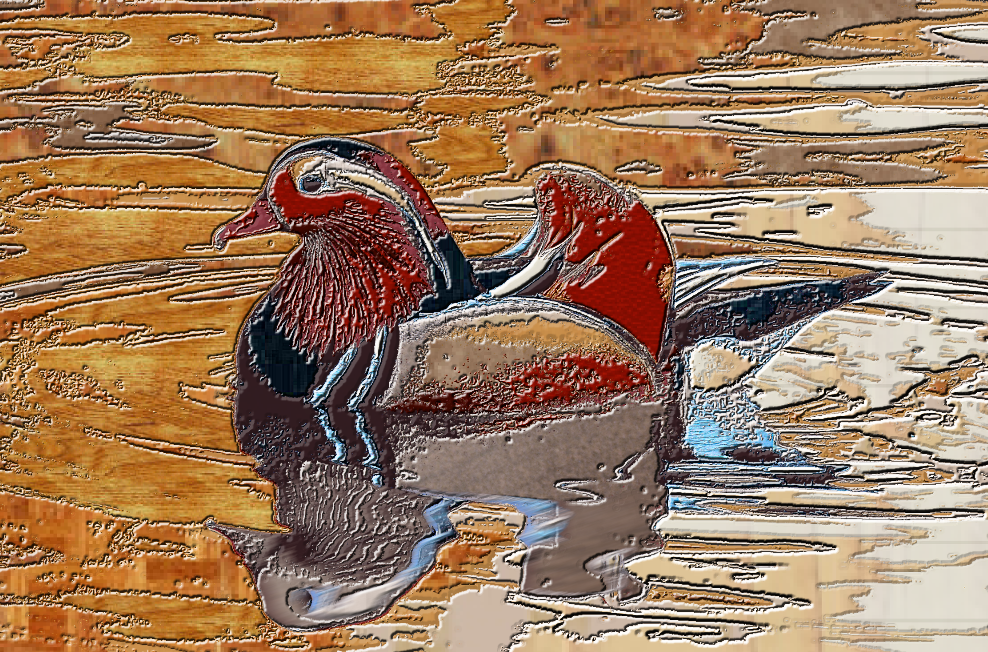
Geez dinasset, another concept! Nice :clap Well, while you were coming up with this one, I was still trying to refine whatever I'm doing.

My little mandarin duck with reflection (don't pick something with a reflection :gaah )

Image

_________________
Image
Macbook Air - MacOS Sierra 10.12
McGimp 2.8.14
G'mic 1.6.5


Top
Post new topic Reply to topic  [ 317 posts ]  Go to page Previous  1 ... 9, 10, 11, 12, 13, 14, 15, 16  Next

All times are UTC - 5 hours [ DST ]


* Login  


Powered by phpBB3 © phpBB Group