It is currently Fri Sep 18, 2026 10:19 pm


All times are UTC - 5 hours [ DST ]


Post new topic Reply to topic  [ 3 posts ] 
Author Message
 Post subject: Heightmap stretch selection (python script)
PostPosted: Wed May 18, 2016 10:12 am  (#1) 
Offline
Script Coder
User avatar

Joined: May 07, 2014
Posts: 4554
Location: Canada
Warning: This script is experimental and you're not able to Ctrl-Z to undo the process of the script.

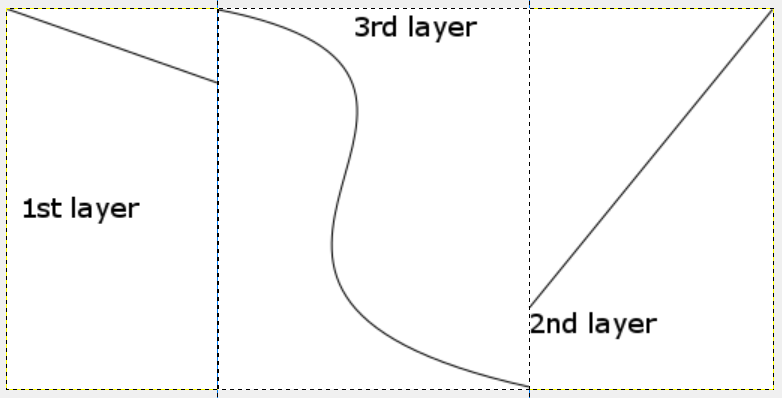
Let's say you have a depth map (gray scale) layer with brightest value at (50,50,50).
And you have another depth map layer with brightest value at (200,200,200).
And you have a third layer of a hand painted depth map layer of intricate pattern/design with brightest values at (255,255,255) and darkest value at (0,0,0).
like this diagram
Image
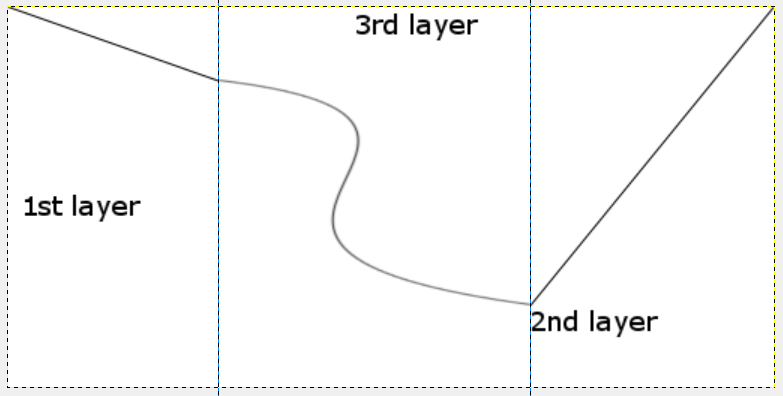
And you want to stretch the height map of your hand painted intricate pattern so that the darkest value matches the brightest value of the first layer and the brightest value matches the brightest value of the second layer.
like this diagram (so that all three layers together gives you a nice height map)
Image

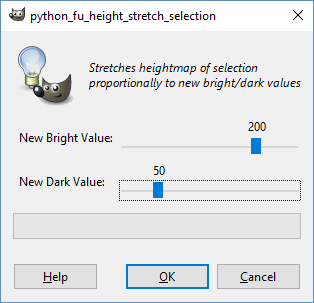
Just make a selection and enter 200 for New Bright Value and enter 50 for New Dark Value.
Image
Script will available under Python-Fu/Height Stretch Selection...
Attachment:
height_stretch_selection.zip [1.84 KiB]
Downloaded 168 times

_________________
Image
Visualize your and others dreams coming true.


Share on Facebook Share on Twitter Share on Orkut Share on Digg Share on MySpace Share on Delicious Share on Technorati
Top
 Post subject: Re: Heightmap stretch selection (python script)
PostPosted: Wed May 18, 2016 2:10 pm  (#2) 
Offline
GimpChat Member
User avatar

Joined: Feb 14, 2012
Posts: 426
This is a nice script but to tell the truth the curves dialog box gives a preview and is a lot faster. The way I work with height maps is more of a visual process. Some layers are not black to white but somewhere in between. I often times will use the [Colors] [Auto] [stretch Contrast] to make something white to black.


Top
 Post subject: Re: Heightmap stretch selection (python script)
PostPosted: Wed May 18, 2016 2:35 pm  (#3) 
Offline
Script Coder
User avatar

Joined: May 07, 2014
Posts: 4554
Location: Canada
PegLeg44 wrote:
This is a nice script but to tell the truth the curves dialog box gives a preview and is a lot faster. The way I work with height maps is more of a visual process. Some layers are not black to white but somewhere in between. I often times will use the [Colors] [Auto] [stretch Contrast] to make something white to black.

I am still beginner at height maps so i thought maybe this would be useful... it's perfectly fine to be wrong. :hehe

_________________
Image
Visualize your and others dreams coming true.


Top
Post new topic Reply to topic  [ 3 posts ] 

All times are UTC - 5 hours [ DST ]


* Login  


Powered by phpBB3 © phpBB Group
