It is currently Mon Sep 21, 2026 7:56 am


All times are UTC - 5 hours [ DST ]


Post new topic Reply to topic  [ 22 posts ]  Go to page 1, 2  Next
Author Message
 Post subject: Need help with transparency
PostPosted: Fri May 20, 2016 12:03 am  (#1) 
Offline
GimpChat Member

Joined: May 20, 2016
Posts: 9
GIMP Version: 2.8.14
Operating System: Windows
OS Version: 7\Windows 7
GIMP Experience: New User


Hello

Just downloaded GIMP yesterday and I need help with transparency

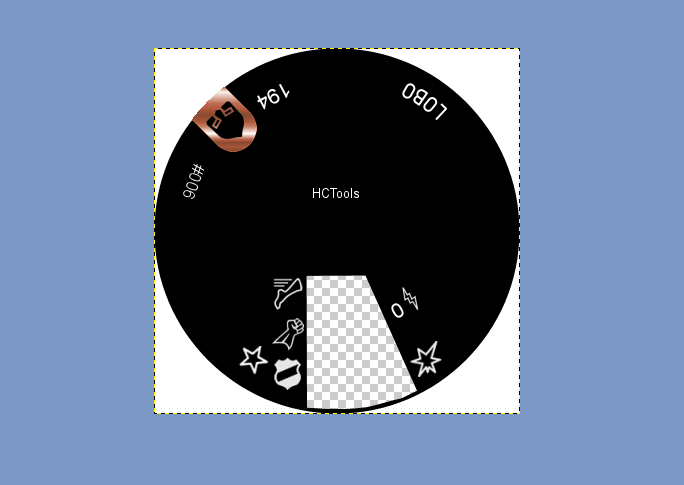
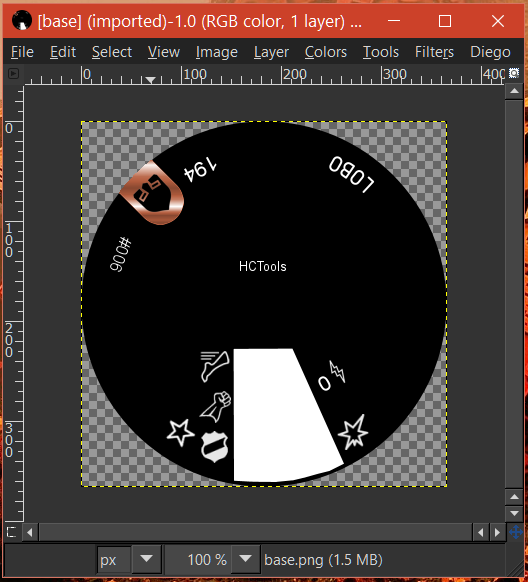
In the attachment, the little open area (that is white) I need it to be transparent so I can see another numbered dial that it will go on top of.

I know nothing about image editing, so this is a big request and more than happy and willing to do my homework.

Could someone break down how to make that little area transparent (while keeping all the icons and lettering on the dial remain white)?

Thank you


Attachments:
base.png
base.png [ 24.32 KiB | Viewed 3994 times ]
Share on Facebook Share on Twitter Share on Orkut Share on Digg Share on MySpace Share on Delicious Share on Technorati
Top
 Post subject: Re: Need help with transparency
PostPosted: Fri May 20, 2016 12:19 am  (#2) 
Offline
GimpChat Member
User avatar

Joined: Sep 24, 2010
Posts: 12845
Since your target already has an alpha channel, just use the majic wand to select the white area then delete. You may need to grow the selection one pixel to remove all the white. :)


Attachments:
solution.png
solution.png [ 111.92 KiB | Viewed 3987 times ]

_________________
Lyle

Psalm 109:8

Image
Top
 Post subject: Re: Need help with transparency
PostPosted: Fri May 20, 2016 9:41 am  (#3) 
Offline
Script Coder
User avatar

Joined: Oct 25, 2010
Posts: 4812
lylejk wrote:
Since your target already has an alpha channel, just use the majic wand to select the white area then delete. You may need to grow the selection one pixel to remove all the white. :)

To make it really perfect:
- select with the wand
- grow 2 px
- Color>COlor 2 alpha and remove the white

_________________
Image


Top
 Post subject: Re: Need help with transparency
PostPosted: Fri May 20, 2016 9:50 am  (#4) 
Offline
GimpChat Member

Joined: May 20, 2016
Posts: 9
Thank you both so very much

I'll give that a go tonight at home!


Top
 Post subject: Re: Need help with transparency
PostPosted: Fri May 20, 2016 9:29 pm  (#5) 
Offline
GimpChat Member

Joined: May 20, 2016
Posts: 9
So, this what I ended up with.....

I had the white area selected with "fuzzy tool"....it was highlighted....clicked the white area......then used "Bucket fill tool"........then I set the affected area to Fill whole selection" and clicked inside that white area....it turned it black....saved it the area was black.....not transparent

Where did I go wrong?

Thanks


Attachments:
base.png
base.png [ 23.26 KiB | Viewed 3863 times ]
Top
 Post subject: Re: Need help with transparency
PostPosted: Fri May 20, 2016 9:54 pm  (#6) 
Offline
GimpChat Member
User avatar

Joined: Sep 24, 2010
Posts: 12845
You don't want to fill the area; just delete it (hit the delete key). I attached what I believe you want as the result (of course the white background of this website won't show the transparency). I actually just selected the area and grew 2 pixels (ofnuts was right) and chose color to alpha (cleaner result). :)


Attachments:
base.png
base.png [ 23.11 KiB | Viewed 3861 times ]

_________________
Lyle

Psalm 109:8

Image
Top
 Post subject: Re: Need help with transparency
PostPosted: Fri May 20, 2016 11:21 pm  (#7) 
Offline
GimpChat Member

Joined: May 20, 2016
Posts: 9
Did that...and it still shows up (white or black) in that area.

I'm importing that dial image into a virtual tabletop program (linking it directly via Imgur)....not sure if that is the issue?

Not sure why I can't get that white area to show up transparent.


Top
 Post subject: Re: Need help with transparency
PostPosted: Sat May 21, 2016 1:44 am  (#8) 
Offline
Global Moderator
User avatar

Joined: Apr 01, 2012
Posts: 8471
Location: On the other side of your screen
acctingman wrote:
Did that...and it still shows up (white or black) in that area.

I'm importing that dial image into a virtual tabletop program (linking it directly via Imgur)....not sure if that is the issue?

Not sure why I can't get that white area to show up transparent.

Probably showed up as your background colour.
I just did one quickly and got this. (Forgot to grow selection :oops: )
Image
Make sure whiteis your background colour and only select with a 'fuzzy select tool' the area you want to clear. I alpha to selected it

_________________
Image
Free Fun Photo Editing & resources
Poems from the Lord
Gimp Newby
Gimp version 3.2.4 and GMIC-Qt 4.0.2 OS :- Windows 10 Home 64


Top
 Post subject: Re: Need help with transparency
PostPosted: Sat May 21, 2016 2:31 am  (#9) 
Offline
GimpChat Member

Joined: Mar 04, 2011
Posts: 2615
acctingman wrote:
Did that...and it still shows up (white or black) in that area.

I'm importing that dial image into a virtual tabletop program (linking it directly via Imgur)....not sure if that is the issue?

Not sure why I can't get that white area to show up transparent.


Whichever way you cut out the area, you should end up with a checker board pattern which in Gimp denotes transparency.

Some games engines handle transparency in a strange way.

When you come to export the image as a png, un-tick the default option
Save color values from transparent pixels

Attachment:
no-transparent-colour.jpg
no-transparent-colour.jpg [ 57.22 KiB | Viewed 3837 times ]


might make a difference.


Top
 Post subject: Re: Need help with transparency
PostPosted: Sat May 21, 2016 3:05 am  (#10) 
Offline
GimpChat Member

Joined: May 19, 2016
Posts: 19
ofnuts wrote:
lylejk wrote:
- grow 2 px

Newb here just learned something. Thanks for that lylejk


Top
 Post subject: Re: Need help with transparency
PostPosted: Sat May 21, 2016 3:35 am  (#11) 
Offline
GimpChat Member
User avatar

Joined: Jul 04, 2015
Posts: 256
tchiqwik wrote:
ofnuts wrote:
lylejk wrote:
- grow 2 px

Newb here just learned something. Thanks for that lylejk


Ditto.


Top
 Post subject: Re: Need help with transparency
PostPosted: Sat May 21, 2016 5:27 am  (#12) 
Offline
GimpChat Member

Joined: Mar 04, 2011
Posts: 2615
A good look at that base.png image and being small 366 x 366 pix a fuzzy select followed by growing 1 or 2 pixels then cut, does leave a horrible jaggy edge.

A more appropriate way, just for this type of image might be a careful erase of the area.

Use a white brush in color erase mode.

Demo and why's-n-wherefore's https://youtu.be/bKvk5Xn6UBY 2 minutes for the whole thing.

Assuming a beginner, remember to reset your brush mode back to normal before closing Gimp ;)


Top
 Post subject: Re: Need help with transparency
PostPosted: Sat May 21, 2016 1:55 pm  (#13) 
Offline
GimpChat Member

Joined: May 20, 2016
Posts: 9
thank you for that video rich!

However, when I load up image I don't see the checked pattern behind the image. I'm guessing it's a layers issue?

I figured I had to "add alpha channel" under transparency, but when I do that it doesn't change....the background is all white


Attachments:
Capture.PNG
Capture.PNG [ 84.28 KiB | Viewed 1794 times ]
Top
 Post subject: Re: Need help with transparency
PostPosted: Sat May 21, 2016 2:06 pm  (#14) 
Offline
Administrator
User avatar

Joined: Aug 10, 2012
Posts: 14206
Location: Native to NYC living in Arizona, Gimp 2.8 - 3.0, Win 11 PC.
acctingman wrote:
thank you for that video rich!

However, when I load up image I don't see the checked pattern behind the image. I'm guessing it's a layers issue?

I figured I had to "add alpha channel" under transparency, but when I do that it doesn't change....the background is all white

That's odd,
because the original image that you posted is a png image, which has transparency.
When I opened your image in Gimp.
There is no white background.
This is what I see when I open the image.
Image

_________________
Image
"A wise man learns more from a foolish question than a fool can learn from a wise answer"
Image


Top
 Post subject: Re: Need help with transparency
PostPosted: Sat May 21, 2016 2:21 pm  (#15) 
Offline
GimpChat Member

Joined: May 20, 2016
Posts: 9
Gah!

I opened up the wrong file.

Time to watch Rich's video again :)


Top
 Post subject: Re: Need help with transparency
PostPosted: Sat May 21, 2016 2:29 pm  (#16) 
Offline
Administrator
User avatar

Joined: Aug 10, 2012
Posts: 14206
Location: Native to NYC living in Arizona, Gimp 2.8 - 3.0, Win 11 PC.
acctingman wrote:
Gah!

I opened up the wrong file.

Time to watch Rich's video again :)

Okay, good luck. :bigthup

_________________
Image
"A wise man learns more from a foolish question than a fool can learn from a wise answer"
Image


Top
 Post subject: Re: Need help with transparency
PostPosted: Sat May 21, 2016 2:42 pm  (#17) 
Offline
GimpChat Member

Joined: May 20, 2016
Posts: 9
So.....I got it to work.

rich2005, thank you for the video. Exactly what I needed.

Everyone else who helped out, thank you very much.

Time to practice this more!!

I'm stuck on how you all have GIMP setup. I have the toolbox and tool options in separate little windows. I know there is a way to get it all in one window. I'm sure there is a tutorial on that so I can find that.

Again, thanks


Top
 Post subject: Re: Need help with transparency
PostPosted: Sat May 21, 2016 2:56 pm  (#18) 
Offline
Administrator
User avatar

Joined: Aug 10, 2012
Posts: 14206
Location: Native to NYC living in Arizona, Gimp 2.8 - 3.0, Win 11 PC.
acctingman wrote:
So.....I got it to work.

rich2005, thank you for the video. Exactly what I needed.

Everyone else who helped out, thank you very much.

Time to practice this more!!

I'm stuck on how you all have GIMP setup.
I have the toolbox and tool options in separate little windows.
I know there is a way to get it all in one window.
I'm sure there is a tutorial on that so I can find that.

Again, thanks

Go to,
Windows>Single-Window Mode.

Image

_________________
Image
"A wise man learns more from a foolish question than a fool can learn from a wise answer"
Image


Top
 Post subject: Re: Need help with transparency
PostPosted: Sun May 22, 2016 12:02 am  (#19) 
Offline
GimpChat Member

Joined: May 19, 2016
Posts: 19
rich2005 wrote:
Demo and why's-n-wherefore's https://youtu.be/bKvk5Xn6UBY 2 minutes for the whole thing.

Very well done and informative video rich. Thanks for that. :)


Top
 Post subject: Re: Need help with transparency
PostPosted: Sun May 22, 2016 10:59 am  (#20) 
Offline
GimpChat Member

Joined: May 20, 2016
Posts: 9
another noob question

I cannot find that little option where you can invert the color from one to the other.....

in rich's video it's where you click to change black to white or white to black....not sure how else to call it.


Attachments:
Capture.PNG
Capture.PNG [ 208.95 KiB | Viewed 1746 times ]
Top
Post new topic Reply to topic  [ 22 posts ]  Go to page 1, 2  Next

All times are UTC - 5 hours [ DST ]


* Login  


Powered by phpBB3 © phpBB Group