It is currently Sat Sep 05, 2026 1:45 am


All times are UTC - 5 hours [ DST ]


Post new topic Reply to topic  [ 259 posts ]  Go to page Previous  1 ... 6, 7, 8, 9, 10, 11, 12, 13  Next
Author Message
 Post subject: Re: Lurifax Blender Art
PostPosted: Fri May 27, 2016 8:45 am  (#161) 
Offline
GimpChat Member
User avatar

Joined: Dec 10, 2013
Posts: 1004
--
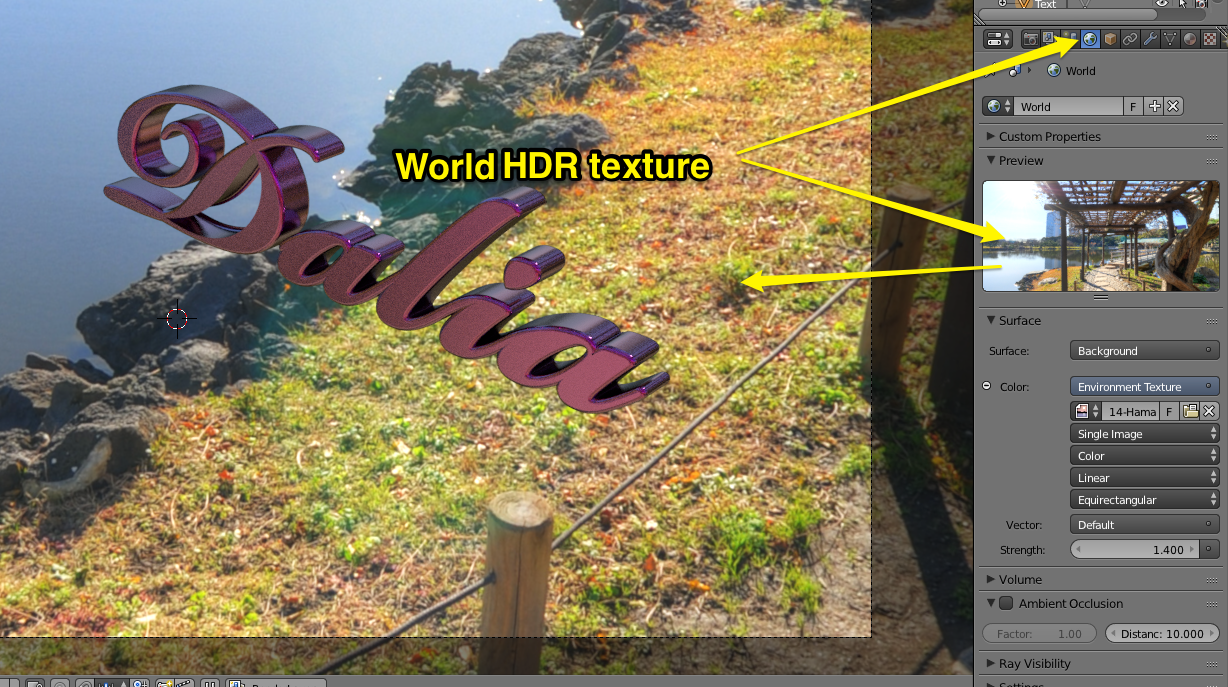
Hello Lurifax! The font name is Bickham Script Bold :oops: Also, Look just download Blender for Mac - the installation took less that 3 seconds. I'm off.... :hi5

Image

_________________
Image
Macbook Air - MacOS Sierra 10.12
McGimp 2.8.14
G'mic 1.6.5


Top
 Post subject: Re: Lurifax Blender Art
PostPosted: Fri May 27, 2016 9:12 am  (#162) 
Offline
GimpChat Member
User avatar

Joined: Feb 14, 2013
Posts: 462
Location: Stockholm
Dalia wrote:
--
Hello Lurifax! The font name is Bickham Script Bold :oops: Also, Look just download Blender for Mac - the installation took less that 3 seconds. I'm off.... :hi5

[ Image ]


Thank you. I come back with one animation exampel.

Perfect. Blender ar easy to download and work with for Macusers. If you got stuck let me know. I help you.


Image

Image

_________________
Late 2017 iMac Retina 4K 21,5 inch Mac OS High Sierra version 10.13.4
3,6 GHz Intel Core i7
16 GB Ram 2400 MHz DDR4
Graphic card Radeon Pro 560 4096 MB
Affinity Photo and Affinity Designers.


Last edited by Lurifax73 on Wed Jun 13, 2018 6:26 am, edited 1 time in total.

Top
 Post subject: Re: Lurifax Blender Art
PostPosted: Fri May 27, 2016 12:04 pm  (#163) 
Offline
GimpChat Member
User avatar

Joined: Dec 10, 2013
Posts: 1004
Wow, thank you! Right now I'm searching for "extreme beginner" tutorials. I'm on a new challenge.

_________________
Image
Macbook Air - MacOS Sierra 10.12
McGimp 2.8.14
G'mic 1.6.5


Top
 Post subject: Re: Lurifax Blender Art
PostPosted: Fri May 27, 2016 12:28 pm  (#164) 
Offline
GimpChat Member
User avatar

Joined: Feb 14, 2013
Posts: 462
Location: Stockholm
OK. You can follow my tutoriala how to make a car on this tread.

http://gimpchat.com/viewtopic.php?f=22&t=7327&start=10

_________________
Late 2017 iMac Retina 4K 21,5 inch Mac OS High Sierra version 10.13.4
3,6 GHz Intel Core i7
16 GB Ram 2400 MHz DDR4
Graphic card Radeon Pro 560 4096 MB
Affinity Photo and Affinity Designers.


Top
 Post subject: Re: Lurifax Blender Art
PostPosted: Sat May 28, 2016 7:45 am  (#165) 
Offline
GimpChat Member
User avatar

Joined: Jan 20, 2013
Posts: 590
Thanks Lurifax. You are so kind.

_________________
Image


Top
 Post subject: Re: Lurifax Blender Art
PostPosted: Sun May 29, 2016 5:06 am  (#166) 
Offline
GimpChat Member
User avatar

Joined: Feb 14, 2013
Posts: 462
Location: Stockholm
Dalia here is the Blender animation I promised you


https://www.youtube.com/embed/smkeDbKiUa8?rel=0

_________________
Late 2017 iMac Retina 4K 21,5 inch Mac OS High Sierra version 10.13.4
3,6 GHz Intel Core i7
16 GB Ram 2400 MHz DDR4
Graphic card Radeon Pro 560 4096 MB
Affinity Photo and Affinity Designers.


Last edited by Lurifax73 on Wed Jun 13, 2018 6:32 am, edited 1 time in total.

Top
 Post subject: Re: Lurifax Blender Art
PostPosted: Sun May 29, 2016 11:28 am  (#167) 
Offline
GimpChat Member
User avatar

Joined: Dec 10, 2013
Posts: 1004
Are you kidding me!!!!??? That is amazing! Blender Animation by Lurifax :tyspin

You know I was pretty much absent from Gimp Chat yesterday because I was trying really hard to just become familiar with Blender. Had to start with just the very basics of setting the interface to work with the Mac and the MagicMouse. Today I'll try to get my keyboard to emulate a windows keyboard.

_________________
Image
Macbook Air - MacOS Sierra 10.12
McGimp 2.8.14
G'mic 1.6.5


Top
 Post subject: Re: Lurifax Blender Art
PostPosted: Sun May 29, 2016 12:22 pm  (#168) 
Offline
GimpChat Member
User avatar

Joined: Feb 14, 2013
Posts: 462
Location: Stockholm
Hi Dalia and thank you.

Do you have problem with your Mac and "Window Keyboard" (Why Window Keyboard???) You dont have a Apple Keyboard cordless as I have??

Image

_________________
Late 2017 iMac Retina 4K 21,5 inch Mac OS High Sierra version 10.13.4
3,6 GHz Intel Core i7
16 GB Ram 2400 MHz DDR4
Graphic card Radeon Pro 560 4096 MB
Affinity Photo and Affinity Designers.


Top
 Post subject: Re: Lurifax Blender Art
PostPosted: Sun May 29, 2016 12:42 pm  (#169) 
Offline
GimpChat Member
User avatar

Joined: Dec 10, 2013
Posts: 1004
I'm on a Macbook but you know what?! I do have a cordless keyboard in this house somewhere. Will try that today.

_________________
Image
Macbook Air - MacOS Sierra 10.12
McGimp 2.8.14
G'mic 1.6.5


Top
 Post subject: Re: Lurifax Blender Art
PostPosted: Sun May 29, 2016 12:46 pm  (#170) 
Offline
GimpChat Member
User avatar

Joined: Feb 14, 2013
Posts: 462
Location: Stockholm
Wery good. Let me know if you need help.

_________________
Late 2017 iMac Retina 4K 21,5 inch Mac OS High Sierra version 10.13.4
3,6 GHz Intel Core i7
16 GB Ram 2400 MHz DDR4
Graphic card Radeon Pro 560 4096 MB
Affinity Photo and Affinity Designers.


Top
 Post subject: Re: Lurifax Blender Art
PostPosted: Sun May 29, 2016 3:26 pm  (#171) 
Offline
GimpChat Member
User avatar

Joined: Dec 10, 2013
Posts: 1004
Thank you Lurifax for your offer. Turns out I don't need the wireless keyboard. I've used "User Preferences" to tell Blender to emulate a three button mouse (instead of the MagicMouse) and have also told it to "Emulate Numpad" so that now it functions perfectly with the macbook's keyboard.

:paint

_________________
Image
Macbook Air - MacOS Sierra 10.12
McGimp 2.8.14
G'mic 1.6.5


Top
 Post subject: Re: Lurifax Blender Art
PostPosted: Sun May 29, 2016 3:53 pm  (#172) 
Offline
GimpChat Member
User avatar

Joined: Feb 14, 2013
Posts: 462
Location: Stockholm
Perfect.

_________________
Late 2017 iMac Retina 4K 21,5 inch Mac OS High Sierra version 10.13.4
3,6 GHz Intel Core i7
16 GB Ram 2400 MHz DDR4
Graphic card Radeon Pro 560 4096 MB
Affinity Photo and Affinity Designers.


Top
 Post subject: Re: Lurifax Blender Art
PostPosted: Sun May 29, 2016 4:42 pm  (#173) 
Offline
GimpChat Member
User avatar

Joined: Feb 14, 2013
Posts: 462
Location: Stockholm
Exploding text.

https://player.vimeo.com/video/168564077

_________________
Late 2017 iMac Retina 4K 21,5 inch Mac OS High Sierra version 10.13.4
3,6 GHz Intel Core i7
16 GB Ram 2400 MHz DDR4
Graphic card Radeon Pro 560 4096 MB
Affinity Photo and Affinity Designers.


Top
 Post subject: Re: Lurifax Blender Art
PostPosted: Sun May 29, 2016 7:33 pm  (#174) 
Offline
GimpChat Member
User avatar

Joined: Dec 10, 2013
Posts: 1004
I'm learning my way around - so excited - on my way to a cup! :oops:

Image

_________________
Image
Macbook Air - MacOS Sierra 10.12
McGimp 2.8.14
G'mic 1.6.5


Top
 Post subject: Re: Lurifax Blender Art
PostPosted: Sun May 29, 2016 8:53 pm  (#175) 
Offline
GimpChat Member
User avatar

Joined: Feb 14, 2013
Posts: 462
Location: Stockholm
Wery good start Dalia.

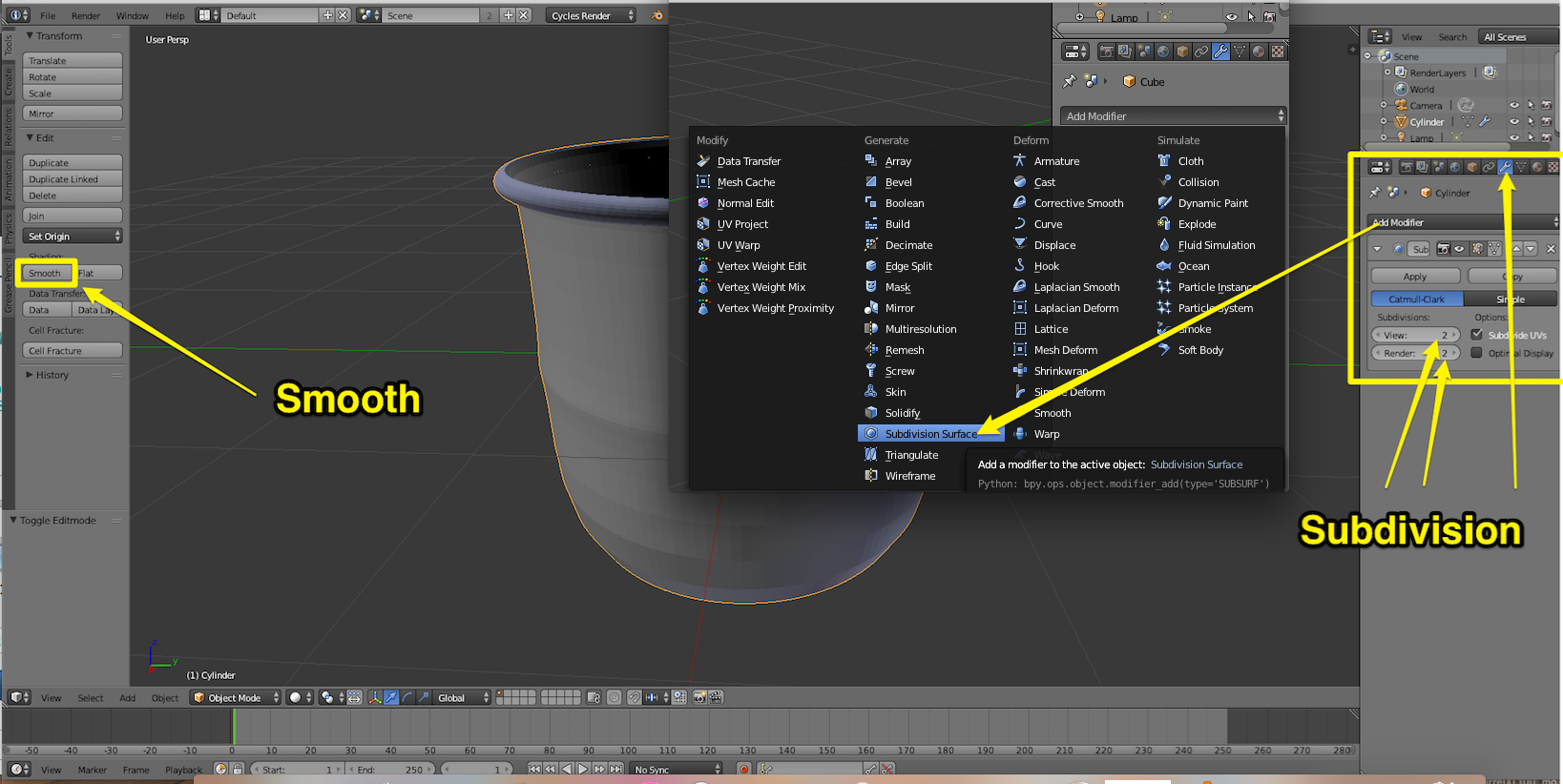
You need to use Loop-Cuts by pressing Ctrl+R

Image

and press Smooth and add Subdivision 2+2
Image

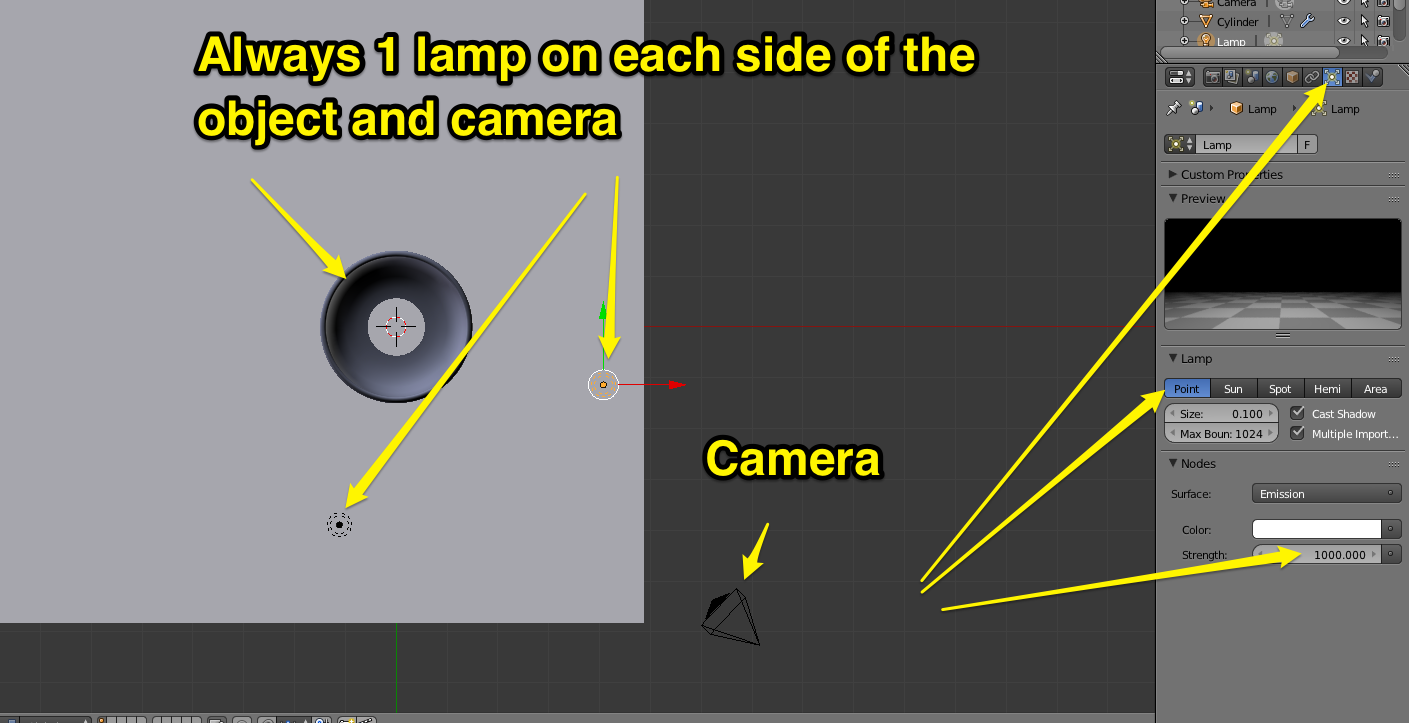
You always use 2 lamps. One on each side of the object and camera.

Image

Example on matertialsetting (Color)

Image

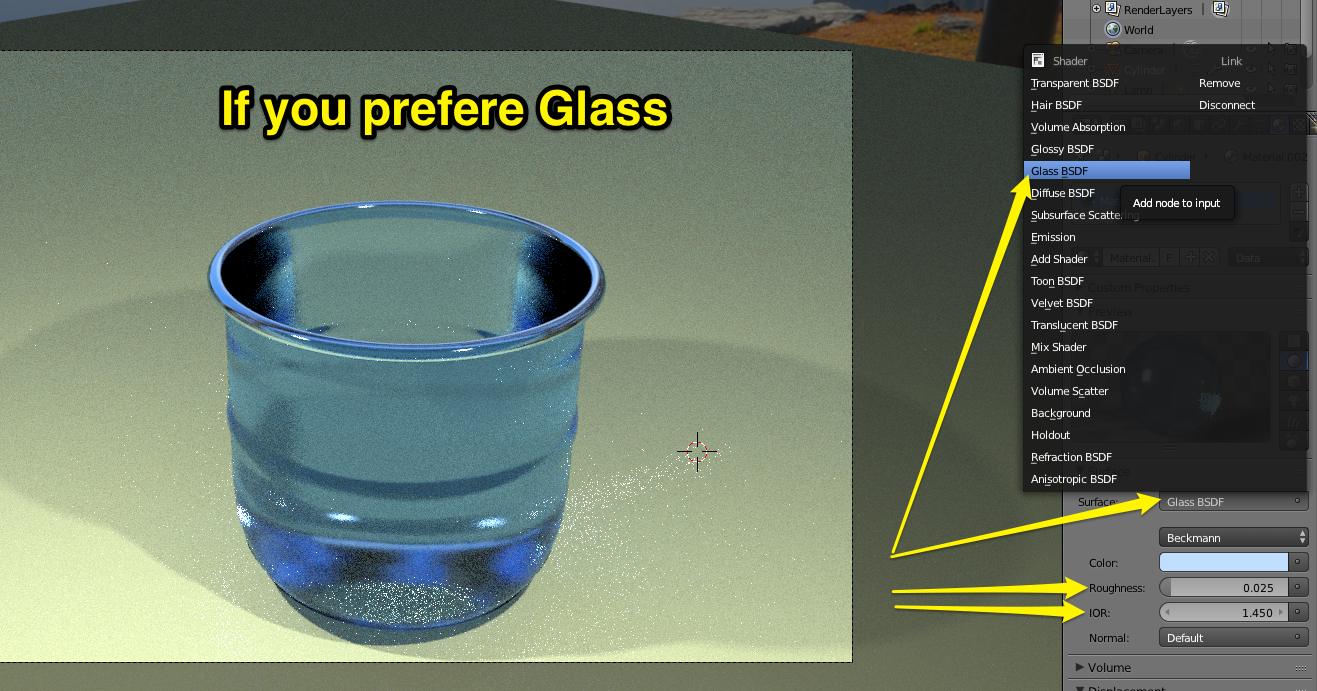
If you prefere Glass

Image


Real glass need thicknes. Press E+S and scale and E+S

Image

Image

_________________
Late 2017 iMac Retina 4K 21,5 inch Mac OS High Sierra version 10.13.4
3,6 GHz Intel Core i7
16 GB Ram 2400 MHz DDR4
Graphic card Radeon Pro 560 4096 MB
Affinity Photo and Affinity Designers.


Top
 Post subject: Re: Lurifax Blender Art
PostPosted: Tue May 31, 2016 1:43 pm  (#176) 
Offline
GimpChat Member
User avatar

Joined: Feb 14, 2013
Posts: 462
Location: Stockholm
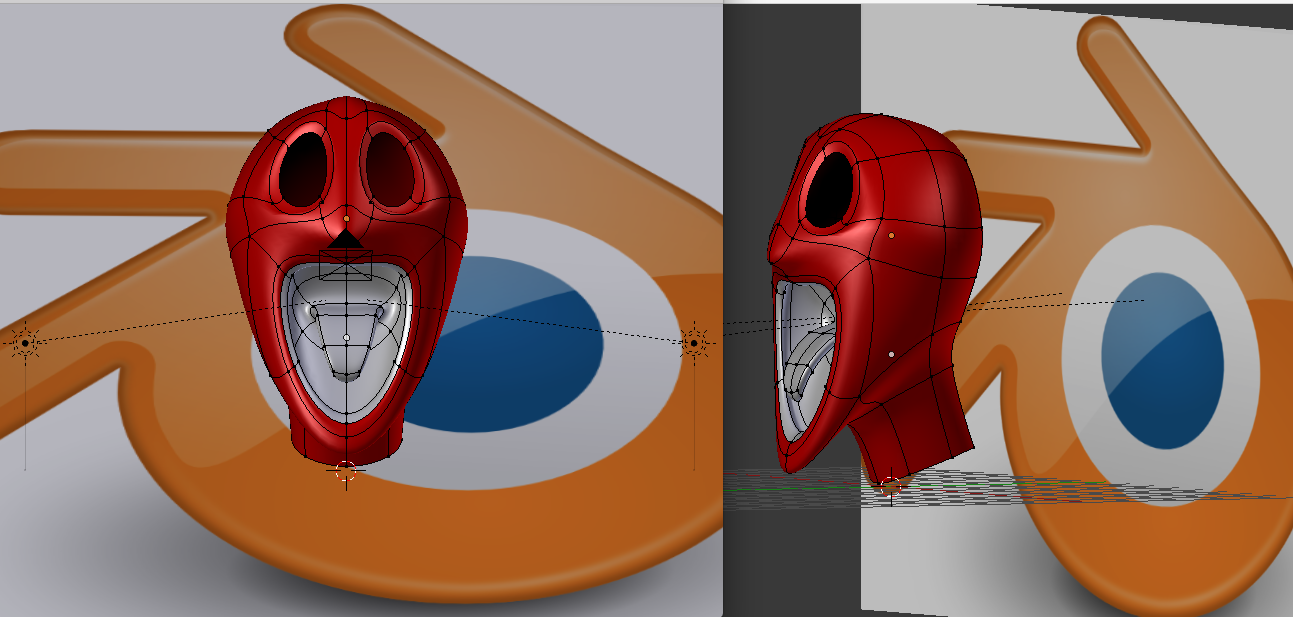
Here comming few images showing you how to make eyes and how to animate them with (Empties) and deforme them with (Lattice) and at the end use tool (Shape Keys) to animate them.
1.
I have already made one head to put the eyes inside with Blender Logo as background.

Image

2.
Start with UV-Sphere.

Image


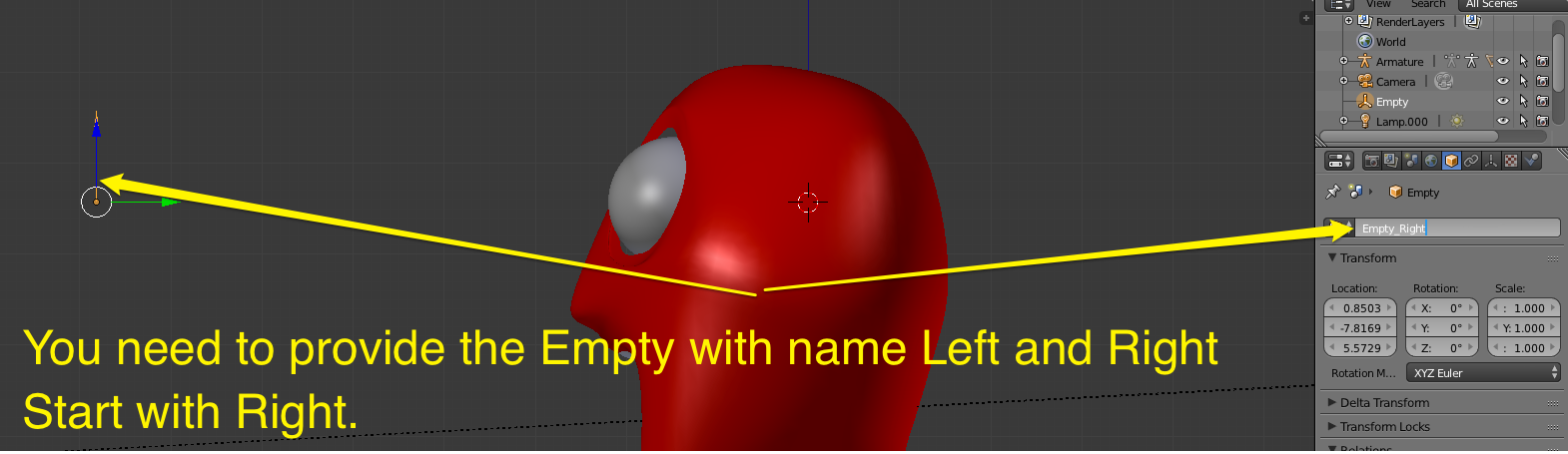
4.
Add Empty from Shift+A

Image

5.

Use Constraint to connect Empty and eye

Image

6.
Important to namn each object.

Image

7.
Track empty to the eye.

Image

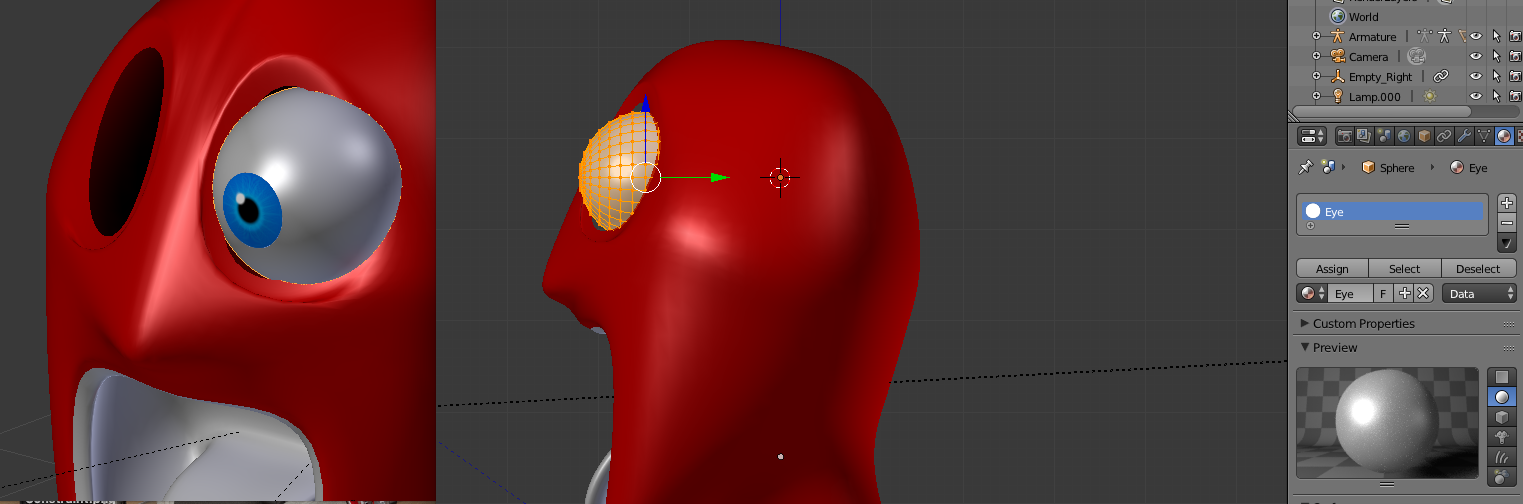
8.
Add material and color to the eye

Image

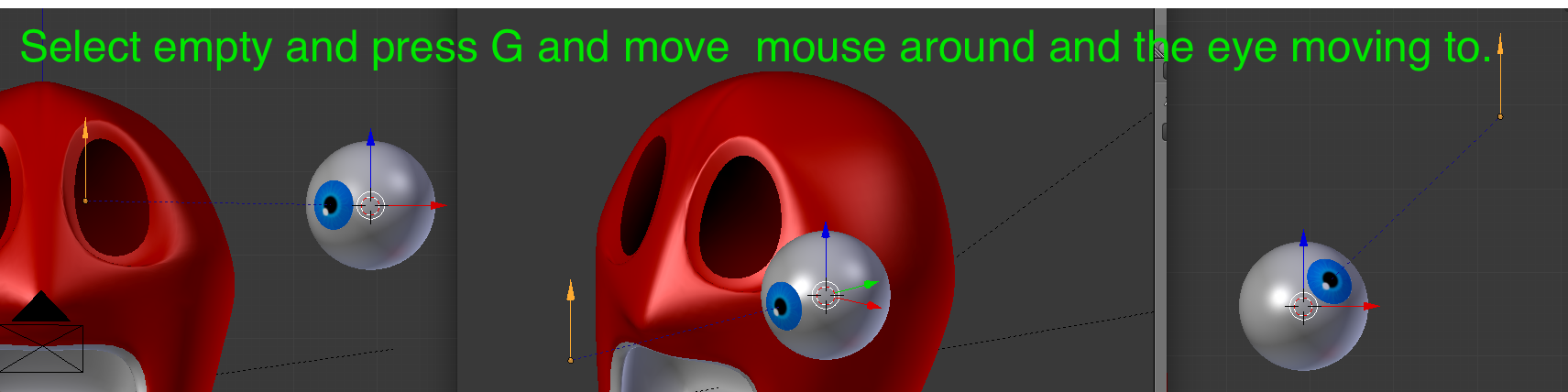
9.

Eye Track to Empty

Image

10.

Select and with G move eye around.

Image

11.

Add Lattice and connect with the eye

Image

12.

Deform lattice.

Image

13.

Make a dubblett of the eye.

Image

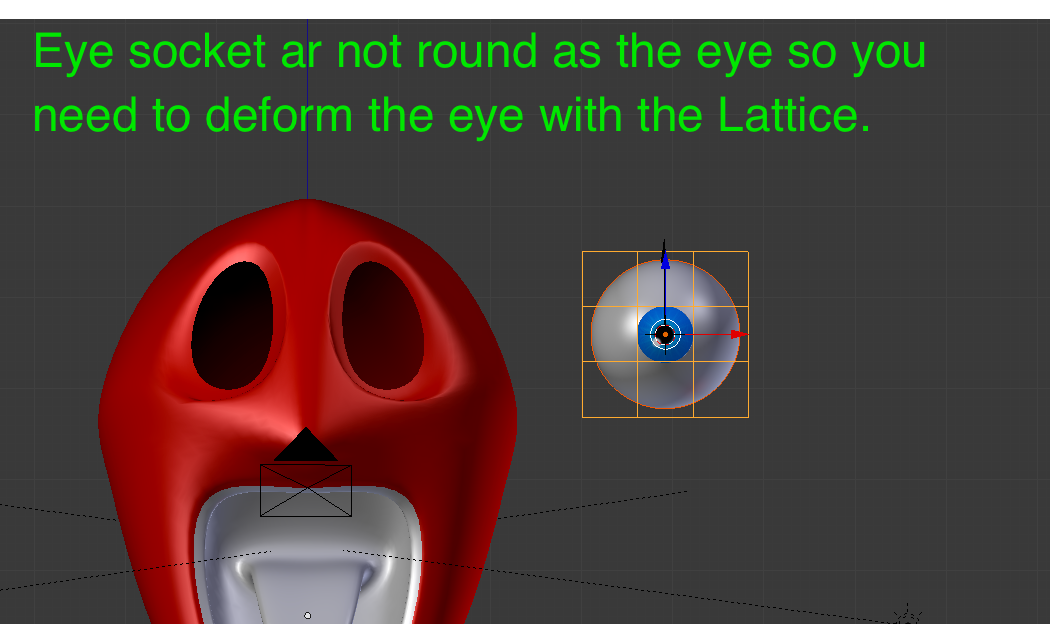
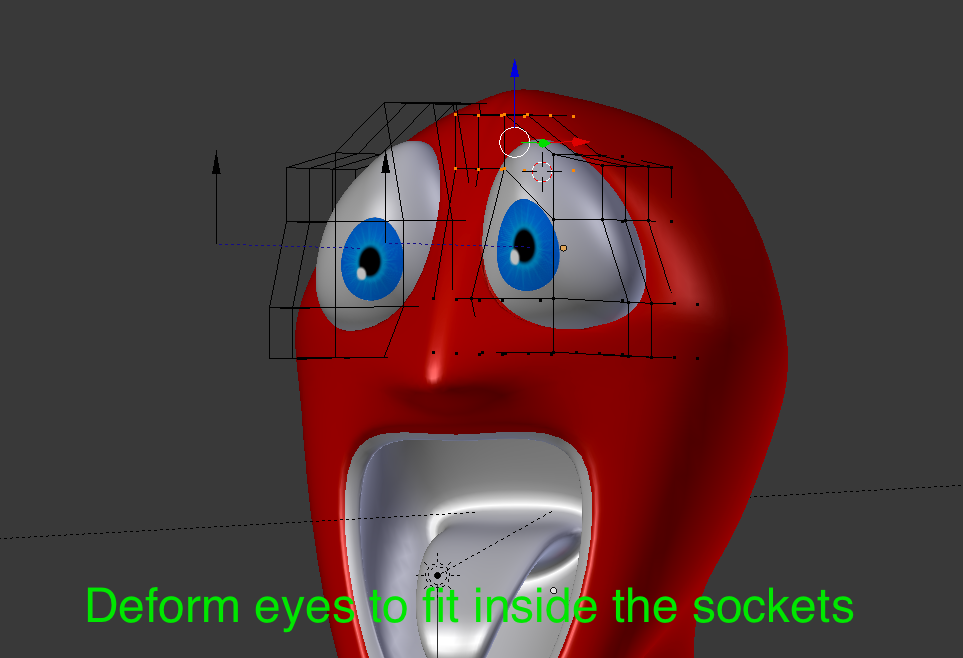
14.

Deform eyes inside the eyesockets.

Image

15.

Select both Empties.

Image

16.

Animate the eyes.


17.
This is the animation after rendering for abouth 12 hours.
https://player.vimeo.com/video/169048012


Lurifax.

_________________
Late 2017 iMac Retina 4K 21,5 inch Mac OS High Sierra version 10.13.4
3,6 GHz Intel Core i7
16 GB Ram 2400 MHz DDR4
Graphic card Radeon Pro 560 4096 MB
Affinity Photo and Affinity Designers.


Last edited by Lurifax73 on Fri Jun 03, 2016 12:34 pm, edited 4 times in total.

Top
 Post subject: Re: Lurifax Blender Art
PostPosted: Wed Jun 01, 2016 6:38 pm  (#177) 
Offline
GimpChat Member
User avatar

Joined: Dec 10, 2013
Posts: 1004
Lurifax, you're too advanced for me! I'm still working on the cup and it has a few holes so I'm starting all over. :oops: I'm not giving up.

Image

_________________
Image
Macbook Air - MacOS Sierra 10.12
McGimp 2.8.14
G'mic 1.6.5


Top
 Post subject: Re: Lurifax Blender Art
PostPosted: Thu Jun 02, 2016 1:36 am  (#178) 
Offline
GimpChat Member
User avatar

Joined: Feb 14, 2013
Posts: 462
Location: Stockholm
God morning Dalia.

Yes, Little WebHut tutorialas ar the best one. Easy to follow and he show you every singel steps you need.

But there is some tricks. You dont need to use all that Curve+Bezier to create your handle.

1.
On your cup you cut 2 holes with 8 vertexes on each hole. Add an Torus with 8 vertexes and cut torus in half.

Image
2.

You select the cup and the handle by hold Shiftbutton down when you select both object and press Ctrl+J to join both object to each other. (A)

Select all vertexes on the cup and handle and press W and scroll down to Bridge Edge Loops. (B)

Delete Loop by press X + Edge Loops. ©


Image

Image

Lurifax.

_________________
Late 2017 iMac Retina 4K 21,5 inch Mac OS High Sierra version 10.13.4
3,6 GHz Intel Core i7
16 GB Ram 2400 MHz DDR4
Graphic card Radeon Pro 560 4096 MB
Affinity Photo and Affinity Designers.


Top
 Post subject: Re: Lurifax Blender Art
PostPosted: Thu Jun 02, 2016 6:15 pm  (#179) 
Offline
GimpChat Member
User avatar

Joined: Feb 14, 2013
Posts: 462
Location: Stockholm
Swimmingfun.

https://player.vimeo.com/video/169166760

_________________
Late 2017 iMac Retina 4K 21,5 inch Mac OS High Sierra version 10.13.4
3,6 GHz Intel Core i7
16 GB Ram 2400 MHz DDR4
Graphic card Radeon Pro 560 4096 MB
Affinity Photo and Affinity Designers.


Top
 Post subject: Re: Lurifax Blender Art
PostPosted: Fri Jun 03, 2016 12:35 pm  (#180) 
Offline
GimpChat Member
User avatar

Joined: Feb 14, 2013
Posts: 462
Location: Stockholm
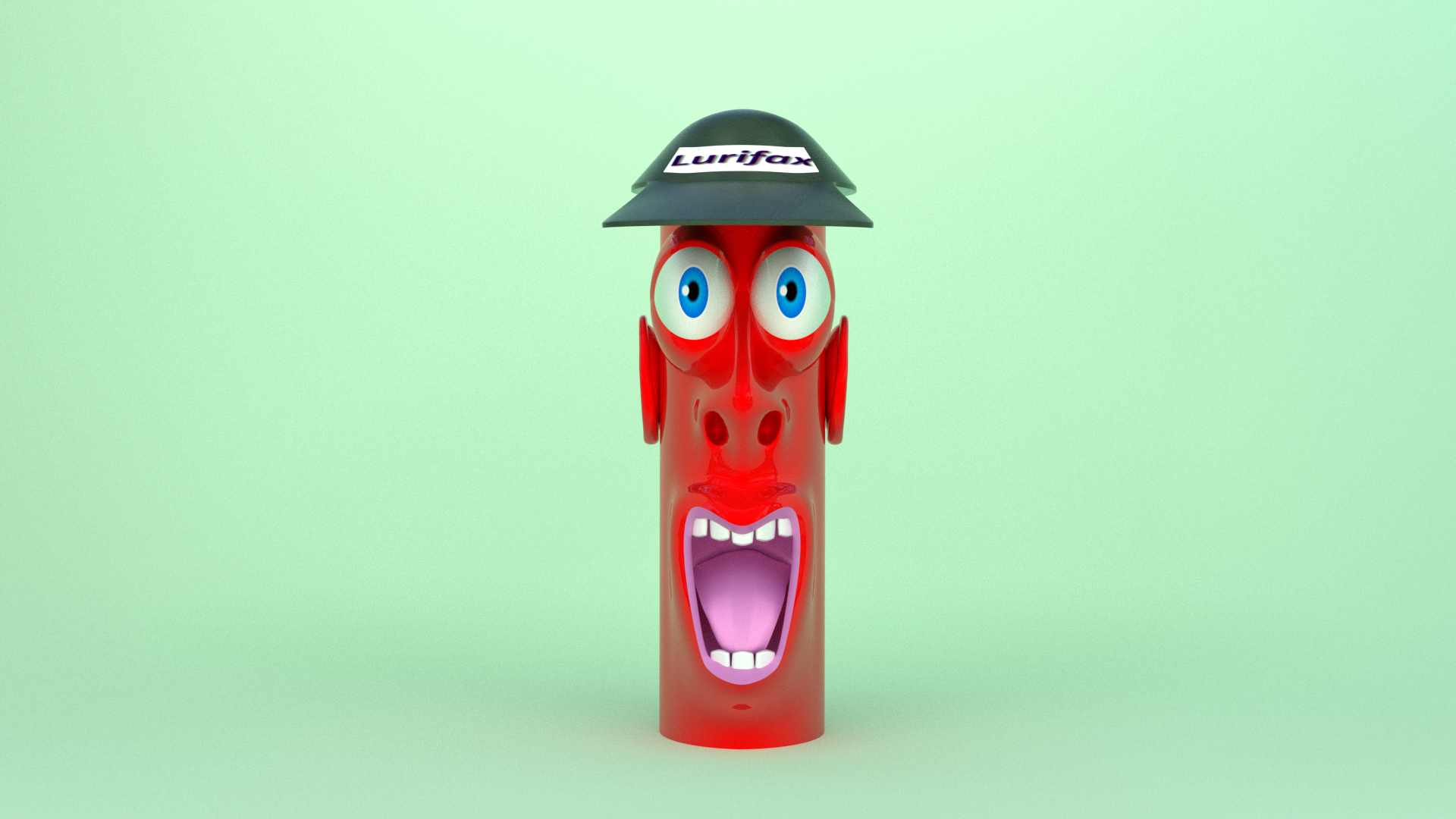
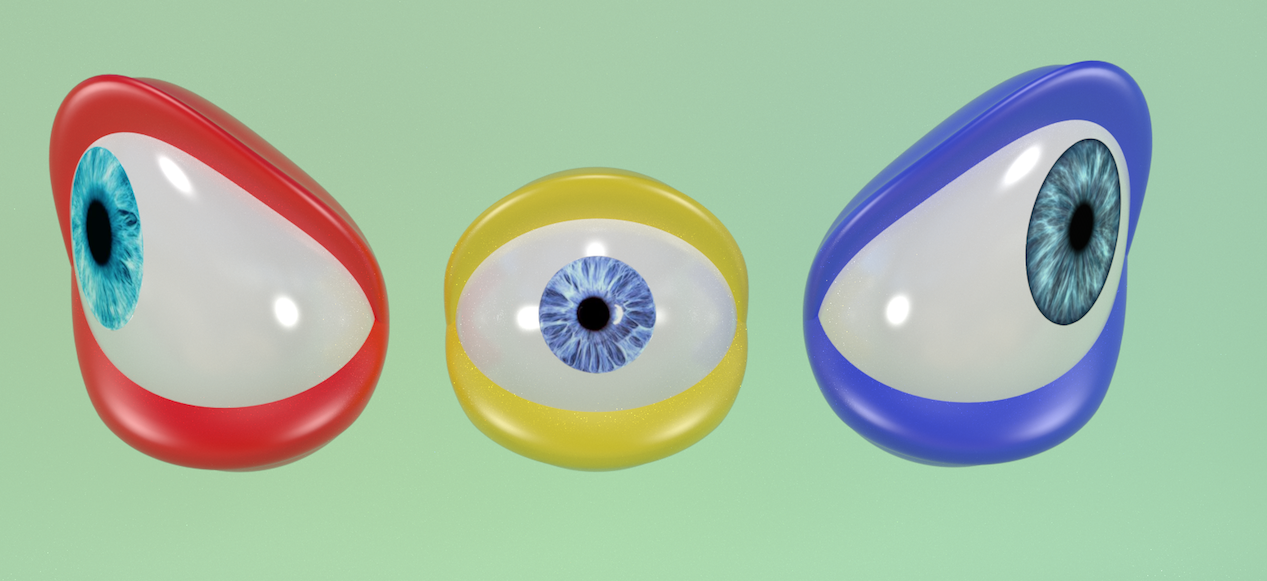
Cartoon Time.

Image


3 Eyes 3 Emptys and 3 Lattice

Image

Image

_________________
Late 2017 iMac Retina 4K 21,5 inch Mac OS High Sierra version 10.13.4
3,6 GHz Intel Core i7
16 GB Ram 2400 MHz DDR4
Graphic card Radeon Pro 560 4096 MB
Affinity Photo and Affinity Designers.


Top
Post new topic Reply to topic  [ 259 posts ]  Go to page Previous  1 ... 6, 7, 8, 9, 10, 11, 12, 13  Next
All times are UTC - 5 hours [ DST ]


* Login  


Powered by phpBB3 © phpBB Group