It is currently Wed Nov 11, 2026 10:09 am


All times are UTC - 5 hours [ DST ]


Post new topic Reply to topic  [ 76 posts ]  Go to page Previous  1, 2, 3, 4
Author Message
 Post subject: Re: Gimp Art Challenge (USB Cable Text Effect)...
PostPosted: Wed Jun 08, 2016 1:16 am  (#61) 
Offline
Administrator
User avatar

Joined: Aug 10, 2012
Posts: 14268
Location: Native to NYC living in Arizona, Gimp 2.8 - 3.0, Win 11 PC.
steven8 wrote:
Wallace wrote:
steven8 wrote:
I can not get the brush to change color from black.
I can paint with another color using the brush,
but when I go to stroke the path...black. :(

The brush was not made to paint in color.
Also, before you stroke a path with the brush.
Zoom in on the path at about 800 and make sure that it is at the size you want it to be once it's stroked.
You can click once or twice to check that the brush is the size you want.


Then how do you change it's color? Sorry for being obtuse, yet again, but I can not get another color. :(


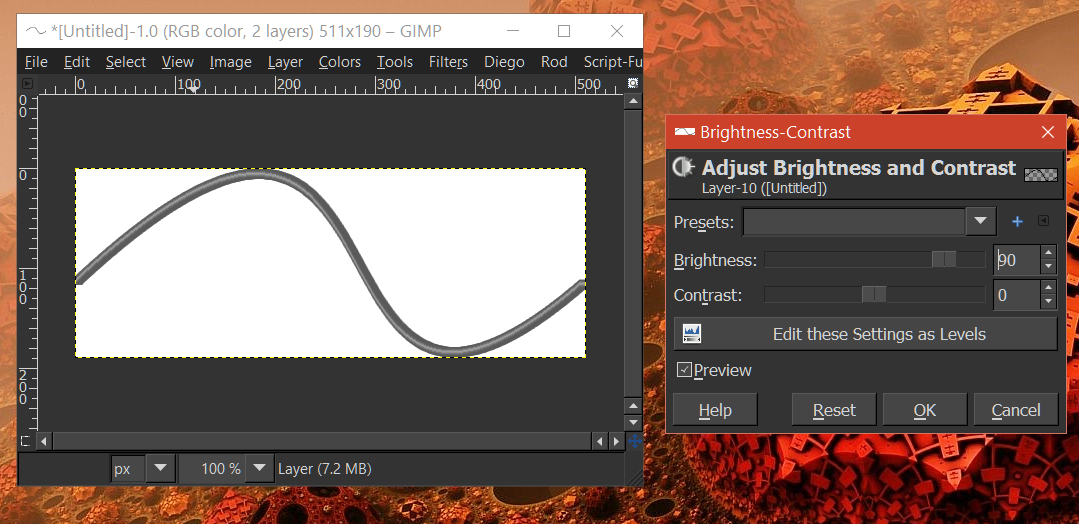
You can adjust the brightness and contrast of the cable.
Image

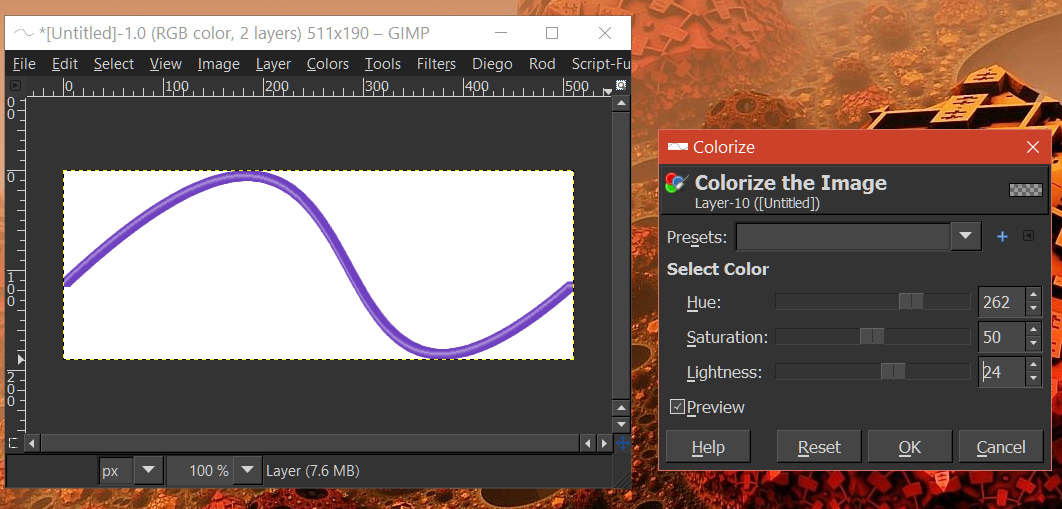
Then use Colorize to color the cable.
Image

_________________
Image
"A wise man learns more from a foolish question than a fool can learn from a wise answer"
Image


Top
 Post subject: Re: Gimp Art Challenge (USB Cable Text Effect)...
PostPosted: Wed Jun 08, 2016 1:31 am  (#62) 
Offline
GimpChat Member
User avatar

Joined: Jul 04, 2015
Posts: 256
Colorize. I honestly never would have thought of that. Thank you.

Just a query, what is it about this brush that it does not take on the selected foreground color?


Top
 Post subject: Re: Gimp Art Challenge (USB Cable Text Effect)...
PostPosted: Wed Jun 08, 2016 1:40 am  (#63) 
Offline
Administrator
User avatar

Joined: Aug 10, 2012
Posts: 14268
Location: Native to NYC living in Arizona, Gimp 2.8 - 3.0, Win 11 PC.
steven8 wrote:
Colorize. I honestly never would have thought of that. Thank you.

Just a query, what is it about this brush that it does not take on the selected foreground color?

Only brushes saved with an image mode format setting of "Gray Scale" will paint in the chosen foreground color.
Any brush which is saved with an image mode format setting of "RGB", will retain it's original colors.

For instance...
Lets say you saved a picture of a red rose as a brush.
If you wanted this image to retain it's original colors.
You would need to save the brush with an image mode format setting of RGB.
If you saved this brush with a "Gray Scale" image mode format setting,
it would then be able to paint with the chosen foreground color.

_________________
Image
"A wise man learns more from a foolish question than a fool can learn from a wise answer"
Image


Top
 Post subject: Re: Gimp Art Challenge (USB Cable Text Effect)...
PostPosted: Wed Jun 08, 2016 1:45 am  (#64) 
Offline
GimpChat Member
User avatar

Joined: Jul 04, 2015
Posts: 256
Wallace wrote:
steven8 wrote:
Colorize. I honestly never would have thought of that. Thank you.

Just a query, what is it about this brush that it does not take on the selected foreground color?

Only brushes saved with an image mode format setting of "Gray Scale" will paint in the chosen foreground color.
Any brush which is saved with an image mode format setting of "RGB", will retain it's original colors.

For instance...
Lets say you saved a picture of a red rose as a brush.
If you wanted this image to retain it's original colors.
You would need to save the brush with an image mode format setting of RGB.
If you saved this brush with a "Gray Scale" image mode format setting,
it would then be able to paint with the chosen foreground color.


Hmm. So, if I were to open your brush in GIMP, change it to grey scale and re-save it, then it would take on the foreground color. I may rename it, so I have both brushes.


Top
 Post subject: Re: Gimp Art Challenge (USB Cable Text Effect)...
PostPosted: Wed Jun 08, 2016 1:47 am  (#65) 
Offline
Administrator
User avatar

Joined: Aug 10, 2012
Posts: 14268
Location: Native to NYC living in Arizona, Gimp 2.8 - 3.0, Win 11 PC.
steven8 wrote:
Wallace wrote:
steven8 wrote:
Colorize. I honestly never would have thought of that. Thank you.

Just a query, what is it about this brush that it does not take on the selected foreground color?

Only brushes saved with an image mode format setting of "Gray Scale" will paint in the chosen foreground color.
Any brush which is saved with an image mode format setting of "RGB", will retain it's original colors.

For instance...
Lets say you saved a picture of a red rose as a brush.
If you wanted this image to retain it's original colors.
You would need to save the brush with an image mode format setting of RGB.
If you saved this brush with a "Gray Scale" image mode format setting,
it would then be able to paint with the chosen foreground color.


Hmm. So, if I were to open your brush in GIMP, change it to grey scale and re-save it, then it would take on the foreground color. I may rename it, so I have both brushes.

That is correct and if you would like to do that,
be my guest and go for it.
You also might want to adjust the brightness and contrast a bit as well,
before saving it to gray scale.

_________________
Image
"A wise man learns more from a foolish question than a fool can learn from a wise answer"
Image


Top
 Post subject: Re: Gimp Art Challenge (USB Cable Text Effect)...
PostPosted: Wed Jun 08, 2016 2:07 am  (#66) 
Offline
GimpChat Member
User avatar

Joined: Jul 04, 2015
Posts: 256
Wallace wrote:
That is correct and if you would like to do that,
be my guest and go for it.
You also might want to adjust the brightness and contrast a bit as well,
before saving it to gray scale.


I will do that tomorrow afternoon. I've never worked with a brush file. Cool!


Top
 Post subject: Re: Gimp Art Challenge (USB Cable Text Effect)...
PostPosted: Wed Jun 08, 2016 2:09 am  (#67) 
Offline
Administrator
User avatar

Joined: Aug 10, 2012
Posts: 14268
Location: Native to NYC living in Arizona, Gimp 2.8 - 3.0, Win 11 PC.
steven8 wrote:
Wallace wrote:
That is correct and if you would like to do that,
be my guest and go for it.
You also might want to adjust the brightness and contrast a bit as well,
before saving it to gray scale.


I will do that tomorrow afternoon. I've never worked with a brush file. Cool!

Okay,
good luck. :bigthup

_________________
Image
"A wise man learns more from a foolish question than a fool can learn from a wise answer"
Image


Top
 Post subject: Re: Gimp Art Challenge (USB Cable Text Effect)...
PostPosted: Wed Jun 08, 2016 12:00 pm  (#68) 
Offline
GimpChat Member
User avatar

Joined: Apr 09, 2016
Posts: 580
Location: Sheffield UK
great discussion, covered many questions I didn't quite know how to put into words, learned a lot - thank you guys RJKD

_________________
Image


Top
 Post subject: Re: Gimp Art Challenge (USB Cable Text Effect)...
PostPosted: Wed Jun 08, 2016 12:02 pm  (#69) 
Offline
GimpChat Member
User avatar

Joined: Apr 09, 2016
Posts: 580
Location: Sheffield UK
no Wallace, however, when I went to the shop, I found a whole range of 'Sharpie' goodies - RJKD

_________________
Image


Top
 Post subject: Re: Gimp Art Challenge (USB Cable Text Effect)...
PostPosted: Wed Jun 08, 2016 12:06 pm  (#70) 
Offline
GimpChat Member
User avatar

Joined: Apr 09, 2016
Posts: 580
Location: Sheffield UK
interesting Issabella, write with a mouse ? I'll google it - RJKD

_________________
Image


Top
 Post subject: Re: Gimp Art Challenge (USB Cable Text Effect)...
PostPosted: Wed Jun 08, 2016 12:35 pm  (#71) 
Offline
GimpChat Member
User avatar

Joined: Mar 01, 2014
Posts: 14237
Location: Spain, Aragón
RJKD, I don't understand you. I wrote my try in this thread using a font named "NEON" :)

_________________
Image

Gimp 2.10.36 (samj) portable _ OS Windows 10 Home_ 64bits
Don’t be afraid to start over. It’s a new chance to rebuild what you want.


Top
 Post subject: Re: Gimp Art Challenge (USB Cable Text Effect)...
PostPosted: Wed Jun 08, 2016 1:01 pm  (#72) 
Offline
Administrator
User avatar

Joined: Aug 10, 2012
Posts: 14268
Location: Native to NYC living in Arizona, Gimp 2.8 - 3.0, Win 11 PC.
I guess a font can be used to help create the USB Cable Text Effect.

If I were going to use a font.
I would use a "Script" type of font as a guide and create my path from it.
That is basically how I went about it, but I hand wrote and then scanned my own handwriting to use as a guide.
Either way you do it, is six of one half dozen of the other.

_________________
Image
"A wise man learns more from a foolish question than a fool can learn from a wise answer"
Image


Top
 Post subject: Re: Gimp Art Challenge (USB Cable Text Effect)...
PostPosted: Fri Jun 17, 2016 5:40 am  (#73) 
Offline
GimpChat Member
User avatar

Joined: Apr 09, 2016
Posts: 580
Location: Sheffield UK
Image

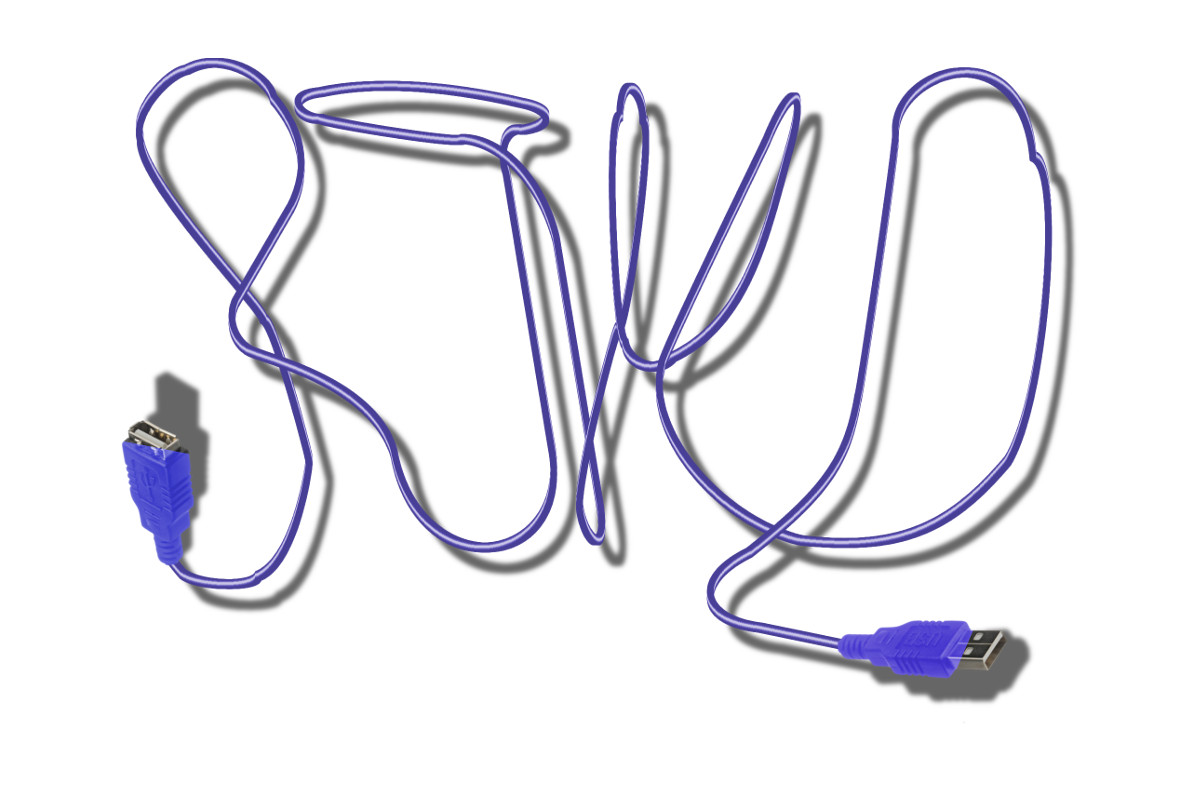
I'm getting there, any critique/suggestions welcome - in Peace RJKD

_________________
Image


Top
 Post subject: Re: Gimp Art Challenge (USB Cable Text Effect)...
PostPosted: Fri Jun 17, 2016 10:56 am  (#74) 
Offline
GimpChat Member
User avatar

Joined: Mar 01, 2014
Posts: 14237
Location: Spain, Aragón
No critique RJKD, on the contrary you got a very nice result writing with a mouse (you did it!) :bigthup I like the shadows too. :)

_________________
Image

Gimp 2.10.36 (samj) portable _ OS Windows 10 Home_ 64bits
Don’t be afraid to start over. It’s a new chance to rebuild what you want.


Top
 Post subject: Re: Gimp Art Challenge (USB Cable Text Effect)...
PostPosted: Fri Jun 17, 2016 4:12 pm  (#75) 
Offline
Administrator
User avatar

Joined: Aug 10, 2012
Posts: 14268
Location: Native to NYC living in Arizona, Gimp 2.8 - 3.0, Win 11 PC.
Issabella wrote:
No critique RJKD,
on the contrary you got a very nice result writing with a mouse (you did it!)
:bigthup
I like the shadows too. :)

Image

_________________
Image
"A wise man learns more from a foolish question than a fool can learn from a wise answer"
Image


Top
 Post subject: Re: Gimp Art Challenge (USB Cable Text Effect)...
PostPosted: Sat Jun 18, 2016 10:24 am  (#76) 
Offline
GimpChat Member
User avatar

Joined: Dec 10, 2013
Posts: 1004
Wow RJKD! Really great work on that gradient and mouse writing! Very nice! :clap

_________________
Image
Macbook Air - MacOS Sierra 10.12
McGimp 2.8.14
G'mic 1.6.5


Top
Post new topic Reply to topic  [ 76 posts ]  Go to page Previous  1, 2, 3, 4

All times are UTC - 5 hours [ DST ]


* Login  


Powered by phpBB3 © phpBB Group