It is currently Thu Jul 23, 2026 12:30 pm


All times are UTC - 5 hours [ DST ]


Post new topic Reply to topic  [ 17 posts ] 
Author Message
 Post subject: Dashed Dots Help
PostPosted: Wed Jun 08, 2016 3:16 am  (#1) 
Offline
GimpChat Member
User avatar

Joined: Dec 22, 2011
Posts: 399
GIMP Version: 2.8.14
Operating System: Windows
GIMP Experience: New User


Hiya...I am able to do this with the path tool going vertical but cannot do this horizontal as I get a normal line. I am trying to draw out squares with dotted lines 1px apart and 1px wide...can anybody help please? TIA

_________________
Image


Share on Facebook Share on Twitter Share on Orkut Share on Digg Share on MySpace Share on Delicious Share on Technorati
Top
 Post subject: Re: Dashed Dots Help
PostPosted: Wed Jun 08, 2016 7:47 am  (#2) 
Offline
GimpChat Member
User avatar

Joined: Nov 16, 2011
Posts: 5127
Location: Metro Vancouver, BC
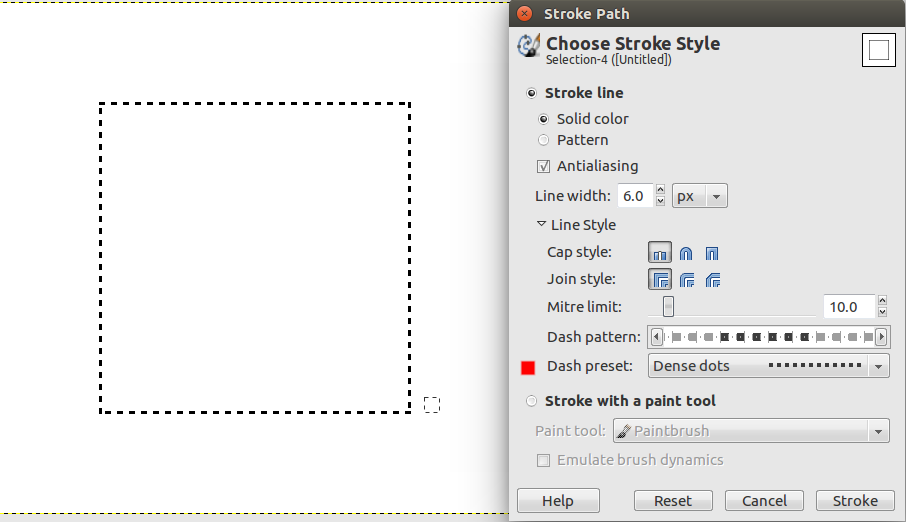
Do you need something like this or maybe you're not closing the path?
Image
Dense dots stroke

_________________
Image
Gimp 2.8.18, Linux, median user
Gimp Chat Tutorials Index
Spirit Bear (Kermode)


Top
 Post subject: Re: Dashed Dots Help
PostPosted: Thu Jun 09, 2016 1:15 am  (#3) 
Offline
GimpChat Member
User avatar

Joined: Dec 22, 2011
Posts: 399
Hiya Odinbc...I am wanting lines and as you can see the horizontal line is fine but the vertical line stays as a block. I am doing exactly the same thing for both.


Attachments:
Untitled.jpg
Untitled.jpg [ 224.16 KiB | Viewed 2960 times ]

_________________
Image
Top
 Post subject: Re: Dashed Dots Help
PostPosted: Thu Jun 09, 2016 1:33 am  (#4) 
Offline
GimpChat Member
User avatar

Joined: Dec 22, 2011
Posts: 399
Cannot do squares either :(


Attachments:
Untitledx.jpg
Untitledx.jpg [ 21.33 KiB | Viewed 2957 times ]

_________________
Image
Top
 Post subject: Re: Dashed Dots Help
PostPosted: Thu Jun 09, 2016 2:01 am  (#5) 
Offline
GimpChat Member
User avatar

Joined: Nov 16, 2011
Posts: 5127
Location: Metro Vancouver, BC
That is strange. Have you tried an tool option reset?

_________________
Image
Gimp 2.8.18, Linux, median user
Gimp Chat Tutorials Index
Spirit Bear (Kermode)


Top
 Post subject: Re: Dashed Dots Help
PostPosted: Thu Jun 09, 2016 2:13 am  (#6) 
Offline
Administrator
User avatar

Joined: Aug 10, 2012
Posts: 14127
Location: Native to NYC living in Arizona, Gimp 2.8 - 3.0, Win 11 PC.
Odinbc wrote:
That is strange. Have you tried an tool option reset?

Yes,
very strange?
This is the first time I've ever seen anything like that.

_________________
Image
"A wise man learns more from a foolish question than a fool can learn from a wise answer"
Image


Top
 Post subject: Re: Dashed Dots Help
PostPosted: Thu Jun 09, 2016 2:20 am  (#7) 
Offline
GimpChat Member
User avatar

Joined: Dec 22, 2011
Posts: 399
Odinbc wrote:
That is strange. Have you tried an tool option reset?

I tried that to no avail :(

_________________
Image


Top
 Post subject: Re: Dashed Dots Help
PostPosted: Thu Jun 09, 2016 3:32 am  (#8) 
Offline
GimpChat Member

Joined: Mar 04, 2011
Posts: 2610
Very strange.
Can not see much wrong with the settings except, the brush spacing which is a percentage of the brush width, should be 200.

Attachment:
dotty.jpg
dotty.jpg [ 138.23 KiB | Viewed 2935 times ]


Maybe set dynamic to off.


I do find that drawing in straight lines using the shift key results in double pixels at regular intervals.

No fix, except drawing in short segments.

best way for a rectangle is still stroking a selection as Odinbc earlier post.


Top
 Post subject: Re: Dashed Dots Help
PostPosted: Sat Jun 11, 2016 1:50 am  (#9) 
Offline
GimpChat Member
User avatar

Joined: Dec 22, 2011
Posts: 399
rich2005 wrote:
Very strange.
Can not see much wrong with the settings except, the brush spacing which is a percentage of the brush width, should be 200.

Attachment:
dotty.jpg


Maybe set dynamic to off.


I do find that drawing in straight lines using the shift key results in double pixels at regular intervals.

No fix, except drawing in short segments.

best way for a rectangle is still stroking a selection as Odinbc earlier post.


Thanks I will keep trying :)

_________________
Image


Top
 Post subject: Re: Dashed Dots Help
PostPosted: Sun Jun 12, 2016 3:10 pm  (#10) 
Offline
GimpChat Member
User avatar

Joined: Jul 04, 2010
Posts: 2253
Location: Retired Moderator Slowly Returning to the Living.
Hi Deb,
I decided to look into the issue and discovered that I too have the same issue. It may be 2.8.14 issue, because many people are using a newer Gimp version and I've been too lazy to upgrade. I will continue to look into it and will post an answer just as soon as I find it!

EDIT: It's a very sloppy work around to turn a path into a selection and stroke the selection. Stroking the selection does work.

Attachment:
Screenshot_318.jpg
Screenshot_318.jpg [ 202.58 KiB | Viewed 2819 times ]

_________________
Artists aren't crazy! We're eccentric! ~G.M. Ross

Image

My Sigs = My Photos
Check out my work at http://www.flickr.com/photos/photomastergreg.


Top
 Post subject: Re: Dashed Dots Help
PostPosted: Sun Jun 12, 2016 3:26 pm  (#11) 
Offline
GimpChat Member
User avatar

Joined: Jul 04, 2010
Posts: 2253
Location: Retired Moderator Slowly Returning to the Living.
Another work around I just did, with a much better outcome, was to copy a good dotted line and paste is as a new line (new layer), rotate the layer by 90 degrees and move it to where I wanted it. It's a pain but it works until I find the problem.
Attachment:
Screenshot_319.jpg
Screenshot_319.jpg [ 164.12 KiB | Viewed 2143 times ]

_________________
Artists aren't crazy! We're eccentric! ~G.M. Ross

Image

My Sigs = My Photos
Check out my work at http://www.flickr.com/photos/photomastergreg.


Top
 Post subject: Re: Dashed Dots Help
PostPosted: Sun Jun 12, 2016 3:55 pm  (#12) 
Offline
Administrator
User avatar

Joined: Aug 10, 2012
Posts: 14127
Location: Native to NYC living in Arizona, Gimp 2.8 - 3.0, Win 11 PC.
PhotoMaster wrote:
Hi Deb,
I decided to look into the issue and discovered that I too have the same issue. It may be 2.8.14 issue, because many people are using a newer Gimp version and I've been too lazy to upgrade. I will continue to look into it and will post an answer just as soon as I find it!

EDIT: It's a very sloppy work around to turn a path into a selection and stroke the selection. Stroking the selection does work.

Attachment:
Screenshot_318.jpg

This could be a known bug with Gimp 2.8.14,
which has been resolved in the latest version of Gimp.
One way to find out if this is so,
would be to report the issue at GNOME Bugzilla;
and or search while there to find if any such bug has been reported.

The link below,
offers some useful information about Gimp bug reporting.


ImageHOW TO Report GIMP BugsImage

_________________
Image
"A wise man learns more from a foolish question than a fool can learn from a wise answer"
Image


Top
 Post subject: Re: Dashed Dots Help
PostPosted: Sun Jun 12, 2016 3:57 pm  (#13) 
Offline
GimpChat Member
User avatar

Joined: Jul 04, 2010
Posts: 2253
Location: Retired Moderator Slowly Returning to the Living.
This is what I have determined. If you are using "Dense Dots" for your Dash Preset, your Line Width must be 2 or greater. A Line Width of 1 won't work for horizontal lines because they seem to overlap forming a solid line. A line width of 2 will work, however. A Dash Preset of "Stipples" requires a Line Width of 4 or more for the same reason. In Odinbc's example, he was using a Line Width of 6 (the default) and at that Line Width it will work. The cut and paste idea I posted above does work however. If anyone else wants to verify my numbers, I would appreciate it.

_________________
Artists aren't crazy! We're eccentric! ~G.M. Ross

Image

My Sigs = My Photos
Check out my work at http://www.flickr.com/photos/photomastergreg.


Top
 Post subject: Re: Dashed Dots Help
PostPosted: Sun Jun 12, 2016 4:20 pm  (#14) 
Online
Script Coder
User avatar

Joined: May 07, 2014
Posts: 4512
Location: Canada
I am using Gimp 2.8.16.
And this bug does occur if i use Line Width less than 5.4.

_________________
TinT


Top
 Post subject: Re: Dashed Dots Help
PostPosted: Sun Jun 12, 2016 5:58 pm  (#15) 
Offline
Administrator
User avatar

Joined: Aug 10, 2012
Posts: 14127
Location: Native to NYC living in Arizona, Gimp 2.8 - 3.0, Win 11 PC.
trandoductin wrote:
I am using Gimp 2.8.16.
And this bug does occur if i use Line Width less than 5.4.

Perhaps this isn't a "bug" after all and only the nature of stroking paths with a dash/dot.

_________________
Image
"A wise man learns more from a foolish question than a fool can learn from a wise answer"
Image


Top
 Post subject: Re: Dashed Dots Help
PostPosted: Sun Jun 12, 2016 6:44 pm  (#16) 
Offline
GimpChat Member
User avatar

Joined: Jul 04, 2010
Posts: 2253
Location: Retired Moderator Slowly Returning to the Living.
If we absolutely must have it 1 pixel wide, we'll have to do it vertical and cut and paste it and make it horizontal.

_________________
Artists aren't crazy! We're eccentric! ~G.M. Ross

Image

My Sigs = My Photos
Check out my work at http://www.flickr.com/photos/photomastergreg.


Top
 Post subject: Re: Dashed Dots Help
PostPosted: Mon Jun 13, 2016 3:04 am  (#17) 
Offline
GimpChat Member

Joined: Mar 04, 2011
Posts: 2610
trandoductin wrote:
I am using Gimp 2.8.16.
And this bug does occur if i use Line Width less than 5.4.


Looks like it is a Windows issue. This in PClinuxOS, Gimp 2.8.16 and a 2 pix grid

Attachment:
compare-dots.jpg
compare-dots.jpg [ 157.93 KiB | Viewed 2111 times ]


Using the pencil tool, the brush does make a difference, the one Debik used Hardness(100) is as good as any.

Black line, pencil size 1, spacing 200% (carefully) drawing straight lines with shift-ctrl-click
Dont expect anything wonderful apart from horizontal/vertical lines.

For convenience, stroking a selection:
solid color, antialiasing off size one pixel, line style dense dots.

I did try say, a bespoke brush, one solid pixel with a transparent pixel(s) on 2 sides. Many drawbacks.
If the end result is an image with just geometrical shapes, then maybe not Gimp, Inkscape as an alternative.


Top
Post new topic Reply to topic  [ 17 posts ] 

All times are UTC - 5 hours [ DST ]


* Login  


Powered by phpBB3 © phpBB Group