It is currently Fri Nov 13, 2026 8:39 pm


All times are UTC - 5 hours [ DST ]


Post new topic Reply to topic  [ 15 posts ] 
Author Message
 Post subject: Help required with shapes path please
PostPosted: Wed Apr 20, 2011 3:25 am  (#1) 
Offline
New Member

Joined: Apr 20, 2011
Posts: 2
Hello,
I've taught myself gimp over the last few months and have followed tutorials online which have been brilliant. I've just downloaded shapes path and it's sitting where it supposed to be and the drop down menu loads with all the different shapes. I'm trying to make a star but when i press ok, I get an error message below :
Error while executing script-fu-star-path:

Error: Procedure execution of gimp-image-undo-group-start failed on invalid input arguments: Procedure 'gimp-image-undo-group-start' has been called with an invalid ID for argument 'image'.
Most likely a plug-in is trying to work on an image that doesn't exist any longer.

In the star box, the top two boxes which say 'images' and 'drawable' are empty. Is this right?

I'm not a designer by profession, learned gimp out of necessity so i could design banners for my ecommerce website. Would appreciate some help because i don't think i'm going to be able to work it out on my own :oops:
Many thanks


Share on Facebook Share on Twitter Share on Orkut Share on Digg Share on MySpace Share on Delicious Share on Technorati
Top
 Post subject: Re: Help required with shapes path please
PostPosted: Wed Apr 20, 2011 4:30 am  (#2) 
Offline
GimpChat Member
User avatar

Joined: Oct 06, 2010
Posts: 4050
What version of GIMP are you using?

Also, there are two scripts available, which one are you using? Sounds like the .7 version, which is the older of the two. The .91 version is newest and should be the one you are using. The .91 version doesn't have input boxes for image and drawable.

Also, people tend to download both, which causes problems. If you do have both scripts uploaded to your scripts folder, remove the .7 version and refresh GIMP.

If you get that squared away, read here about creating stars with this script:

viewtopic.php?f=11&t=1200&p=13668&hilit=shapes+path#p13668

_________________
"In order to attain the impossible, one must attempt the absurd."
~ Miguel de Cervantes


Top
 Post subject: Re: Help required with shapes path please
PostPosted: Wed Apr 20, 2011 5:41 am  (#3) 
Offline
New Member

Joined: Apr 20, 2011
Posts: 2
Hi there,
thanks for coming back so quickly. I downloaded .91 yesterday. As far as I know i never had .7 loaded because the shapes page was non-existent until i downloaded .91. I can't find .7 in the program files anywhere so i'm not sure that this is the problem. What would it be called if not shapes-path in the program files?
thanks


Top
 Post subject: Re: Help required with shapes path please
PostPosted: Wed Apr 20, 2011 6:05 am  (#4) 
Offline
Script Coder
User avatar

Joined: Jun 22, 2010
Posts: 1171
Location: Here and there
To me you are getting an error because the script needs you have an image open ready to draw a shape onto and if the Image and Drawable selections are empty then you don't have an image open.

That said, mahvin's advice is good, assuming that we're talking about the same script. So my question has to be, where did you download the script from?

Kevin

ps. I was writing this when you replied...


Top
 Post subject: Re: Help required with shapes path please
PostPosted: Wed Apr 20, 2011 8:09 am  (#5) 
Offline
Retired Staff
User avatar

Joined: May 22, 2008
Posts: 6946
Location: Somewhere in GIMP
yappydog wrote:
Most likely a plug-in is trying to work on an image that doesn't exist any longer.
You may need to close gimp and re-open it.

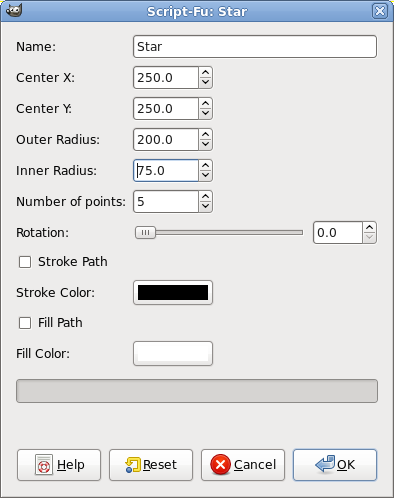
Here is an example of a star I made. I started with a 500px x 500px image and used these settings:


Image

Image

_________________
Image
World War IV will be fought with sticks and stones. - Albert Einstein


Top
 Post subject: Re: Help required with shapes path please
PostPosted: Wed Apr 20, 2011 9:22 am  (#6) 
Offline
Script Coder
User avatar

Joined: Apr 23, 2010
Posts: 1553
Location: not from Guildford after all
When discussing third-party scripts or plug-ins, it would be nice if somebody provided a link to that which is being discussed.

_________________
Any sufficiently primitive technology is indistinguishable from a rock.


Top
 Post subject: Re: Help required with shapes path please
PostPosted: Wed Apr 20, 2011 9:27 am  (#7) 
Offline
Script Coder
User avatar

Joined: Jun 22, 2010
Posts: 1171
Location: Here and there
Just to confirm- with the 0.91 version of the script from http://registry.gimp.org/node/59 (which I'm guessing we are talking about) You must have an open image to draw into.

However it should be noted that the script has been written to allow it to be run when you don't have an image open, which will always cause it to generate this error.

Kevin


Last edited by paynekj on Wed Apr 20, 2011 9:38 am, edited 3 times in total.

Top
 Post subject: Re: Help required with shapes path please
PostPosted: Wed Apr 20, 2011 9:29 am  (#8) 
Offline
Global Moderator
User avatar

Joined: May 16, 2010
Posts: 16262
Yes here is mine - 0.91 version of the script.
Keep in mind that X= left or right on the image, and Y= up or down.So if you use 250.0 by 250.0 you want a 500x500 new document to start and run the filter on a transparent layer.This places the star exactly center on your image layer.
Settings
Image

Results
Image

_________________
Image


Top
 Post subject: Re: Help required with shapes path please
PostPosted: Wed Apr 20, 2011 4:18 pm  (#9) 
Offline
GimpChat Member
User avatar

Joined: Oct 06, 2010
Posts: 4050
Quote:
Just to confirm- with the 0.91 version of the script from http://registry.gimp.org/node/59 (which I'm guessing we are talking about) You must have an open image to draw into.

However it should be noted that the script has been written to allow it to be run when you don't have an image open, which will always cause it to generate this error.

Kevin


It's always interesting, at least for me, to discover something totally new. I have never tried to use shapes path without an image open, so it never dawned on me that someone was attempting to do just that. So, after trying to use it without an image open, I now understand what the problem most likely is, (like you say). Now my curiosity wants to know why the author permitted this - or - if it's just a fluke of how the code permits something without it ever actually being intended by the author.

_________________
"In order to attain the impossible, one must attempt the absurd."
~ Miguel de Cervantes


Top
 Post subject: Re: Help required with shapes path please
PostPosted: Wed Apr 20, 2011 4:49 pm  (#10) 
Offline
GimpChat Member
User avatar

Joined: Jul 04, 2010
Posts: 2253
Location: Retired Moderator Slowly Returning to the Living.
I haven't checked to see what version I have, but Kevin is correct about an image needing to be open before running the script. Running it by itself, without an open image, gives the error that Yappydog described. It works when an image is present but gives the following when there is no open image.
Attachment:
StarMessage.jpg
StarMessage.jpg [ 73.27 KiB | Viewed 3993 times ]


Attachments:
StarError.jpg
StarError.jpg [ 65.73 KiB | Viewed 3993 times ]

_________________
Artists aren't crazy! We're eccentric! ~G.M. Ross

Image

My Sigs = My Photos
Check out my work at http://www.flickr.com/photos/photomastergreg.
Top
 Post subject: Re: Help required with shapes path please
PostPosted: Wed Apr 20, 2011 10:56 pm  (#11) 
Offline
Script Coder
User avatar

Joined: Apr 23, 2010
Posts: 1553
Location: not from Guildford after all
mahvin wrote:
It's always interesting, at least for me, to discover something totally new. I have never tried to use shapes path without an image open, so it never dawned on me that someone was attempting to do just that. So, after trying to use it without an image open, I now understand what the problem most likely is, (like you say). Now my curiosity wants to know why the author permitted this - or - if it's just a fluke of how the code permits something without it ever actually being intended by the author.

The problem stems from the menu command constraints used when the various functions are registered with GIMP's Procedural DataBase (PDB). The line after the copyright date in the 'script-fu-register' blocks should be "*" and not "". The asterisk indicates that any type of image is acceptable, but that an image is necessary. The empty quotes signify that no image is required; in which case the script will presumably create a new image, or perform operations that have nothing to do with images (for example, sort a palette or modify a brush).

The script's author should be forgiven, in my opinion, as this feature was not originally explained very well in the GIMP documentation (the original script is over six years old). I have made the same mistake in the past and no doubt there are scripts of mine being distributed which would exhibit the same misbehavior. Some more experienced GIMP users will recall the days when such "non-image" scripts were placed in the "Xtns" menu in the (now non-existent) Toolbox Menu, which made this distinction more clear, even if the availability of the commands were specified incorrectly within the script.

_________________
Any sufficiently primitive technology is indistinguishable from a rock.


Top
 Post subject: Re: Help required with shapes path please
PostPosted: Wed Apr 20, 2011 11:54 pm  (#12) 
Offline
Global Moderator
User avatar

Joined: May 16, 2010
Posts: 16262
I see that error a lot and now i am glad to know how to fix it if needed.

Thanks Saulgoode.

_________________
Image


Top
 Post subject: Re: Help required with shapes path please
PostPosted: Thu Apr 21, 2011 9:46 am  (#13) 
Offline
GimpChat Member

Joined: Apr 12, 2010
Posts: 5870
Quote:
The problem stems from the menu command constraints used when the various functions are registered with GIMP's Procedural DataBase (PDB). The line after the copyright date in the 'script-fu-register' blocks should be "*" and not "". The asterisk indicates that any type of image is acceptable, but that an image is necessary.


I am wrong or this it is a fundementhal point, but would be no sufficent to modify the script so could create its own image , instead then edit as now the active layer ?

I ask because i can't see how that script can create a new image, users can't chose W and H and apparently the script will not detect automatically the right size of the new image
(here i may be wrong , i could not understand all part of the script, i just suppose the author didn't consider the possibility for the script to create a new image )

So in case what else may be needed to edit a similar script so can be image indipendent ?

I suppose right size of new image should be the size of what created by the script + a few px margin at the border,(maybe not needed but better few px free margin then few pixel badly cropped away) but i would have no idea on how to code this

_________________
My 3D Gallery on Deviantart http://photocomix2.deviantart.com/
Main gallery http://www.flickriver.com/photos/photocomix-mandala/
Mandala and simmetry http://www.flickriver.com/photos/photocomix_mandala/

Image

Mrs Wilbress


Top
 Post subject: Re: Help required with shapes path please
PostPosted: Thu Apr 21, 2011 4:19 pm  (#14) 
Offline
GimpChat Member
User avatar

Joined: Jul 04, 2010
Posts: 2253
Location: Retired Moderator Slowly Returning to the Living.
saulgoode wrote:
The problem stems from the menu command constraints used when the various functions are registered with GIMP's Procedural DataBase (PDB). The line after the copyright date in the 'script-fu-register' blocks should be "*" and not "". The asterisk indicates that any type of image is acceptable, but that an image is necessary. The empty quotes signify that no image is required; in which case the script will presumably create a new image, or perform operations that have nothing to do with images (for example, sort a palette or modify a brush).


I've written a few scripts and never knew this! We do indeed learn here!

I moved this topic to "Gimp Help" forum.

_________________
Artists aren't crazy! We're eccentric! ~G.M. Ross

Image

My Sigs = My Photos
Check out my work at http://www.flickr.com/photos/photomastergreg.


Top
 Post subject: Re: Help required with shapes path please
PostPosted: Fri Apr 22, 2011 6:25 am  (#15) 
Offline
Global Moderator
User avatar

Joined: May 16, 2010
Posts: 16262
The thing is PC is that if you add the asteric between the quotes - the filter wont even be selectable in the menu list. :)
Then you have to add the drawable to get it to show.
It is a good thing to know.

_________________
Image


Top
Post new topic Reply to topic  [ 15 posts ] 

All times are UTC - 5 hours [ DST ]


* Login  


Powered by phpBB3 © phpBB Group