It is currently Wed Nov 11, 2026 9:17 pm


All times are UTC - 5 hours [ DST ]


Post new topic Reply to topic  [ 8 posts ] 
Author Message
 Post subject: How to scale a large number of images quickly
PostPosted: Tue Jul 05, 2016 3:01 am  (#1) 
Offline
GimpChat Member

Joined: Dec 10, 2013
Posts: 106
GIMP Version: 2.8.14
Operating System: Windows
GIMP Experience: New User


For example, I have a lot of images, that I wish to scale them all to the same width , for example, 750px, while height restricted to ratio, no specified height needed.

Any quick way to do it to a large number of images instead of doing them one by one?


Share on Facebook Share on Twitter Share on Orkut Share on Digg Share on MySpace Share on Delicious Share on Technorati
Top
 Post subject: Re: How to scale a large number of images quickly
PostPosted: Tue Jul 05, 2016 3:29 am  (#2) 
Offline
GimpChat Member

Joined: Mar 04, 2011
Posts: 2629
The BIMP plugin

http://www.alessandrofrancesconi.it/projects/bimp/

looks like this

Attachment:
bimp.jpg
bimp.jpg [ 91.1 KiB | Viewed 4653 times ]


Top
 Post subject: Re: How to scale a large number of images quickly
PostPosted: Tue Jul 05, 2016 3:41 am  (#3) 
Offline
GimpChat Member

Joined: Dec 10, 2013
Posts: 106
rich2005 wrote:
The BIMP plugin

http://www.alessandrofrancesconi.it/projects/bimp/

looks like this

Attachment:
bimp.jpg


Any alternatives to this one? I know this already :clap


Top
 Post subject: Re: How to scale a large number of images quickly
PostPosted: Tue Jul 05, 2016 4:10 am  (#4) 
Offline
GimpChat Member

Joined: Mar 04, 2011
Posts: 2629
kenny1999 wrote:
rich2005 wrote:
The BIMP plugin

http://www.alessandrofrancesconi.it/projects/bimp/

Any alternatives to this one? I know this already :clap


Too difficult for you?

Nothing for Gimp with your requirements Batch + fixed width + keep aspect ratio

None Gimp try http://www.faststone.org/FSResizerDetail.htm


Top
 Post subject: Re: How to scale a large number of images quickly
PostPosted: Tue Jul 05, 2016 6:12 am  (#5) 
Offline
Script Coder
User avatar

Joined: Oct 25, 2010
Posts: 4812
If you can handle the command line, then ImageMagick's convert command is for you.

_________________
Image


Top
 Post subject: Re: How to scale a large number of images quickly
PostPosted: Tue Jul 05, 2016 8:24 am  (#6) 
Offline
GimpChat Member
User avatar

Joined: Jan 20, 2013
Posts: 14835
Location: roma, italy
another interesting software (free) is Xnconvert
in addition to resizing you can do a lot of other actions

_________________
"Where am I ?"


Top
 Post subject: Re: How to scale a large number of images quickly
PostPosted: Tue Jul 05, 2016 9:39 am  (#7) 
Offline
GimpChat Member

Joined: Mar 04, 2011
Posts: 2629
dinasset wrote:
another interesting software (free) is Xnconvert
in addition to resizing you can do a lot of other actions


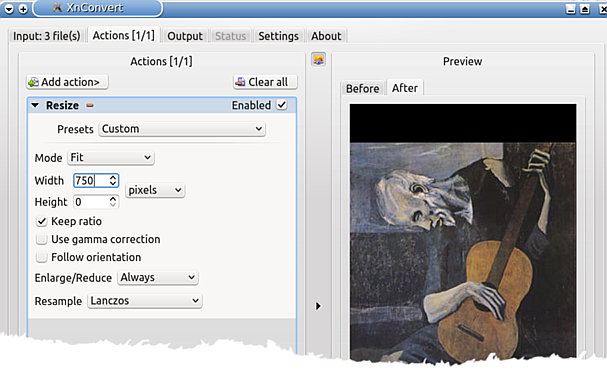
My preference as well. XnConvert was the first thing I looked at, then thought no good.

While it does have a 'keep-aspect-ratio' tick box and you can set a width and a height, the result depends on whether the image is portrait or landscape.

Started to think about it. Set the height to zero and that will force a 750 pix width regardless of orientation. Seems to work, but who know what OP will do ;)

Dialog looks like this

Attachment:
xnconvert.jpg
xnconvert.jpg [ 45.03 KiB | Viewed 4549 times ]


Top
 Post subject: Re: How to scale a large number of images quickly
PostPosted: Tue Jul 05, 2016 11:05 am  (#8) 
Offline
GimpChat Member
User avatar

Joined: Jan 20, 2013
Posts: 14835
Location: roma, italy
Rich, tested on Win 10: it works with your setup (force width and preserve ratio)

_________________
"Where am I ?"


Top
Post new topic Reply to topic  [ 8 posts ] 

All times are UTC - 5 hours [ DST ]


* Login  


Powered by phpBB3 © phpBB Group