It is currently Sat Sep 12, 2026 9:43 am


All times are UTC - 5 hours [ DST ]


Post new topic Reply to topic  [ 129 posts ]  Go to page Previous  1, 2, 3, 4, 5, 6, 7  Next
Author Message
 Post subject: Re: Playing with light rays
PostPosted: Sat Jul 09, 2016 11:35 pm  (#61) 
Offline
GimpChat Member
User avatar

Joined: Jan 20, 2013
Posts: 14835
Location: roma, italy
2-ton wrote:
I always just get a few areas of rays, not sure how you manage to get a full circle of rays.

did you read my post #51 ? duplicate, rotate 90%, repeat....

_________________
"Where am I ?"


Top
 Post subject: Re: Playing with light rays
PostPosted: Sat Jul 09, 2016 11:51 pm  (#62) 
Offline
GimpChat Member
User avatar

Joined: Jan 20, 2013
Posts: 14835
Location: roma, italy
#2ton
another hint: if you start with a subject filled with a texture having many contrasting color pieces, you get much more rays, look:
input:
Attachment:
input-filled.jpg
input-filled.jpg [ 1.22 MiB | Viewed 1267 times ]

output of rays (default parameters):
Attachment:
output-of-rights.jpg
output-of-rights.jpg [ 269.78 KiB | Viewed 1267 times ]


then you may play with modes and combine

_________________
"Where am I ?"


Top
 Post subject: Re: Playing with light rays
PostPosted: Sat Jul 09, 2016 11:59 pm  (#63) 
Offline
GimpChat Member
User avatar

Joined: Jan 20, 2013
Posts: 14835
Location: roma, italy
... a combination of previous two images, filling the head with color/pattern

Attachment:
a-combination.jpg
a-combination.jpg [ 862.29 KiB | Viewed 1264 times ]

_________________
"Where am I ?"


Top
 Post subject: Re: Playing with light rays
PostPosted: Sun Jul 10, 2016 4:15 am  (#64) 
Offline
GimpChat Member
User avatar

Joined: Mar 01, 2014
Posts: 14187
Location: Spain, Aragón
Dalia, very nice outcome. I love it. :)
Dinasset, good research. All that we can help in this light ray filter is great help. I don't know if my previous settings have helped. Anyway I understand the behaviour in central rays with the object in the centre, too.
My current aim is to understand the directions of the ray when the object is placed in corners. I'm happy I start to understand it.
Here my result.


Attachments:
Playing with ray directions.png
Playing with ray directions.png [ 1.95 MiB | Viewed 1259 times ]

_________________
Image

Gimp 2.10.30(samj) portable _ OS Windows 10 Home_ 64bits
Don’t be afraid to start over. It’s a new chance to rebuild what you want.
Top
 Post subject: Re: Playing with light rays
PostPosted: Sun Jul 10, 2016 5:01 am  (#65) 
Offline
GimpChat Member
User avatar

Joined: Jan 20, 2013
Posts: 14835
Location: roma, italy
this is really nice, Issabella !

_________________
"Where am I ?"


Top
 Post subject: Re: Playing with light rays
PostPosted: Sun Jul 10, 2016 5:08 am  (#66) 
Offline
GimpChat Member
User avatar

Joined: Mar 01, 2014
Posts: 14187
Location: Spain, Aragón
Thank so much Dinasset. I'm going to write soon my settings and directions of light rays when the object isn't in the centre of the canvas. :)

_________________
Image

Gimp 2.10.30(samj) portable _ OS Windows 10 Home_ 64bits
Don’t be afraid to start over. It’s a new chance to rebuild what you want.


Last edited by Issabella on Sun Jul 10, 2016 10:02 am, edited 1 time in total.

Top
 Post subject: Re: Playing with light rays
PostPosted: Sun Jul 10, 2016 8:29 am  (#67) 
Offline
GimpChat Member
User avatar

Joined: Mar 01, 2014
Posts: 14187
Location: Spain, Aragón
I've finished my second tutorial to explain how light rays behave when the objects aren't in the centre of the canvas. I hope it can help you a little.
I can't upload my xcf file as it is too heavy (8.58 MB). :(


Attachments:
Final Outcome.png
Final Outcome.png [ 1.43 MiB | Viewed 1242 times ]
More about directions of light rays.pdf [1.07 MiB]
Downloaded 125 times

_________________
Image

Gimp 2.10.30(samj) portable _ OS Windows 10 Home_ 64bits
Don’t be afraid to start over. It’s a new chance to rebuild what you want.
Top
 Post subject: Re: Playing with light rays
PostPosted: Sun Jul 10, 2016 12:39 pm  (#68) 
Offline
GimpChat Member

Joined: May 12, 2015
Posts: 4693
Issabella, your images are beautiful and your tutorials are very organized and well written. Thank you for your time and effort you put into helping others.


Top
 Post subject: Re: Playing with light rays
PostPosted: Sun Jul 10, 2016 12:59 pm  (#69) 
Offline
GimpChat Member
User avatar

Joined: Apr 08, 2010
Posts: 5420
Location: Northwest Ohio
ImageStill cannot get a handle on this. I only could manage a small width of rays, and had to keep making new copies and rotating 20 degrees each time in order to get a full circle. There must be a better way! Also the render is not good, neither my foreground select tool, nor the Gmic version will work. I resorted to the old black and white to layer mask way.


Top
 Post subject: Re: Playing with light rays
PostPosted: Sun Jul 10, 2016 1:50 pm  (#70) 
Offline
GimpChat Member
User avatar

Joined: Mar 01, 2014
Posts: 14187
Location: Spain, Aragón
Pat, thank you so much for your commentary. I'm happy if it can be useful. :)
2-ton that little girl is an angel. Nice outcome. :)

_________________
Image

Gimp 2.10.30(samj) portable _ OS Windows 10 Home_ 64bits
Don’t be afraid to start over. It’s a new chance to rebuild what you want.


Top
 Post subject: Re: Playing with light rays
PostPosted: Sun Jul 10, 2016 6:55 pm  (#71) 
Offline
GimpChat Member
User avatar

Joined: Dec 10, 2013
Posts: 1004
Still trying...

Image

_________________
Image
Macbook Air - MacOS Sierra 10.12
McGimp 2.8.14
G'mic 1.6.5


Top
 Post subject: Re: Playing with light rays
PostPosted: Sun Jul 10, 2016 7:56 pm  (#72) 
Offline
Administrator
User avatar

Joined: Aug 10, 2012
Posts: 14203
Location: Native to NYC living in Arizona, Gimp 2.8 - 3.0, Win 11 PC.
Dalia wrote:
Still trying...

[ Image ]

Nice one Dalia. :bigthup

Check this one out.
Attachment:
GC light rays.png
GC light rays.png [ 283.42 KiB | Viewed 1460 times ]


I attached the XCF file if anyone wishes to view it.
Attachment:
GC light rays.xcf [2.08 MiB]
Downloaded 154 times

_________________
Image
"A wise man learns more from a foolish question than a fool can learn from a wise answer"
Image


Top
 Post subject: Re: Playing with light rays
PostPosted: Sun Jul 10, 2016 9:18 pm  (#73) 
Offline
GimpChat Member
User avatar

Joined: Dec 10, 2013
Posts: 1004
Thanks for your comment and your xcf file. Nice one on yours Wallace. :jumpclap

_________________
Image
Macbook Air - MacOS Sierra 10.12
McGimp 2.8.14
G'mic 1.6.5


Top
 Post subject: Re: Playing with light rays
PostPosted: Sun Jul 10, 2016 9:25 pm  (#74) 
Offline
Administrator
User avatar

Joined: Aug 10, 2012
Posts: 14203
Location: Native to NYC living in Arizona, Gimp 2.8 - 3.0, Win 11 PC.
Dalia wrote:
Thanks for your comment and your xcf file. Nice one on yours Wallace. :jumpclap

You're welcome and thank you Dalia.
Image

Image

I did another.
This one is sort of a more "practical" usage of light rays.

Image

And the XCF file.
Attachment:
45135.xcf [4.87 MiB]
Downloaded 90 times

_________________
Image
"A wise man learns more from a foolish question than a fool can learn from a wise answer"
Image


Top
 Post subject: Re: Playing with light rays
PostPosted: Mon Jul 11, 2016 12:18 am  (#75) 
Offline
Administrator
User avatar

Joined: Aug 10, 2012
Posts: 14203
Location: Native to NYC living in Arizona, Gimp 2.8 - 3.0, Win 11 PC.
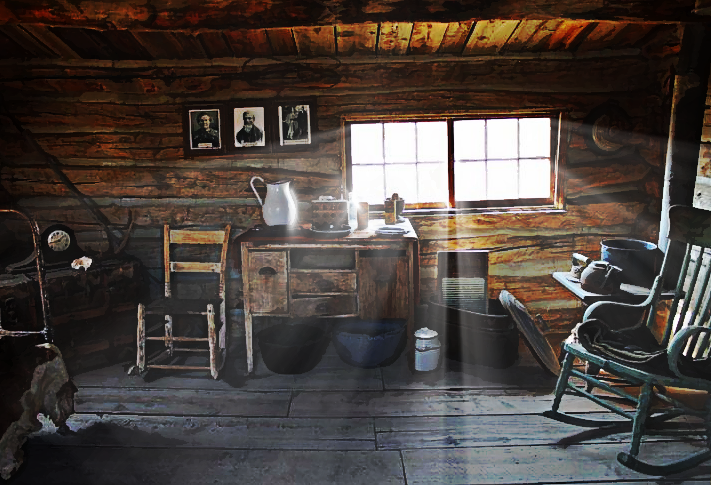
I'm having fun with this and did another image.

Before Light Rays
Image


After Light Rays
Image

_________________
Image
"A wise man learns more from a foolish question than a fool can learn from a wise answer"
Image


Top
 Post subject: Re: Playing with light rays
PostPosted: Mon Jul 11, 2016 1:29 am  (#76) 
Offline
GimpChat Member
User avatar

Joined: Jan 20, 2013
Posts: 14835
Location: roma, italy
good idea, Wallace, I applied it on the "trees image" of Issabella

_________________
"Where am I ?"


Top
 Post subject: Re: Playing with light rays
PostPosted: Mon Jul 11, 2016 1:30 am  (#77) 
Offline
GimpChat Member
User avatar

Joined: Jan 20, 2013
Posts: 14835
Location: roma, italy
Dalia wrote:
Still trying...

[ Image ]


excellent, Dalia

_________________
"Where am I ?"


Top
 Post subject: Re: Playing with light rays
PostPosted: Mon Jul 11, 2016 2:05 am  (#78) 
Offline
Administrator
User avatar

Joined: Aug 10, 2012
Posts: 14203
Location: Native to NYC living in Arizona, Gimp 2.8 - 3.0, Win 11 PC.
dinasset wrote:
good idea, Wallace, I applied it on the "trees image" of Issabella

Nice! :bigthup

_________________
Image
"A wise man learns more from a foolish question than a fool can learn from a wise answer"
Image


Top
 Post subject: Re: Playing with light rays
PostPosted: Mon Jul 11, 2016 7:33 am  (#79) 
Offline
GimpChat Member
User avatar

Joined: Apr 08, 2010
Posts: 5420
Location: Northwest Ohio
Ooooh, love it used to enhance the natural light!


Top
 Post subject: Re: Playing with light rays
PostPosted: Mon Jul 11, 2016 7:56 am  (#80) 
Offline
GimpChat Member
User avatar

Joined: Apr 08, 2010
Posts: 5420
Location: Northwest Ohio
Well, this isn't too bad but it's not what I was trying to do, lol. I wanted some heavy rays and a few light rays to come from the pencil point, and had to move layers of rays around to get them to radiate from where I wanted, never did figure out how to get some fat rays and some bright thin rays.
Image

Argh, definitely not what I was trying to do. I need a slider map, as the end result is not that much like what the preview shows. I also cannot seem to find a setting that lets only the rays get the colors, and often some of the rays come out gray.
Image


Top
Post new topic Reply to topic  [ 129 posts ]  Go to page Previous  1, 2, 3, 4, 5, 6, 7  Next

All times are UTC - 5 hours [ DST ]


* Login  


Powered by phpBB3 © phpBB Group