It is currently Thu Nov 12, 2026 9:46 pm


All times are UTC - 5 hours [ DST ]


Post new topic Reply to topic  [ 10 posts ] 
Author Message
 Post subject: Script install (Wavelet Decomposition) Tried Everything Not working
PostPosted: Mon Jul 18, 2016 2:53 pm  (#1) 
Offline
GimpChat Member

Joined: Jul 18, 2016
Posts: 10
GIMP Version: 2.8.14
Operating System: Mac OS
OS Version: El Capitan
GIMP Experience: Intermediate Level

List any relevant plug-ins or scripts:
Wavelet Decomposition

List any ERROR messages you received:
Not recognized


I am having serious trouble and have tried everything with installing this "wavelet decomposition" script. It is necessary for me to do a project at work. I am a faithful GIMP user and am good at figuring things out on my own but I cannot get this to work and refuse to give up! I am not a forum guy and have no idea what I am doing but am desperate for help and thought I would try this. I am desperate to like get some type of human help here. Just like cause the typical install procedures Ive tried them all there is something I am doing wrong or need to do in addition to those basic rules. I am looking for detailed help here and would be so grateful. Thanks to anyone who can help or attempt to or let me know where to go to get help with this. Thanks so much.

All the best


Share on Facebook Share on Twitter Share on Orkut Share on Digg Share on MySpace Share on Delicious Share on Technorati
Top
 Post subject: Re: Script install (Wavelet Decomposition) Tried Everything Not workin
PostPosted: Tue Jul 19, 2016 7:57 am  (#2) 
Offline
GimpChat Member

Joined: Mar 04, 2011
Posts: 2629
No Replies?

Caveat - not a Mac user

Your post implies a script. Is it this one? http://registry.gimp.org/node/13549

As a script it goes in wherever scripts go in an OSX installation.
I see various places mentioned
/Users/{your_id}/Library/GIMP/2.8/ or possibly /Users/{your_id}/Library/Application Support/GIMP/2.8/

Using it:
The snag with this is it pops the original image at the top of the layer stack and it should be at the bottom.

Attachment:
decompose02.jpg
decompose02.jpg [ 80.46 KiB | Viewed 4308 times ]


The script equates close to the more usual compiled plugin, this in my linux machine.

Attachment:
decompose01.jpg
decompose01.jpg [ 87.62 KiB | Viewed 4308 times ]


Turn layer visibility on/off for varying degrees of sharpening.

Looking for the tutorial on the registry.gimp.org page? - almost long gone.

You might get it on the internet archive
http://web.archive.org/web/201306181524 ... se-plug-in


Top
 Post subject: Re: Script install (Wavelet Decomposition) Tried Everything Not workin
PostPosted: Tue Jul 19, 2016 4:21 pm  (#3) 
Offline
GimpChat Member

Joined: Jul 18, 2016
Posts: 10
THANKS FOR YOUR RESPONSE. I have tried all of that but am now trying to find out what G'MIC is for Gimp I hear it is like a free database of filters and that wavelet decompose is on it .... do you know what that is. I am kind of still lost. So I actually got the "Wavelet Decompose" under my image tab and got the "Simple Wavelet Decompose" under the layers tab. But when I use them I get errors. So kind of lost at this point. Thanks please help or suggest a way if you can thanks so much for your time.


Attachments:
Wave Simple 2.png
Wave Simple 2.png [ 540.41 KiB | Viewed 4280 times ]
Wave Simple 1.png
Wave Simple 1.png [ 35.64 KiB | Viewed 4280 times ]
Wave 2.png
Wave 2.png [ 516.55 KiB | Viewed 4280 times ]
Top
 Post subject: Re: Script install (Wavelet Decomposition) Tried Everything Not workin
PostPosted: Wed Jul 20, 2016 3:30 am  (#4) 
Offline
GimpChat Member

Joined: Mar 04, 2011
Posts: 2629
I can get that error message as well providing I turn off the Gimp compatibility mode.

Attachment:
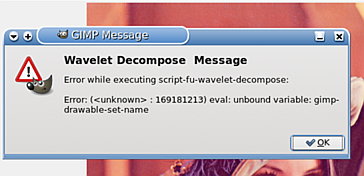
error-message.jpg
error-message.jpg [ 16.09 KiB | Viewed 4258 times ]


I am sure most Gimp users do not know that their old scripts are liable to fail with newer versions of Gimp.

It looks like the Mac version has been compiled with compatibility OFF

This can be enabled if you run Gimp from a command line with the switch ON

gimp --pdb-compat-mode=on


and then the script might work.

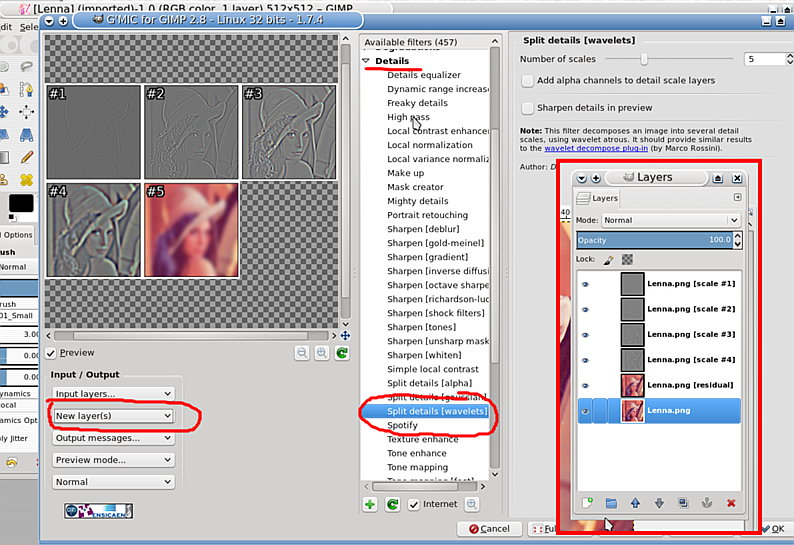
Looking at your other posts, if you can get gmic installed, then you get an equivalent result.
looks like this: make sure you set Output Mode to New Layers otherwise you lose the original layer.

Attachment:
gmic-wavelet.jpg
gmic-wavelet.jpg [ 113.1 KiB | Viewed 4258 times ]


Top
 Post subject: Re: Script install (Wavelet Decomposition) Tried Everything Not workin
PostPosted: Wed Jul 20, 2016 6:21 am  (#5) 
Offline
GimpChat Member

Joined: Mar 04, 2011
Posts: 2629
updated the script, worth a try, works here, no guarantees in OSX

Remember to unzip it.


Attachments:
wavelet-decompose.scm.zip [1.82 KiB]
Downloaded 174 times
Top
 Post subject: Re: Script install (Wavelet Decomposition) Tried Everything Not workin
PostPosted: Wed Jul 20, 2016 1:27 pm  (#6) 
Offline
GimpChat Member

Joined: Jul 18, 2016
Posts: 10
Thanks so much for your help I can't thank you enough I am going to give your new one a try and then maybe try McGimp again because you see I downloaded that McGimp and it opened and I got the G'MIC filter in it but niether worked and whatever i did in McGimp gave me an error message. Also is there anyway i can get G'MIC on my regular gimp without getting McGimp I would prefer not having a different program
Thanks so much look forward to hearing from you!

Best


Top
 Post subject: Re: Script install (Wavelet Decomposition) Tried Everything Not workin
PostPosted: Wed Jul 20, 2016 2:21 pm  (#7) 
Offline
GimpChat Member

Joined: Jul 18, 2016
Posts: 10
OMG I THINK IT WORKED!!! THANKS SO MUCH FOR ALL OF YOUR HELP TO EVERYONE. It however was your updated .scm zip that ended up working when i put it in the old 2.0 folder on my Mac OS

Thanks ya'll are the best!!!

THANKS!!!

Lets hope it keeps working!! and nothing was messed up !!! Fingers crossed


Top
 Post subject: Re: Script install (Wavelet Decomposition) Tried Everything Not workin
PostPosted: Wed Jul 20, 2016 2:58 pm  (#8) 
Offline
GimpChat Member

Joined: Jul 18, 2016
Posts: 10
rich2005

I am posting this to see what you have to say about this. Most every tutorial you find the wavelet decompose underneath the filters Generic tab and if gives you less options and the standard is 5 layers. However if you look at the picture attached mine looks different and gives me more options that is all great and it seems to be working. But I would love to be able to find a tutorial using my version of Wavelet Decompose which on my Mac OS in regular Gimp you find it under the Image tab in the main menu bar at the bottom. So it is in a different place and works differently but it works. I kind of know what I am doing based on what the filter is supposed to do but genuinely curious why it is so different from every tutorial online. PS not using McGimp just Regular Gimp 2.8.16. Let me know what you think!!!

Best


Attachments:
Wave New.png
Wave New.png [ 1.26 MiB | Viewed 4207 times ]
Top
 Post subject: Re: Script install (Wavelet Decomposition) Tried Everything Not workin
PostPosted: Wed Jul 20, 2016 3:25 pm  (#9) 
Offline
GimpChat Member

Joined: Mar 04, 2011
Posts: 2629
The menu location is irrelevant, that is where the author put it, it can be changed easily..but why.

If you look back at post 2 viewtopic.php?f=8&t=14321#p196841

The only difference between the script and the compiled version is the location of the original layer, top rather than bottom. Easily moved if necessary.

Why not take things easy and try-out on just a single layer to see what happens.

The old tutorial from the gimp-registry is on the web archive but can be a bit slow in loading, so I dumped it to a PDF
http://www.mediafire.com/download/t3vbd ... r_Gimp.pdf about 1 MB

That shows up to 10 layers for removing defects.

packing in for the night, so best of luck


Top
 Post subject: Re: Script install (Wavelet Decomposition) Tried Everything Not workin
PostPosted: Thu Jul 21, 2016 4:06 am  (#10) 
Offline
GimpChat Member

Joined: Mar 04, 2011
Posts: 2629
Another day, another look at the script.

OP was looking for a tutorial based on that script., there is a meet-the-gimp episode showing that
http://blog.meetthegimp.org/tag/wavelet-decompose/
worth downloading the video but it is 20 minutes and covers several subjects.
then another worth checking
http://blog.patdavid.net/2014/07/wavele ... again.html
but it uses gmic. Just need to read between the lines in places.

For a quick demo, using the script: https://youtu.be/w9y65s3IYw0 three and a half minutes.

Suffering from hayfever so desperately trying not to sneeze during that ;)


Top
Post new topic Reply to topic  [ 10 posts ] 

All times are UTC - 5 hours [ DST ]


* Login  


Powered by phpBB3 © phpBB Group