It is currently Wed Nov 18, 2026 11:22 am


All times are UTC - 5 hours [ DST ]


Post new topic Reply to topic  [ 137 posts ]  Go to page Previous  1, 2, 3, 4, 5 ... 7  Next
Author Message
 Post subject: Re: Fading perspective text
PostPosted: Thu Aug 18, 2016 11:08 am  (#21) 
Offline
Administrator
User avatar

Joined: Aug 10, 2012
Posts: 14276
Location: Native to NYC living in Arizona, Gimp 2.8 - 3.0, Win 11 PC.
RJKD wrote:
Enjoy - I'm knocked out with the
"Metallica" one Wallace,
what font did you use for that one please?

Thanks RJKD. :bigthup

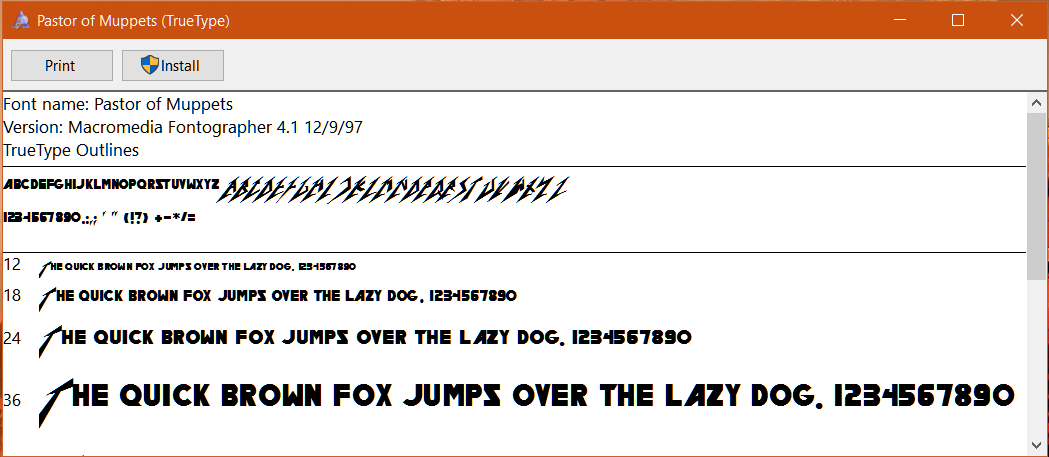
Here's a snip-it of the that font.
It's called "Pastor of Muppets".
:hehe
Image

I've also been working on this Led-Zeppelin image.
Attachment:
led-zeppelin.png
led-zeppelin.png [ 283.17 KiB | Viewed 3273 times ]

_________________
Image
"A wise man learns more from a foolish question than a fool can learn from a wise answer"
Image


Top
 Post subject: Re: Fading perspective text
PostPosted: Thu Aug 18, 2016 3:10 pm  (#22) 
Offline
GimpChat Member
User avatar

Joined: Apr 09, 2016
Posts: 580
Location: Sheffield UK
Brilliant Wallace, I've just about got it, I'm learning an awful lot from this thread, thank you guys.
Image

_________________
Image


Top
 Post subject: Re: Fading perspective text
PostPosted: Thu Aug 18, 2016 7:23 pm  (#23) 
Offline
GimpChat Member

Joined: Jul 17, 2016
Posts: 293
Location: Arlington, TX
RJKD wrote:
Brilliant Wallace, I've just about got it, I'm learning an awful lot from this thread, thank you guys.

I'd say you're more than merely learning. That's a fine bit of work you have there. I really like how you flipped the gradient to have the dark edge on the face.

_________________
Just a short while ago I was a complete idiot when it comes to GIMP. Today, after many hours of practice, reading, and watching tutorials, I am proud to say I am an incomplete idiot.

Image


Top
 Post subject: Re: Fading perspective text
PostPosted: Fri Aug 19, 2016 8:16 am  (#24) 
Offline
GimpChat Member
User avatar

Joined: Apr 09, 2016
Posts: 580
Location: Sheffield UK
Thankyou Sasquatch, one word of encouragement has more worth than a thousand criticisms.
Do you, Wallace or anyone else know what I should do with this - I want to try Wallace's curved text work, so I downloaded ofnuts 'text along path' script at sourceforge but the name of the download is "unconfirmed 835946.crdownload" so I haven't installed it yet, should I go ahead or find a different method?

_________________
Image


Top
 Post subject: Re: Fading perspective text
PostPosted: Fri Aug 19, 2016 8:27 am  (#25) 
Offline
GimpChat Member

Joined: Jul 17, 2016
Posts: 293
Location: Arlington, TX
I would use saulgoode's "warp text" script.

_________________
Just a short while ago I was a complete idiot when it comes to GIMP. Today, after many hours of practice, reading, and watching tutorials, I am proud to say I am an incomplete idiot.

Image


Top
 Post subject: Re: Fading perspective text
PostPosted: Fri Aug 19, 2016 9:37 am  (#26) 
Offline
Administrator
User avatar

Joined: Aug 10, 2012
Posts: 14276
Location: Native to NYC living in Arizona, Gimp 2.8 - 3.0, Win 11 PC.
RJKD wrote:
Thankyou Sasquatch, one word of encouragement has more worth than a thousand criticisms.
Do you, Wallace or anyone else know what I should do with this - I want to try Wallace's curved text work, so I downloaded ofnuts 'text along path' script at sourceforge but the name of the download is "unconfirmed 835946.crdownload" so I haven't installed it yet, should I go ahead or find a different method?


Has the downloaded file remained as 835946.crdownload after the download was completed?

If so you should delete it.

You can get most,
if not all of Ofnuts' Gimp path tools using the link below.

Ofnuts' Gimp path tools

If you have any issues with the initial download.
Go back within your browser to the linked page and refresh the page,
then try the download again.

_________________
Image
"A wise man learns more from a foolish question than a fool can learn from a wise answer"
Image


Top
 Post subject: Re: Fading perspective text
PostPosted: Fri Aug 19, 2016 12:09 pm  (#27) 
Offline
GimpChat Member
User avatar

Joined: Apr 09, 2016
Posts: 580
Location: Sheffield UK
Yes Wallace it remained incomplete and I got a warning saying "this file could harm your computer" so I deleted it, thank you for the link.

_________________
Image


Top
 Post subject: Re: Fading perspective text
PostPosted: Fri Aug 19, 2016 1:13 pm  (#28) 
Offline
Administrator
User avatar

Joined: Aug 10, 2012
Posts: 14276
Location: Native to NYC living in Arizona, Gimp 2.8 - 3.0, Win 11 PC.
RJKD wrote:
Yes Wallace it remained incomplete and I got a warning saying
"this file could harm your computer"
so I deleted it, thank you for the link.

Okay you're welcome.
Just as a side note.
Some security software, especially Windows Defender.
May display this message when downloading .py (Python) files/plugins.

Is the message displayed similar to this image below?


Image

_________________
Image
"A wise man learns more from a foolish question than a fool can learn from a wise answer"
Image


Top
 Post subject: Re: Fading perspective text
PostPosted: Fri Aug 19, 2016 2:12 pm  (#29) 
Offline
GimpChat Member

Joined: Jul 17, 2016
Posts: 293
Location: Arlington, TX
Did a quick demo to show why I recommend using the "warp text" script over any "text along path" script for this application. You can see how the text-along-path has a faceted look. Since it is essentially just pasting each letter on the path perpendicular to the path at that specific point you end up with a cut/paste look. Which is fine for many applications. But when the text is the focus of the project, the warp script creates a much more fluid look. Of course, the warp script also requires more work and takes much longer to run.
Image

Also, the warp script lets you do more complicated tricks than simply following a path.
Image
That bowed shape is just begging to be used with this faded perspective technique.

The warp script, however, is limited to fairly simple curves. So if you need a lot of text along an undulating path you need a text-along-path script.

_________________
Just a short while ago I was a complete idiot when it comes to GIMP. Today, after many hours of practice, reading, and watching tutorials, I am proud to say I am an incomplete idiot.

Image


Top
 Post subject: Re: Fading perspective text
PostPosted: Fri Aug 19, 2016 2:21 pm  (#30) 
Offline
Administrator
User avatar

Joined: Aug 10, 2012
Posts: 14276
Location: Native to NYC living in Arizona, Gimp 2.8 - 3.0, Win 11 PC.
Sasquatch wrote:
Did a quick demo to show why I recommend using the "warp text" script over any "text along path" script for this application. You can see how the text-along-path has a faceted look. Since it is essentially just pasting each letter on the path perpendicular to the path at that specific point you end up with a cut/paste look. Which is fine for many applications. But when the text is the focus of the project, the warp script creates a much more fluid look. Of course, the warp script also requires more work and takes much longer to run.
[ Image ]

Also, the warp script lets you do more complicated tricks than simply following a path.
[ Image ]
That bowed shape is just begging to be used with this faded perspective technique.

The warp script, however, is limited to fairly simple curves. So if you need a lot of text along an undulating path you need a text-along-path script.

Have you tried "Lens Distortion"?
And also "Bend Curve"?

_________________
Image
"A wise man learns more from a foolish question than a fool can learn from a wise answer"
Image


Top
 Post subject: Re: Fading perspective text
PostPosted: Fri Aug 19, 2016 2:23 pm  (#31) 
Offline
GimpChat Member

Joined: Jul 17, 2016
Posts: 293
Location: Arlington, TX
I've used lens distortion a few times on different projects. But never on text. Haven't heard of "bend curve" before. Is that a "stock" filter?

_________________
Just a short while ago I was a complete idiot when it comes to GIMP. Today, after many hours of practice, reading, and watching tutorials, I am proud to say I am an incomplete idiot.

Image


Top
 Post subject: Re: Fading perspective text
PostPosted: Fri Aug 19, 2016 3:10 pm  (#32) 
Offline
Administrator
User avatar

Joined: Aug 10, 2012
Posts: 14276
Location: Native to NYC living in Arizona, Gimp 2.8 - 3.0, Win 11 PC.
Sasquatch wrote:
I've used lens distortion a few times on different projects. But never on text. Haven't heard of "bend curve" before. Is that a "stock" filter?

Yes.
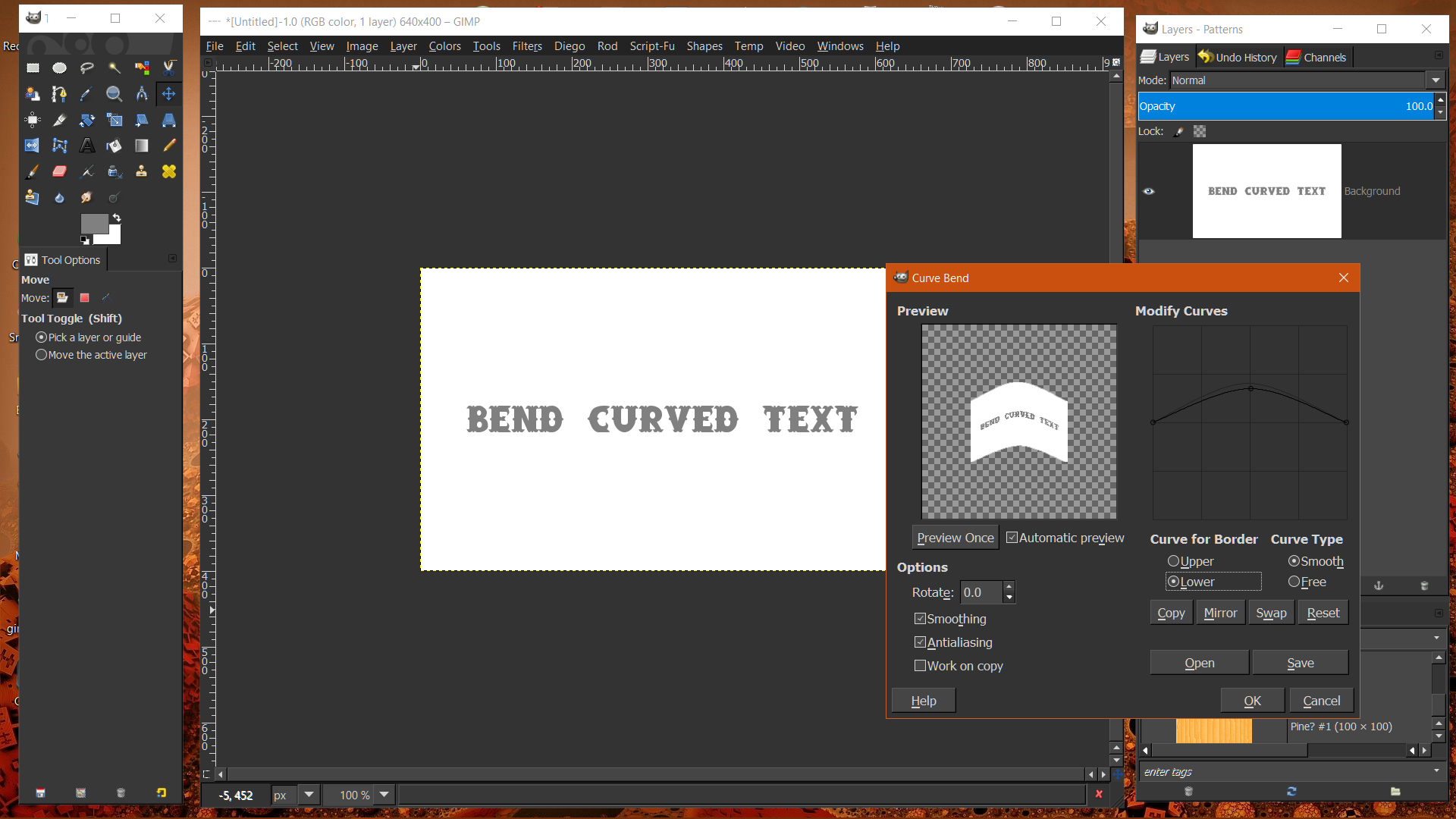
I it's called Curve Bend and is located at,
Filter>Distort>Curve Bend
.
Image

I made this old signature image you see below using Curve Bend.

Image

_________________
Image
"A wise man learns more from a foolish question than a fool can learn from a wise answer"
Image


Top
 Post subject: Re: Fading perspective text
PostPosted: Fri Aug 19, 2016 4:07 pm  (#33) 
Offline
GimpChat Member

Joined: Jul 17, 2016
Posts: 293
Location: Arlington, TX
Oooooohhh! That looks fun! I'll be experimenting with it soon. Thanks.

_________________
Just a short while ago I was a complete idiot when it comes to GIMP. Today, after many hours of practice, reading, and watching tutorials, I am proud to say I am an incomplete idiot.

Image


Top
 Post subject: Re: Fading perspective text
PostPosted: Fri Aug 19, 2016 4:35 pm  (#34) 
Offline
GimpChat Member
User avatar

Joined: Mar 16, 2015
Posts: 613
Location: On Earth,specifically Queensland,Australia
Thanks Wallace. I need that knowledge for a tut on Design Cuts.com that requires bending text. Now I can do it without Photoshop.

_________________
Image


Top
 Post subject: Re: Fading perspective text
PostPosted: Fri Aug 19, 2016 5:36 pm  (#35) 
Offline
Script Coder
User avatar

Joined: Oct 25, 2010
Posts: 4812
RJKD wrote:
Thankyou Sasquatch, one word of encouragement has more worth than a thousand criticisms.
Do you, Wallace or anyone else know what I should do with this - I want to try Wallace's curved text work, so I downloaded ofnuts 'text along path' script at sourceforge but the name of the download is "unconfirmed 835946.crdownload" so I haven't installed it yet, should I go ahead or find a different method?

This is a temporary name used by Chrome while the file downloads, once finished the file gets the correct name (nothing to do with my scripts, just Chrome and the download server who don't understand each other fully).

_________________
Image


Top
 Post subject: Re: Fading perspective text
PostPosted: Fri Aug 19, 2016 7:22 pm  (#36) 
Offline
Global Moderator
User avatar

Joined: Oct 02, 2014
Posts: 5096
Location: Sydney Australia
I'm supposed to be having a break from Gimp to get my garden back into order - but right now I'm having a coffee break from gardening and saw this thread, so I hope you don't mind me joining in.

Not exactly what you guys are creating but a variation of the same genre and using curve/bend...

Image

Wallace - didn't we do something like this, way back, with your snowflake?

_________________
Image

Respect should be offered freely but hard earned


Top
 Post subject: Re: Fading perspective text
PostPosted: Fri Aug 19, 2016 7:56 pm  (#37) 
Offline
GimpChat Member

Joined: Jul 17, 2016
Posts: 293
Location: Arlington, TX
A double fade! I hadn't thought of that. Awesome.

_________________
Just a short while ago I was a complete idiot when it comes to GIMP. Today, after many hours of practice, reading, and watching tutorials, I am proud to say I am an incomplete idiot.

Image


Top
 Post subject: Re: Fading perspective text
PostPosted: Sat Aug 20, 2016 6:00 am  (#38) 
Offline
Administrator
User avatar

Joined: Aug 10, 2012
Posts: 14276
Location: Native to NYC living in Arizona, Gimp 2.8 - 3.0, Win 11 PC.
oldmangrumpy wrote:

Wallace - didn't we do something like this, way back, with your snowflake?

You could be right, but I really don't remember.

Edit:
I found the thread you're referring to OMG.


3D/Extruded type Snowflake

_________________
Image
"A wise man learns more from a foolish question than a fool can learn from a wise answer"
Image


Top
 Post subject: Re: Fading perspective text
PostPosted: Sat Aug 20, 2016 6:12 am  (#39) 
Offline
GimpChat Member
User avatar

Joined: Apr 09, 2016
Posts: 580
Location: Sheffield UK
Yes Wallace, my Windows message was exactly as you posted above, I'll try it again. I'm still trying to post the xcf of my Universe where i used layer masks and got that 'oil on water effect' but after 2 attempts, each several hours long (the attachment box saying upload in progress), I gave up, I will try again today and if it doesn't work, I'll make another one and check the brush opacity as you suggested.

_________________
Image


Top
 Post subject: Re: Fading perspective text
PostPosted: Sat Aug 20, 2016 6:22 am  (#40) 
Offline
Administrator
User avatar

Joined: Aug 10, 2012
Posts: 14276
Location: Native to NYC living in Arizona, Gimp 2.8 - 3.0, Win 11 PC.
RJKD wrote:
Yes Wallace, my Windows message was exactly as you posted above, I'll try it again. I'm still trying to post the xcf of my Universe where i used layer masks and got that 'oil on water effect' but after 2 attempts, each several hours long (the attachment box saying upload in progress), I gave up, I will try again today and if it doesn't work, I'll make another one and check the brush opacity as you suggested.

There is a 5242880 bytes file size limit.
Maybe your xcf file is over this limit?

_________________
Image
"A wise man learns more from a foolish question than a fool can learn from a wise answer"
Image


Top
Post new topic Reply to topic  [ 137 posts ]  Go to page Previous  1, 2, 3, 4, 5 ... 7  Next

All times are UTC - 5 hours [ DST ]


* Login  


Powered by phpBB3 © phpBB Group