It is currently Thu Sep 24, 2026 7:50 am


All times are UTC - 5 hours [ DST ]


Post new topic Reply to topic  [ 45 posts ]  Go to page Previous  1, 2, 3  Next
Author Message
 Post subject: Re: Gimp Custom Brushes Disappearing
PostPosted: Wed Sep 14, 2016 10:16 pm  (#21) 
Offline
GimpChat Member

Joined: Sep 12, 2016
Posts: 22
Thanks Wallace, I can definitely make those folders.. I'm good at that at least. You should see my backup drive.... Waaaaaaay too many zillions of folders (and backups of backups of backups with copies of backups.... 12 copies of some files... I can be obsessive)

Anyway, I'll create those folders (do I need all the _storage ones, or should I just start with brushes and maybe patterns as I have a few of those I've created I wouldn't want to lose too .... or do I need to make one for every kind?) I'll see what happens. In the meantime I had a lot of fun this evening painting a heron. :)


Top
 Post subject: Re: Gimp Custom Brushes Disappearing
PostPosted: Wed Sep 14, 2016 10:30 pm  (#22) 
Offline
GimpChat Member

Joined: Sep 12, 2016
Posts: 22
So I've moved my patterns and my brushes to the folders I created, and refreshed the brushes and saw my brushes go away (which I actually expected), so then I closed Gimp and then re-opened it, and while it was opening it said it was querying new plug-ins. The brushes weren't visible, but I'm not close to panic (because I know where everything is)

BUT.... I'm having trouble figuring out how the Add-On manager allows me to access my spiffy brushes and my spiffy patterns that I put in those folders.

Also, do I have to go in and manually move any new brushes from my brushes to my brushes_storage folder? i created a brush of my spiffy new Heron (and saw how I could have been naming them better all along) but now the only custom brush I have is one honking huge heron brush, and the others are in the _storage folder.

PS.... I did want to say that even after I ask these questions I don't just sit around and wait, I try to figure it out for myself as well.


Top
 Post subject: Re: Gimp Custom Brushes Disappearing
PostPosted: Thu Sep 15, 2016 12:03 am  (#23) 
Offline
Administrator
User avatar

Joined: Aug 10, 2012
Posts: 14207
Location: Native to NYC living in Arizona, Gimp 2.8 - 3.0, Win 11 PC.
LadyLithia wrote:
So I've moved my patterns and my brushes to the folders I created, and refreshed the brushes and saw my brushes go away (which I actually expected), so then I closed Gimp and then re-opened it, and while it was opening it said it was querying new plug-ins. The brushes weren't visible, but I'm not close to panic (because I know where everything is)

BUT.... I'm having trouble figuring out how the Add-On manager allows me to access my spiffy brushes and my spiffy patterns that I put in those folders.

Also, do I have to go in and manually move any new brushes from my brushes to my brushes_storage folder? i created a brush of my spiffy new Heron (and saw how I could have been naming them better all along) but now the only custom brush I have is one honking huge heron brush, and the others are in the _storage folder.

PS.... I did want to say that even after I ask these questions I don't just sit around and wait, I try to figure it out for myself as well.


It's up to you.
Create whatever storage folders you think you might need.

I'm not exactly sure what that "querying new plug-ins" message was,
but it could have something to do with the addition of the add-on manager?

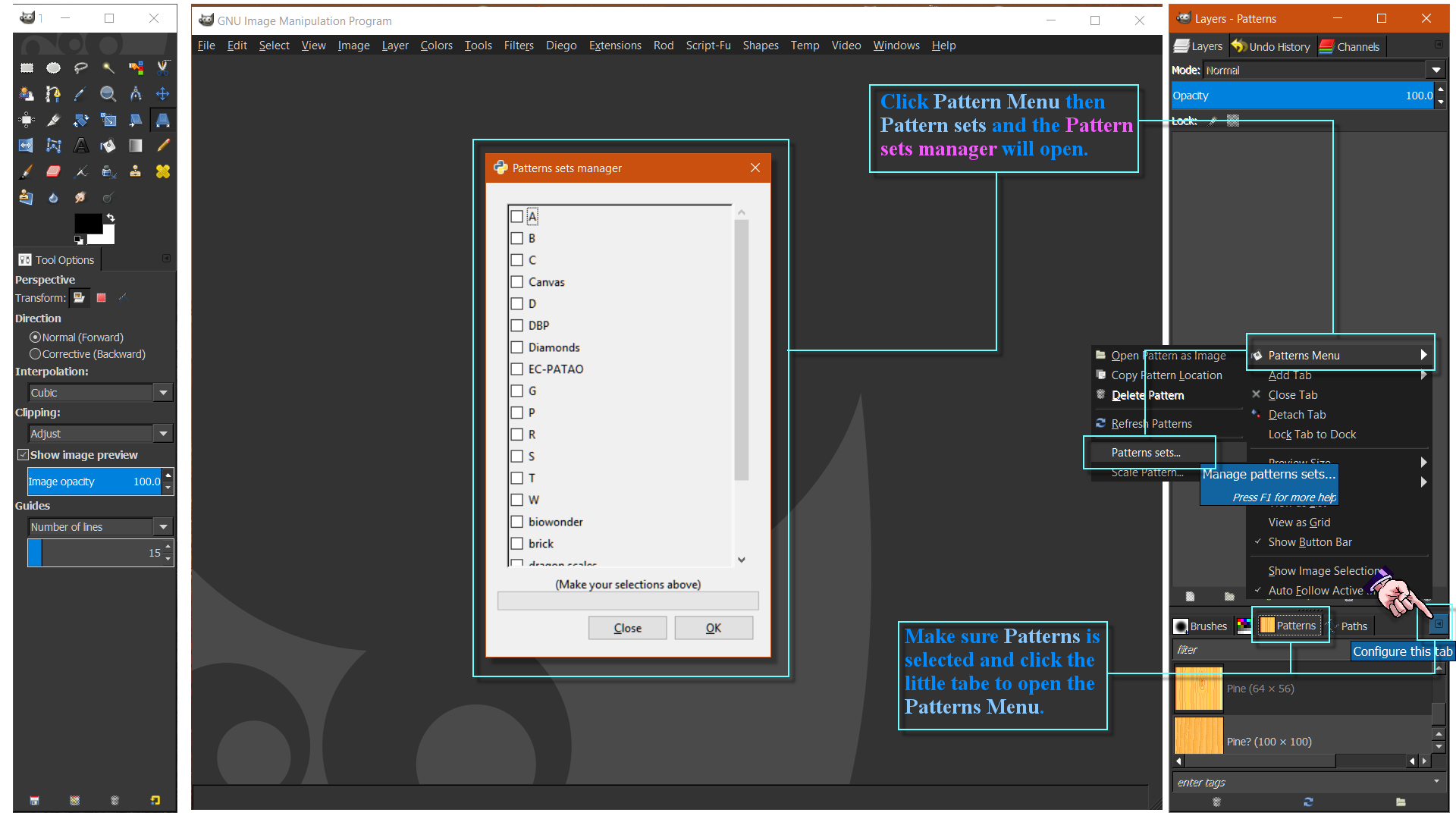
Maybe the image below will explain where to find your stored patterns.

Image

You'll also find your Brush sets in the Brushes Menu.
Same with Gradients, Pallets and Fonts.
Most storage sets can be found in their respective menus.

I created a storage folder for my scripts,
and found out that Script sets can be found under the Help Menu.

_________________
Image
"A wise man learns more from a foolish question than a fool can learn from a wise answer"
Image


Top
 Post subject: Re: Gimp Custom Brushes Disappearing
PostPosted: Thu Sep 15, 2016 7:59 am  (#24) 
Offline
Script Coder
User avatar

Joined: Oct 25, 2010
Posts: 4812
To get back to the original subject, just a thought... if you are missing a file, and running an antivirus, check the AV logs just in case it had a false positive on the file and quarantined it.

_________________
Image


Top
 Post subject: Re: Gimp Custom Brushes Disappearing
PostPosted: Thu Sep 15, 2016 5:35 pm  (#25) 
Offline
GimpChat Member
User avatar

Joined: Nov 16, 2011
Posts: 5127
Location: Metro Vancouver, BC
LadyLithia wrote:
Thanks so much. The brushes have all been saving successfully, showing in my brushes folder, showing in the brushes tool window, etc. The problem is that I seem to have gotten to the point where when I add a new one, an old one goes *poof* with no discernible pattern. I just don't know why they just go *poof* and would like to solve the problem entirely, or find a way to get my brushes into a file that won't go poof.
If a new brush shows in the first position of the Brushes tab it might only be in (copy/paste) memory. In that case it needs one more step to be saved to your brushes folder.
Try, Edit → Copy → Visible, Edit → Paste as → New brush. Use the “New Brush” dialog to name and save it.

_________________
Image
Gimp 2.8.18, Linux, median user
Gimp Chat Tutorials Index
Spirit Bear (Kermode)


Top
 Post subject: Re: Gimp Custom Brushes Disappearing
PostPosted: Thu Sep 15, 2016 7:26 pm  (#26) 
Offline
GimpChat Member

Joined: Sep 12, 2016
Posts: 22
Odinbc wrote:
If a new brush shows in the first position of the Brushes tab it might only be in (copy/paste) memory. In that case it needs one more step to be saved to your brushes folder.
Try, Edit → Copy → Visible, Edit → Paste as → New brush. Use the “New Brush” dialog to name and save it.


No, the new brushes exist, are available the next time I open GIMP. A good 200 of them. I have occasionally forgotten to save it properly and lost a brush. They're not just in the temporary clipboard position, but to the right and below


Top
 Post subject: Re: Gimp Custom Brushes Disappearing
PostPosted: Thu Sep 15, 2016 7:58 pm  (#27) 
Offline
GimpChat Member

Joined: Sep 12, 2016
Posts: 22
Wallace wrote:
It's up to you.
Create whatever storage folders you think you might need.

I'm not exactly sure what that "querying new plug-ins" message was,
but it could have something to do with the addition of the add-on manager?

Maybe the image below will explain where to find your stored patterns.

Image

You'll also find your Brush sets in the Brushes Menu.
Same with Gradients, Pallets and Fonts.
Most storage sets can be found in their respective menus.

I created a storage folder for my scripts,
and found out that Script sets can be found under the Help Menu.


So I did what you image showed, and my little pop up menu led me to the brushes sets manager, which is empty... same with my pattern sets... empty

Suggestions?

I'll try a screen shot:
Okay.... so in between my first attempt and my second attempt, I put all my brushes into a folder inside the Brushes_storage folder, instead of loose, and when I went to make the screen shot, the bushes sets manager changed and showed my new folder... so I guess it's working.

now i'll keep track of the brushes i have and when i add some, we'll see if the ones I have stay in their folder and don't suddenly go missing

Hopefully this willl solve my problem entirely.


Top
 Post subject: Re: Gimp Custom Brushes Disappearing
PostPosted: Thu Sep 15, 2016 8:00 pm  (#28) 
Offline
GimpChat Member

Joined: Sep 12, 2016
Posts: 22
ofnuts wrote:
To get back to the original subject, just a thought... if you are missing a file, and running an antivirus, check the AV logs just in case it had a false positive on the file and quarantined it.


There was nothing in my quarantine folder. :(


Top
 Post subject: Re: Gimp Custom Brushes Disappearing
PostPosted: Thu Sep 15, 2016 9:19 pm  (#29) 
Offline
Administrator
User avatar

Joined: Aug 10, 2012
Posts: 14207
Location: Native to NYC living in Arizona, Gimp 2.8 - 3.0, Win 11 PC.
LadyLithia wrote:

So I did what you image showed, and my little pop up menu led me to the brushes sets manager, which is empty... same with my pattern sets... empty

Suggestions?

I'll try a screen shot:
Okay.... so in between my first attempt and my second attempt, I put all my brushes into a folder inside the Brushes_storage folder, instead of loose, and when I went to make the screen shot, the bushes sets manager changed and showed my new folder... so I guess it's working.

now i'll keep track of the brushes i have and when i add some, we'll see if the ones I have stay in their folder and don't suddenly go missing

Hopefully this willl solve my problem entirely.


I think I failed to mention,
that you need to have a folder inside the storage folder for each set.
They can't be left lose. :oops:
Image

_________________
Image
"A wise man learns more from a foolish question than a fool can learn from a wise answer"
Image


Top
 Post subject: Re: Gimp Custom Brushes Disappearing
PostPosted: Thu Sep 15, 2016 10:07 pm  (#30) 
Offline
GimpChat Member

Joined: Sep 12, 2016
Posts: 22
Wallace wrote:

I think I failed to mention,
that you need to have a folder inside the storage folder for each set.
They can't be left lose. :oops:
[ Image ][/align]


Oh, that's fine, i was able to give it a shot, and figured it out. Your graphic is how I was able to understand the missing step, because none of the patterns in your screen shot was a pattern itself, they were all just groupings.... SETS... and i reasoned that a set was a group of files, and folders are the easiest way to group things. So even if you forgot a step, you covered it with your screen shot. I appreciate your help. It'll be a couple of days before I make some new brushes, but i'll be making a lot of them, just to test the theory that this will solve my problem. So I'll be checking back on Saturday or Sunday to say exactly how it's going.

Here's a question.... when I make new brushes, will they save to the regular folder, and I'll have to move them to my folder-within-a-folder? My guess is yes, and that's okay, I just wondered.

:tyspin


Top
 Post subject: Re: Gimp Custom Brushes Disappearing
PostPosted: Thu Sep 15, 2016 10:44 pm  (#31) 
Offline
Administrator
User avatar

Joined: Aug 10, 2012
Posts: 14207
Location: Native to NYC living in Arizona, Gimp 2.8 - 3.0, Win 11 PC.
LadyLithia wrote:

Oh, that's fine, i was able to give it a shot, and figured it out. Your graphic is how I was able to understand the missing step, because none of the patterns in your screen shot was a pattern itself, they were all just groupings.... SETS... and i reasoned that a set was a group of files, and folders are the easiest way to group things. So even if you forgot a step, you covered it with your screen shot. I appreciate your help. It'll be a couple of days before I make some new brushes, but i'll be making a lot of them, just to test the theory that this will solve my problem. So I'll be checking back on Saturday or Sunday to say exactly how it's going.

Here's a question.... when I make new brushes, will they save to the regular folder, and I'll have to move them to my folder-within-a-folder? My guess is yes, and that's okay, I just wondered.

:tyspin

If you export a brush by selecting the Export As Function,
"normally" you can choose where it exports to.

See example screenshot...

Image

_________________
Image
"A wise man learns more from a foolish question than a fool can learn from a wise answer"
Image


Top
 Post subject: Re: Gimp Custom Brushes Disappearing
PostPosted: Fri Sep 16, 2016 3:27 pm  (#32) 
Offline
GimpChat Member
User avatar

Joined: Jun 22, 2015
Posts: 234
This is an interesting subject

I noticed years ago, that when you paste into custom brushes, they sometimes disappear

Two different computers with 3 different OS

You will notice the same thing happens with patterns, as well

I downloaded a Metal patterns zip with about 8 different patterns, copy and pasted them to my Patterns.
and now, 9 months later there are only 2 left

But what I find strange is, I did some glass patterns the same way, and they are all still there


Top
 Post subject: Re: Gimp Custom Brushes Disappearing
PostPosted: Fri Sep 16, 2016 3:57 pm  (#33) 
Offline
GimpChat Member
User avatar

Joined: Apr 09, 2016
Posts: 580
Location: Sheffield UK
I'm a real novice - using Win7 GIMP 2.8, I can't save as (brushes) always have to export as. Maybe helpful?

_________________
Image


Top
 Post subject: Re: Gimp Custom Brushes Disappearing
PostPosted: Sat Sep 17, 2016 11:29 pm  (#34) 
Offline
GimpChat Member

Joined: Sep 12, 2016
Posts: 22
Wallace wrote:
If you export a brush by selecting the Export As Function,
"normally" you can choose where it exports to.

See example screenshot...

Image[/align]


Thanks for sharing that. I remember going through the motions of saving a brush in that method, separate from the method I currently use of just using the paste-as method. Right now one of the things I have been doing is using the "export" function to export a series of images to a folder that I can later use to animate, so normally I'd rather not switch type and location every half hour or more frequently. But I will remember that technique when I am not trying to create an animation.


Last edited by LadyLithia on Sun Sep 18, 2016 12:31 am, edited 1 time in total.

Top
 Post subject: Re: Gimp Custom Brushes Disappearing
PostPosted: Sat Sep 17, 2016 11:37 pm  (#35) 
Offline
GimpChat Member

Joined: Sep 12, 2016
Posts: 22
Norseman143 wrote:
This is an interesting subject

I noticed years ago, that when you paste into custom brushes, they sometimes disappear

Two different computers with 3 different OS

You will notice the same thing happens with patterns, as well

I downloaded a Metal patterns zip with about 8 different patterns, copy and pasted them to my Patterns.
and now, 9 months later there are only 2 left

But what I find strange is, I did some glass patterns the same way, and they are all still there


Yes, I noticed that I had three brushes that I ceated one after the other within about a minute. The first of the three went missing about the time I noticed that brushes were going missing.... but the other two are still there. So there really is no rhyme or reason. But I do have additional information I'll be posting in a separate reply... I think I've figured it out... somehow. Or at least, the more brighter folks on here might be bright enough to figure it out.


Top
 Post subject: Re: Gimp Custom Brushes Disappearing
PostPosted: Sat Sep 17, 2016 11:39 pm  (#36) 
Offline
GimpChat Member

Joined: Sep 12, 2016
Posts: 22
RJKD wrote:
I'm a real novice - using Win7 GIMP 2.8, I can't save as (brushes) always have to export as. Maybe helpful?


I might give that theory a test soon. Perhaps only those saved in the "paste-as new-brush" method are going missing, and those that are exported as .gbr won't. We'll see. I've been making more brushes than I really need, mostly to test various theories, see if brushes go missing.


Top
 Post subject: Re: Gimp Custom Brushes Disappearing
PostPosted: Sun Sep 18, 2016 12:08 am  (#37) 
Offline
GimpChat Member

Joined: Sep 12, 2016
Posts: 22
So i have new information... and I am now wondering if it has to do with a limit on the number of brushes I can actually have.

I've been working on my latest project and making and saving brushes more than necessary, mostly to test whether the Add On Manager has solved my problem.

As I was working, I decided that I needed to use one of my newest brushes. I am still saving everything to two locations so as to lose no more brushes, and I haven't been saving them to the new folder, used by the add-on manager. But when I went to use the brush, it wasn't there. (grrrr)

SO.... I started by trying to recall what I named the file. i was pretty sure I named it "Lion_Head_Aker" of some sort, but might have named it "Aker" (the egyptian god the symbol represented)... so I looked in both places alphabetically in my list of glyphs. (brushes).... my old simpler "lion head" symbol was still there, but not the new one (and yes, they had different names).

So I had noted that I had 209 glyphs that I'd transported to my new Brushes_Storage folder, to the hieroglyphics folder within. I checked to see if my Lion_Head_Aker symbol was in that folder, and was started to find it, with the name I thought I'd remembered. I looked again at GIMP and couldn't see the brush where it should have been alphabetically. I counted the number of custom brushes I had, saw that there were exactly 209 brushes. I looked back at the folder, and saw that I had exactly 209 brushes in the folder.

Then it occurred to me that I had created more brushes over the last couple of hours, so I looked at the regular brushes folder, where the new brushes are automatically saved. Sure enough there were eight new brushes, in addition to the 209 in the sub-folder in the Brushes_storage folder....

So my theory is that GIMP won't allow me to have more than 209 brushes. When I do have more, it only SHOWS me 209 brushes. But because I have the sub-folder, they haven't actually been deleted from existence. (which is what was happening before)

Of course I don't know how long this will work.... or why it is that GIMP is showing ALL the newest brushes, and only SOME of the older brushes in my sub-folder. Very weird! (I had already copied my Lion brush into the sub folder)

But I figured that the bright ones who have been helping me might be able to solve this with this additional information.


Top
 Post subject: Re: Gimp Custom Brushes Disappearing
PostPosted: Sun Sep 18, 2016 12:31 am  (#38) 
Offline
GimpChat Member

Joined: Sep 12, 2016
Posts: 22
One thing I decided to do was create another folder in the brushes_storage folder, name it Hieroglyphics2, and put all my named brushes in that folder (mostly just because that was a convenient way to separate them into two groups, eventually I'll go in and name the 202 without descriptive names).

i then loaded both sets, along with my set of space brushes i had downloaded, and now I can see all the brushes in the two folders (but not the brushes that went missing that started me on this odyssey of discovery of the location of the missing brushes)

Perhaps I just can't have more than 209 brushes in any one folder, or the thing starts to have kittens, but I can have a dozen folders i that is what it takes. i'm hoping this solves the problem. (and yes, my lion head brush is back)

Thanks. :)


Top
 Post subject: Re: Gimp Custom Brushes Disappearing
PostPosted: Sun Sep 18, 2016 1:32 pm  (#39) 
Offline
Administrator
User avatar

Joined: Aug 10, 2012
Posts: 14207
Location: Native to NYC living in Arizona, Gimp 2.8 - 3.0, Win 11 PC.
Before I installed the add-on manager.
I had well over 209 brushes installed.
I now have 17 different storage folders for brushes.
One of the folders holds 204 brushes.
I totaled up all my stored brushes and I have 541 brushes in storage folders.
At one time all these brushes were also installed in my user brushes folder.

I never heard of any kind of limit,
as what you're describing.
This is a very perplexing situation indeed.

The only thing that I can think,
is that this may be some type of Gimp Profile issue.
Renaming the profile,
so that Gimp creates a new one,
could solve this issue,
but I'm not 100% sure if this would work or not.

Maybe someone else will read this and give us their opinion on whether this would be of any help?

_________________
Image
"A wise man learns more from a foolish question than a fool can learn from a wise answer"
Image


Top
 Post subject: Re: Gimp Custom Brushes Disappearing
PostPosted: Sun Sep 18, 2016 3:12 pm  (#40) 
Offline
Script Coder
User avatar

Joined: Oct 25, 2010
Posts: 4812
There is no "per folder" limit in Gimp or in the add-on manager. I just played without problems with a set of 300 brushes.

I notice that when you paste as a new brush, Gimp adds a number at the end of the file name.

_________________
Image


Top
Post new topic Reply to topic  [ 45 posts ]  Go to page Previous  1, 2, 3  Next

All times are UTC - 5 hours [ DST ]


* Login  


Powered by phpBB3 © phpBB Group