It is currently Fri Nov 13, 2026 9:20 pm


All times are UTC - 5 hours [ DST ]


Post new topic Reply to topic  [ 19 posts ] 
Author Message
 Post subject: There's got to be an easier way to center a path
PostPosted: Tue Apr 26, 2011 11:53 am  (#1) 
Offline
Retired Staff
User avatar

Joined: May 22, 2008
Posts: 6946
Location: Somewhere in GIMP
GIMP Version: 2.6.11
Operating System: Linux
OS Version: Fedora 12
GIMP Experience: Intermediate Level

List any relevant plug-ins or scripts:
G'MIC Pattern Frame


I used G'MIC to make a Pattern Frame (<Image> Filters > GMIC > Arrays & frames > Pattern Frame).

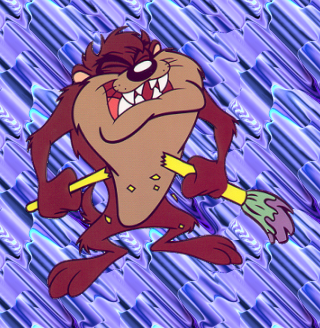
This is the image I started the frame with. I did alpha to selection and saved the selection as a path.

Image

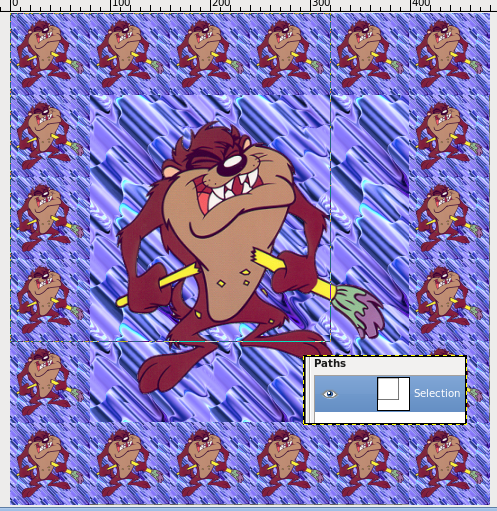
Then I ran the GMIC filter and got these results. This is a screen shot showing the path and the path thumbnail showing the location of the path.

Image

What I finally did was make a new transparent layer and did Path to Selection, filled the selection with the Bucket tool, autocropped the layer and centered it. Then did alpha to selection of the color block and saved it to a path.

I deleted the color block layer and duplicated the results from GMIC. Selection to path and deleted one layer leaving the frame, then inverted the selection and deleted on the other layer leaving the image of Taz.

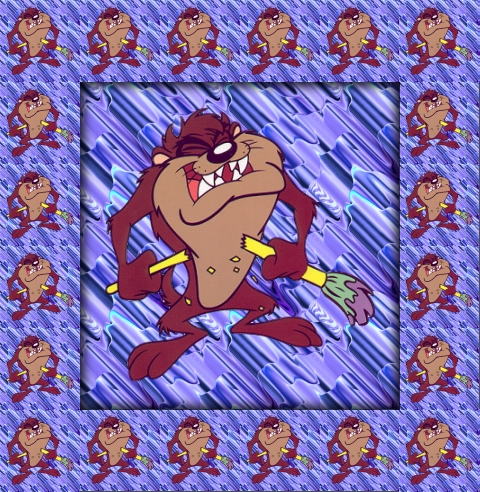
Then I could do a drop shadow on the frame. This is the final result. What I'm looking for is an easier way to center the path.

Image

_________________
Image
World War IV will be fought with sticks and stones. - Albert Einstein


Share on Facebook Share on Twitter Share on Orkut Share on Digg Share on MySpace Share on Delicious Share on Technorati
Top
 Post subject: Re: There's got to be an easier way to center a path
PostPosted: Tue Apr 26, 2011 12:30 pm  (#2) 
Offline
Script Coder
User avatar

Joined: Jul 14, 2010
Posts: 697
Use the alignment tool. it works on paths, too!

http://docs.gimp.org/en/gimp-tool-align.html

-Rob A>

_________________
Image
Fantasy Cartography and Mapping by RobA


Top
 Post subject: Re: There's got to be an easier way to center a path
PostPosted: Tue Apr 26, 2011 12:42 pm  (#3) 
Offline
Retired Staff
User avatar

Joined: May 22, 2008
Posts: 6946
Location: Somewhere in GIMP
RobA wrote:
Use the alignment tool. it works on paths, too!
-Rob A>
I tried it but it won't work. I tried doing the path to selection also but still no joy. It just selects the full-sized image.

Image

_________________
Image
World War IV will be fought with sticks and stones. - Albert Einstein


Top
 Post subject: Re: There's got to be an easier way to center a path
PostPosted: Tue Apr 26, 2011 12:57 pm  (#4) 
Offline
GimpChat Member

Joined: Mar 29, 2011
Posts: 346
Location: Wisconsin
The way I do it is set up center guides (cross-hairs) and then use the move tool to move the path to the center. The center of the path will snap to the guides.

_________________
Image


Top
 Post subject: Re: There's got to be an easier way to center a path
PostPosted: Tue Apr 26, 2011 12:59 pm  (#5) 
Offline
GimpChat Member

Joined: Apr 11, 2010
Posts: 545
Location: In the mini-chat, saying silly things
Doesn't work for me either. Looks like you can align to the path, but not the path itself.

Maybe you could use guides and then move the path with the move tool?

_________________
Image


Top
 Post subject: Re: There's got to be an easier way to center a path
PostPosted: Tue Apr 26, 2011 1:06 pm  (#6) 
Offline
Retired Staff
User avatar

Joined: May 22, 2008
Posts: 6946
Location: Somewhere in GIMP
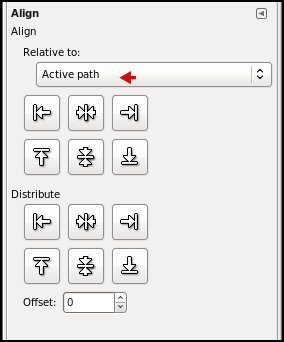
I did find a workaround that works for me. Path to Selection, then in the Alignment tool options choose Relative to Selection (probably wouldn't work on a transparent layer), used the centering buttons and the filled part of the image moved to be centered around the selection. Then Image > Fit Canvas to Layers. That puts everything back into the image window with the path centered.

_________________
Image
World War IV will be fought with sticks and stones. - Albert Einstein


Top
 Post subject: Re: There's got to be an easier way to center a path
PostPosted: Tue Apr 26, 2011 2:22 pm  (#7) 
Offline
Global Moderator
User avatar

Joined: May 16, 2010
Posts: 16262
How about if i do a rain dance will that work? :)

_________________
Image


Top
 Post subject: Re: There's got to be an easier way to center a path
PostPosted: Tue Apr 26, 2011 3:07 pm  (#8) 
Offline
GimpChat Member

Joined: Apr 11, 2010
Posts: 545
Location: In the mini-chat, saying silly things
It'll work for me. Been way too hot and dry here. ;)

_________________
Image


Top
 Post subject: Re: There's got to be an easier way to center a path
PostPosted: Tue Apr 26, 2011 4:21 pm  (#9) 
Offline
Script Coder
User avatar

Joined: Oct 25, 2010
Posts: 4812
What works for me: make the path(s) visible, start Align tool, click on path in image: this adds 4 tiny square that mark its bouding box. Shift-click on other paths to add them. Then hit one of the align/distribute buttons.

PS: Do not confuse paths and strokes. If you have several strokes clicking on any of them selects the whole path.

_________________
Image


Top
 Post subject: Re: There's got to be an easier way to center a path
PostPosted: Tue Apr 26, 2011 6:38 pm  (#10) 
Offline
Script Coder
User avatar

Joined: Apr 23, 2010
Posts: 1553
Location: not from Guildford after all
It seems to me that the heart of the problem is that the G'Mic filter is poorly behaved. A script/plug-in should avoid modifying any more of the image than necessary to accomplish the desired effect. For this case of adding a tiled border around a layer using the contents of the layer as the tile, it would seem to me unnecessary to be repositioning the layer relative to other elements of the image (e.g., paths, channels, or other layers).

While I may be misinterpreting what the G'Mic filter is supposed be doing, I would have you check out this script. It tiles around the active layer with scaled versions of the contents of the selection (or the full layer, if no selection) yet it leaves the original layer intact -- creating a new layer holding the rendered border. If the "Expand as necessary" option is checked, the image may increase in size; regardless, all existing layers, channels, and paths retain their original positioning relative to the original layer. Since the script is well-behaved, there is no need to re-align things after it has executed.

Attachment:
SStaz.png
SStaz.png [ 103.67 KiB | Viewed 6904 times ]

_________________
Any sufficiently primitive technology is indistinguishable from a rock.


Last edited by saulgoode on Wed Apr 27, 2011 6:47 am, edited 2 times in total.

Top
 Post subject: Re: There's got to be an easier way to center a path
PostPosted: Tue Apr 26, 2011 6:56 pm  (#11) 
Offline
Retired Staff
User avatar

Joined: May 22, 2008
Posts: 6946
Location: Somewhere in GIMP
saulgoode wrote:
It seems to me that the heart of the problem is that the G'Mic filter is poorly behaved. A script/plug-in should avoid modifying any more of the image than necessary to accomplish the desired effect. For this case of adding a tiled border around a layer using the contents of the layer as the tile, it would seem to me unnecessary to be repositioning the layer relative to other elements of the image (e.g., paths, channels, or other layers).

While I may be misinterpreting what the G'Mic filter is supposed be doing, I would have you check out this script. It tiles around the active layer with scaled versions of the contents of the selection (or the full layer, if no selection) yet it leaves the original layer intact -- creating a new layer holding the rendered border. If the "Expand as necessary" option is checked, the image may increase in size; regardless, all existing layers, channels, and paths retain their original positioning relative to the original layer. Since the script is well-behaved, there is no need to re-align things after it has executed.
That works perfectly for me. The main image is on a layer by itself and the border on another. Most cool.

Thank you very much, saulgoode.

@ofnuts: Even with the path visible in the image window, when I click the alignment tool and click within the visible path, the alignment squares still are in the corners of the image window, not around the path.

_________________
Image
World War IV will be fought with sticks and stones. - Albert Einstein


Top
 Post subject: Re: There's got to be an easier way to center a path
PostPosted: Tue Apr 26, 2011 7:02 pm  (#12) 
Offline
GimpChat Member
User avatar

Joined: Oct 06, 2010
Posts: 4050
Saulgoode:

Most images are 4:3 ratio so having equal number of tiles sort of distorts the tiling, is there any way you could compensate the script to account for 4:3 ratio? Or am I asking too much? ;)

_________________
"In order to attain the impossible, one must attempt the absurd."
~ Miguel de Cervantes


Top
 Post subject: Re: There's got to be an easier way to center a path
PostPosted: Tue Apr 26, 2011 7:02 pm  (#13) 
Offline
Script Coder
User avatar

Joined: Apr 23, 2010
Posts: 1553
Location: not from Guildford after all
I've had to make a minor fix to the script so that the rendered border layer is properly positioned in the layerstack (beneath the original layer). I have updated the link in my original post.

_________________
Any sufficiently primitive technology is indistinguishable from a rock.


Last edited by saulgoode on Wed Apr 27, 2011 6:47 am, edited 1 time in total.

Top
 Post subject: Re: There's got to be an easier way to center a path
PostPosted: Tue Apr 26, 2011 7:22 pm  (#14) 
Offline
Script Coder
User avatar

Joined: Apr 23, 2010
Posts: 1553
Location: not from Guildford after all
mahvin wrote:
Most images are 4:3 ratio so having equal number of tiles sort of distorts the tiling, is there any way you could compensate the script to account for 4:3 ratio? Or am I asking too much? ;)

If you were to do that, it would be necessary to determine how to handle the (likely) mismatch between either the placement of the tiles or their aspect ratios. I will think about it but it is indeed a more demanding task (and I don't do "aeshetics" very well).

_________________
Any sufficiently primitive technology is indistinguishable from a rock.


Top
 Post subject: Re: There's got to be an easier way to center a path
PostPosted: Tue Apr 26, 2011 7:32 pm  (#15) 
Offline
GimpChat Member
User avatar

Joined: Oct 06, 2010
Posts: 4050
This isn't crucial for me, it was more a question of ease (is it possible to be done with relatively painless effort?). But thanks for thinking about it. :)

_________________
"In order to attain the impossible, one must attempt the absurd."
~ Miguel de Cervantes


Top
 Post subject: Re: There's got to be an easier way to center a path
PostPosted: Tue Apr 26, 2011 7:54 pm  (#16) 
Offline
Global Moderator
User avatar

Joined: May 16, 2010
Posts: 16262
I do so love a well behaved script. :)

_________________
Image


Top
 Post subject: Re: There's got to be an easier way to center a path
PostPosted: Wed Apr 27, 2011 2:17 am  (#17) 
Offline
Script Coder
User avatar

Joined: Oct 25, 2010
Posts: 4812
Oregonian wrote:

@ofnuts: Even with the path visible in the image window, when I click the alignment tool and click within the visible path, the alignment squares still are in the corners of the image window, not around the path.
Don't click "within". Click "on" the path.

_________________
Image


Top
 Post subject: Re: There's got to be an easier way to center a path
PostPosted: Wed Apr 27, 2011 10:01 am  (#18) 
Offline
Retired Staff
User avatar

Joined: May 22, 2008
Posts: 6946
Location: Somewhere in GIMP
Aha! The secret is revealed. Thank you, ofnuts. It does work.

_________________
Image
World War IV will be fought with sticks and stones. - Albert Einstein


Top
 Post subject: Re: There's got to be an easier way to center a path
PostPosted: Wed Apr 27, 2011 1:25 pm  (#19) 
Offline
Global Moderator
User avatar

Joined: May 16, 2010
Posts: 16262
And i didn't even have to do a rain dance. :)

_________________
Image


Top
Post new topic Reply to topic  [ 19 posts ] 

All times are UTC - 5 hours [ DST ]


* Login  


Powered by phpBB3 © phpBB Group