It is currently Mon Sep 21, 2026 12:52 am


All times are UTC - 5 hours [ DST ]


Post new topic Reply to topic  [ 11 posts ] 
Author Message
 Post subject: Problems converting .CR2 files with Gimp-UFraw
PostPosted: Thu Sep 22, 2016 3:30 am  (#1) 
Offline
GimpChat Member
User avatar

Joined: Nov 15, 2014
Posts: 875
GIMP Version: 2.8.14
Operating System: Linux
GIMP Experience: Basic Level

List any relevant plug-ins or scripts:
Gimp-UFraw


Help, fellow Gimpers!

In the last few days if I try to convert .CR2 files from my camera using Gimp-UFraw I am getting very strange results.
The embedded .jpeg from the camera is OK and if I do the conversion using XnView MP it is OK.
An example of each is below. (Scaled for speed of upload.)

I have tried deleting and re-installing Gimp-UFraw and still have the same result.

I am on holiday in Greece with my small laptop, so unable to do comparisons using my desktop computer.

Any help or advice greatly appreciated.

david.


Attachments:
sea.jpg
sea.jpg [ 235.4 KiB | Viewed 4035 times ]
sea1.jpg
sea1.jpg [ 127.44 KiB | Viewed 4035 times ]
Share on Facebook Share on Twitter Share on Orkut Share on Digg Share on MySpace Share on Delicious Share on Technorati
Top
 Post subject: Re: Problems converting .CR2 files with Gimp-UFraw
PostPosted: Thu Sep 22, 2016 5:37 am  (#2) 
Offline
Script Coder
User avatar

Joined: Oct 25, 2010
Posts: 4812
The UFRaw plugin is becoming obsolete. There are many good free alternative these days, such as RawTherapee, Darltable, etc.... Some even exist as Gimp plugins (but I still don't see what you gain from sing them as plugins).

pixls.us is the forum to watch if you are using Open Source software for your photography.

_________________
Image


Top
 Post subject: Re: Problems converting .CR2 files with Gimp-UFraw
PostPosted: Thu Sep 22, 2016 8:54 am  (#3) 
Offline
GimpChat Member
User avatar

Joined: Nov 15, 2014
Posts: 875
@ofnuts,
Many thanks for your reply.

I have used UFraw because it is small and integrated with Gimp (my laptop is fairly antique!)
Do you have any recommendations for a replacement to use on an old laptop?

I find it strange that it should have suddenly stopped working, even after re-installing, when there have been no updates to either UFraw or Gimp - It makes me think that perhaps there is a corrupt file which was not removed by the deletion.

Thanks again,
david.


Top
 Post subject: Re: Problems converting .CR2 files with Gimp-UFraw
PostPosted: Thu Sep 22, 2016 9:26 am  (#4) 
Offline
GimpChat Member

Joined: Mar 04, 2011
Posts: 2615
david wrote:
..I find it strange that it should have suddenly stopped working, even after re-installing, when there have been no updates to either UFraw or Gimp...


Could be an old setting. Reinstall not much use because there is a settings file ~/.config/ufrawrc that will remain. Delete that and see if it makes any difference.

RawTherapee is much better tool but no direct input into Gimp.

If using Ubuntu or one of the derivatives you can try enabling this ppa
https://launchpad.net/~dhor/+archive/ubuntu/myway instructions on the web page
A new updated version nufraw is available there + some others that might do, photivo, fotoxx, delabratory. But it is for 'buntu distros. (Mint etc)


Top
 Post subject: Re: Problems converting .CR2 files with Gimp-UFraw
PostPosted: Thu Sep 22, 2016 11:34 am  (#5) 
Offline
GimpChat Member
User avatar

Joined: Nov 15, 2014
Posts: 875
@rich2005,
Thanks for the info.
I tried deleting the settings file - unfortunately, no difference.

Can I ask you to tell me in simple terms how to download/install nufraw?
As a complete beginner to Linux Ubuntu I am afraid the instructions did not mean much to me!

david.


Top
 Post subject: Re: Problems converting .CR2 files with Gimp-UFraw
PostPosted: Thu Sep 22, 2016 1:02 pm  (#6) 
Offline
GimpChat Member
User avatar

Joined: Nov 16, 2011
Posts: 5127
Location: Metro Vancouver, BC
david wrote:
@rich2005,
Thanks for the info.
I tried deleting the settings file - unfortunately, no difference.

Can I ask you to tell me in simple terms how to download/install nufraw?
As a complete beginner to Linux Ubuntu I am afraid the instructions did not mean much to me!

david.
First get the PPA, you'll need two commands.
sudo add-apt-repository ppa:dhor/myway
sudo apt-get update

First command type
sudo add-apt-repository ppa:dhor/myway
press [enter]
Type password, press [enter]
Press [enter] to continue...
You terminal should look something like this.
Image
At the new command prompt (empty above), type the second command
sudo apt-get update
press [enter]

To install any of the programs from the PPA list
sudo apt-get install [name]
The program name from the PPA list (without brackets).

_________________
Image
Gimp 2.8.18, Linux, median user
Gimp Chat Tutorials Index
Spirit Bear (Kermode)


Top
 Post subject: Re: Problems converting .CR2 files with Gimp-UFraw
PostPosted: Thu Sep 22, 2016 1:11 pm  (#7) 
Offline
GimpChat Member

Joined: Mar 04, 2011
Posts: 2615
Beaten to all the detail by odinbc, however

Before you dump ufraw, the dependencies are
gimp-ufraw
libgtkimageview0
liblensfun-data
liblensfun0

It might be worth re-installing those as well, see if that makes a difference.

nufraw - there is a description here: https://sourceforge.net/projects/nufraw/

To install, in a terminal enter
sudo apt-get install nufraw

lots of output ending in a yes(Y) to install, same for gimp-nufraw
sudo apt-get install gimp-nufraw


The gimp-nufraw plugin interface looks like this: http://imgur.com/m64C1aE

Still think you might be better off with RawTherapee


Top
 Post subject: Re: Problems converting .CR2 files with Gimp-UFraw
PostPosted: Fri Sep 23, 2016 5:40 am  (#8) 
Offline
GimpChat Member
User avatar

Joined: Nov 15, 2014
Posts: 875
Odinbc and rich2005,

Many thanks!!!
I have downloaded nufraw, but only had 5 minutes to try it this morning. (Different time zones!)
First quick try - I haven't found the OK button to convert and when I used the button to send to Gimp I got an error message. Tonight I hope I will have an hour to look properly, but I am on the way to solving my problem.
I only require raw conversion to adjust exposure and, occasionally, white balance when I get it wrong! Everything else I do in Gimp.

Again many thanks for your help and advice.

david.


Top
 Post subject: Re: Problems converting .CR2 files with Gimp-UFraw
PostPosted: Fri Sep 23, 2016 7:34 am  (#9) 
Offline
GimpChat Member

Joined: Mar 04, 2011
Posts: 2615
I found the stand-alone would not send to Gimp either. Guessing a bug.

However using Gimp -> Open, the gimp-nufraw plugin opens a raw image, same interface, ok that and the image opens in Gimp.


Top
 Post subject: Re: Problems converting .CR2 files with Gimp-UFraw
PostPosted: Fri Sep 23, 2016 9:55 am  (#10) 
Offline
GimpChat Member
User avatar

Joined: Nov 16, 2011
Posts: 5127
Location: Metro Vancouver, BC
david wrote:
Odinbc and rich2005,

Many thanks!!!
I have downloaded nufraw, but only had 5 minutes to try it this morning. (Different time zones!)
First quick try - I haven't found the OK button to convert and when I used the button to send to Gimp I got an error message. Tonight I hope I will have an hour to look properly, but I am on the way to solving my problem.
I only require raw conversion to adjust exposure and, occasionally, white balance when I get it wrong! Everything else I do in Gimp.

Again many thanks for your help and advice.

david.
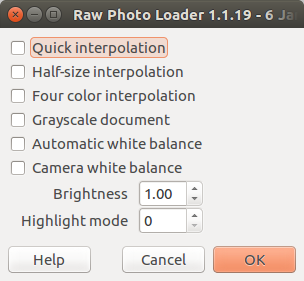
The best way to get RAW images into GIMP is (as ofnuts mentioned), Darktable, Photoflow or RawTherapee, especially since UFRaw is no longer practical. If I need to quickly load a RAW image into GIMP I use dcraw (gimp-dcraw) loader. I normally load NEF, but I've used it with other RAW formats without error. It's rarely used, has minimal options, but does the job.

Image

BTW, excellent GIMP color management and camera raw info at, Nine Degrees Below.

_________________
Image
Gimp 2.8.18, Linux, median user
Gimp Chat Tutorials Index
Spirit Bear (Kermode)


Top
 Post subject: Re: Problems converting .CR2 files with Gimp-UFraw
PostPosted: Fri Sep 23, 2016 11:44 am  (#11) 
Offline
GimpChat Member
User avatar

Joined: Nov 15, 2014
Posts: 875
Back in business!!!
I was getting nowhere with nufraw, so I deleted it and the dependencies for ufraw, then re-installed ufraw.
It has allowed me to process several photos I needed urgently, including creating a "fake" bracketed exposure for a subject where the contrast was extreme.

Slow time I will investigate the better options suggested

I could not have achieved it without the help I have received.

My thanks again.
david.


Top
Post new topic Reply to topic  [ 11 posts ] 

All times are UTC - 5 hours [ DST ]


* Login  


Powered by phpBB3 © phpBB Group