Currently there is no way (at least I don't know of one) to add a Stop to an editable gradient
at a
specific offset percentage specifying
color and
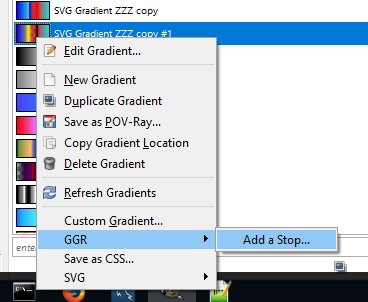
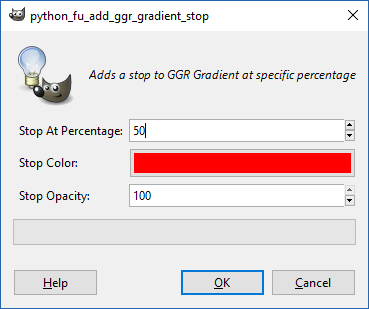
opacitySo this .py script will help with that. (Access by right clicking a gradient <Gradients>/GGR/Add a Stop...)
Release 2.
Attachment:
 edit-gradients.zip [1.75 KiB]
Downloaded 212 times
edit-gradients.zip [1.75 KiB]
Downloaded 212 times
2 functions
1. <Gradients>/GGR/Add a Stop...
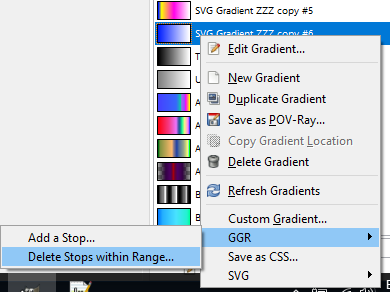
2. <Gradients>/GGR/Delete Stops within Range...
Release 2 Notes: Added "Delete Stops within Range" so that it's similar to <Gradients>/SVG/Delete Stops within Range.
Where it's located.
Options.
I put it under <Gradients>/GGR/Add a Stop...
but it's more like any editable gradient. (Okay for now I think, I want it to be different from <Gradients>/SVG/Add a Stop...)
 Login
Login Register
 Tweets
 FAQ
FAQ Advanced Search








 I thought I discovered a well hidden gem when i went a cross a message on Gimp's Developer's mailing list archive that mentioned dragging and dropping colors onto gradients.

