It is currently Tue Nov 17, 2026 1:00 am


All times are UTC - 5 hours [ DST ]


Post new topic Reply to topic  [ 27 posts ]  Go to page 1, 2  Next
Author Message
 Post subject: glowing pictures?
PostPosted: Thu Apr 28, 2011 11:26 am  (#1) 
Offline
GimpChat Member

Joined: Mar 07, 2011
Posts: 206
can anyone tell me how i can make a glowing picture like any picture i want i want the pic to glow


Share on Facebook Share on Twitter Share on Orkut Share on Digg Share on MySpace Share on Delicious Share on Technorati
Top
 Post subject: Re: glowing pictures?
PostPosted: Thu Apr 28, 2011 11:41 am  (#2) 
Offline
Retired Staff
User avatar

Joined: May 22, 2008
Posts: 6946
Location: Somewhere in GIMP
Take a look at this script. There are example images of what it does on the web page to click and look at.

http://registry.gimp.org/node/17320

Original image here

Image

_________________
Image
World War IV will be fought with sticks and stones. - Albert Einstein


Top
 Post subject: Re: glowing pictures?
PostPosted: Thu Apr 28, 2011 12:05 pm  (#3) 
Offline
GimpChat Member

Joined: Mar 07, 2011
Posts: 206
no i want the glowing pic around the pic not the light effect


Top
 Post subject: Re: glowing pictures?
PostPosted: Thu Apr 28, 2011 12:12 pm  (#4) 
Offline
Retired Staff
User avatar

Joined: May 22, 2008
Posts: 6946
Location: Somewhere in GIMP
Is there an example you can show us?

_________________
Image
World War IV will be fought with sticks and stones. - Albert Einstein


Top
 Post subject: Re: glowing pictures?
PostPosted: Thu Apr 28, 2011 12:32 pm  (#5) 
Offline
GimpChat Member

Joined: Mar 07, 2011
Posts: 206
yeah like this " Image " like that but with gimp i did that pic with photoshop


Top
 Post subject: Re: glowing pictures?
PostPosted: Thu Apr 28, 2011 12:49 pm  (#6) 
Offline
Retired Staff
User avatar

Joined: May 22, 2008
Posts: 6946
Location: Somewhere in GIMP
That's fairly easy to do. Open your render and make sure there is plenty of canvas around it, Image > Canvas Size (you don't want the glow around the head and feet chopped off like in your example.

Make a new transparent layer, move it below your render layer and fill it with the color you want around the render.

Select the render layer, right click the render layer and do Alpha to Selection.

Select > Grow > I used 20 but you may want more or less.

Image

Select > Invert

Select > Feather > I used 20 but again the choice is yours.

Press the delete key.

Image

_________________
Image
World War IV will be fought with sticks and stones. - Albert Einstein


Top
 Post subject: Re: glowing pictures?
PostPosted: Thu Apr 28, 2011 12:56 pm  (#7) 
Offline
GimpChat Member

Joined: Mar 07, 2011
Posts: 206
wheres the grow option at?


Top
 Post subject: Re: glowing pictures?
PostPosted: Thu Apr 28, 2011 12:57 pm  (#8) 
Offline
Retired Staff
User avatar

Joined: May 22, 2008
Posts: 6946
Location: Somewhere in GIMP
In the Image window menu, Select > Grow

_________________
Image
World War IV will be fought with sticks and stones. - Albert Einstein


Top
 Post subject: Re: glowing pictures?
PostPosted: Thu Apr 28, 2011 1:06 pm  (#9) 
Offline
Retired Staff
User avatar

Joined: May 22, 2008
Posts: 6946
Location: Somewhere in GIMP
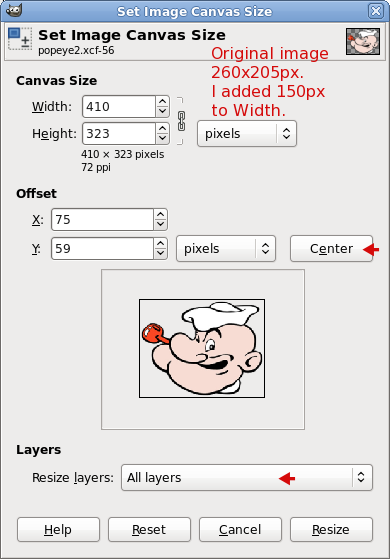
I'm not sure if you know about Canvas Size, so here's a screenshot of the Canvas sizing dialog.

Be sure to click the Center button and the dropdown list by Resize layers and choose All Layers.

Image

_________________
Image
World War IV will be fought with sticks and stones. - Albert Einstein


Top
 Post subject: Re: glowing pictures?
PostPosted: Thu Apr 28, 2011 1:13 pm  (#10) 
Offline
Retired Staff
User avatar

Joined: May 22, 2008
Posts: 6946
Location: Somewhere in GIMP
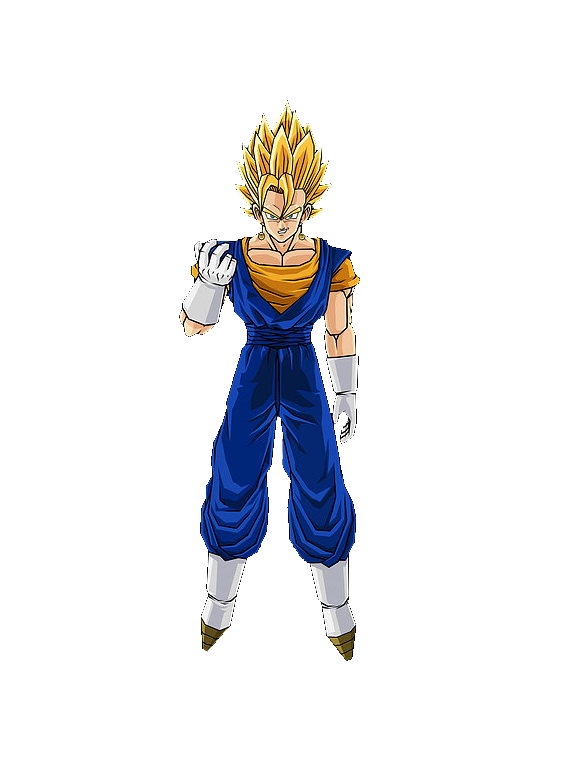
Miguel, your render has unsightly white pixels around it.

If you do alpha to selection, Select > Shrink > 1

Select > Invert

Colors > Color to Alpha (make sure white - ffffff is the color in the color bar), that should get rid of those white pixels.

_________________
Image
World War IV will be fought with sticks and stones. - Albert Einstein


Top
 Post subject: Re: glowing pictures?
PostPosted: Thu Apr 28, 2011 1:17 pm  (#11) 
Offline
GimpChat Member

Joined: Mar 07, 2011
Posts: 206
its ok i did it look Image cool huh


Top
 Post subject: Re: glowing pictures?
PostPosted: Thu Apr 28, 2011 1:20 pm  (#12) 
Offline
Retired Staff
User avatar

Joined: May 22, 2008
Posts: 6946
Location: Somewhere in GIMP
You didn't resize your canvas enough and the top and bottom edges of the feathering are chopped off. That way you don't have a smooth glow all away around your image. Also look at how I said to get rid of those white pixels around the render.

I'm not letting you off easy because you have the potential to become an excellent GIMP user. You are creative and have great ideas.

_________________
Image
World War IV will be fought with sticks and stones. - Albert Einstein


Top
 Post subject: Re: glowing pictures?
PostPosted: Thu Apr 28, 2011 1:38 pm  (#13) 
Offline
GimpChat Member

Joined: Mar 07, 2011
Posts: 206
i dont know how to delete those white things around the render :(


Top
 Post subject: Re: glowing pictures?
PostPosted: Thu Apr 28, 2011 1:40 pm  (#14) 
Offline
Retired Staff
User avatar

Joined: May 22, 2008
Posts: 6946
Location: Somewhere in GIMP
http://gimpchat.com/viewtopic.php?p=20383#p20383

_________________
Image
World War IV will be fought with sticks and stones. - Albert Einstein


Top
 Post subject: Re: glowing pictures?
PostPosted: Thu Apr 28, 2011 2:05 pm  (#15) 
Offline
GimpChat Member

Joined: Mar 07, 2011
Posts: 206
how about this one? Image


Top
 Post subject: Re: glowing pictures?
PostPosted: Thu Apr 28, 2011 2:08 pm  (#16) 
Offline
Retired Staff
User avatar

Joined: May 22, 2008
Posts: 6946
Location: Somewhere in GIMP
Your render looks ever so much better, there are still some white or light pixels around it. You have still chopped off your glow.

Can you post just your render?

_________________
Image
World War IV will be fought with sticks and stones. - Albert Einstein


Top
 Post subject: Re: glowing pictures?
PostPosted: Thu Apr 28, 2011 2:28 pm  (#17) 
Offline
GimpChat Member

Joined: Mar 07, 2011
Posts: 206
Imagewell its better idk how to render anymore :(


Top
 Post subject: Re: glowing pictures?
PostPosted: Thu Apr 28, 2011 2:34 pm  (#18) 
Offline
Retired Staff
User avatar

Joined: May 22, 2008
Posts: 6946
Location: Somewhere in GIMP
Your render looks good now.

When I resized the canvas, I broke the link in it this time and added 200 pixels to both width and height. I clicked the Center button in the Canvas Sizing dialog, chose All Layers in the dropdown (that removes the layer boundary around the render), and OK.

Then I followed my instructions about putting the glow around the render. I used blue because I want YOU to fix the glow in the color around it.

Image

_________________
Image
World War IV will be fought with sticks and stones. - Albert Einstein


Top
 Post subject: Re: glowing pictures?
PostPosted: Thu Apr 28, 2011 2:39 pm  (#19) 
Offline
GimpChat Member
User avatar

Joined: Apr 18, 2011
Posts: 620
Location: New York
here's my efforts.

very easy to do, thanks


Attachments:
880_2382b.png
880_2382b.png [ 153.63 KiB | Viewed 2337 times ]

_________________
Ubuntu 24.04.1, Kernel i686, 6.8.0-52-generic
python3 v3.12.3 ----- GIMP - ver 2.10.38
Top
 Post subject: Re: glowing pictures?
PostPosted: Thu Apr 28, 2011 2:48 pm  (#20) 
Offline
Retired Staff
User avatar

Joined: May 22, 2008
Posts: 6946
Location: Somewhere in GIMP
Excellent! Five gold stars to you. It's simple things like this that help you build your GIMP knowledge and good stepping stones to more complicated images. Good job, Miguel. I knew you could do it. :clap :jumpclap

:yr

_________________
Image
World War IV will be fought with sticks and stones. - Albert Einstein


Top
Post new topic Reply to topic  [ 27 posts ]  Go to page 1, 2  Next

All times are UTC - 5 hours [ DST ]


* Login  


Powered by phpBB3 © phpBB Group