It is currently Mon Nov 16, 2026 8:24 pm


All times are UTC - 5 hours [ DST ]


Post new topic Reply to topic  [ 12 posts ] 
Author Message
 Post subject: Zoom recentres image
PostPosted: Fri Apr 29, 2011 2:38 am  (#1) 
Offline
GimpChat Member

Joined: Apr 29, 2011
Posts: 5
GIMP Version: 2.6.11
Operating System: Linux
OS Version: XP - SP3
GIMP Experience: Advanced Level


*I posted this over at gimptalk.com a few days ago, but it seems to have been down for the last few days.*

I've been using gimp since v0.99, way back in 1998, and zoom in/out (+/-) has always zoomed in on the region of the cursor. I've just installed 2.6.11 from source (it doesn't use gtk+ version 3, btw; it still requires v2) and the behaviour has changed: now +/- always zooms in or out on the centre of the image. The zoom tool still zooms in/out on the cursor, as expected.

Is it a configuration option I've overlooked? I've checked all the help files and online help I can find, but can't find anything. I actually suspect it's an artefact of using GEGL, but (a) haven't confirmed this, and (b) haven't found a way to reinstate the old behaviour.

Anyone got any suggestions?

TIA


Share on Facebook Share on Twitter Share on Orkut Share on Digg Share on MySpace Share on Delicious Share on Technorati
Top
 Post subject: Re: Zoom recentres image
PostPosted: Fri Apr 29, 2011 4:58 am  (#2) 
Offline
Script Coder
User avatar

Joined: Apr 23, 2010
Posts: 1553
Location: not from Guildford after all
fishcustard wrote:
I've just installed 2.6.11 from source (it doesn't use gtk+ version 3, btw; it still requires v2) and the behaviour has changed: now +/- always zooms in or out on the centre of the image. The zoom tool still zooms in/out on the cursor, as expected.

My understanding/recollection on this is that prior to version 2.6, for non-mouse zooms, GIMP would zoom such that the center of the display window (not the image) remained the same. This behavior was modified in 2.6 so that both the center of the image and the center of the display window are taken into account. My speculation is that this is done so that zooming in does not leave the image completely outside the display area.

To my knowledge, this has nothing to do with GEGL and there are no options to configure this to behave differently.

_________________
Any sufficiently primitive technology is indistinguishable from a rock.


Top
 Post subject: Re: Zoom recentres image
PostPosted: Fri Apr 29, 2011 8:33 am  (#3) 
Offline
Retired Staff
User avatar

Joined: May 22, 2008
Posts: 6946
Location: Somewhere in GIMP
fishcustard wrote:
I've been using gimp since v0.99, way back in 1998, and zoom in/out (+/-) has always zoomed in on the region of the cursor. I've just installed 2.6.11 from source (it doesn't use gtk+ version 3, btw; it still requires v2) and the behaviour has changed: now +/- always zooms in or out on the centre of the image. The zoom tool still zooms in/out on the cursor, as expected.
I hope I'm understanding this correctly.

If I put my mouse cursor on a region of the image and use +/- for zooming, it zooms where the cursor is resting on the image for me. I'm using Fedora, Linux, I don't know if the OS makes a difference.

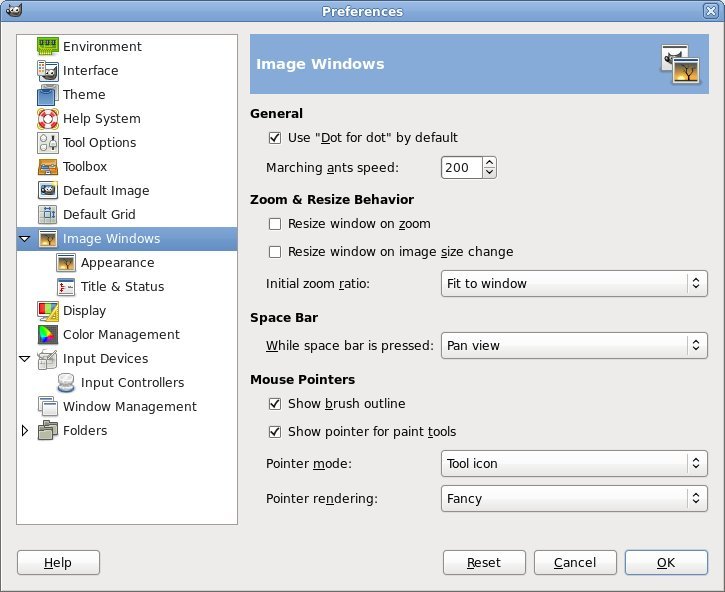
I looked in Edit > Preferences > Image Windows and these are the settings I have in there.

Image

_________________
Image
World War IV will be fought with sticks and stones. - Albert Einstein


Top
 Post subject: Re: Zoom recentres image
PostPosted: Fri Apr 29, 2011 8:44 am  (#4) 
Offline
GimpChat Member
User avatar

Joined: Apr 09, 2011
Posts: 1764
ok well I find with the cursor over the image it will zoom in, but I have to use the - key to zoom out...using mac OS 10.6.7 and GIMP 2.6.11

*shrugs*


Top
 Post subject: Re: Zoom recentres image
PostPosted: Fri Apr 29, 2011 8:51 am  (#5) 
Offline
Retired Staff
User avatar

Joined: May 22, 2008
Posts: 6946
Location: Somewhere in GIMP
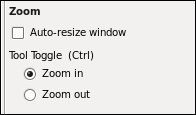
Akky, if you select the Zoom tool :zoom and look at the options in the tool box, to use the mouse cursor to zoom out you need to select the Zoom out option.

Also, if you want to revert to the original zoom of the image press the `(accent key) or press 1 for 100% zoom.

Image

_________________
Image
World War IV will be fought with sticks and stones. - Albert Einstein


Top
 Post subject: Re: Zoom recentres image
PostPosted: Fri Apr 29, 2011 10:45 am  (#6) 
Offline
GimpChat Member

Joined: Apr 29, 2011
Posts: 5
Oregonian wrote:
If I put my mouse cursor on a region of the image and use +/- for zooming, it zooms where the cursor is resting on the image for me. I'm using Fedora, Linux, I don't know if the OS makes a difference.

I looked in Edit > Preferences > Image Windows and these are the settings I have in there.


What version of gimp are you using, Oregonian? I've tried this in several versions between 2.6.4 and 2.6.11, on several different OSs, always with the same result (the image is recentred, and the sliders on the side and bottom are moved to the middle of the bar.) Any earlier version, I get the behaviour I expect. My Edit->Preferences->Image Windows panel has the two "resize" options checked, but even if I reconfigure it to be identical to yours I still get the problem.

I had a look at the NEWS files in the source tree, and it refers to bug #556603: "Zoom region always zooms in center of image". It says it was fixed; perhaps I've stumbled upon a repeat of the bug.


saulgoode, I'm finding more and more evidence that I was wrong about it being GEGL, but the problem does persist.


Top
 Post subject: Re: Zoom recentres image
PostPosted: Fri Apr 29, 2011 10:53 am  (#7) 
Offline
Retired Staff
User avatar

Joined: May 22, 2008
Posts: 6946
Location: Somewhere in GIMP
My gimp version is 2.6.11

You may need to close and re-open gimp for those settings to "take."

_________________
Image
World War IV will be fought with sticks and stones. - Albert Einstein


Top
 Post subject: Re: Zoom recentres image
PostPosted: Fri Apr 29, 2011 11:06 am  (#8) 
Offline
Global Moderator
User avatar

Joined: May 16, 2010
Posts: 16272
Mine works just like its supposed to - zooms in on the mouse location.
I am using 2.6.11 windows xp
Mine is setup dot for dot also. :)

_________________
Image


Top
 Post subject: Re: Zoom recentres image
PostPosted: Sat Apr 30, 2011 5:30 am  (#9) 
Offline
GimpChat Member

Joined: Apr 29, 2011
Posts: 5
I've looked a bit further into this, and it now appears that if "Resize Image on Zoom" is checked (I have it checked by default) zooming in/out with +/- always recentres the image. Zooming on or out with the zoom tool, though, always zooms to where you click. I verified that this behaviour (+/- zoom) is different in 2.6.x to anything earlier (I didn't check 2.5.x, only 2.4.x and earlier.) <edit> I should add that if "Resize Image on Zoom" is not checked, the image zooms around the cursor, as expected.</edit>

Is this what you expect? I'm thinking it qualifies as a bug, although it probably should have been reported a lot sooner.


Top
 Post subject: Re: Zoom recentres image
PostPosted: Sat Apr 30, 2011 6:08 am  (#10) 
Offline
GimpChat Member
User avatar

Joined: Apr 09, 2011
Posts: 1764
Oregonian wrote:
Akky, if you select the Zoom tool :zoom and look at the options in the tool box, to use the mouse cursor to zoom out you need to select the Zoom out option.

Also, if you want to revert to the original zoom of the image press the `(accent key) or press 1 for 100% zoom.

Image


Gotcha!! LOL why didnt I do that huh??? Silly me!!


Top
 Post subject: Re: Zoom recentres image
PostPosted: Sat Apr 30, 2011 9:33 am  (#11) 
Offline
Retired Staff
User avatar

Joined: May 22, 2008
Posts: 6946
Location: Somewhere in GIMP
Well, I've been caught up short in the Tool Options too. When I click a tool, my focus is then on the image and I don't look at the Tool Options. I keep having to remind myself to look outside the box (image window) and look at the Tool Options box.

_________________
Image
World War IV will be fought with sticks and stones. - Albert Einstein


Top
 Post subject: Re: Zoom recentres image
PostPosted: Sat Apr 30, 2011 10:54 pm  (#12) 
Offline
GimpChat Member

Joined: Apr 29, 2011
Posts: 5
OK, well I should have looked at BugZilla before I posted here. It's bug #568150

Thanks for your comments, everyone.


Top
Post new topic Reply to topic  [ 12 posts ] 

All times are UTC - 5 hours [ DST ]


* Login  


Powered by phpBB3 © phpBB Group