It is currently Fri Sep 25, 2026 12:07 pm


All times are UTC - 5 hours [ DST ]


Post new topic Reply to topic  [ 16 posts ] 
Author Message
 Post subject: Creating a Seamless Camouflage in Gimp
PostPosted: Mon Oct 17, 2016 12:43 am  (#1) 
Offline
GimpChat Member

Joined: Oct 16, 2016
Posts: 7
GIMP Version: 2.8.14
Operating System: Windows
OS Version: Windows 10
GIMP Experience: Basic Level


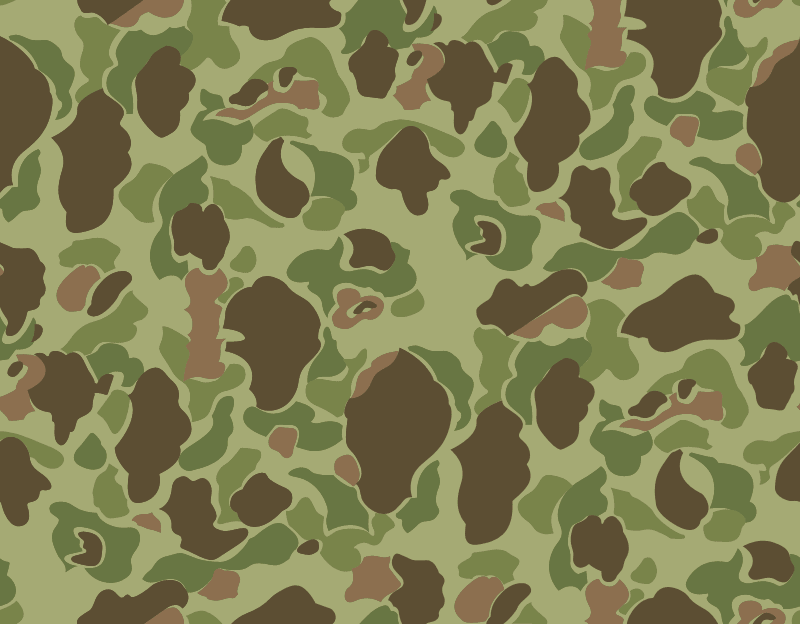
Hi, I've been trying to create an accurate texture of an old camouflage called P42 that looks like this. (I plan on fixing the artifacting in a new attempt.)
Image
The end result I got was:
Non Seamless:
Image
Seamless:
Image

My question is about the second one. Is seamless supposed to look like this or have I done something wrong. If I have, what can I do to fix it? Thanks for any help.


Share on Facebook Share on Twitter Share on Orkut Share on Digg Share on MySpace Share on Delicious Share on Technorati
Top
 Post subject: Re: Creating a Seamless Camouflage in Gimp
PostPosted: Mon Oct 17, 2016 1:16 am  (#2) 
Offline
Script Coder
User avatar

Joined: May 07, 2014
Posts: 4554
Location: Canada
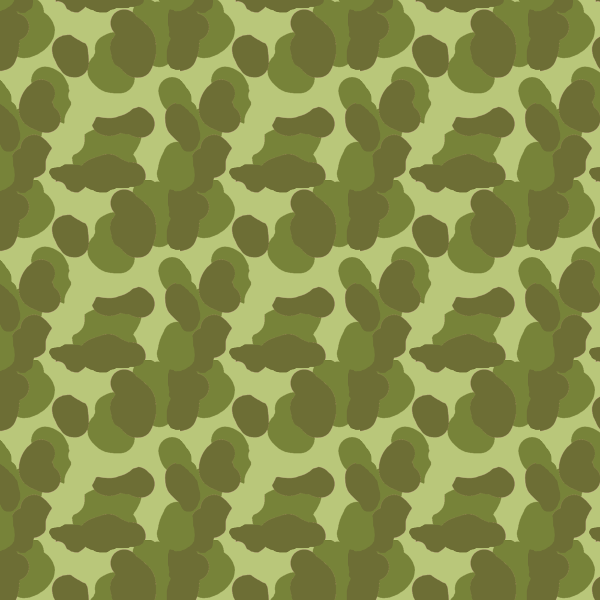
Here's yours when used as a pattern
your non seamless used pattern.
Image
your seamless used as pattern.
Image

And here I played with your non seamless and manually make it seamless by drawing likely extension of shapes over the edges and cutting and pasting the extra parts on to it's opposite sides so that it is seamless.
Image

when used as pattern
Image

_________________
Image
Visualize your and others dreams coming true.


Top
 Post subject: Re: Creating a Seamless Camouflage in Gimp
PostPosted: Mon Oct 17, 2016 2:32 am  (#3) 
Offline
GimpChat Member
User avatar

Joined: Oct 06, 2010
Posts: 4050
The second version is diffusion and its just a blend of shapes meshed together and not what most people are really looking for. Patched base makes everything looked "squared" on a larger canvas, also not what people are actually wanting. There are better methods at obtaining the camo look using seamless software like Seamless Studio (and others), unfortunately, it involves creating the actual camo shapes for the pattern, pretty much like Tin has done above. If you create the shapes as brushes, you can easily do what Tin has done and without the use of any other software.

I have a tutorial on using gradients and palettes to recolor your camo designs quickly, located here: http://www.mahvin.com/2010/02/gimp-tuto ... sited.html

_________________
"In order to attain the impossible, one must attempt the absurd."
~ Miguel de Cervantes


Top
 Post subject: Re: Creating a Seamless Camouflage in Gimp
PostPosted: Mon Oct 17, 2016 2:36 am  (#4) 
Offline
GimpChat Member

Joined: Sep 20, 2016
Posts: 293
after a bit of google-magic, i came up with this seamless pattern:

http://meisaizukan.web.fc2.com/wallpape ... mc-01L.gif


Top
 Post subject: Re: Creating a Seamless Camouflage in Gimp
PostPosted: Mon Oct 17, 2016 3:05 am  (#5) 
Offline
Script Coder
User avatar

Joined: May 07, 2014
Posts: 4554
Location: Canada
mahvin wrote:
The second version is diffusion and its just a blend of shapes meshed together and not what most people are really looking for. Patched base makes everything looked "squared" on a larger canvas, also not what people are actually wanting. There are better methods at obtaining the camo look using seamless software like Seamless Studio (and others), unfortunately, it involves creating the actual camo shapes for the pattern, pretty much like Tin has done above. If you create the shapes as brushes, you can easily do what Tin has done and without the use of any other software.

I have a tutorial on using gradients and palettes to recolor your camo designs quickly, located here: http://www.mahvin.com/2010/02/gimp-tuto ... sited.html


That's a sweet tutorial. Thanks I learned something ....Tilable clouds.

_________________
Image
Visualize your and others dreams coming true.


Top
 Post subject: Re: Creating a Seamless Camouflage in Gimp
PostPosted: Mon Oct 17, 2016 3:24 am  (#6) 
Offline
GimpChat Member

Joined: Sep 20, 2016
Posts: 293
Tweaked the colours and made it into a pattern.

Attachment:
Duckhunter.pat [1.9 MiB]
Downloaded 247 times


Attachments:
Duckhunter.jpg
Duckhunter.jpg [ 91.95 KiB | Viewed 8867 times ]
Top
 Post subject: Re: Creating a Seamless Camouflage in Gimp
PostPosted: Mon Oct 17, 2016 3:26 am  (#7) 
Offline
GimpChat Member
User avatar

Joined: Sep 24, 2010
Posts: 12846
There's plenty of camo script-fus out there. Don't believe I use the one below, but it looks cool too. :)

http://registry.gimp.org/node/24331

_________________
Lyle

Psalm 109:8

Image


Top
 Post subject: Re: Creating a Seamless Camouflage in Gimp
PostPosted: Mon Oct 17, 2016 3:46 am  (#8) 
Offline
GimpChat Member

Joined: Mar 04, 2011
Posts: 2615
lylejk wrote:
There's plenty of camo script-fus out there. Don't believe I use the one below, but it looks cool too. :)

http://registry.gimp.org/node/24331


There is one already built into Gimp - been there for a long time. Makes a seamless tile.
File -> Create -> Patterns -> Camouflage
Attachment:
camo.jpg
camo.jpg [ 21.78 KiB | Viewed 8861 times ]


Top
 Post subject: Re: Creating a Seamless Camouflage in Gimp
PostPosted: Mon Oct 17, 2016 7:51 am  (#9) 
Offline
Global Moderator
User avatar

Joined: May 16, 2010
Posts: 16175
There is also a script that cuts the edges and moves them to create seamless textures from an open texture file.
I can not for the life of me remember the name of it though.
This one maybe? http://registry.gimp.org/node/25653

Rob A. has one named rrMakeSeamless. But that one blends also i believe.


Top
 Post subject: Re: Creating a Seamless Camouflage in Gimp
PostPosted: Mon Oct 17, 2016 8:37 am  (#10) 
Offline
Global Moderator
User avatar

Joined: May 16, 2010
Posts: 16175
Filter Forge 6 Pro. :) Use it however you wish to.

Seamless camo fabric.
Image


Top
 Post subject: Re: Creating a Seamless Camouflage in Gimp
PostPosted: Mon Oct 17, 2016 8:50 am  (#11) 
Offline
Global Moderator
User avatar

Joined: May 16, 2010
Posts: 16175
Image


Top
 Post subject: Re: Creating a Seamless Camouflage in Gimp
PostPosted: Mon Oct 17, 2016 8:57 am  (#12) 
Offline
Global Moderator
User avatar

Joined: Apr 01, 2012
Posts: 8471
Location: On the other side of your screen
rich2005 wrote:
lylejk wrote:
There's plenty of camo script-fus out there. Don't believe I use the one below, but it looks cool too. :)

http://registry.gimp.org/node/24331


There is one already built into Gimp - been there for a long time. Makes a seamless tile.
File -> Create -> Patterns -> Camouflage
Attachment:
camo.jpg

Was thinking about this too. Amazed no one brought it up before you did.

_________________
Image
Free Fun Photo Editing & resources
Poems from the Lord
Gimp Newby
Gimp version 3.2.4 and GMIC-Qt 4.0.2 OS :- Windows 10 Home 64


Top
 Post subject: Re: Creating a Seamless Camouflage in Gimp
PostPosted: Mon Oct 17, 2016 1:27 pm  (#13) 
Offline
Script Coder
User avatar

Joined: May 07, 2014
Posts: 4554
Location: Canada
I thought Mahvin's technique of using Tilable Solid Noise was more interesting then GIMP's Create New Camouflage.
I scripted it here -> Mahvin Camouflage Script for GIMP

_________________
Image
Visualize your and others dreams coming true.


Last edited by trandoductin on Wed Nov 28, 2018 12:53 pm, edited 1 time in total.

Top
 Post subject: Re: Creating a Seamless Camouflage in Gimp
PostPosted: Mon Oct 17, 2016 4:26 pm  (#14) 
Offline
Script Coder
User avatar

Joined: Oct 25, 2010
Posts: 4812
trandoductin wrote:
And here I played with your non seamless and manually make it seamless by drawing likely extension of shapes over the edges and cutting and pasting the extra parts on to it's opposite sides so that it is seamless.


viewtopic.php?f=9&t=7825 :mrgreen:

_________________
Image


Top
 Post subject: Re: Creating a Seamless Camouflage in Gimp
PostPosted: Mon Oct 17, 2016 5:14 pm  (#15) 
Offline
Script Coder
User avatar

Joined: May 07, 2014
Posts: 4554
Location: Canada
ofnuts wrote:
trandoductin wrote:
And here I played with your non seamless and manually make it seamless by drawing likely extension of shapes over the edges and cutting and pasting the extra parts on to it's opposite sides so that it is seamless.


viewtopic.php?f=9&t=7825 :mrgreen:


Oh that's a good one. Thanks ofnuts :cool
ofnuts wrote:
...
you will be given an occasion to play a low-cost equivalent to Rubik's cube with you own images..

:hehe

_________________
Image
Visualize your and others dreams coming true.


Top
 Post subject: Re: Creating a Seamless Camouflage in Gimp
PostPosted: Fri Oct 28, 2016 4:02 pm  (#16) 
Offline
GimpChat Member

Joined: Oct 16, 2016
Posts: 7
Thanks everybody, this has been really helpful. I've been trying for a long time to get templates to look seamless like all of your examples. I'll definitely be looking through and trying out all of the plugins and tutorials suggested here.


Top
Post new topic Reply to topic  [ 16 posts ] 

All times are UTC - 5 hours [ DST ]


* Login  


Powered by phpBB3 © phpBB Group