It is currently Thu Nov 12, 2026 7:35 am


All times are UTC - 5 hours [ DST ]


Post new topic Reply to topic  [ 116 posts ]  Go to page Previous  1, 2, 3, 4, 5, 6  Next
Author Message
 Post subject: Re: Can anybody tell me what I'm doing wrong?
PostPosted: Wed Jul 27, 2016 12:46 am  (#61) 
Offline
GimpChat Member

Joined: Sep 10, 2015
Posts: 112
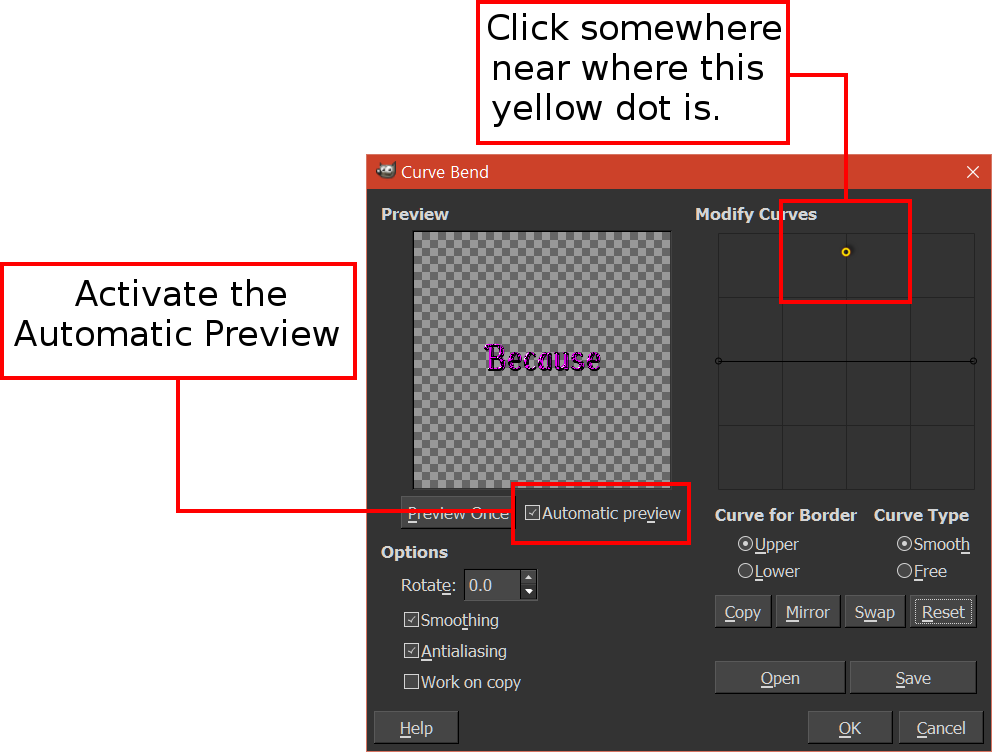
Thanks, but I think I am launching the filter having an image (the image appears as the "Because" in the left side box).

If someone could just tell me how to hot up the "Modify Curves" box in the Curves filter... I just can't find any way to turn it on. If you could tell me the specific steps (I am probably not doing something very simple, one of those everyone-knows-but-me things) to get that box turned on I would appreciate it.

Or if someone has a "curve-an-image" plug-in, I would really like to have it.

I have downloaded several Gimp plug-ins that appear as SCM files that Windows 10 refuses to open. I think somehow somewhere there's got to be someway to open a Gimp SCM file, it's just a matter of convincing Windows 10 to do it. (I've found stuff to download on the internet that says it can, but not from any source I would trust.)


Top
 Post subject: Re: Can anybody tell me what I'm doing wrong?
PostPosted: Wed Jul 27, 2016 12:49 am  (#62) 
Offline
GimpChat Member
User avatar

Joined: Jan 20, 2013
Posts: 14835
Location: roma, italy
Send me (post here) your source .png image

_________________
"Where am I ?"


Top
 Post subject: Re: Can anybody tell me what I'm doing wrong?
PostPosted: Wed Jul 27, 2016 12:51 am  (#63) 
Offline
GimpChat Member
User avatar

Joined: Jan 20, 2013
Posts: 14835
Location: roma, italy
Maybe I discovered your fault: do you have the transparent BG selected when you launch the filter?

_________________
"Where am I ?"


Top
 Post subject: Re: Can anybody tell me what I'm doing wrong?
PostPosted: Wed Jul 27, 2016 1:04 am  (#64) 
Offline
GimpChat Member
User avatar

Joined: Jan 20, 2013
Posts: 14835
Location: roma, italy
looking again into your previous post, I see a "not responding" message coming out from the filter: does this happen always on your PC using also other images as source?

_________________
"Where am I ?"


Top
 Post subject: Re: Can anybody tell me what I'm doing wrong?
PostPosted: Wed Jul 27, 2016 1:41 am  (#65) 
Offline
GimpChat Member

Joined: Sep 10, 2015
Posts: 112
The "not responding" was just from the screenshot. Here's the image I am trying to curve. I 've tried clicking on each layer, flattening it, nothing gets that Modify Curve box to hot up.

On a better note, I figured out how to open the SCM files: all I had to do was tell my computer to open them in Notepad, not Paint. Now if I could just find where some of them went to in Gimp...


Attachments:
55 Because.xcf [186.08 KiB]
Downloaded 98 times
Top
 Post subject: Re: Can anybody tell me what I'm doing wrong?
PostPosted: Wed Jul 27, 2016 3:05 am  (#66) 
Offline
Administrator
User avatar

Joined: Aug 10, 2012
Posts: 14268
Location: Native to NYC living in Arizona, Gimp 2.8 - 3.0, Win 11 PC.
I was wondering if you tried to use the curve bend interface, as if it was functioning?

I'm thinking,
that the curve line used to manipulate the bend is actually present,
but can't be seen.

Try this as an experiment,
if you haven't yet tried this already.

Image

When you do what is in the screenshot above,
dose your image bend?

Image

_________________
Image
"A wise man learns more from a foolish question than a fool can learn from a wise answer"
Image


Top
 Post subject: Re: Can anybody tell me what I'm doing wrong?
PostPosted: Wed Jul 27, 2016 3:54 am  (#67) 
Offline
GimpChat Member

Joined: Sep 10, 2015
Posts: 112
The only thing I could get to click on was the Automatic Preview. There's nothing for me to click in the right hand Modify Curve box, but I clicked the black all over the place just in case. Nothing.


Attachments:
Screenshot (57).png
Screenshot (57).png [ 111.55 KiB | Viewed 1864 times ]
Top
 Post subject: Re: Can anybody tell me what I'm doing wrong?
PostPosted: Wed Jul 27, 2016 4:00 am  (#68) 
Offline
Administrator
User avatar

Joined: Aug 10, 2012
Posts: 14268
Location: Native to NYC living in Arizona, Gimp 2.8 - 3.0, Win 11 PC.
newtogimp wrote:
The only thing I could get to click on was the Automatic Preview. There's nothing for me to click in the right hand Modify Curve box, but I clicked the black all over the place just in case. Nothing.

Can you change your Gimp theme back to the default theme,
to see if this makes any difference?

Also can you disable single window mode?

_________________
Image
"A wise man learns more from a foolish question than a fool can learn from a wise answer"
Image


Top
 Post subject: Re: Can anybody tell me what I'm doing wrong?
PostPosted: Wed Jul 27, 2016 4:23 am  (#69) 
Offline
GimpChat Member

Joined: Sep 10, 2015
Posts: 112
I'm sorry, but I don't know what a "Gimp theme" is. If I changed it to default would I lose all my plugs-ins, etc.?

I checked my Windows box, my single window isn't turned on.

This is the most I can get with the Curve Filter (I don't know what to do with it, though I have a sneaky suspicion I know why Gimp is calling it the "dummy" layer).


Attachments:
Screenshot (59).png
Screenshot (59).png [ 156.36 KiB | Viewed 1858 times ]
Top
 Post subject: Re: Can anybody tell me what I'm doing wrong?
PostPosted: Wed Jul 27, 2016 4:45 am  (#70) 
Offline
GimpChat Member

Joined: Mar 04, 2011
Posts: 2629
The clue is in your screenshot: Using one of the Windoze High Visibility themes.

Black-on-black does not show

Go back to a more regular Windows theme.

Attachment:
hi-vis.jpg
hi-vis.jpg [ 195.44 KiB | Viewed 1969 times ]


Top
 Post subject: Re: Can anybody tell me what I'm doing wrong?
PostPosted: Wed Jul 27, 2016 5:15 am  (#71) 
Offline
GimpChat Member

Joined: Sep 10, 2015
Posts: 112
THANK YOU!!!!!!!!!


Top
 Post subject: Re: Can anybody tell me what I'm doing wrong?
PostPosted: Wed Oct 26, 2016 11:09 pm  (#72) 
Offline
GimpChat Member

Joined: Sep 10, 2015
Posts: 112
I am trying to "extract hair" (taking a person with a head of hair, lifting her from her background, and putting her against another background). I am following this video tutorial:
http://www.bing.com/videos/search?q=gim ... &FORM=VIRE

My problem is that when I go to Colors>Curves I can't adjust it so I get a white background like the tutorial gets. The best I can get is a black background. Can anyone tell me how to get that white background in Colors>Curves like the tutorial is getting? Thank you.


Top
 Post subject: Re: Can anybody tell me what I'm doing wrong?
PostPosted: Thu Oct 27, 2016 12:20 am  (#73) 
Offline
Script Coder
User avatar

Joined: May 07, 2014
Posts: 4561
Location: Canada
What is your picture?
White hair on black background or black hair on white background would work either way you'll just have invert colors when after you apply it as a mask.

EDIT: The Color->Curves step, you just want different contrast between your hair and your background it doesn't matter if the background is black or white as long your hair is the opposite so that it stands out from background. Depending on the image, your background can be pushed to white or black whichever works.

_________________
Image
Visualize your and others dreams coming true.


Top
 Post subject: Re: Can anybody tell me what I'm doing wrong?
PostPosted: Thu Oct 27, 2016 2:37 am  (#74) 
Offline
GimpChat Member

Joined: Sep 10, 2015
Posts: 112
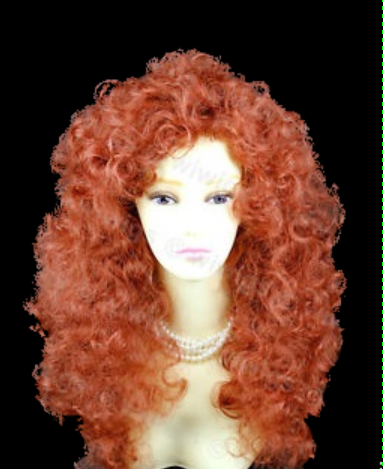
Thank you. I'm totally lost. All I want to do is lift the wig out of this picture and paste it onto another picture. I know to Add Alpha Channel>make a duplicate layer>Colors>Curves ... and then I'm lost, nothing works like in the tutorial and I can't find another tutorial that gives me what I want. :gaah


Attachments:
frizzy red wig.jpg
frizzy red wig.jpg [ 39.48 KiB | Viewed 1927 times ]
Top
 Post subject: Re: Can anybody tell me what I'm doing wrong?
PostPosted: Thu Oct 27, 2016 3:09 am  (#75) 
Offline
GimpChat Member
User avatar

Joined: Jan 20, 2013
Posts: 14835
Location: roma, italy
Best tool I know so far is G'MIC Foreground Extract interactive.
Unfortunately it seems no more working on the last update (or it's just me...)

Edit: I get always this sequence of messages when trying to finish (escape)
----------------------------------------------------------------------------------------------------------------------------
GIMP Error
Calling error for procedure 'gimp-drawable-sub-thumbnail':
Procedure 'gimp-drawable-sub-thumbnail' has been called with an invalid ID for argument 'drawable'. Most likely a plug-in is trying to work on a layer that doesn't exist any longer.

GIMP Error
Calling error for procedure 'gimp-drawable-sub-thumbnail':
Procedure 'gimp-drawable-sub-thumbnail' has been called with an invalid ID for argument 'drawable'. Most likely a plug-in is trying to work on a layer that doesn't exist any longer.

GIMP Error
Calling error for procedure 'gimp-drawable-sub-thumbnail':
Procedure 'gimp-drawable-sub-thumbnail' has been called with an invalid ID for argument 'drawable'. Most likely a plug-in is trying to work on a layer that doesn't exist any longer.

_________________
"Where am I ?"


Top
 Post subject: Re: Can anybody tell me what I'm doing wrong?
PostPosted: Thu Oct 27, 2016 7:11 am  (#76) 
Offline
Global Moderator
User avatar

Joined: May 16, 2010
Posts: 16256
Open image
add alpha channel
duplicate
on duplicated layer run colors>curves until background is almost all black
now desturate the layer Colors>desaturate (lightness seems best)
now you need to fill in the entire LIGHT area with white
select the bottom layer - right click add layer mask (white) full opacity
select the top layer Edit>Cut select the layer mask on bottom layer Edit Paste - anchor the layer

Image

_________________
Image


Top
 Post subject: Re: Can anybody tell me what I'm doing wrong?
PostPosted: Thu Oct 27, 2016 7:19 am  (#77) 
Offline
Global Moderator
User avatar

Joined: May 16, 2010
Posts: 16256
Touched up a bit and added to a black bg.

Image

_________________
Image


Top
 Post subject: Re: Can anybody tell me what I'm doing wrong?
PostPosted: Thu Oct 27, 2016 10:36 am  (#78) 
Offline
Script Coder
User avatar

Joined: May 07, 2014
Posts: 4561
Location: Canada
here's my try


Attachments:
doll_wig.png
doll_wig.png [ 121.48 KiB | Viewed 1907 times ]

_________________
Image
Visualize your and others dreams coming true.
Top
 Post subject: Re: Can anybody tell me what I'm doing wrong?
PostPosted: Thu Oct 27, 2016 7:05 pm  (#79) 
Offline
GimpChat Member

Joined: Sep 10, 2015
Posts: 112
Thank you but I just can't seem to get it.

Add Alpha channel
Duplicate
On duplicate layer (I would think this is the bottom layer, but since nothing happens in the curves box when the bottom layer is selected, I guess the "duplicate layer" is actually the top layer?)>Colors>curves>turn to blackish>OK
On duplicate layer (still top layer?):Color>desaturate (lightness)
Fill in entire white area (which would be her face)
R click bottom layer (??)> Add layer mask (white)
Cl top layer: Edit>Cut
Cl layer mask on bottom layer (?? there's only one layer left): Edit>Paste

Maybe there should be an Invert in there somewhere? I've tried experimenting, gone down in flames. :(


Attachments:
3 frizzy red wig.jpg
3 frizzy red wig.jpg [ 26.04 KiB | Viewed 1889 times ]
Top
 Post subject: Re: Can anybody tell me what I'm doing wrong?
PostPosted: Thu Oct 27, 2016 8:22 pm  (#80) 
Offline
Administrator
User avatar

Joined: Aug 10, 2012
Posts: 14268
Location: Native to NYC living in Arizona, Gimp 2.8 - 3.0, Win 11 PC.
newtogimp wrote:
Thank you but I just can't seem to get it.

Add Alpha channel
Duplicate
On duplicate layer (I would think this is the bottom layer, but since nothing happens in the curves box when the bottom layer is selected, I guess the "duplicate layer" is actually the top layer?)>Colors>curves>turn to blackish>OK
On duplicate layer (still top layer?):Color>desaturate (lightness)
Fill in entire white area (which would be her face)
R click bottom layer (??)> Add layer mask (white)
Cl top layer: Edit>Cut
Cl layer mask on bottom layer (?? there's only one layer left): Edit>Paste

Maybe there should be an Invert in there somewhere? I've tried experimenting, gone down in flames. :(

The background of your wig image is mostly black and can't be change to white using color curves.
If you notice,
the image used in the tutorial,
has a lighter background then the over all foreground.

You would need to use color curves,
as described it the tutorial,
but in reverse.
So your background would be mostly black.
Painting anything of the background black,
that was not made darker by color curves.
Then panting everything else,
or the foreground white.
To come up with the proper image to use as a layer mask.

Your image would look something like in the thumbnail below.

Image

_________________
Image
"A wise man learns more from a foolish question than a fool can learn from a wise answer"
Image


Top
Post new topic Reply to topic  [ 116 posts ]  Go to page Previous  1, 2, 3, 4, 5, 6  Next

All times are UTC - 5 hours [ DST ]


* Login  


Powered by phpBB3 © phpBB Group