It is currently Tue Nov 10, 2026 6:49 pm


All times are UTC - 5 hours [ DST ]


Post new topic Reply to topic  [ 8 posts ] 
Author Message
 Post subject: Newbie help required
PostPosted: Wed Nov 02, 2016 4:58 am  (#1) 
Offline
GimpChat Member

Joined: Oct 28, 2016
Posts: 6
GIMP Version: 2.8.14
Operating System: Windows
GIMP Experience: New User


I have a shot of a floor plan of a furnished room from an overhead camera system. From this still I need to produce a black and white "mask" with any open areas of floor being white and all other items (walls, furniture etc.) being black. I think this would be a simple task for an experienced user but I have no idea where to start. Any tips would be very much appreciated.


Share on Facebook Share on Twitter Share on Orkut Share on Digg Share on MySpace Share on Delicious Share on Technorati
Top
 Post subject: Re: Newbie help required
PostPosted: Wed Nov 02, 2016 6:09 am  (#2) 
Offline
GimpChat Member

Joined: Sep 23, 2016
Posts: 317
Difficult to say without seeing the image. Much depends on how different the colour of the floor is from the rest of the room. If the floor colour is distinctive a simple select by colour may be possilbe. If the colours tend to blend into each other something like painting on a transparent layer may be needed. Or using paths to make a selection. Can you make the image available?


Top
 Post subject: Re: Newbie help required
PostPosted: Wed Nov 02, 2016 7:09 am  (#3) 
Offline
GimpChat Member

Joined: Oct 28, 2016
Posts: 6
Hi,

Tried uploading the png file but got message "extension is not allowed". There are many different tones in the room including several over the floor area. The image itself is B&W. I had thought that maybe painting in conjunction with selection + filling might work but I have virtually no experience in image manipulation so struggling a wee bit!


Top
 Post subject: Re: Newbie help required
PostPosted: Wed Nov 02, 2016 7:26 am  (#4) 
Offline
Global Moderator
User avatar

Joined: May 16, 2010
Posts: 16252
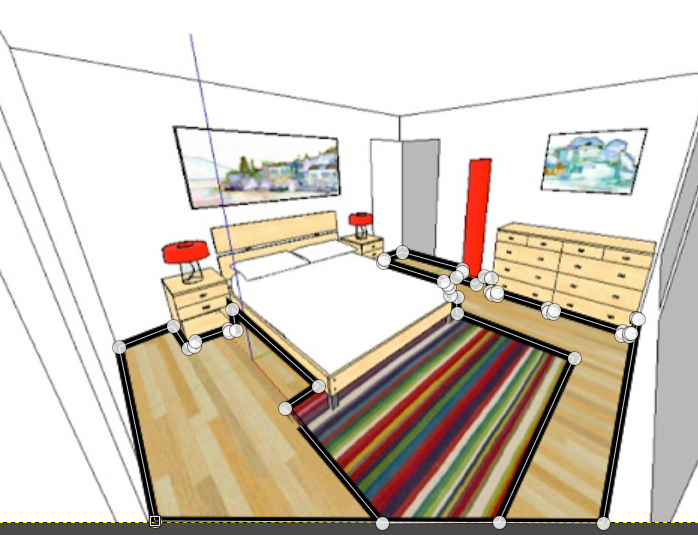
All you need to do is use the paths tool to create a path of the floor (use ctrl key plus left click to close the path) then right click the path layer and select Path to Selection. Now right click the layer of the image and select add layer mask> USE from selection.

Image

Image

_________________
Image


Top
 Post subject: Re: Newbie help required
PostPosted: Wed Nov 02, 2016 8:00 am  (#5) 
Offline
GimpChat Member

Joined: Oct 28, 2016
Posts: 6
Hi Rod,

Sorry but you've completely lost me there!


Top
 Post subject: Re: Newbie help required
PostPosted: Wed Nov 02, 2016 8:47 am  (#6) 
Offline
GimpChat Member
User avatar

Joined: Oct 06, 2010
Posts: 4050
Image

Using the Path Tool, point to point, Rod is suggesting you follow the exposed floor, then simply fill that path selection with white, everything else on the same image can be filled with black, once you invert the path selection. Then you'll have your mask.

_________________
"In order to attain the impossible, one must attempt the absurd."
~ Miguel de Cervantes


Top
 Post subject: Re: Newbie help required
PostPosted: Wed Nov 02, 2016 9:25 am  (#7) 
Offline
Global Moderator
User avatar

Joined: May 16, 2010
Posts: 16252
Yeah like Blighty II was saying, you may need more than one selection or path. We would have to see the layout first. :)

_________________
Image


Top
 Post subject: Re: Newbie help required
PostPosted: Wed Nov 02, 2016 9:27 am  (#8) 
Offline
GimpChat Member

Joined: Oct 28, 2016
Posts: 6
Thanks all I'll give it a go.


Top
Post new topic Reply to topic  [ 8 posts ] 

All times are UTC - 5 hours [ DST ]


* Login  


Powered by phpBB3 © phpBB Group