It is currently Mon Sep 21, 2026 5:56 am


All times are UTC - 5 hours [ DST ]


Post new topic Reply to topic  [ 6 posts ] 
Author Message
 Post subject: Mouse Not Activate Tool After Gmic Install
PostPosted: Sat Nov 26, 2016 12:10 am  (#1) 
Offline
GimpChat Member

Joined: Nov 25, 2016
Posts: 14
GIMP Version: 2.8.14
Operating System: Windows
GIMP Experience: New User


Gimp 2.8.18 and Gmic 1.7.9 after Gmic install left clicking a tool no longer activates the tool. If I left click the tool and then press "enter", the tool will activate. Using hot key for the tool works.

Any ideas? Thanks. Maybe an older version of Gmic? Just wondering if anyone else had this happen.
I'm new to the forum so not sure this is posted in the proper section.

This is crazy. If I change programs, Chrome for example, then go back to Gimp, the mouse will activate a tool once. Then I would need to change programs again. Touch pad does the same thing.


Share on Facebook Share on Twitter Share on Orkut Share on Digg Share on MySpace Share on Delicious Share on Technorati
Top
 Post subject: Re: Mouse Not Activate Tool After Gmic Install
PostPosted: Sat Nov 26, 2016 10:45 am  (#2) 
Offline
Administrator
User avatar

Joined: Aug 10, 2012
Posts: 14206
Location: Native to NYC living in Arizona, Gimp 2.8 - 3.0, Win 11 PC.
Syngensmyth wrote:
GIMP Version: 2.8.14
Operating System: Windows
GIMP Experience: New User


Gimp 2.8.18 and Gmic 1.7.9 after Gmic install left clicking a tool no longer activates the tool. If I left click the tool and then press "enter", the tool will activate. Using hot key for the tool works.

Any ideas? Thanks. Maybe an older version of Gmic? Just wondering if anyone else had this happen.
I'm new to the forum so not sure this is posted in the proper section.

This is crazy. If I change programs, Chrome for example, then go back to Gimp, the mouse will activate a tool once. Then I would need to change programs again. Touch pad does the same thing.

I do believe the latest G'MIC is the 1.7.9 version.
If you haven't uninstalled and reinstalled this latest version.
I would highly suggest trying this.
To see if it has any effect on this odd behavior.
If reinstalling G'MIC doesn't resolve this behavior.
It may be possible that there is something within you current Gimp User Profile,
which is causing this issue and you may need to create a new Gimp User Profile.

You can create a new Gimp User Profile,
by renaming the current profile.
In my case,

(if I were to rename my current profile.
I would rename it to something like,
.gimp-2.8_old.)

Once you rename your current profile.
Start Gimp and it will create a new Gimp User profile.

You can then see if this behavior continues with the newly created Gimp User profile.
If it doesn't, then it was something within the Old profile,
which was causing the issue.

You can then begin to move the resources,
a little at a time.
From the Old profile,
back into the new profile.
Then restart Gimp to see if this behavior reappears.

By moving the Old resources back into the newly created Gimp User Profile,
in small batches.
You begin the process of elimination.
To determine what was causing the issue.

If you don't wish to do the process of elimination.
You can continue using this newly created Gimp User Profile and begin rebuilding this new profile's resources.
As you add new resources to the new profile.
Start Gimp to see if it preforms "normally".

If creating a new Gimp User Profile doesn't resolve this issue.
There may be something on your system,
which is causing this issue.
The most likely thing that might be causing this issue.
Would be some type of security software.
Disabling this software may also resolve this issue.

_________________
Image
"A wise man learns more from a foolish question than a fool can learn from a wise answer"
Image


Top
 Post subject: Re: Mouse Not Activate Tool After Gmic Install
PostPosted: Sat Nov 26, 2016 11:36 am  (#3) 
Offline
GimpChat Member

Joined: Nov 25, 2016
Posts: 14
Wallace, thank you for your detailed reply. Good to know about creating new profile. I had already uninstalled Gimp thoroughly, cleaned registry and deleted any trace of Gimp I could find. Then I reinstalled. Nothing helps yet. This is only on one laptop so I suspect it is a windows driver issue but can't find it. I have been using Gimp for years on many different machines and this is the first issue that has me totally stumped. Partha's portable builds have the same behavior on this laptop. I am so dependent on Gimp that I'm on the verge of doing a Windows reinstall. I WILL NOT USE A PC WITHOUT GIMP - PERIOD :)

PS: I use your sharpening plugin and love it :) Thanks for all your hard work on behalf of the Gimp community.


Top
 Post subject: Re: Mouse Not Activate Tool After Gmic Install
PostPosted: Sat Nov 26, 2016 12:04 pm  (#4) 
Offline
GimpChat Member

Joined: Nov 25, 2016
Posts: 14
After putting up with this problem for months on this laptop, my work on it yesterday paid off. Installing MS Intellipoint, reinstalling Gimp, etc. The mouse - tool activation mysteriously works today. I do believe it was a mouse driver issue somehow but that is the problem with doing several things at once. You never really know which one actually fixed the problem. Last night it still didn't work.


Top
 Post subject: Re: Mouse Not Activate Tool After Gmic Install
PostPosted: Sat Nov 26, 2016 7:43 pm  (#5) 
Offline
Administrator
User avatar

Joined: Aug 10, 2012
Posts: 14206
Location: Native to NYC living in Arizona, Gimp 2.8 - 3.0, Win 11 PC.
Syngensmyth wrote:
After putting up with this problem for months on this laptop, my work on it yesterday paid off. Installing MS Intellipoint, reinstalling Gimp, etc. The mouse - tool activation mysteriously works today. I do believe it was a mouse driver issue somehow but that is the problem with doing several things at once. You never really know which one actually fixed the problem. Last night it still didn't work.

Thanks for your kind words Syngensmyth. :bigthup

You might want to look into using the,
System File Checker tool.
To repair missing or corrupted system files,
if it finds any.
To see if this can help with this issue.

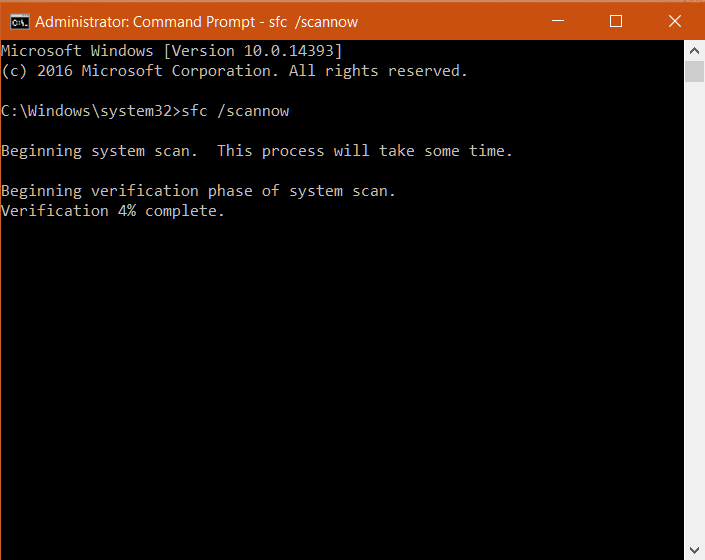
Open command prompt (as administrator),
type the following blue text,
sfc /scannow
To run the System File Checker.

Image

_________________
Image
"A wise man learns more from a foolish question than a fool can learn from a wise answer"
Image


Top
 Post subject: Re: Mouse Not Activate Tool After Gmic Install
PostPosted: Sun Nov 27, 2016 1:41 am  (#6) 
Offline
GimpChat Member

Joined: Nov 25, 2016
Posts: 14
I found the problem. My second laptop's mouse was not activating tools. What the heck?
I had started using a little program called DimScreen. Once I turned off DimScreen, Gimp was back in action.
What a relief!

I had already run sfc :)


Top
Post new topic Reply to topic  [ 6 posts ] 

All times are UTC - 5 hours [ DST ]


* Login  


Powered by phpBB3 © phpBB Group