It is currently Wed Sep 23, 2026 7:50 am


All times are UTC - 5 hours [ DST ]


Post new topic Reply to topic  [ 7 posts ] 
Author Message
 Post subject: Can I crop an image beyond the border and add color to the frame?
PostPosted: Tue Dec 06, 2016 7:36 pm  (#1) 
Offline
New Member

Joined: Dec 06, 2016
Posts: 2
GIMP Version: 2.8.14
Operating System: Mac OS
OS Version: OS X 10.10.2 Yosomite
GIMP Experience: Basic Level


Old Photoshop used to allow me to crop an image beyond the border and add color to the padded area. I could choose a background color and that would be added. I could continue to add borders and colors of my choice as well as layering shapes. Can I do this in gimp? I have tried to post an example of what I am trying to do but Gimp is saying it looks too "spamy". I hope I've explained it OK:)


Share on Facebook Share on Twitter Share on Orkut Share on Digg Share on MySpace Share on Delicious Share on Technorati
Top
 Post subject: Re: Can I crop an image beyond the border and add color to the frame?
PostPosted: Tue Dec 06, 2016 8:45 pm  (#2) 
Offline
Script Coder
User avatar

Joined: Feb 18, 2011
Posts: 4826
Location: Bendigo Vic. Australia
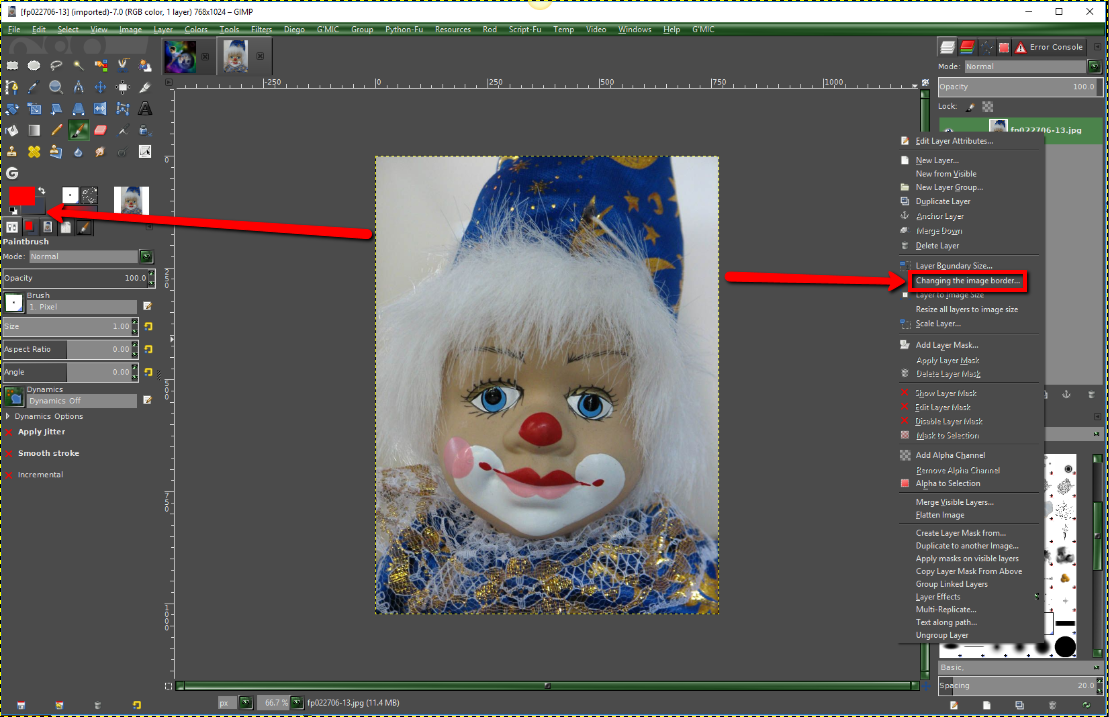
You can use 'Changing the image border' on an Image without alpha channel
Image
Set your Bkg color to required padding color
Image

Image
change to image
Image


Attachment:
Changing Image Border.scm [7.59 KiB]
Downloaded 168 times

_________________
Image
No matter how much you push the envelope, it'll still be stationery.


Top
 Post subject: Re: Can I crop an image beyond the border and add color to the frame?
PostPosted: Tue Dec 06, 2016 9:33 pm  (#3) 
Offline
New Member

Joined: Dec 06, 2016
Posts: 2
Thank you ever so much!!
I appreciate your carefully detailed directions, the illustrations and the download. Very generous and kind!


Top
 Post subject: Re: Can I crop an image beyond the border and add color to the frame?
PostPosted: Tue Dec 06, 2016 9:45 pm  (#4) 
Offline
Script Coder
User avatar

Joined: May 07, 2014
Posts: 4554
Location: Canada
The sample image (does anyone else find it creepy).
Like it's fakely drawn eyes but together with the face it looks real...
so creepy.

_________________
Image
Visualize your and others dreams coming true.


Top
 Post subject: Re: Can I crop an image beyond the border and add color to the frame?
PostPosted: Tue Dec 06, 2016 11:03 pm  (#5) 
Offline
GimpChat Member
User avatar

Joined: Nov 30, 2016
Posts: 34
Location: Earth (still...)
I don't believe in Zeus but I'm scared stiff of clowns. Look I'm naked a wizard, and surely mad....(DoseOne in THEM http://genius.com/Themselves-another-pa ... ain-lyrics )

_________________
A day without learning something, is a day wasted.


Top
 Post subject: Re: Can I crop an image beyond the border and add color to the frame?
PostPosted: Wed Dec 07, 2016 12:29 am  (#6) 
Offline
GimpChat Member

Joined: Sep 23, 2016
Posts: 317
serrosew53 wrote:
Old Photoshop used to allow me to crop an image beyond the border and add color to the padded area. I could choose a background color and that would be added. I could continue to add borders and colors of my choice as well as layering shapes. Can I do this in gimp?


You can use (Image > Canvas Size)

This can increase the canvas size. Add layers as needed and bucket fill with the colour of you choice.


Top
 Post subject: Re: Can I crop an image beyond the border and add color to the frame?
PostPosted: Wed Dec 07, 2016 12:51 am  (#7) 
Offline
Script Coder
User avatar

Joined: Feb 18, 2011
Posts: 4826
Location: Bendigo Vic. Australia
trandoductin wrote:
The sample image (does anyone else find it creepy).
Like it's fakely drawn eyes but together with the face it looks real...
so creepy.

Did not mean to freak you both out Trandoductin and runSpotrun13

_________________
Image
No matter how much you push the envelope, it'll still be stationery.


Top
Post new topic Reply to topic  [ 7 posts ] 

All times are UTC - 5 hours [ DST ]


cron

* Login  


Powered by phpBB3 © phpBB Group