It is currently Wed Nov 11, 2026 4:08 am


All times are UTC - 5 hours [ DST ]


Post new topic Reply to topic  [ 116 posts ]  Go to page Previous  1, 2, 3, 4, 5, 6  Next
Author Message
 Post subject: Re: Can anybody tell me what I'm doing wrong?
PostPosted: Thu Oct 27, 2016 11:44 pm  (#81) 
Offline
GimpChat Member

Joined: Sep 10, 2015
Posts: 112
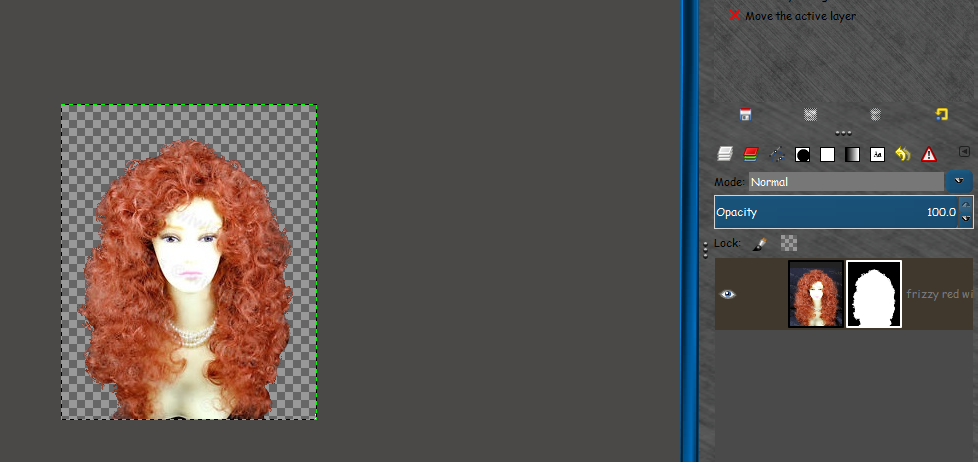
Thank you to everyone who tried to help me. (I'm not an artist and I guess it shows.) I found a tutorial on layer masks (I've never used a layer mask before) and I finally did it. But sheesh, did it look bad, like a hackjob cut-out copy/paste, not like what I see in the tutorials where you can see all the wispy fine hairs, not at all like what Rod and tranductin were able to do. Guess I'll just keep experimenting. Again, thank you to everyone for your help, you all gave me a much better understanding of what the concept was.

Edit: Well I practiced and finally figured it out. Deciding how much white and black to put in the curves box is really an art form, takes a lot of experimenting!


Attachments:
33 surprised head.jpg
33 surprised head.jpg [ 15.54 KiB | Viewed 1766 times ]
Top
 Post subject: Re: Can anybody tell me what I'm doing wrong?
PostPosted: Fri Oct 28, 2016 5:42 am  (#82) 
Offline
Global Moderator
User avatar

Joined: May 16, 2010
Posts: 16256
newtogimp wrote:
Thank you but I just can't seem to get it.

Add Alpha channel
Duplicate
On duplicate layer (I would think this is the bottom layer, but since nothing happens in the curves box when the bottom layer is selected, I guess the "duplicate layer" is actually the top layer?)>Colors>curves>turn to blackish>OK
On duplicate layer (still top layer?):Color>desaturate (lightness)
Fill in entire white area (which would be her face)
R click bottom layer (??)> Add layer mask (white)
Cl top layer: Edit>Cut
Cl layer mask on bottom layer (?? there's only one layer left): Edit>Paste

Maybe there should be an Invert in there somewhere? I've tried experimenting, gone down in flames. :(

The duplicate layer will be the top layer. You did it correctly. Its all in how you fill in the white area.
You can as an alternative do it this way.
1) open your image
2) add alpha channel
3) right click add layer mask - white full opacity
4) select the layer mask, using BLACK paint and paint on the mask where you want the IMAGE to show through

Example
Image

_________________
Image


Top
 Post subject: Re: Can anybody tell me what I'm doing wrong?
PostPosted: Mon Dec 19, 2016 12:34 am  (#83) 
Offline
GimpChat Member

Joined: Sep 10, 2015
Posts: 112
Windows 10 tried to upgrade me and crashed my computer; I lost Gimp. I am trying to restore Gimp to what I had. I am trying to put Layersfx back into it.

I have downloaded Layersfx to my Desktop. Then I have gone Edit > Preferences >Folders> Scripts. But I don't know how to get/move the Layersfx from my Desktop into this Script-Fu folder; the Layersfx on my Desktop won't drag and drop, nor will it copy/paste.

Can anyone tell me how I can put this Layersfx script into this folder? Thank you.


Top
 Post subject: Re: Can anybody tell me what I'm doing wrong?
PostPosted: Mon Dec 19, 2016 1:20 am  (#84) 
Offline
GimpChat Member
User avatar

Joined: Jan 20, 2013
Posts: 14835
Location: roma, italy
Open:
C:\Users\(yourname)\.gimp-2.8\scripts
Right click on your desktop .scm file and choose "copy"
Right click on the previously open folder (C:\Users\(yourname)\.gimp-2.8\scripts) and choose "paste".
Restart Gimp

_________________
"Where am I ?"


Top
 Post subject: Re: Can anybody tell me what I'm doing wrong?
PostPosted: Mon Dec 19, 2016 1:35 am  (#85) 
Offline
GimpChat Member

Joined: Sep 10, 2015
Posts: 112
Thanks, but there isn't any "Scripts" folder in that list (see screenshot). The only way I can find the "Scripts" folder is through Edit>Preferences>Folders>Scripts.


Attachments:
Screenshot (1).png
Screenshot (1).png [ 119.99 KiB | Viewed 1713 times ]
Top
 Post subject: Re: Can anybody tell me what I'm doing wrong?
PostPosted: Mon Dec 19, 2016 1:50 am  (#86) 
Offline
GimpChat Member
User avatar

Joined: Jan 20, 2013
Posts: 14835
Location: roma, italy
Create yourself an empty folder "scripts" under .gimp-2.8
Then procede

_________________
"Where am I ?"


Top
 Post subject: Re: Can anybody tell me what I'm doing wrong?
PostPosted: Mon Dec 19, 2016 2:28 am  (#87) 
Offline
GimpChat Member

Joined: Sep 10, 2015
Posts: 112
Thank you, worked perfectly. I'd just assumed the folders had to come from the Gimp download, it didn't dawn on me I could just make one (I know, computer-dumb). Thanks again!


Top
 Post subject: Re: Can anybody tell me what I'm doing wrong?
PostPosted: Mon Dec 19, 2016 2:34 am  (#88) 
Offline
GimpChat Member
User avatar

Joined: Jan 20, 2013
Posts: 14835
Location: roma, italy
Glad you solved your problem.

_________________
"Where am I ?"


Top
 Post subject: Re: Can anybody tell me what I'm doing wrong?
PostPosted: Mon Dec 19, 2016 6:52 am  (#89) 
Offline
Global Moderator
User avatar

Joined: May 16, 2010
Posts: 16256
Thats very strange as GIMP always adds all the needed resource sub folders and rc files for extra addons when it installs itself. After first run it will auto create other needed files in the /USERNAME/.gimp-2.8 folder.
Where did you get your install from?

You should have more folders also.
gradients
patterns
pallets
gimpressionist
scripts
themes
You are missing quite a few.

_________________
Image


Top
 Post subject: Re: Can anybody tell me what I'm doing wrong?
PostPosted: Tue Dec 20, 2016 3:22 am  (#90) 
Offline
GimpChat Member

Joined: Sep 10, 2015
Posts: 112
I just downloaded it from the GIMP site. I got them all the first time I downloaded Gimp (before my crash) but not this time. I just assumed they'd changed something.
_____________________________________________
Could anybody give me instructions for how I could change this black background to white? I've tried using fuzzy select/delete over a white layer, but I just keep ending up with a transparent background. Thank you.


Attachments:
star cov.png
star cov.png [ 130.06 KiB | Viewed 1693 times ]
Top
 Post subject: Re: Can anybody tell me what I'm doing wrong?
PostPosted: Tue Dec 20, 2016 7:48 am  (#91) 
Offline
GimpChat Member
User avatar

Joined: Apr 09, 2016
Posts: 580
Location: Sheffield UK
This isn't as good as a bit more care could give - however, delete all your black with whatever selection tool gives you the results you want, then add a white layer below your cut out and export as jpeg, png or whatever you wish
Image
Attachment:
star cov.xcf [296.94 KiB]
Downloaded 82 times

_________________
Image


Top
 Post subject: Re: Can anybody tell me what I'm doing wrong?
PostPosted: Tue Dec 20, 2016 8:58 am  (#92) 
Offline
GimpChat Member

Joined: Mar 04, 2011
Posts: 2629
Quote:
..Could anybody give me instructions for how I could change this black background to white? I've tried using fuzzy select/delete over a white layer, but I just keep ending up with a transparent background. Thank you.


The problem is, the black is not 100% black. Invert the colors and you will see it is a gradient.

Various ways, none very wonderful.

Try
1. Make a selection of the bulk of the 'black'. Quick-mask or fuzzy is good for this and fill with white leaving just the 'decorations' filled with black.
2. Use color-to-alpha with 'black' as the remove color
3. Remove the alpha channel (make sure background color is set to white)

Gives this:
Attachment:
star cov.png
star cov.png [ 35.65 KiB | Viewed 1773 times ]


Top
 Post subject: Re: Can anybody tell me what I'm doing wrong?
PostPosted: Wed Dec 21, 2016 3:12 am  (#93) 
Offline
GimpChat Member

Joined: Sep 10, 2015
Posts: 112
Thank you. Both methods worked and I have recorded them in my how-to Gimp log, will undoubtedly be used more. Thanks again.


Top
 Post subject: Re: Can anybody tell me what I'm doing wrong?
PostPosted: Sat Dec 24, 2016 8:29 pm  (#94) 
Offline
GimpChat Member

Joined: Sep 10, 2015
Posts: 112
I am trying to get my Bevel Reflect Logo up and running again, but am running into the problem of the Dialog box being too big for my screen, I can't get to the "OK" command. I had this same problem before and people here told me how to fix it. I went back and followed those instructions again, but it hasn't solved the problem. So, can anybody tell me how to get Bevel Reflect Logo up and running in a Windows 64 computer running Gimp 2.8? I have downloaded:

Script-Fu Scrolling Interface Mod Win_x64 in scripts folder
Script-fu-interface-Mod-V1.0-Win_x64.zip
Version: 1.0
Author: GnuTux

Bevel Reflect Logo in scripts folder
bevel-reflect-logo.scm
Version: 1.6
Author: GnuTux

ML Bevel Reflect Source Code in plug-ins folder
MLBevelReflectV2_Source.c.zip
Version: 2.0
Author: Marcel Lancelle & GnuTux

Thank you.


Top
 Post subject: Re: Can anybody tell me what I'm doing wrong?
PostPosted: Sat Dec 24, 2016 11:12 pm  (#95) 
Offline
Administrator
User avatar

Joined: Aug 10, 2012
Posts: 14268
Location: Native to NYC living in Arizona, Gimp 2.8 - 3.0, Win 11 PC.
newtogimp wrote:
I am trying to get my Bevel Reflect Logo up and running again, but am running into the problem of the Dialog box being too big for my screen, I can't get to the "OK" command. I had this same problem before and people here told me how to fix it. I went back and followed those instructions again, but it hasn't solved the problem. So, can anybody tell me how to get Bevel Reflect Logo up and running in a Windows 64 computer running Gimp 2.8? I have downloaded:

Script-Fu Scrolling Interface Mod Win_x64 in scripts folder
Script-fu-interface-Mod-V1.0-Win_x64.zip
Version: 1.0
Author: GnuTux

Bevel Reflect Logo in scripts folder
bevel-reflect-logo.scm
Version: 1.6
Author: GnuTux

ML Bevel Reflect Source Code in plug-ins folder
MLBevelReflectV2_Source.c.zip
Version: 2.0
Author: Marcel Lancelle & GnuTux

Thank you.

There are two things needed.
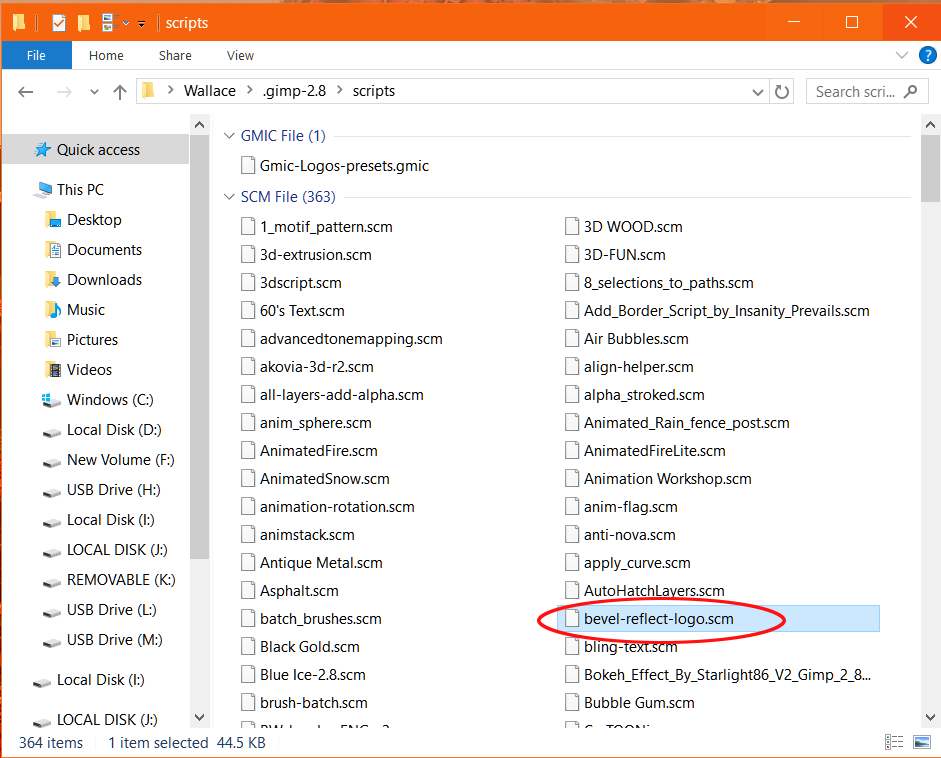
1. bevel-reflect-logo.scm
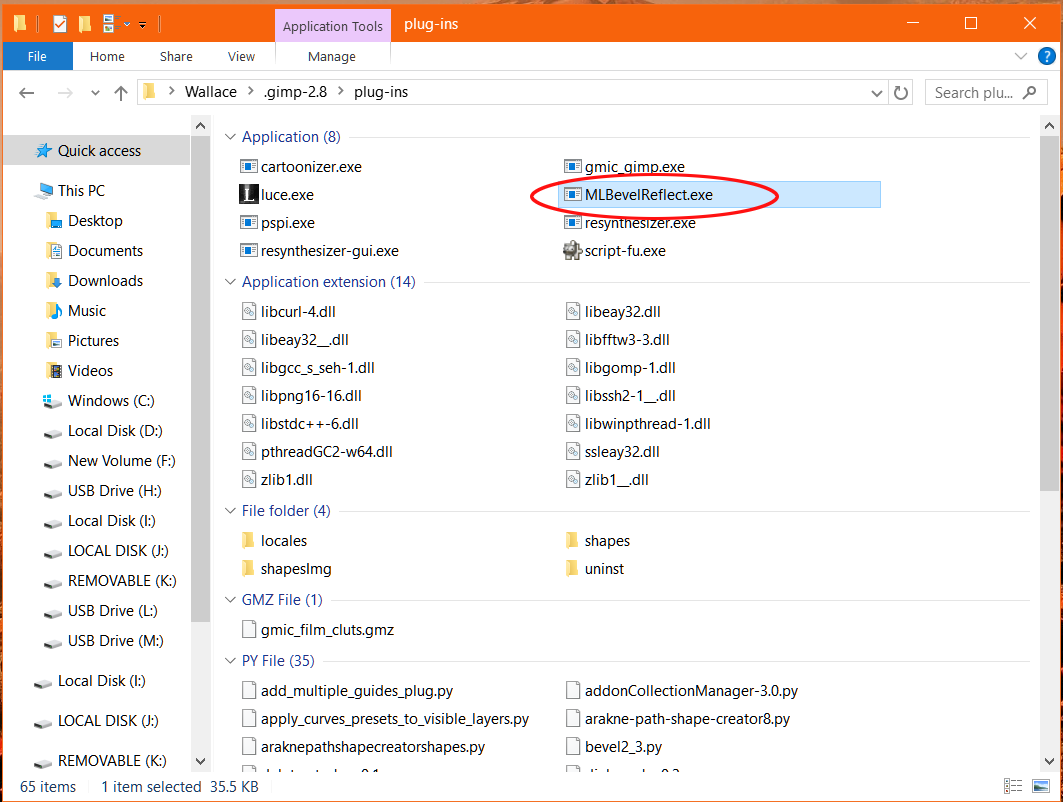
2. MLBevelReflect.exe

The BRL script goes into your scripts folder
The MLBR Exacutable goes into your plug-ins folder.

If you have these two installed correctly BRL should work.
With the Script-fu-interface-Mod-V1.0-Win installed.

You should then be able to use the scroll function,
when running BRL.

_________________
Image
"A wise man learns more from a foolish question than a fool can learn from a wise answer"
Image


Top
 Post subject: Re: Can anybody tell me what I'm doing wrong?
PostPosted: Sun Dec 25, 2016 12:38 am  (#96) 
Offline
GimpChat Member

Joined: Sep 10, 2015
Posts: 112
I thought that's what I did. Would you mind taking a look at my plug-in folder (screenshot below) and tell me if I have the right download for Bevel Reflect Logo (on Windows 64 bit, Gimp 2.8)? Thanks.


Attachments:
Screenshot (6).png
Screenshot (6).png [ 89.79 KiB | Viewed 1734 times ]
Top
 Post subject: Re: Can anybody tell me what I'm doing wrong?
PostPosted: Sun Dec 25, 2016 2:11 am  (#97) 
Offline
Administrator
User avatar

Joined: Aug 10, 2012
Posts: 14268
Location: Native to NYC living in Arizona, Gimp 2.8 - 3.0, Win 11 PC.
newtogimp wrote:
I thought that's what I did. Would you mind taking a look at my plug-in folder (screenshot below) and tell me if I have the right download for Bevel Reflect Logo (on Windows 64 bit, Gimp 2.8)? Thanks.

There are two things needed.
1. bevel-reflect-logo.scm
The BRL script goes into your scripts folder.
Image

2. MLBevelReflect.exe
The MLBR Exacutable goes into your plug-ins folder.
Image

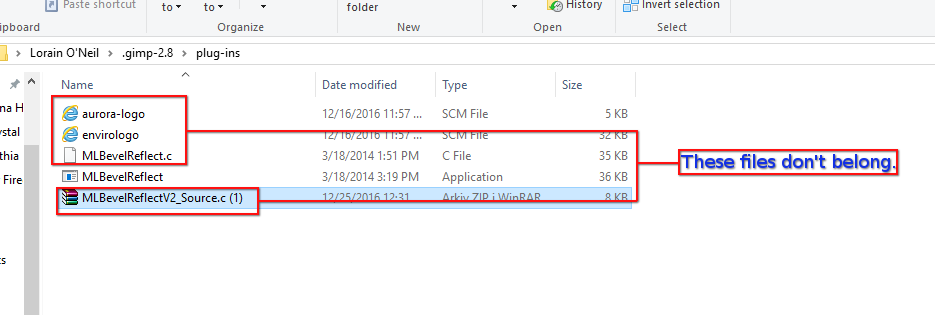
The files below don't belong in the plug-ins folder.
Even though these files are there,
this shouldn't effect the functioning of the ML Bevel Reflect.
Image

_________________
Image
"A wise man learns more from a foolish question than a fool can learn from a wise answer"
Image


Top
 Post subject: Re: Can anybody tell me what I'm doing wrong?
PostPosted: Sun Dec 25, 2016 9:14 am  (#98) 
Offline
Global Moderator
User avatar

Joined: May 16, 2010
Posts: 16256
Nothing should be in the plugins folder except exe,py,and DLL extension files. And maybe a few extra folders that install with certain plugins.
Nothing should be in the scripts folder except scm extensions.

_________________
Image


Top
 Post subject: Re: Can anybody tell me what I'm doing wrong?
PostPosted: Mon Dec 26, 2016 4:43 am  (#99) 
Offline
GimpChat Member

Joined: Sep 10, 2015
Posts: 112
:( I cleaned out what shouldn't have been in those folders.

I have Gimp 2.8.18 and Windows 10 64 bit.

I have MLBevelReflect ("Application"), and script-fu ("Application"), and Script-fu interface ("C file") [this is Version V1.1] in my Plug-in folder.

I have bevel-reflect-logo ("SCM File") in my scripts folder.

I've gotten the dialogue box to where I can now reach the OK button, but when I click it nothing happens. I've turned Gimp on and off, but that doesn't fix it. There must be something I need to do to turn these things on. :(


Top
 Post subject: Re: Can anybody tell me what I'm doing wrong?
PostPosted: Mon Dec 26, 2016 5:59 am  (#100) 
Offline
Global Moderator
User avatar

Joined: May 16, 2010
Posts: 16256
newtogimp wrote:
:( I cleaned out what shouldn't have been in those folders.

I have Gimp 2.8.18 and Windows 10 64 bit.

I have MLBevelReflect ("Application"), and script-fu ("Application"), and Script-fu interface ("C file") [this is Version V1.1] in my Plug-in folder.

I have bevel-reflect-logo ("SCM File") in my scripts folder.

I've gotten the dialogue box to where I can now reach the OK button, but when I click it nothing happens. I've turned Gimp on and off, but that doesn't fix it. There must be something I need to do to turn these things on. :(

You do not need the c file at all. Remove it.
Also could you please attach a print screen snapshot of the dialog you are having trouble with?

_________________
Image


Top
Post new topic Reply to topic  [ 116 posts ]  Go to page Previous  1, 2, 3, 4, 5, 6  Next

All times are UTC - 5 hours [ DST ]


* Login  


Powered by phpBB3 © phpBB Group