It is currently Thu Nov 12, 2026 1:43 pm


All times are UTC - 5 hours [ DST ]


Post new topic Reply to topic  [ 116 posts ]  Go to page Previous  1, 2, 3, 4, 5, 6
Author Message
 Post subject: Re: Can anybody tell me what I'm doing wrong?
PostPosted: Mon Dec 26, 2016 6:56 am  (#101) 
Offline
GimpChat Member

Joined: Sep 10, 2015
Posts: 112
I've removed the C folder.

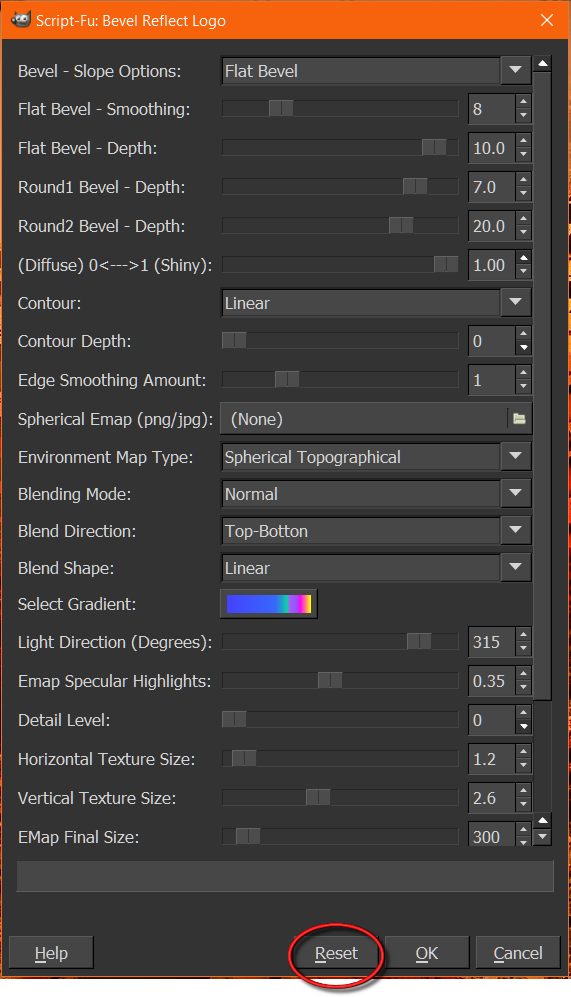
In the dialogue box below, it looks like I can't reach the OK button on the bottom, but really I can, it barely peeks up from beneath the black bar, but it does peek up just enough so that I can indeed click it. It just doesn't trigger anything happening when I do.


Attachments:
Scripts folder.png
Scripts folder.png [ 335.49 KiB | Viewed 1892 times ]
plug in.png
plug in.png [ 315.71 KiB | Viewed 1892 times ]
Dialogue Box.png
Dialogue Box.png [ 394.88 KiB | Viewed 1892 times ]
Top
 Post subject: Re: Can anybody tell me what I'm doing wrong?
PostPosted: Mon Dec 26, 2016 7:04 am  (#102) 
Offline
Global Moderator
User avatar

Joined: May 16, 2010
Posts: 16261
It does look like you have room to move the dialog up to be able to access the OK switch.
So nothing happens when you press OK even after you select reset first?
Do you get an error dialog window that pops up?

_________________
Image


Top
 Post subject: Re: Can anybody tell me what I'm doing wrong?
PostPosted: Mon Dec 26, 2016 7:32 am  (#103) 
Offline
GimpChat Member

Joined: Sep 10, 2015
Posts: 112
Um... what is reset first?

Nothing happens at all when I click OK.


Top
 Post subject: Re: Can anybody tell me what I'm doing wrong?
PostPosted: Mon Dec 26, 2016 2:54 pm  (#104) 
Offline
Administrator
User avatar

Joined: Aug 10, 2012
Posts: 14268
Location: Native to NYC living in Arizona, Gimp 2.8 - 3.0, Win 11 PC.
newtogimp wrote:
Um... what is reset first?

Nothing happens at all when I click OK.


Rod was referring to the Reset option.

Image

By the way,
your image has meany elements to it.
What exactly are you trying to run BRL on?

_________________
Image
"A wise man learns more from a foolish question than a fool can learn from a wise answer"
Image


Top
 Post subject: Re: Can anybody tell me what I'm doing wrong?
PostPosted: Tue Dec 27, 2016 6:17 am  (#105) 
Offline
GimpChat Member

Joined: Sep 10, 2015
Posts: 112
I'm a self pubber who puts her books on Amazon (I'm what we call a "prawn" in the self-pubber world --I don't sell a lot of books, but some). Amazon recently started a thing where self-pubbers could offer their books for sale directly in Amazon in paperback form. However, to do that, the books have to be formatted to Amazon's rather exacting standards. I got through reformatting the manuscript for one of my books okay, but reformatting the covers has been difficult because I can't get GIMP up and running again like I had it before my Windows 10 crash (I'd made most of my covers with Gimp). The image above is one of my book covers, I made the title with BRL and a gold emap from here on Gimpchat. Unfortunately I either didn't save that text or it was lost in the crash, at any rate I don't have it so I need to reproduce it to put the title on the spine (I've used instead just a text from the Text box, but that doesn't look so good and it will look really awful for some of my other books, most of which I used BRL to make the title text with). So I really need to get BRL up and running again, but so far nothing I do turns it "on." I hit reset, nothing happened. I guess maybe I will have to uninstall Gimp and then reinstall it? Try again? I can't think of anything else to turn BRL "on."


Top
 Post subject: Re: Can anybody tell me what I'm doing wrong?
PostPosted: Tue Dec 27, 2016 7:23 am  (#106) 
Offline
GimpChat Member

Joined: Mar 04, 2011
Posts: 2629
Your screenshots of installation looks ok to me.

Reinstalling Gimp rarely fixes anything, since the problem is often in the Gimp profile.

Rename that to disable it. something like C:\Users\your-name\.gimp-2.8.bak

Restart Gimp to create a new empty one.

Try the 2 plug-ins / 1 .scm before adding anything else.

Attachment:
logo.jpg
logo.jpg [ 137.49 KiB | Viewed 1845 times ]

Rather than File -> Create - Logo
Try adding a text layer. Layer to Image size. Apply Filter -> Alpha-to-logo - Bevel Reflect.


Top
 Post subject: Re: Can anybody tell me what I'm doing wrong?
PostPosted: Tue Dec 27, 2016 7:40 am  (#107) 
Offline
Global Moderator
User avatar

Joined: May 16, 2010
Posts: 16261
Yeah i don't for the life of me understand why it doesn't work. You should be able to hit reset, type in the text you want and hit ok and it should work and create a new image.
Selecting reset button on the dialog window will reset the script at its default state. Which it should have no problem running in. As that is the TEST state of the script by the original script author.
You have the script-fu.exe and mlbevelreflect.exe in the correct folder. You can tell that by the scroll bar in the dialog interface.

I have to say try what Rich has stated and create some text first and run the alpha to logo script on that text layer. Bevel Reflect Logo comes with two scripts in one actually.
1) alpha to logo > which runs on a text layer or an alpha layer.
2) create logo > automated version which allows you to create some text within the dialog and run it on that text only.

_________________
Image


Top
 Post subject: Re: Can anybody tell me what I'm doing wrong?
PostPosted: Wed Dec 28, 2016 2:11 am  (#108) 
Offline
GimpChat Member

Joined: Sep 10, 2015
Posts: 112
I got it working but in an extremely weird way.
None of the bottom tabs worked, not Help, OK, Reset, Cancel, etc. I also noticed that the nearest-the-bottom entry, "Blend Shape," had the bottom of its letters sheared off (you can see it in my screenshot above). I figured that meant that everything below that shearing had been basically nullified. I decided to take a picture of it to post here, and seeing as how I have recently discovered the Windows Snipping Tool I thought that would be a perfect opportunity to try it out. I drew the Snipping Tool Box over the BRL Dialogue box and whoa! Before I could even finish drawing the box, the Snipping Tool just suddenly reduced the Dialogue box size-wise to fit my screen, and with plenty of room to spare. I clicked the OK button on the BRL Dialogue box and it worked at once! So obviously the problem was that the Dialogue box was too big, the bottom part of it wasn't actually working on my screen. But with the Snipping Tool shrinking it, it works fine. I think they call that "the luck of the Irish"! Thanks so much to everyone who helped me get everything loaded correctly. Designing is not my skill, and the You Tube tutorials, while good, just don't hold a candle to the help offered here on Gimpchat. Thanks again.
_______________________________
Edit: Found an even easier way online! All I have to do is drag my top taskbar to the side and that gives plenty of room for the OK button on the bottom of the BRL Dialogue box.


Top
 Post subject: Re: Can anybody tell me what I'm doing wrong?
PostPosted: Wed Dec 28, 2016 11:06 am  (#109) 
Offline
Administrator
User avatar

Joined: Aug 10, 2012
Posts: 14268
Location: Native to NYC living in Arizona, Gimp 2.8 - 3.0, Win 11 PC.
newtogimp wrote:
I got it working but in an extremely weird way.
None of the bottom tabs worked, not Help, OK, Reset, Cancel, etc. I also noticed that the nearest-the-bottom entry, "Blend Shape," had the bottom of its letters sheared off (you can see it in my screenshot above). I figured that meant that everything below that shearing had been basically nullified. I decided to take a picture of it to post here, and seeing as how I have recently discovered the Windows Snipping Tool I thought that would be a perfect opportunity to try it out. I drew the Snipping Tool Box over the BRL Dialogue box and whoa! Before I could even finish drawing the box, the Snipping Tool just suddenly reduced the Dialogue box size-wise to fit my screen, and with plenty of room to spare. I clicked the OK button on the BRL Dialogue box and it worked at once! So obviously the problem was that the Dialogue box was too big, the bottom part of it wasn't actually working on my screen. But with the Snipping Tool shrinking it, it works fine. I think they call that "the luck of the Irish"! Thanks so much to everyone who helped me get everything loaded correctly. Designing is not my skill, and the You Tube tutorials, while good, just don't hold a candle to the help offered here on Gimpchat. Thanks again.
_______________________________
Edit: Found an even easier way online! All I have to do is drag my top taskbar to the side and that gives plenty of room for the OK button on the bottom of the BRL Dialogue box.


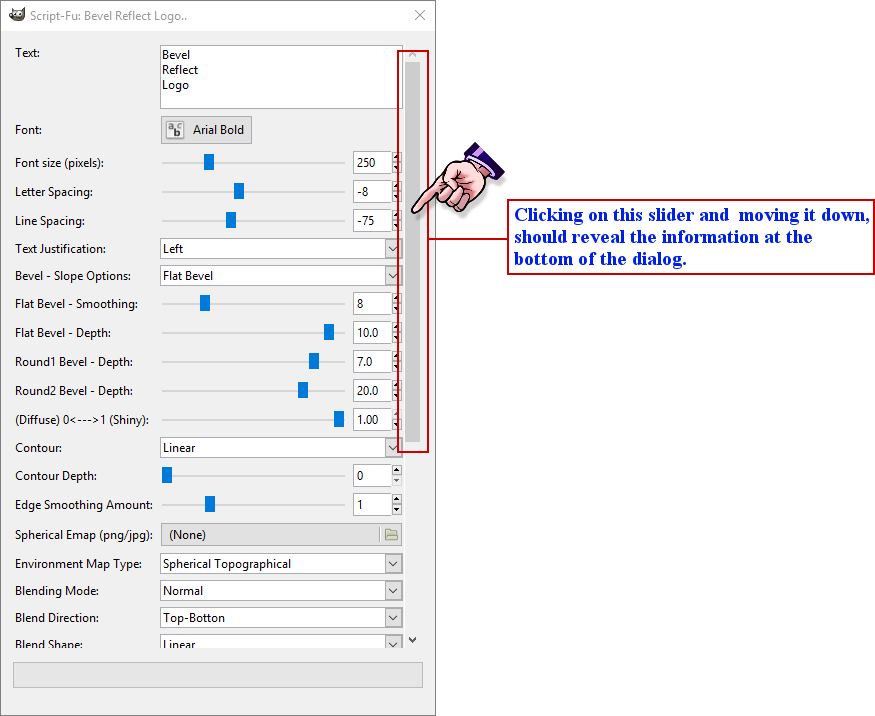
From the screenshot you provided.
It appears that the slider is present on your BRL dialog box.


Image

_________________
Image
"A wise man learns more from a foolish question than a fool can learn from a wise answer"
Image


Top
 Post subject: Re: Can anybody tell me what I'm doing wrong?
PostPosted: Wed Dec 28, 2016 12:12 pm  (#110) 
Offline
GimpChat Member

Joined: Sep 10, 2015
Posts: 112
Thanks, but it doesn't. Even with the slider fully lowered it doesn't make the OK button working. Not a problem though, I'll just always remember to move my taskbar to the side when I use BRL.

I think you actually may have even known a solution to the problem. I posted to GNU and he explained it is a Windows 10 problem, that Windows 10 blocks the bottom of some scripts. He directed me to "Altdrag" which when I clicked on was your post from 2014 explaining how Windows users can make Dialogue boxes smaller. I'm going to try it.


Last edited by newtogimp on Wed Dec 28, 2016 12:28 pm, edited 3 times in total.

Top
 Post subject: Re: Can anybody tell me what I'm doing wrong?
PostPosted: Wed Dec 28, 2016 12:25 pm  (#111) 
Offline
GimpChat Member

Joined: Mar 04, 2011
Posts: 2629
A different thread but it was indicted here:

viewtopic.php?f=8&t=15114

I am not really a windows user and nowhere near a Win machine at the moment but maybe a "Save Windows Positions Now" now in Edit -> Preferences -> Window Management might fix the size of the dialog. (or not as the case might be)


Top
 Post subject: Re: Can anybody tell me what I'm doing wrong?
PostPosted: Wed Dec 28, 2016 12:37 pm  (#112) 
Offline
Administrator
User avatar

Joined: Aug 10, 2012
Posts: 14268
Location: Native to NYC living in Arizona, Gimp 2.8 - 3.0, Win 11 PC.
newtogimp wrote:
Thanks, but it doesn't. Even with the slider fully lowered it doesn't make the OK button working. Not a problem though, I'll just always remember to move my taskbar to the side when I use BRL.

I think you actually may have even known a solution to the problem. I posted to GNU and he explained it is a Windows 10 problem, that Windows 10 blocks the bottom of some scripts. He directed me to "Altdrag" which when I clicked on was your post from 2014 explaining how Windows users can make Dialogue boxes smaller. I'm going to try it.

I made this video about "AltDrag".


www.youtube.com Video from : www.youtube.com


Also,
have you tried to create a new Gimp User Profile?

_________________
Image
"A wise man learns more from a foolish question than a fool can learn from a wise answer"
Image


Top
 Post subject: Re: Can anybody tell me what I'm doing wrong?
PostPosted: Wed Aug 23, 2017 12:20 am  (#113) 
Offline
GimpChat Member

Joined: Sep 10, 2015
Posts: 112
This is probably really stupid but I am stumped, would appreciate any help.

I am following directions to make a gold frame. The directions say:
"Make sure the transparent layer is selected. Go to Menu > Select > To path > Edit > Stroke path. Set the line width size to whatever size you want"

I right click on the transparent layer, but there is nothing that says "To path" that comes up for me to click.

I know there is a "Paths" at the top of the Menu, but I can't really get it to do anything. Or, should I be doing something with the Paths tool in the toolbox?

Thanks for any help.


Top
 Post subject: Re: Can anybody tell me what I'm doing wrong?
PostPosted: Wed Aug 23, 2017 12:40 am  (#114) 
Offline
GimpChat Member

Joined: Sep 23, 2016
Posts: 317
newtogimp wrote:
This is probably really stupid but I am stumped, would appreciate any help.

I am following directions to make a gold frame. The directions say:
"Make sure the transparent layer is selected. Go to Menu > Select > To path > Edit > Stroke path. Set the line width size to whatever size you want"

I right click on the transparent layer, but there is nothing that says "To path" that comes up for me to click.

I know there is a "Paths" at the top of the Menu, but I can't really get it to do anything. Or, should I be doing something with the Paths tool in the toolbox?

Thanks for any help.


I think that is 2 separate steps.

Assuming that you have an active selection:

Step 1: Select > To Path

Step 2: In the paths dialogue make sure that the path is visible and active, then
Edit > Stroke Path


Top
 Post subject: Re: Can anybody tell me what I'm doing wrong?
PostPosted: Wed Aug 23, 2017 12:59 am  (#115) 
Offline
GimpChat Member

Joined: Sep 10, 2015
Posts: 112
Thank you. I thought they meant for me to "select" something in the Menu box. I didn't realize they meant for me to click the Select tab. I know, dumb.

Thanks again.


Top
 Post subject: Re: Can anybody tell me what I'm doing wrong?
PostPosted: Wed Aug 23, 2017 1:49 am  (#116) 
Offline
Script Coder
User avatar

Joined: Oct 25, 2010
Posts: 4812
Btw, it's a better idea to start a new thread for a new question.

_________________
Image


Top
Post new topic Reply to topic  [ 116 posts ]  Go to page Previous  1, 2, 3, 4, 5, 6

All times are UTC - 5 hours [ DST ]


* Login  


Powered by phpBB3 © phpBB Group