|
| GimpChat Member |
 |
Joined: Jan 30, 2017
Posts: 19
|
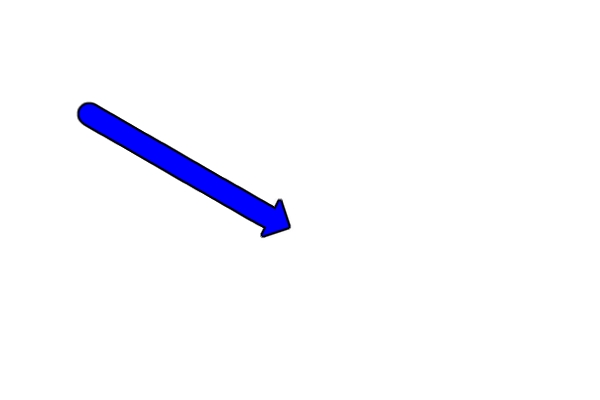
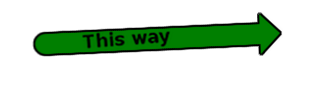
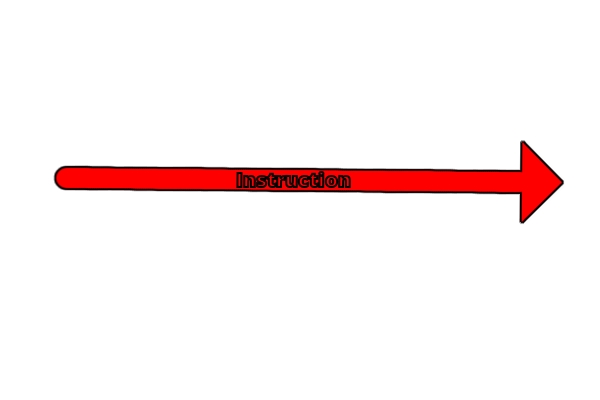
Hello there ! Here is the V2.0 of my script !   Caution : it works with the text_along_path script modified by me (I join it too) What's new? It has been translated to english You can put a text on the arrow Any feedback welcome  Hey Ofnuts, I have modified your script so the declared function returns the vectors created. What do you think of it ? You can see my modifications by looking for the "#modif perso" coments. I join the script and copy past it here after. #!/usr/bin/python
# Python arrow: create an arrow from a vector
#
# Copyright 2017 CC0, Jacques Duflos <[email protected]>
# Please share and enjoy under the terms of the GPL v2 or later.
# History
# v1.0 30-01-2017 First published version
# v1.1 12-02-2017 make two scripts with and without options
# v2.0 28-02-2017 possibility to add text on the arrow.
# translate to english, file name changed to
# arrow_labeled. arrow_labeled. Implies to add
# the text along path v0.5(modified by me)
# To do:
# if a tangant is specified at the last point, use it instead of calculating it ; or use the path-arrow-heads-0.0 to draw the head
# find out how to put special caracters in the option window
# use the text_along_path script to add text along the arrow
# move the scritp acces to the path toolbox
from gimpfu import *
from math import pi
from cmath import phase
txts = {
'message no path' : {
'en':'No path selected',
'fr':'Aucun chemin selectionne',
'es':'No hay ninguna ruta seleccionada'},
'short description quike arrow' : {
'en':'Create an arrow from a vector',
'fr':'Cree une fleche a partir d un chemin',
'es':'Crea una flecha con un camino'},
'long description quike arrow' : {
'en':'Create an arrow from a vector without options',
'fr':'Cree une fleche a partir d un chemin sans demander d option',
'es':'Crea una flecha con un camino sin optiones'},
'short description arrow' : {
'en':'Create an arrow from a vector',
'fr':'Cree une fleche a partir d un chemin',
'es':'Crea una flecha con un camino'},
'long description arrow' : {
'en':'Create an arrow from a vector with options',
'fr':'Cree une fleche a partir d un chemin avec des options',
'es':'Crea una flecha con un camino con optiones'},
'option shaft width' : {
'en':'Width of the shaft',
'fr':'Largeur de la tige',
'es':'Ancho del eje'},
'option spike ration' : {
'en':'Size of the head (times the shaft)',
'fr':'Taille de la pointe p/r a la tigh',
'es':'Tamano de la flecha x el eje'},
'option color' : {
'en':'Color of the arrow',
'fr':'Couleur de la fleche',
'es':'Color de la flecha'},
'option is border' : {
'en':'With border?',
'fr':'Avec bord ?',
'es':'Con borde?'}
}
language = 'en'
txt = {}
for (key, val) in txts.items():
txt[key] = val[language]
def python_quike_arrow(img, layer):
width = pdb.gimp_context_get_brush_size()
spike_ratio = 2
color = gimp.get_foreground()
is_border = [color[index] for index in [0,1,2]] != [0,0,0]
pdb.gimp_undo_push_group_start(img)
arrow_from_path(img, layer, None, width, spike_ratio, color, is_border, (0,0,0))
pdb.gimp_undo_push_group_end(img)
def python_arrow_labeled(img, layer, text, width, spike_ratio, color, is_border, border_color):
pdb.gimp_undo_push_group_start(img)
arrow_from_path(img, layer, None, text, width, spike_ratio, color, is_border, border_color)
pdb.gimp_undo_push_group_end(img)
def arrow_from_path(img, layer, vec, text, width, spike_ratio, color, is_border, border_color):
# if no vector specified, get active one and check
if vec == None:
vec = pdb.gimp_image_get_active_vectors(img)
if vec == None:
# afficher un message
pdb.gimp_message_set_handler(0)
pdb.gimp_message(txt['message no path'])
else:
# get the actual brush, and layer position
old_color = pdb.gimp_context_get_foreground()
old_brush = pdb.gimp_context_get_brush()
old_size = pdb.gimp_context_get_brush_size()
position = pdb.gimp_image_get_item_position(img, layer)
# create new layer to work on
lay_arrow = pdb.gimp_layer_new(img, img.width, img.height, 1, "arrow", 100, 0)
pdb.gimp_image_insert_layer(img, lay_arrow, None, position)
pdb.gimp_image_set_active_layer(img, lay_arrow)
# set the brush and draw the shaft
pdb.gimp_context_set_foreground(color)
pdb.gimp_context_set_brush("2. Hardness 100")
pdb.gimp_context_set_brush_size(width)
pdb.gimp_edit_stroke_vectors(lay_arrow, vec)
#draw the spike
spike_width = width * spike_ratio
#get the final point
type, num_points, controlpoints, closed = pdb.gimp_vectors_stroke_get_points(vec, 1)
xf,yf = [controlpoints[index] for index in [num_points-4, num_points-3]]
#get a point before the end and see the angle
length = pdb.gimp_vectors_stroke_get_length(vec, 1, 1)
ppf = pdb.gimp_vectors_stroke_get_point_at_dist(vec, 1, length-3, 1)
xpf, ypf = ppf[0], ppf[1]
angle = pi/2 + phase(complex(xf-xpf,yf-ypf))
#create spike layer
lay_spike = pdb.gimp_layer_new(img, spike_width, spike_width * 0.5, 1, "spike", 100, 0)
pdb.gimp_image_insert_layer(img, lay_spike, None, position)
pdb.gimp_image_set_active_layer(img, lay_spike)
#selecte the spike shape and fill it
shape = [x * spike_width for x in [
0.0 , 0.5,
1.0 , 0.5,
0.5 , 0.0]]
pdb.gimp_free_select(img, 6, shape, 2, True, False, 0)
pdb.gimp_edit_bucket_fill(lay_spike, 0, 0, 100, 0, False, 0, 0)
pdb.gimp_selection_none(img)
# rotate, translate, merge layer and drop shadow
pdb.gimp_item_transform_rotate(lay_spike, angle, False, spike_width * 0.5, spike_width * 0.5)
pdb.gimp_layer_translate(lay_spike, xf - spike_width *0.5, yf - spike_width * 0.5)
new_layer = pdb.gimp_image_merge_down(img, lay_spike, 2)
# create the shadow if asked
if is_border:
pdb.gimp_selection_layer_alpha(new_layer)
pdb.gimp_selection_grow(img, 2)
gimp.set_foreground(border_color)
pdb.gimp_bucket_fill(new_layer, 0, 2, 100, 0, False, 0, 0)
new_layer = pdb.gimp_image_merge_down(img, new_layer, 2)
# text
Fpath = pdb.python_fu_text_along_path_full(img, vec,
text, pdb.gimp_context_get_font(), width,
2,3 , True, 0.0, 0.0, False, False, 0, 0, 0)
pdb.gimp_vectors_to_selection(Fpath, 2, True, False, 0, 0)
pdb.gimp_bucket_fill(new_layer, 0, 0, 100, 0, False, 0, 0)
# reset the old brush and layer, display and close undo group
pdb.gimp_context_set_foreground(old_color)
pdb.gimp_context_set_brush(old_brush)
pdb.gimp_context_set_brush_size(old_size)
pdb.gimp_image_set_active_layer(img, new_layer)
pdb.gimp_selection_none(img)
pdb.gimp_displays_flush()
register(
"python_fu_quike_arrow",
txt['short description quike arrow'],
txt['long description quike arrow'],
"Jacques Duflos",
"Jacques Duflos CC0",
"2017",
"<Image>/Filters/Quike arrow",
"*",
[
],
[],
python_quike_arrow)
register(
"python_fu_arrow_labeled",
txt['short description arrow'],
txt['long description arrow'],
"Jacques Duflos",
"Jacques Duflos CC0",
"2017",
"<Image>/Filters/Arrow...",
"*",
[
(PF_STRING, 'text', 'Text:', ''),
(PF_SPINNER, 'width', txt['option shaft width'], 10,(1, 1000, 1)),
(PF_SPINNER, 'spike_ratio', 'Tamano de la flecha x el ejen):', 2,(1, 100, 1)),
(PF_COLOR, 'color', 'Color de la flecha:', (255,0,0)),
(PF_BOOL , 'is_border', 'Con borde ?', True),
(PF_COLOR, 'border_color', 'Color del borde:', (0,0,0))
],
[],
python_arrow_labeled)
main()
|
|
 Login
Login Register
 Tweets
 FAQ
FAQ Advanced Search