It is currently Tue Nov 17, 2026 2:50 am


All times are UTC - 5 hours [ DST ]


Post new topic Reply to topic  [ 20 posts ] 
Author Message
 Post subject: help!! gimp fullscreen problem on mac
PostPosted: Fri Apr 29, 2011 12:56 am  (#1) 
Offline
New Member

Joined: Apr 29, 2011
Posts: 4
GIMP Version: 2.6.11
Operating System: Mac OS
OS Version: XP - SP3
GIMP Experience: Beginner Level


im pretty green in gimp and i dont know what i did. its in some kind of full screen mode. there is no way out of the program once i start it unless i turn off/reset my mac. i attached a pic to show what gimp looks like once i start the program. i should also mention that ive uninstalled and trashed gimp and all of the files i could find in my HD then reinstalled gimp hoping it would restore all defaults. no luck. plz help! thanks

-jesse


Attachments:
Screen shot 2011-04-28 at 10.45.52 PM.png
Screen shot 2011-04-28 at 10.45.52 PM.png [ 1.29 MiB | Viewed 3529 times ]
Share on Facebook Share on Twitter Share on Orkut Share on Digg Share on MySpace Share on Delicious Share on Technorati
Top
 Post subject: Re: help!! gimp fullscreen problem on mac
PostPosted: Fri Apr 29, 2011 8:06 am  (#2) 
Offline
GimpChat Member
User avatar

Joined: Apr 18, 2011
Posts: 620
Location: New York
I don't have a MAC but I found this

maybe that will help you look for a solution

_________________
Ubuntu 24.04.1, Kernel i686, 6.8.0-52-generic
python3 v3.12.3 ----- GIMP - ver 2.10.38


Top
 Post subject: Re: help!! gimp fullscreen problem on mac
PostPosted: Fri Apr 29, 2011 8:16 am  (#3) 
Offline
GimpChat Member
User avatar

Joined: Apr 09, 2011
Posts: 1764
if you go to edit/preferences there are window settings in there
great there is another mac user about as well!! YIPPEEEEEEEEE!!


Top
 Post subject: Re: help!! gimp fullscreen problem on mac
PostPosted: Fri Apr 29, 2011 8:23 am  (#4) 
Offline
GimpChat Member
User avatar

Joined: Apr 09, 2011
Posts: 1764
oops I just did an edit ...you have to do it on the GIMP window....not the finder..and its edit/preferences


Top
 Post subject: Re: help!! gimp fullscreen problem on mac
PostPosted: Fri Apr 29, 2011 11:16 am  (#5) 
Offline
Global Moderator
User avatar

Joined: May 16, 2010
Posts: 16274
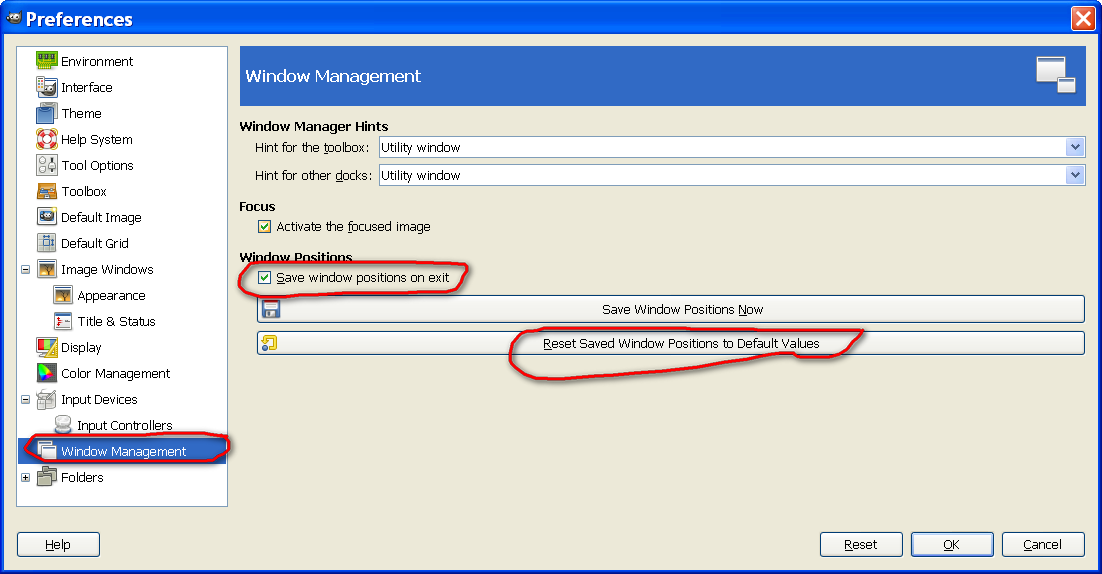
Have you tried
Edit/Preferences/Window Management
Save window positions on exit?

You can also default them back to the regular installed default positions in this area of preferences.
Image

_________________
Image


Top
 Post subject: Re: help!! gimp fullscreen problem on mac
PostPosted: Fri Apr 29, 2011 7:20 pm  (#6) 
Offline
New Member

Joined: Apr 29, 2011
Posts: 4
Sorry guys, Ive tried your suggestions. Still nothing. Thanks for the help though. Its almost as if I have to buy a new comp just so I can run gimp. You would think that a complete uninstall/reinstall would default the program...


Top
 Post subject: Re: help!! gimp fullscreen problem on mac
PostPosted: Fri Apr 29, 2011 7:24 pm  (#7) 
Offline
GimpChat Member
User avatar

Joined: Oct 06, 2010
Posts: 4050
I'm not a Mac user, but if you have your rc files still residing in your single user folder (.gimp-2.6), just move those files to another location, and reboot GIMP. I have no idea where the single user folder resides. On Windows and Linux it resides in the User folder as a hidden file.

_________________
"In order to attain the impossible, one must attempt the absurd."
~ Miguel de Cervantes


Top
 Post subject: Re: help!! gimp fullscreen problem on mac
PostPosted: Fri Apr 29, 2011 7:39 pm  (#8) 
Offline
Global Moderator
User avatar

Joined: May 16, 2010
Posts: 16274
I assumed those were deleted with
Quote:
"all of the files i could find in my HD"

If you haven't gotten rid of those Gimp will re-use them for any future install.

_________________
Image


Top
 Post subject: Re: help!! gimp fullscreen problem on mac
PostPosted: Fri Apr 29, 2011 8:14 pm  (#9) 
Offline
GimpChat Member
User avatar

Joined: Apr 08, 2010
Posts: 5420
Location: Northwest Ohio
you have mac but are running windows xp? How do you do that?
I see that your dock is missing underneath gimp, is that what you mean by full screen mode?
Can you get your dock back by going into the app folder>>>system preferences>>>personal>>>dock and fix up some of the settings?


Top
 Post subject: Re: help!! gimp fullscreen problem on mac
PostPosted: Fri Apr 29, 2011 8:22 pm  (#10) 
Offline
GimpChat Member
User avatar

Joined: Mar 02, 2011
Posts: 1850
Location: Michigan
2-ton wrote:
you have mac but are running windows xp? How do you do that?
I see that your dock is missing underneath gimp, is that what you mean by full screen mode?
Can you get your dock back by going into the app folder>>>system preferences>>>personal>>>dock and fix up some of the settings?


No he/she didn't change it, the Template Defaults to that.

They have OSX

_________________
Image
I'm back I think


Top
 Post subject: Re: help!! gimp fullscreen problem on mac
PostPosted: Sat Apr 30, 2011 2:25 am  (#11) 
Offline
GimpChat Member
User avatar

Joined: Apr 09, 2011
Posts: 1764
2-ton wrote:
you have mac but are running windows xp? How do you do that?
I see that your dock is missing underneath gimp, is that what you mean by full screen mode?
Can you get your dock back by going into the app folder>>>system preferences>>>personal>>>dock and fix up some of the settings?


These days you can run Windows on its own on a mac computer or you can have VMware which allows you to add several different OS as well as the Mac OS X .
So using the vmWare you can run Windows XP and WIndows 7 and also any one of the Linux OS (not all at the same time. I often have windows XP and Mac OS running at the same time but the XP side is often asleep...I only use it to convert tubes when necessary so that I can use them in GIMP which I run on Mac OS X.
Thing to remember is that once you start using windows environment then you are subject to the same sorts of viruses which normally affect Windows OS.


Top
 Post subject: Re: help!! gimp fullscreen problem on mac
PostPosted: Sat Apr 30, 2011 2:29 am  (#12) 
Offline
GimpChat Member
User avatar

Joined: Apr 09, 2011
Posts: 1764
try this

When in full screen mode press Command-Option-A (or Apple alt A if you wish). This will exit full screen where you can access the X11 options and un-tick full "allow full screen mode". Silly really. :)


Top
 Post subject: Re: help!! gimp fullscreen problem on mac
PostPosted: Sat Apr 30, 2011 8:04 am  (#13) 
Offline
GimpChat Member

Joined: Apr 11, 2010
Posts: 545
Location: In the mini-chat, saying silly things
Rod wrote:
I assumed those were deleted with
Quote:
"all of the files i could find in my HD"

If you haven't gotten rid of those Gimp will re-use them for any future install.


Unless they are hidden files on a mac. I wouldn't rule out that this is the problem just yet.

If akky's solution doesn't work then try to search for a folder called .gimp-2.6. If you've put brushes or scripts in there before back them up. Then empty the entire folder and start up gimp again.

If there is a way on a Mac to make hidden folders or files show, do that first. Otherwise you might not find the folder.

_________________
Image


Top
 Post subject: Re: help!! gimp fullscreen problem on mac
PostPosted: Sat Apr 30, 2011 8:59 am  (#14) 
Offline
GimpChat Member
User avatar

Joined: Apr 08, 2010
Posts: 5420
Location: Northwest Ohio
I downloaded a program that is listed as secrets.prefpane in my apps folder...it is to find hidden files/folders in a mac.


Top
 Post subject: Re: help!! gimp fullscreen problem on mac
PostPosted: Sat Apr 30, 2011 9:06 am  (#15) 
Offline
GimpChat Member
User avatar

Joined: Apr 09, 2011
Posts: 1764
I remembered it happened to me once a while back and I searched for the solution again...I knew it wasnt difficult but I think thats what I did...and I got that from another forum.


Top
 Post subject: Re: help!! gimp fullscreen problem on mac
PostPosted: Mon May 02, 2011 11:25 pm  (#16) 
Offline
New Member

Joined: Apr 29, 2011
Posts: 4
akky wrote:
try this

When in full screen mode press Command-Option-A (or Apple alt A if you wish). This will exit full screen where you can access the X11 options and un-tick full "allow full screen mode". Silly really. :)


awesome that worked! thanks dude!


Top
 Post subject: Re: help!! gimp fullscreen problem on mac
PostPosted: Tue May 03, 2011 2:02 am  (#17) 
Offline
GimpChat Member
User avatar

Joined: Apr 09, 2011
Posts: 1764
thats great!!! Glad it worked.


Top
 Post subject: Re: help!! gimp fullscreen problem on mac
PostPosted: Tue May 03, 2011 12:40 pm  (#18) 
Offline
Global Moderator
User avatar

Joined: May 16, 2010
Posts: 16274
Good deal! :)
Awesome news to hear you got it fixed.

_________________
Image


Top
 Post subject: Re: help!! gimp fullscreen problem on mac
PostPosted: Wed May 04, 2011 11:24 am  (#19) 
Offline
New Member

Joined: Apr 29, 2011
Posts: 4
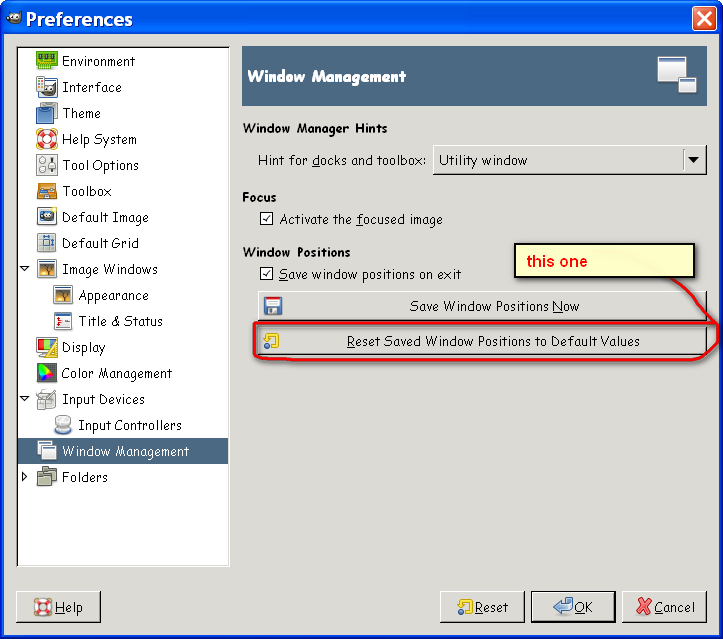
Sooo so simple its stupid really. Still, would be nice to see a "restore all to defaults" option but hey, shes up and going again. Thanks guys.


Top
 Post subject: Re: help!! gimp fullscreen problem on mac
PostPosted: Wed May 04, 2011 1:26 pm  (#20) 
Offline
Global Moderator
User avatar

Joined: May 16, 2010
Posts: 16274
You can actually do that here. :)
Image

_________________
Image


Top
Post new topic Reply to topic  [ 20 posts ] 

All times are UTC - 5 hours [ DST ]


* Login  


Powered by phpBB3 © phpBB Group