It is currently Thu Jun 18, 2026 10:57 am


All times are UTC - 5 hours [ DST ]


Post new topic Reply to topic  [ 65 posts ]  Go to page Previous  1, 2, 3, 4  Next
Author Message
 Post subject: Re: indexprint
PostPosted: Thu Mar 02, 2017 3:02 pm  (#21) 
Offline
GimpChat Member
User avatar

Joined: Jan 20, 2013
Posts: 14831
Location: roma, italy
Only as a last double-check (afterwards I will give it up):
-is there someone having indexprint running on a 64-bits env? (I'm running 64-bits Windows 10)

_________________
"Where am I ?"


Top
 Post subject: Re: indexprint
PostPosted: Thu Mar 02, 2017 3:51 pm  (#22) 
Offline
GimpChat Member

Joined: Apr 14, 2011
Posts: 67
Location: The Netherlands
Hi Dinasset.

Indexprint is working on both windows-7 64 bits and Linux 16.04 64 bits with Gimp 2.8.20. Indexprint installs on Linux easily but do not forget to install pyexiv2 also it is just a known little bug. On windows it is a little bit more complicated as usual.

To see what is going wrong start Gimp within a terminal in Linux, start Indexprint and examine its output.
On windows start also the terminal go to the root and type the following: gimp-2.8 > error.txt 2>&1. Start Indexprint and quit and quit Gimp. Look in the root dir for error.txt and examine. Oke in both situations the text produced could be cryptic. Never mind send it to me or post it here I'm the maintainer/developer of Indexprint.

For debugging I like to know your operating system and your Gimp version (number, official one, Partha compile, and so on). And what you have installed (with version numbers) so far. Unfortunatly I can not test windows 10 I don't have it but I know it runs on windows 10.

_________________
Happy Gimping !!


Top
 Post subject: Re: indexprint
PostPosted: Thu Mar 02, 2017 8:39 pm  (#23) 
Offline
GimpChat Member

Joined: Dec 29, 2015
Posts: 223
Hi rich2005,

Thanks.


Last edited by Rashid on Mon Mar 22, 2021 11:20 pm, edited 1 time in total.

Top
 Post subject: Re: indexprint
PostPosted: Fri Mar 03, 2017 12:44 am  (#24) 
Offline
GimpChat Member
User avatar

Joined: Jan 20, 2013
Posts: 14831
Location: roma, italy
moroquendo wrote:
Hi Dinasset.

Indexprint is working on both windows-7 64 bits and Linux 16.04 64 bits with Gimp 2.8.20. Indexprint installs on Linux easily but do not forget to install pyexiv2 also it is just a known little bug. On windows it is a little bit more complicated as usual.

To see what is going wrong start Gimp within a terminal in Linux, start Indexprint and examine its output.
On windows start also the terminal go to the root and type the following: gimp-2.8 > error.txt 2>&1. Start Indexprint and quit and quit Gimp. Look in the root dir for error.txt and examine. Oke in both situations the text produced could be cryptic. Never mind send it to me or post it here I'm the maintainer/developer of Indexprint.

For debugging I like to know your operating system and your Gimp version (number, official one, Partha compile, and so on). And what you have installed (with version numbers) so far. Unfortunatly I can not test windows 10 I don't have it but I know it runs on windows 10.

Thanks, but I decided to give it up, I can survive also without Indexprint.
Intricate filters are not "bread for my teeth" as we say here. I like better plug-ins which install themselves without so complicated dependencies and interrelationships.
Thanks anyhow.
If you are now the developer, I hope you will sooner or later rewrite it with a more "easy" construction.

_________________
"Where am I ?"


Top
 Post subject: Re: indexprint
PostPosted: Fri Mar 03, 2017 11:45 am  (#25) 
Offline
GimpChat Member

Joined: Apr 14, 2011
Posts: 67
Location: The Netherlands
Hi Dinasset,

That is oke. I think I make one big zip file (for windows) with all the dependecies in it. It is impossible to make one big installer but.... if you download the extension pack installation will be easier (http://registry.gimp.org/node/27656). It contains not the latest version but who cares.

_________________
Happy Gimping !!


Top
 Post subject: Re: indexprint
PostPosted: Fri Mar 03, 2017 11:56 am  (#26) 
Offline
GimpChat Member

Joined: Apr 14, 2011
Posts: 67
Location: The Netherlands
Rashid wrote:
I also visited the developer's website and downloaded the version 4... I think version 2 installation is more easy for the persons who are not expert in computer sciences. For version 3, I don't know where to put glade files in Ubuntu 16.04. So I keep myself now restricted to version 2 or Windows.


For Ubuntu (or Xubuntu 16.04 I have) installing Glade is not necessary. But using package center (I use synaptic package center) install pyexiv2 and libglade2-0. The last one is absolutly necessary it is not installed by default anymore :(

And for those who likes to experiment there is a new version with a very very basic (not working correctly) preview window.

_________________
Happy Gimping !!


Top
 Post subject: Re: indexprint
PostPosted: Fri Mar 03, 2017 12:12 pm  (#27) 
Offline
GimpChat Member

Joined: Apr 14, 2011
Posts: 67
Location: The Netherlands
rich2005 wrote:
@Rashid

Version 4 works (at least a quick try & seems to) All the installation info is there on the developers web page
http://www.sullockenzlin.demon.nl/Gimp.html

Use your package manager to install

python-gtk2 python-glade2 and python-pyexiv2 plus whatever dependencies they pull in.

One folder from the zip file IndexprintDevelopment and one file IndexprintDevelopment.py go in ~/.gimp-2.8/plug-ins

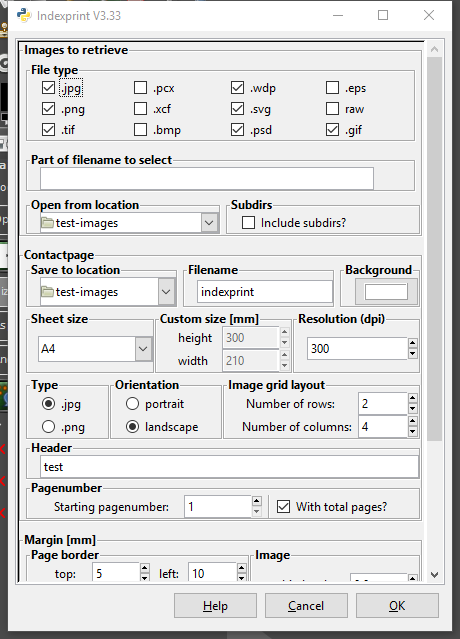
The plugin registers in File -> Indexprint development. Looks like this in Kubuntu 16.04 64 bit Gimp 2.8.20

It seems to me that Kubuntu installs libglade2-0 by default. :) Xubuntu doesn't. :(

_________________
Happy Gimping !!


Top
 Post subject: Re: indexprint
PostPosted: Fri Mar 03, 2017 2:06 pm  (#28) 
Offline
GimpChat Member

Joined: Mar 04, 2011
Posts: 2603
moroquendo wrote:
rich2005 wrote:
@Rashid

-----snip----
Use your package manager to install

python-gtk2 python-glade2 and python-pyexiv2 plus whatever dependencies they pull in.

-----snip----

It seems to me that Kubuntu installs libglade2-0 by default. :) Xubuntu doesn't. :(


As you wrote earlier, always worth running in a terminal to see what is missing.

However for python-glade2 , libglade2 is a dependency which will be pulled in even for Xubuntu. Perhaps it depends which package manager you use.

Attachment:
glade.jpg
glade.jpg [ 72.74 KiB | Viewed 1702 times ]


Top
 Post subject: Re: indexprint
PostPosted: Fri Mar 03, 2017 2:41 pm  (#29) 
Offline
GimpChat Member
User avatar

Joined: Jan 20, 2013
Posts: 14831
Location: roma, italy
moroquendo wrote:
Hi Dinasset,

That is oke. I think I make one big zip file (for windows) with all the dependecies in it. It is impossible to make one big installer but.... if you download the extension pack installation will be easier (http://registry.gimp.org/node/27656). It contains not the latest version but who cares.

Hi moroquendo,
run the pack, a few quick comments:
1- after this autoinstallation indexprint works (at least I did one try and got the sheets); GOOD NEWS!
2- contactsheet (the predecessor, also auto installed) abends when selecting the source folder (tried many times)
3- for the rest I have to check about possible duplicates installed by the package
MANY THANKS!

_________________
"Where am I ?"


Top
 Post subject: Re: indexprint
PostPosted: Fri Mar 03, 2017 9:03 pm  (#30) 
Offline
Script Coder
User avatar

Joined: Feb 18, 2011
Posts: 4826
Location: Bendigo Vic. Australia
I have a .zip with precise instructions that i used to successfully install Indexprint and Line border2 in 2.8.20
Image

Image

Attachment:
Indexprint Lineborder.zip [668.88 KiB]
Downloaded 122 times

_________________
Image
No matter how much you push the envelope, it'll still be stationery.


Top
 Post subject: Re: indexprint
PostPosted: Sat Mar 04, 2017 1:33 am  (#31) 
Offline
GimpChat Member

Joined: Dec 29, 2015
Posts: 223
I copied.


So whole process stops here.


Last edited by Rashid on Mon Mar 22, 2021 11:22 pm, edited 1 time in total.

Top
 Post subject: Re: indexprint
PostPosted: Sat Mar 04, 2017 1:52 am  (#32) 
Offline
GimpChat Member
User avatar

Joined: Jan 20, 2013
Posts: 14831
Location: roma, italy
Graechan wrote:
I have a .zip with precise instructions that i used to successfully install Indexprint and Line border2 in 2.8.20
[ Image ]

[ Image ]

Attachment:
Indexprint Lineborder.zip

Thanks Graechan.
As I wrote, after the extensions pack installation suggested by moroquendo Indexprint is now running.
What is not running is the predecessor, ContactSheet: it shows up but after the input folder selection it abends (=ends abnormally).
When I'll have some time I'll try to understand why.

_________________
"Where am I ?"


Top
 Post subject: Re: indexprint
PostPosted: Sat Mar 04, 2017 2:20 am  (#33) 
Offline
Script Coder
User avatar

Joined: Feb 18, 2011
Posts: 4826
Location: Bendigo Vic. Australia
Rashid wrote:
I copied 'libglade-2.0-0.dll' and 'libxml2.dll' in '/bin' folder. I do not know whether their location is correct or not?

I do not know at all where to paste 'python/Lib/site-packages/gtk-2.0/gtk/glade.pyd' files.

So whole process stops here.

Rashid in my computer it's (C:\Program Files\GIMP 2\Python\Lib\site-packages\gtk-2.0\gtk\glade.pyd)
you should be able to work out where yours should go now

_________________
Image
No matter how much you push the envelope, it'll still be stationery.


Top
 Post subject: Re: indexprint
PostPosted: Sat Mar 04, 2017 3:18 am  (#34) 
Offline
GimpChat Member
User avatar

Joined: Jan 20, 2013
Posts: 14831
Location: roma, italy
Graechan, do you have also ContactSheet running in your system?
From my first analysis, it seems "contactsheet.mo" is missing from the installation and I do not find it anywhere on internet; do you have it?

_________________
"Where am I ?"


Top
 Post subject: Re: indexprint
PostPosted: Sat Mar 04, 2017 5:32 am  (#35) 
Offline
GimpChat Member

Joined: Apr 14, 2011
Posts: 67
Location: The Netherlands
rich2005 wrote:
moroquendo wrote:
rich2005 wrote:
@Rashid

-----snip----
Use your package manager to install

python-gtk2 python-glade2 and python-pyexiv2 plus whatever dependencies they pull in.

-----snip----

It seems to me that Kubuntu installs libglade2-0 by default. :) Xubuntu doesn't. :(


As you wrote earlier, always worth running in a terminal to see what is missing.

However for python-glade2 , libglade2 is a dependency which will be pulled in even for Xubuntu. Perhaps it depends which package manager you use.
.....

Always good to know, thanks.
I will make an investigation to rewrite the installation procedure.

_________________
Happy Gimping !!


Top
 Post subject: Re: indexprint
PostPosted: Sat Mar 04, 2017 5:37 am  (#36) 
Offline
GimpChat Member

Joined: Apr 14, 2011
Posts: 67
Location: The Netherlands
dinasset wrote:
moroquendo wrote:
Hi Dinasset,

That is oke. I think I make one big zip file (for windows) with all the dependecies in it. It is impossible to make one big installer but.... if you download the extension pack installation will be easier (http://registry.gimp.org/node/27656). It contains not the latest version but who cares.

Hi moroquendo,
run the pack, a few quick comments:
1- after this autoinstallation indexprint works (at least I did one try and got the sheets); GOOD NEWS!
2- contactsheet (the predecessor, also auto installed) abends when selecting the source folder (tried many times)
3- for the rest I have to check about possible duplicates installed by the package
MANY THANKS!

Good to hear.
Contactsheet is not maintained any longer.

_________________
Happy Gimping !!


Top
 Post subject: Re: indexprint
PostPosted: Sat Mar 04, 2017 5:41 am  (#37) 
Offline
GimpChat Member

Joined: Apr 14, 2011
Posts: 67
Location: The Netherlands
Graechan wrote:
I have a .zip with precise instructions that i used to successfully install Indexprint and Line border2 in 2.8.20
[ Image ]

[ Image ]

Attachment:
Indexprint Lineborder.zip

If you have Lineborder 2 running Indexprint v3 and 4 will run too. Both programs have the same dependecies.

_________________
Happy Gimping !!


Top
 Post subject: Re: indexprint
PostPosted: Sat Mar 04, 2017 5:43 am  (#38) 
Offline
GimpChat Member
User avatar

Joined: Jan 20, 2013
Posts: 14831
Location: roma, italy
@moroquendo
OK, just to know, even if no more maintained: do you have an idea while "contactsheet" as downloaded/installed by the extensions pack does abnormally terminate after selection of the input folder?
note that if I do not select any folder the filter starts (without obviously continuing but starts), while if I select a folder from the top down list the filter does not even start (I put a "gimp-message" at the beginning saying "starting", and it doesn't show up).
Also the .mo file is not installed with the pack.

_________________
"Where am I ?"


Top
 Post subject: Re: indexprint
PostPosted: Sat Mar 04, 2017 5:48 am  (#39) 
Offline
GimpChat Member

Joined: Apr 14, 2011
Posts: 67
Location: The Netherlands
dinasset wrote:
@moroquendo
OK, just to know, even if no more maintained: do you have an idea while "contactsheet" as downloaded/installed by the extensions pack does abnormally terminate after selection of the input folder?
note that if I do not select any folder the filter starts (without obviously continuing but starts), while if I select a folder from the top down list the filter does not even start (I put a "gimp-message" at the beginning saying "starting", and it doesn't show up).
Also the .mo file is not installed with the pack.

The .mo file is only necessary for translations, default is English.
Why contactsheet is not installed correctly I do not know. I have to install contactsheet first on my system to see what goes wrong.

_________________
Happy Gimping !!


Top
 Post subject: Re: indexprint
PostPosted: Sat Mar 04, 2017 5:52 am  (#40) 
Offline
GimpChat Member
User avatar

Joined: Jan 20, 2013
Posts: 14831
Location: roma, italy
OK, thanks

_________________
"Where am I ?"


Top
Post new topic Reply to topic  [ 65 posts ]  Go to page Previous  1, 2, 3, 4  Next

All times are UTC - 5 hours [ DST ]


* Login  


Powered by phpBB3 © phpBB Group