It is currently Sun Oct 11, 2026 11:39 am


All times are UTC - 5 hours [ DST ]


Post new topic Reply to topic  [ 204 posts ]  Go to page Previous  1 ... 6, 7, 8, 9, 10, 11  Next
Author Message
 Post subject: Re: Qt-based G'MIC plug-in
PostPosted: Tue Apr 11, 2017 12:18 am  (#161) 
Offline
GimpChat Member
User avatar

Joined: Mar 13, 2016
Posts: 83
@Dinasset
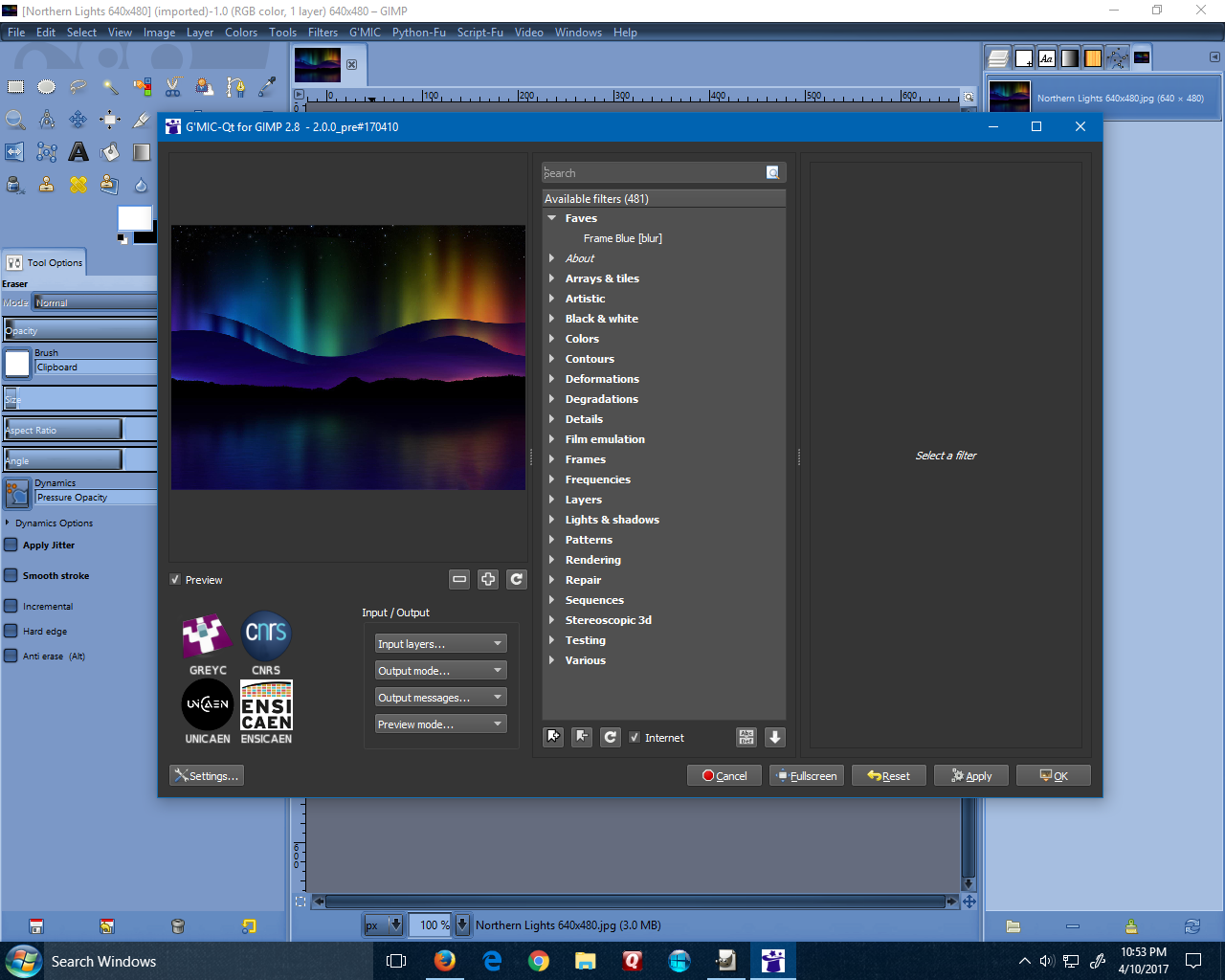
Everything seems to be working fine...Larry


Windows 10 64bits / Gimp 2.8.20
G'MIC_2.0.0_QT_Win64_ pre#170410_10-Apr-2017


Image

_________________
Image


Top
 Post subject: Re: Qt-based G'MIC plug-in
PostPosted: Tue Apr 11, 2017 12:23 am  (#162) 
Offline
GimpChat Member
User avatar

Joined: Jan 20, 2013
Posts: 14835
Location: roma, italy
OK, thanks Larry.
Hence, it's me.
(only another question: did you start from the .zip file?)

_________________
"Where am I ?"


Top
 Post subject: Re: Qt-based G'MIC plug-in
PostPosted: Tue Apr 11, 2017 12:32 am  (#163) 
Offline
GimpChat Member
User avatar

Joined: Mar 13, 2016
Posts: 83
@Dinasset
No, I started it in Gimp not from the zip file. Have a good tomorrow.
:)


Top
 Post subject: Re: Qt-based G'MIC plug-in
PostPosted: Tue Apr 11, 2017 12:33 am  (#164) 
Offline
GimpChat Member
User avatar

Joined: Jan 20, 2013
Posts: 14835
Location: roma, italy
So you used the .exe?
(My previous question was:
- did you download the .zip file, unzipped it and moved the unzipped folder to Gimp folder?
The other way is:
- download the .exe file and execute it)
Anyhow, thanks.

_________________
"Where am I ?"


Last edited by dinasset on Tue Apr 11, 2017 12:36 am, edited 1 time in total.

Top
 Post subject: Re: Qt-based G'MIC plug-in
PostPosted: Tue Apr 11, 2017 12:36 am  (#165) 
Offline
GimpChat Member
User avatar

Joined: Sep 24, 2010
Posts: 12850
I never use the installe, Diego; only the zip files. All appear well for me too. :)

_________________
Lyle

Psalm 109:8

Image


Top
 Post subject: Re: Qt-based G'MIC plug-in
PostPosted: Tue Apr 11, 2017 12:36 am  (#166) 
Offline
GimpChat Member
User avatar

Joined: Jan 20, 2013
Posts: 14835
Location: roma, italy
Fine, I have to re-try. Thanks.

_________________
"Where am I ?"


Top
 Post subject: Re: Qt-based G'MIC plug-in
PostPosted: Tue Apr 11, 2017 12:38 am  (#167) 
Offline
GimpChat Member
User avatar

Joined: Mar 13, 2016
Posts: 83
@Dinasset
RE: (only another question: did you start from the .zip file?)


No, I used the zip version and dropped them in my user folder...if that helps to clarify. :hehe

_________________
Image


Top
 Post subject: Re: Qt-based G'MIC plug-in
PostPosted: Tue Apr 11, 2017 12:46 am  (#168) 
Offline
GimpChat Member
User avatar

Joined: Jan 20, 2013
Posts: 14835
Location: roma, italy
Tried again.
Cleaned the user/gimp folder removing all folders related to G'MIC.
Inserted only the unzipped folder of the new qt version: same error; no problem, I have the GTK running (and likely the previous qt release, if I want)

Edit: I confirm that moving back the previous release of qt (17.03), I have it running.
That's OK for me, now.


Here the screenshot:
Attachment:
Cattura.PNG
Cattura.PNG [ 225.98 KiB | Viewed 2256 times ]

_________________
"Where am I ?"


Top
 Post subject: Re: Qt-based G'MIC plug-in
PostPosted: Tue Apr 11, 2017 2:31 am  (#169) 
Offline
GimpChat Member
User avatar

Joined: Jan 03, 2011
Posts: 1656
That's interesting dinasset, there must be something going wrong with the new version.
A bit hard to debug right now since we haven't been able to reproduce the bug, but we'll investigate !


Top
 Post subject: Re: Qt-based G'MIC plug-in
PostPosted: Tue Apr 11, 2017 9:15 am  (#170) 
Offline
GimpChat Member
User avatar

Joined: Jan 20, 2013
Posts: 14835
Location: roma, italy
David,
do not care any more for this error I found, because it happens only on my "standard" user, who is full of programs/filters.
I repeated the installation on a clean user (whom I use only for testing new filters in a totally "clean" environment) and qt opens regularly.
So, certainly there is "something" in the compilation of the last release which differs from the previous compilations, all running also in my standard user environment, but very likely it's very difficult to find out "what", so simply forget.
I will test next release when ready.

_________________
"Where am I ?"


Top
 Post subject: Re: Qt-based G'MIC plug-in
PostPosted: Tue Apr 11, 2017 9:26 am  (#171) 
Offline
GimpChat Member
User avatar

Joined: Jun 06, 2016
Posts: 1033
win 7 64bit qt 04/10/17 version works fine for me.
I just open the zip file in the plug-ins folder and let it overwrite all dll's.
It did not find it to distort the layers while working on selections.
It shows the command string in the script dialog box!
Very good!


Top
 Post subject: Re: Qt-based G'MIC plug-in
PostPosted: Tue Apr 11, 2017 11:03 am  (#172) 
Offline
GimpChat Member
User avatar

Joined: Mar 18, 2011
Posts: 283
Location: Lusaka, Zambia
Hi,

Wow!, I can only recommend that G'MIG plug-in should have an option to install and run as a stand-alone program. IMO, it's a very capable and a complete tool own its own for photo effects.

Just thinking. :roll:


Top
 Post subject: Re: Qt-based G'MIC plug-in
PostPosted: Tue Apr 11, 2017 12:17 pm  (#173) 
Offline
Global Moderator
User avatar

Joined: May 16, 2010
Posts: 16200
Its much faster on my 2 core machine now too David. =)


Top
 Post subject: Re: Qt-based G'MIC plug-in
PostPosted: Wed Apr 12, 2017 4:12 am  (#174) 
Offline
GimpChat Member
User avatar

Joined: Jan 03, 2011
Posts: 1656
josephbupe wrote:
Hi,

Wow!, I can only recommend that G'MIG plug-in should have an option to install and run as a stand-alone program. IMO, it's a very capable and a complete tool own its own for photo effects.

Just thinking. :roll:


The plug-in is already available as a stand-alone exe, check this link : http://gmic.eu/files/prerelease/gmic_qt_win64.zip


Top
 Post subject: Re: Qt-based G'MIC plug-in
PostPosted: Mon Apr 24, 2017 1:56 am  (#175) 
Offline
GimpChat Member
User avatar

Joined: Jan 03, 2011
Posts: 1656
Great news : Sébastien has finally released the source code of G'MIC-Qt on github, licensed under GPL3.
Do not hesitate to play with it and report any weirdness ! Link : https://github.com/c-koi/gmic-qt


Last edited by Ronounours on Mon Apr 24, 2017 5:00 am, edited 1 time in total.

Top
 Post subject: Re: Qt-based G'MIC plug-in
PostPosted: Mon Apr 24, 2017 2:10 am  (#176) 
Offline
GimpChat Member
User avatar

Joined: Nov 04, 2015
Posts: 1482
Ronounours "Link : https://github.com/c-koi/gmic-qt4"

Sorry the link didn't work for me.


Top
 Post subject: Re: Qt-based G'MIC plug-in
PostPosted: Mon Apr 24, 2017 2:57 am  (#177) 
Offline
GimpChat Member

Joined: Mar 04, 2011
Posts: 2618
That is a bit strange a 404, however, back off one level to https://github.com/c-koi then choose the project which is
https://github.com/c-koi/gmic-qt What is the difference? the '4'


Top
 Post subject: Re: Qt-based G'MIC plug-in
PostPosted: Mon Apr 24, 2017 3:02 am  (#178) 
Offline
GimpChat Member
User avatar

Joined: Sep 24, 2010
Posts: 12850
As Rich figured out, the correct link is https://github.com/c-koi/gmic-qt

_________________
Lyle

Psalm 109:8

Image


Top
 Post subject: Re: Qt-based G'MIC plug-in
PostPosted: Mon Apr 24, 2017 3:20 am  (#179) 
Offline
GimpChat Member
User avatar

Joined: Jan 20, 2013
Posts: 14835
Location: roma, italy
Don't see the need of the source, except for other OS.
Am I wrong?

_________________
"Where am I ?"


Top
 Post subject: Re: Qt-based G'MIC plug-in
PostPosted: Mon Apr 24, 2017 5:05 am  (#180) 
Offline
GimpChat Member
User avatar

Joined: Jan 03, 2011
Posts: 1656
@dinasset : from our point of view (developers), that's wrong indeed :)
Now, other people have the opportunity to compile and test, report bugs, propose patches to the code, etc..
That means more tests, more feedback and a more robust code in the future.
Something we couldn't do without releasing the source code.
That's one strength of FLOSS, without any doubts.


Top
Post new topic Reply to topic  [ 204 posts ]  Go to page Previous  1 ... 6, 7, 8, 9, 10, 11  Next

All times are UTC - 5 hours [ DST ]


* Login  


Powered by phpBB3 © phpBB Group