It is currently Sun Nov 08, 2026 5:49 am


All times are UTC - 5 hours [ DST ]


Post new topic Reply to topic  [ 7 posts ] 
Author Message
 Post subject: Default Font Tool Options Not Saving
PostPosted: Tue Apr 25, 2017 9:14 am  (#1) 
Offline
New Member

Joined: Apr 25, 2017
Posts: 2
GIMP Version: 2.8.20
Operating System: Windows
OS Version: Windows 10
GIMP Experience: Experienced User


Hey everyone,

I understand the process for saving tool options for default settings, however, when attempting to save the default startup font to be anything other than Sans, it never seems to actually apply those settings. This means that every time that I open the font tool again, even after having saved the tool option (with and without checking the "Save tool settings upon exit" checkbox) it ALWAYS reverts back to the Sans font once again.

I am using GIMP 2.8.20, on the Windows 10 platform, and since I also use it on a Surface Pro 4, I use the Color-48 theme (so that all the of the buttons are not incredibly tiny, making it easier to work with a smaller screen on the SP4).

I have looked into numerous other threads and boards relating to this, but no matter what I attempt, it ALWAYS just reverts back to the Sans font when I open the font tool.

Any suggestions as to why it is not saving what I am choosing as the default?

Thanks for any help that can be provided.


Share on Facebook Share on Twitter Share on Orkut Share on Digg Share on MySpace Share on Delicious Share on Technorati
Top
 Post subject: Re: Default Font Tool Options Not Saving
PostPosted: Tue Apr 25, 2017 10:04 am  (#2) 
Offline
GimpChat Member
User avatar

Joined: Jan 20, 2013
Posts: 14835
Location: roma, italy
Same environment.
I changed the font, went to Edit/Preferences/Tool Options
clicked on Save tool options now then OK (check you didn't miss the OK)
closed, restarted Gimp, and the font is exactly what I changed.

_________________
"Where am I ?"


Top
 Post subject: Re: Default Font Tool Options Not Saving
PostPosted: Tue Apr 25, 2017 10:15 am  (#3) 
Offline
Administrator
User avatar

Joined: Aug 10, 2012
Posts: 14265
Location: Native to NYC living in Arizona, Gimp 2.8 - 3.0, Win 11 PC.
wedjlok wrote:
GIMP Version: 2.8.20
Operating System: Windows
OS Version: Windows 10
GIMP Experience: Experienced User


Hey everyone,

I understand the process for saving tool options for default settings, however, when attempting to save the default startup font to be anything other than Sans, it never seems to actually apply those settings. This means that every time that I open the font tool again, even after having saved the tool option (with and without checking the "Save tool settings upon exit" checkbox) it ALWAYS reverts back to the Sans font once again.

I am using GIMP 2.8.20, on the Windows 10 platform, and since I also use it on a Surface Pro 4, I use the Color-48 theme (so that all the of the buttons are not incredibly tiny, making it easier to work with a smaller screen on the SP4).

I have looked into numerous other threads and boards relating to this, but no matter what I attempt, it ALWAYS just reverts back to the Sans font when I open the font tool.

Any suggestions as to why it is not saving what I am choosing as the default?

Thanks for any help that can be provided.

Have you tried going back to the default theme,
to see if it's the theme that's causing this behavior?

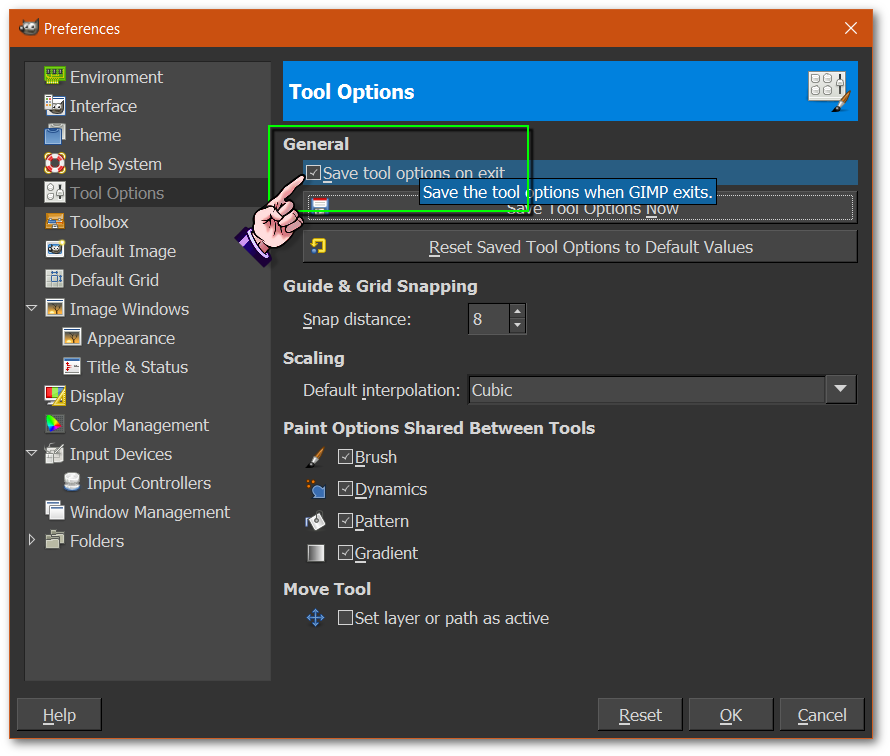
In addition to what dinasset has explained.
Be sure to check the little box,
(Save tool options on exit),
when saving in the Preferences>Tool Options dialog.

Image

Also,
if all else has failed.
You can submit a bug report,
to see if it's indeed a new or known issue,
with this version of Gimp.

Eek! A Bug! How To Report GIMP Bugs

_________________
Image
"A wise man learns more from a foolish question than a fool can learn from a wise answer"
Image


Top
 Post subject: Re: Default Font Tool Options Not Saving
PostPosted: Tue Apr 25, 2017 12:16 pm  (#4) 
Offline
New Member

Joined: Apr 25, 2017
Posts: 2
Quote:
Have you tried going back to the default theme,
to see if it's the theme that's causing this behavior?


Unfortunately, if I go back to a default theme, then it pretty much just makes GIMP fairly useless to me on the SP4 because the buttons become so small as to be almost unusable.


Top
 Post subject: Re: Default Font Tool Options Not Saving
PostPosted: Tue Apr 25, 2017 12:30 pm  (#5) 
Offline
Global Moderator
User avatar

Joined: May 16, 2010
Posts: 16251
If you close GIMP then open your "gimprc" file (found in the .gimp-2.8 directory) in a text editor you will see a line that looks like this.
(save-tool-options yes)


Make sure that says "yes" and not "no" .
Save the gimprc file and re open GIMP.

Change the font and close GIMP. It should be saved as the default font when you restart GIMP.

_________________
Image


Top
 Post subject: Re: Default Font Tool Options Not Saving
PostPosted: Thu Dec 27, 2018 7:13 am  (#6) 
Offline
New Member

Joined: Dec 27, 2018
Posts: 1
It doesn't work if you make the change in the pop-up floating window that appears when you are typing. You must make the change in the Tool options pane and then go into Edit-Preferences-Tool Options-Save tool options now-OK

Hope this helps,
OonaghG

Attachment:
Gimp defaults.PNG
Gimp defaults.PNG [ 91.13 KiB | Viewed 7042 times ]


Top
 Post subject: Re: Default Font Tool Options Not Saving
PostPosted: Thu Dec 27, 2018 10:45 am  (#7) 
Offline
GimpChat Member
User avatar

Joined: May 10, 2013
Posts: 1443
Location: Finland
Gimp text tool has always been bit quirky.
Let's say you type anything in the canvas and change the font.
Now, if you backspace to the beginning of your text,
it will revert back to the one saved in tool options.
Bit weird in my opinion. Not annoying though because I'm not writing a book with Gimp.

If I got you right, you want to have same font every time you launch Gimp?
Then set up your font properties in tools pane, go to preferences and DISABLE "save tool options on exit".
Then click "save tool options now".
First thing I do every time with new Gimp installation, is to set up all the tools to my default preference
and make sure I have "save tool options on exit" disabled.
Save tool options on exit is good if you know you will continue unfinished project on next launch.


Top
Post new topic Reply to topic  [ 7 posts ] 

All times are UTC - 5 hours [ DST ]


* Login  


Powered by phpBB3 © phpBB Group