It is currently Tue Jun 30, 2026 12:40 am


All times are UTC - 5 hours [ DST ]


Post new topic Reply to topic  [ 88 posts ]  Go to page Previous  1, 2, 3, 4, 5  Next
Author Message
 Post subject: Re: SpiderPaint script new version for GMIC QT 2
PostPosted: Sat Jul 08, 2017 6:16 am  (#61) 
Offline
GimpChat Member
User avatar

Joined: Mar 01, 2014
Posts: 14052
Location: Spain, Aragón
Solved, animicule. No problem the filter continues working great!

_________________
Image

Gimp 2.10.30(samj) portable _ OS Windows 10 Home_ 64bits
Don’t be afraid to start over. It’s a new chance to rebuild what you want.


Top
 Post subject: Re: SpiderPaint script new version for GMIC QT 2
PostPosted: Sat Jul 08, 2017 10:49 am  (#62) 
Offline
Global Moderator
User avatar

Joined: May 16, 2010
Posts: 16071
Issabella wrote:
Sorry animicule, I have a problem. Having run the filter several times I now have the option no available, it is in light grey without option to run the filter. What can it be? I post how it is currently. :(

Hi Issabella.
I know you already solved this but I will answer it just in case someone else has this problem.

If you open a image and your BASpiderPaint for Qt is grayed out or not clickable, just right click the image layer>add alpha channel. The filter should now work or be available.

_________________
Image


Top
 Post subject: Re: SpiderPaint script new version for GMIC QT 2
PostPosted: Sat Jul 08, 2017 11:00 am  (#63) 
Offline
GimpChat Member

Joined: May 12, 2015
Posts: 4693
Racer, Animicule, Issabella, Beautiful Images!


Top
 Post subject: Re: SpiderPaint script new version for GMIC QT 2
PostPosted: Sat Jul 08, 2017 11:01 am  (#64) 
Offline
Global Moderator
User avatar

Joined: May 16, 2010
Posts: 16071
I do however have this error.

  File "C:\Users\Rod\.gimp-2.8\plug-ins\1BA_SpiderPaint_v2c_qt2.py", line 787, in BA_SpiderPaint_v2c_qt2
    lay5.mode = SCREEN_MODE
error: could not set mode on layer (ID 177)

_________________
Image


Top
 Post subject: Re: SpiderPaint script new version for GMIC QT 2
PostPosted: Sat Jul 08, 2017 11:29 am  (#65) 
Offline
GimpChat Member
User avatar

Joined: Mar 01, 2014
Posts: 14052
Location: Spain, Aragón
Thank you so much Rod, it's exactly as you said. The picture didn't have alpha channel. :)
Rod, I wish you can solver the problem or animicule can do it!
Thank you. :)

_________________
Image

Gimp 2.10.30(samj) portable _ OS Windows 10 Home_ 64bits
Don’t be afraid to start over. It’s a new chance to rebuild what you want.


Top
 Post subject: Re: SpiderPaint script new version for GMIC QT 2
PostPosted: Sat Jul 08, 2017 1:48 pm  (#66) 
Offline
GimpChat Member

Joined: May 12, 2015
Posts: 4693
Attachment:
BA.SpiderPaintQT.Hearts.jpg
BA.SpiderPaintQT.Hearts.jpg [ 651.69 KiB | Viewed 1535 times ]

Attachment:
BA.SpiderPaintQT.PitcherFlowersFruit.jpg
BA.SpiderPaintQT.PitcherFlowersFruit.jpg [ 897.76 KiB | Viewed 1535 times ]


Top
 Post subject: Re: SpiderPaint script new version for GMIC QT 2
PostPosted: Sat Jul 08, 2017 5:04 pm  (#67) 
Offline
GimpChat Member
User avatar

Joined: Apr 15, 2017
Posts: 1837
Issabella and Pat625, those images are lovely. Yes, this filter requires you to cut out the object in question and have an alpha channel. It's a bit of work just to prep the image for a filter.

My 2nd test on a 32-bit PNG that already had the alpha channel:

Attachment:
spider_paint_test2.jpg
spider_paint_test2.jpg [ 179.89 KiB | Viewed 1532 times ]


Top
 Post subject: Re: SpiderPaint script new version for GMIC QT 2
PostPosted: Sat Jul 08, 2017 9:57 pm  (#68) 
Offline
Global Moderator
User avatar

Joined: May 16, 2010
Posts: 16071
Thanks racer-x! Didn't catch this part. =)

You must use an image with alpha and transparency. Even if the
transparency is a 1 pixel eraser in a corner.

_________________
Image


Top
 Post subject: Re: SpiderPaint script new version for GMIC QT 2
PostPosted: Sat Jul 08, 2017 10:24 pm  (#69) 
Offline
Global Moderator
User avatar

Joined: May 16, 2010
Posts: 16071
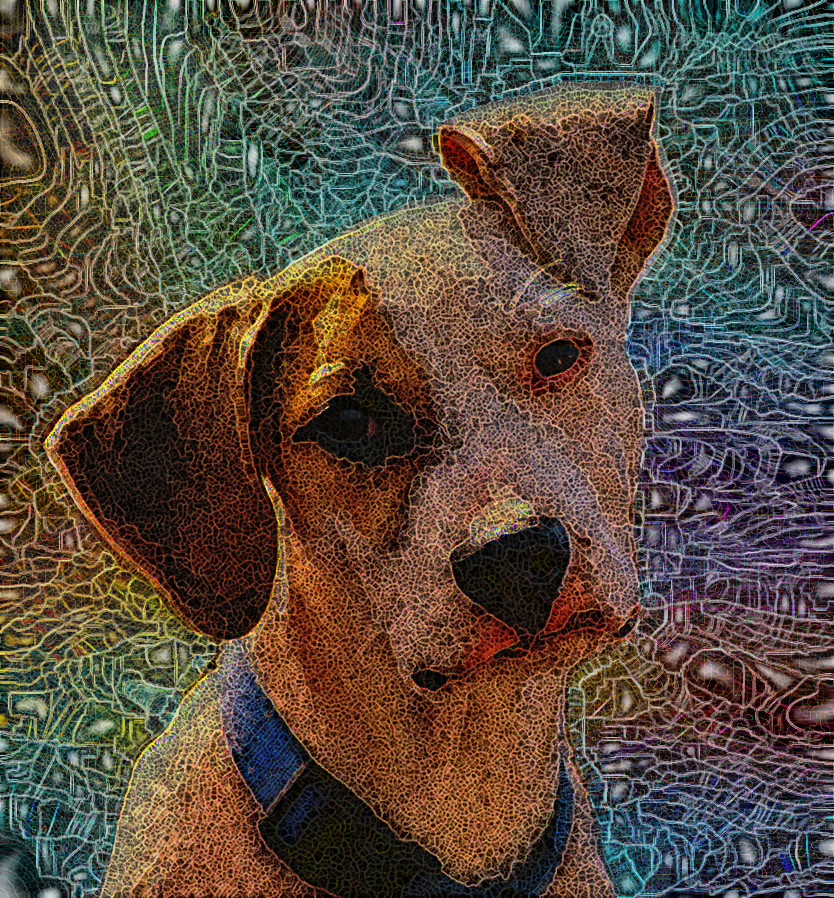
Works great now! =)

Image

_________________
Image


Top
 Post subject: Re: SpiderPaint script new version for GMIC QT 2
PostPosted: Sat Jul 08, 2017 11:39 pm  (#70) 
Offline
GimpChat Member
User avatar

Joined: Jan 20, 2013
Posts: 14831
Location: roma, italy
Rod, I found on Google the original image of your much used dog; is it just a "lost dog" or "your lost dog"?
Attachment:
mr-animalflyer-letter.jpg
mr-animalflyer-letter.jpg [ 37.7 KiB | Viewed 1507 times ]

_________________
"Where am I ?"


Top
 Post subject: Re: SpiderPaint script new version for GMIC QT 2
PostPosted: Sun Jul 09, 2017 12:58 pm  (#71) 
Offline
GimpChat Member
User avatar

Joined: Apr 15, 2017
Posts: 1837
Test #3: An Osprey with fish that I shot today.

Attachment:
spider_paint_test3.jpg
spider_paint_test3.jpg [ 238.74 KiB | Viewed 1276 times ]


Top
 Post subject: Re: SpiderPaint script new version for GMIC QT 2
PostPosted: Sun Jul 09, 2017 1:08 pm  (#72) 
Offline
GimpChat Member
User avatar

Joined: Jun 06, 2016
Posts: 1033
Nice RacerX !
seldom see an Osprey around prairie...


Top
 Post subject: Re: SpiderPaint script new version for GMIC QT 2
PostPosted: Sun Jul 09, 2017 1:13 pm  (#73) 
Offline
GimpChat Member
User avatar

Joined: Apr 15, 2017
Posts: 1837
Thanks, animicule.

I just tried it without the cutout, and I think it looks better...

Attachment:
spider_paint_test3b.jpg
spider_paint_test3b.jpg [ 297.16 KiB | Viewed 1273 times ]


Top
 Post subject: Re: SpiderPaint script new version for GMIC QT 2
PostPosted: Sun Jul 09, 2017 1:37 pm  (#74) 
Offline
GimpChat Member

Joined: May 12, 2015
Posts: 4693
Racer, Rod, really nice pictures.

Rod I have wondered, Is that really your dog?


Top
 Post subject: Re: SpiderPaint script new version for GMIC QT 2
PostPosted: Sun Jul 09, 2017 8:11 pm  (#75) 
Offline
GimpChat Member

Joined: May 12, 2015
Posts: 4693
Attachment:
BA.SpiderPaintQT.Cat.jpg
BA.SpiderPaintQT.Cat.jpg [ 762.01 KiB | Viewed 1264 times ]


Top
 Post subject: Re: SpiderPaint script new version for GMIC QT 2
PostPosted: Sun Jul 09, 2017 11:04 pm  (#76) 
Offline
GimpChat Member
User avatar

Joined: Jan 20, 2013
Posts: 14831
Location: roma, italy
Excellent outcome, Pat.
Racer, I agree with you, second one is perfect.

_________________
"Where am I ?"


Top
 Post subject: Re: SpiderPaint script new version for GMIC QT 2
PostPosted: Mon Jul 10, 2017 3:57 am  (#77) 
Offline
GimpChat Member
User avatar

Joined: Apr 15, 2017
Posts: 1837
Thanks dinasset. Excellent cat image Pat. Test #4: a young Eagle in flight I shot. This one had errors in the upper left, so I filled it with blue.

Attachment:
spider_paint_test4.jpg
spider_paint_test4.jpg [ 398.19 KiB | Viewed 1252 times ]


Top
 Post subject: Re: SpiderPaint script new version for GMIC QT 2
PostPosted: Mon Jul 10, 2017 10:30 am  (#78) 
Offline
GimpChat Member
User avatar

Joined: Mar 01, 2014
Posts: 14052
Location: Spain, Aragón
Racer, Pat, Rod you have got excellent results! :jumpclap


Attachments:
Caballo-Fino_BA_SpiderPaint2.jpg
Caballo-Fino_BA_SpiderPaint2.jpg [ 733.51 KiB | Viewed 1240 times ]

_________________
Image

Gimp 2.10.30(samj) portable _ OS Windows 10 Home_ 64bits
Don’t be afraid to start over. It’s a new chance to rebuild what you want.
Top
 Post subject: Re: SpiderPaint script new version for GMIC QT 2
PostPosted: Mon Jul 10, 2017 11:07 am  (#79) 
Offline
GimpChat Member
User avatar

Joined: Jun 06, 2016
Posts: 1033
RacerX, if you saved your cutout, may I suggest, try it again using thick borders....
I do at least one cutout and sometimes 2 to get the borders in place.
Without cutout, borders only go along outside edge - not very useful in making
the subject pop out...


Top
 Post subject: Re: SpiderPaint script new version for GMIC QT 2
PostPosted: Mon Jul 10, 2017 12:35 pm  (#80) 
Offline
Global Moderator
User avatar

Joined: May 16, 2010
Posts: 16071
Pat625 wrote:

Rod I have wondered, Is that really your dog?


No. I have poodle mix puppies (2). And 3 cats. =)
Think someone here used this image first and i just re-use it for all my tests. Wish i knew the original author. So i could give them credit here.

_________________
Image


Top
Post new topic Reply to topic  [ 88 posts ]  Go to page Previous  1, 2, 3, 4, 5  Next

All times are UTC - 5 hours [ DST ]


* Login  


Powered by phpBB3 © phpBB Group