It is currently Wed Aug 26, 2026 2:07 pm


All times are UTC - 5 hours [ DST ]


Post new topic Reply to topic  [ 7 posts ] 
Author Message
 Post subject: New version of Joined-up Text filter (Version 2.06)
PostPosted: Mon Aug 21, 2017 2:48 am  (#1) 
Offline
GimpChat Member
User avatar

Joined: Aug 08, 2016
Posts: 2861
Location: East Midlands of England
New feature: Shaded text option (as requested by Rod).

Download filter and fonts here:

Attachment:
JoinedUpVersion206.zip [92.59 KiB]
Downloaded 265 times


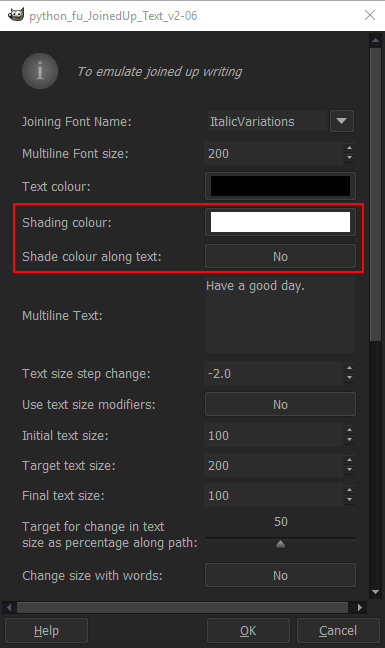
The relevant options for the new feature are high-lighted in this screen-shot of the filter dialog:

Click on the 'Text colour:' tool and the 'Shaded text colour:' tool and select the two colours to use for shaded text.
Click on 'Shade colour along text:' to set the option to 'Yes', and you're ready to go.

Attachment:
JoinedUpDialogv206.jpg
JoinedUpDialogv206.jpg [ 102.73 KiB | Viewed 5965 times ]


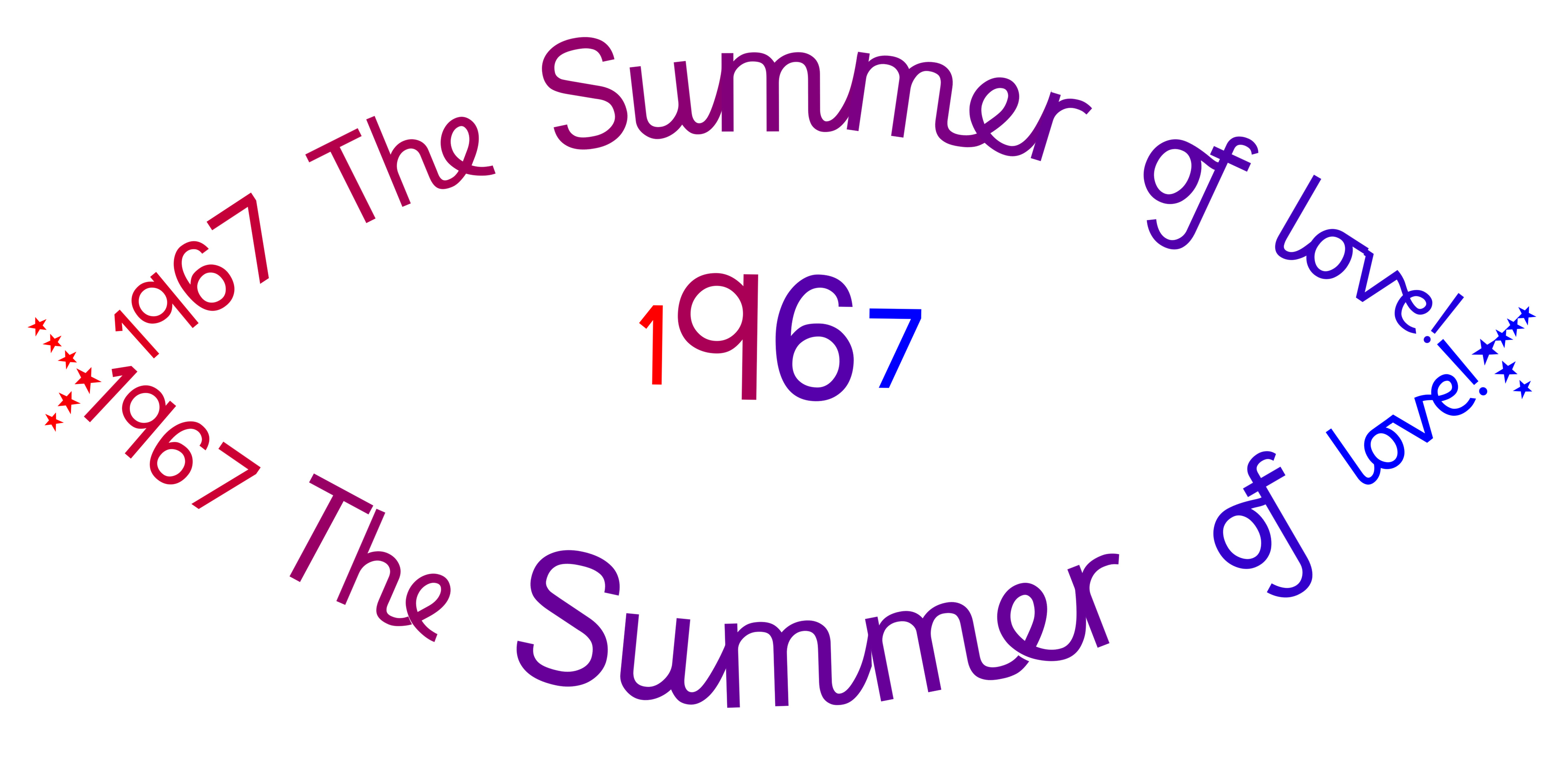
The option will apply the shading differently when the 'Change size with words:' option is set to 'Yes'.
In this case it will restrict the number of shades used to the number of words in the entered text: As in the simple example below:

Attachment:
Summer67.jpg
Summer67.jpg [ 748.37 KiB | Viewed 5965 times ]


Instructions for installing the filter:

Remove or relocate the old plugin from your plugin folder and copy over the new, unzipped version.
Remove or relocate the old fonts from your user Fonts folder and copy over the new, unzipped versions.

To access the filter use the path:

Filters>>Text FX>>Joined-up Text...

Here are the usual links to solutions for using long dialog boxes with python plugins:

Link to post detailing JAZZON's solutions for scrolling py script user interface. Post #1:

viewtopic.php?f=9&t=13714

and a link to Bytes and Pixels solution via Rod. Post #10:

viewtopic.php?f=9&t=14502&p=200197&hilit=scroll+python+interface#p200197

_________________
Image
"Let no one steal your dreams."
Paul Cookson

Custom Font Links
2.10 Tools
Character Paths
White Bases


Share on Facebook Share on Twitter Share on Orkut Share on Digg Share on MySpace Share on Delicious Share on Technorati
Top
 Post subject: Re: New version of Joined-up Text filter (Version 2.06)
PostPosted: Mon Aug 21, 2017 4:14 pm  (#2) 
Offline
GimpChat Member
User avatar

Joined: Aug 08, 2016
Posts: 2861
Location: East Midlands of England
The shaded text option is quite good at blending between two set colours but for a more vibrant set of tones I think a better option might be to take colours from gradients used with the blending tool. Working on this for the next version.

Attachment:
GentleRainSpiral_ColourFromGradient.jpg
GentleRainSpiral_ColourFromGradient.jpg [ 1.06 MiB | Viewed 5910 times ]

_________________
Image
"Let no one steal your dreams."
Paul Cookson

Custom Font Links
2.10 Tools
Character Paths
White Bases


Top
 Post subject: Re: New version of Joined-up Text filter (Version 2.06)
PostPosted: Tue Aug 22, 2017 12:25 am  (#3) 
Offline
GimpChat Member

Joined: May 12, 2015
Posts: 4693
The colors look really brilliant. I will try this as soon as I can. What you are doing with your scripts is wonderful!


Top
 Post subject: Re: New version of Joined-up Text filter (Version 2.06)
PostPosted: Tue Aug 22, 2017 5:48 am  (#4) 
Offline
GimpChat Member
User avatar

Joined: Sep 24, 2010
Posts: 12838
Yes; we once had real entertainers back in the day, Pat. Today, not so much. :)

_________________
Lyle

Psalm 109:8

Image


Top
 Post subject: Re: New version of Joined-up Text filter (Version 2.06)
PostPosted: Tue Aug 22, 2017 6:06 am  (#5) 
Offline
Global Moderator
User avatar

Joined: May 16, 2010
Posts: 16168
Thanks for the addition to the filter Skinnyhouse. Looking foreword to the gradient version. :)

_________________
Image


Top
 Post subject: Re: New version of Joined-up Text filter (Version 2.06)
PostPosted: Tue Aug 22, 2017 6:55 am  (#6) 
Offline
Global Moderator
User avatar

Joined: May 16, 2010
Posts: 16168
Image

_________________
Image


Top
 Post subject: Re: New version of Joined-up Text filter (Version 2.06)
PostPosted: Tue Aug 22, 2017 11:52 am  (#7) 
Offline
GimpChat Member
User avatar

Joined: Aug 08, 2016
Posts: 2861
Location: East Midlands of England
Rod: You're very welcome. Hope you enjoy 2.07 too.

_________________
Image
"Let no one steal your dreams."
Paul Cookson

Custom Font Links
2.10 Tools
Character Paths
White Bases


Top
Post new topic Reply to topic  [ 7 posts ] 

All times are UTC - 5 hours [ DST ]


* Login  


Powered by phpBB3 © phpBB Group



