It is currently Sat Jun 27, 2026 6:43 am


All times are UTC - 5 hours [ DST ]


Post new topic Reply to topic  [ 16 posts ] 
Author Message
 Post subject: Add Text to a jpg - GIMP 2.8.2 – Text tiny
PostPosted: Tue Nov 21, 2017 1:23 pm  (#1) 
Offline
GimpChat Member

Joined: Feb 26, 2014
Posts: 248
GIMP Version: 2.8.14
Operating System: Windows
GIMP Experience: Basic Level


Hi there,
I open a photo (jpg) in GIMP. I then click on the capital A – Text Editor in the Tool Box. I then draw the area where I’d like to add text. There is a larger box in the center surrounded by 4 boxes in the upper and lower corners of that larger box. I start typing in the large center box with a default font of Sans 18 and the characters appear so tiny they’re unreadable.

Even if I change the font to Old Bookman 28 or 56 you still can’t read the characters.

I’ve created text in that Text Editor box before but it doesn’t seem to work now.

Any idea how to correct this?

Thanks so much.


Share on Facebook Share on Twitter Share on Orkut Share on Digg Share on MySpace Share on Delicious Share on Technorati
Top
 Post subject: Re: Add Text to a jpg - GIMP 2.8.2 – Text tiny
PostPosted: Tue Nov 21, 2017 1:50 pm  (#2) 
Offline
Script Coder
User avatar

Joined: Oct 25, 2010
Posts: 4812
What is you zoom factor (or the actual size of the picture in pixels)?

_________________
Image


Top
 Post subject: Re: Add Text to a jpg - GIMP 2.8.2 – Text tiny
PostPosted: Tue Nov 21, 2017 2:02 pm  (#3) 
Offline
GimpChat Member

Joined: Sep 23, 2016
Posts: 317
Does this help?
https://www.gimp-forum.net/Thread-Canno ... t-on-image


Top
 Post subject: Re: Add Text to a jpg - GIMP 2.8.2 – Text tiny
PostPosted: Tue Nov 21, 2017 2:02 pm  (#4) 
Offline
GimpChat Member

Joined: Mar 04, 2011
Posts: 2604
This my video (somewhat old) on using the text tool. Unlike others at least it is short.
http://www.youtube.com/watch?v=ChcTE9KROmc&hd=1

It is the same if you use the old style text editor dialog but for Gimp 2.8

In one picture, the basics.

1. You do not need to 'draw' a text box. In dynamic mode the box expands to fit the text. Just click in the canvas.

2 and 3 The tool option settings adjust all the text in any particular text layer Font, size, color, justification. This is the one you need to use, not the on-canvas properties

4. The on-canvas settings will adjust the properties of selected text.

Attachment:
text-properties.jpg
text-properties.jpg [ 179.3 KiB | Viewed 13857 times ]


Top
 Post subject: Re: Add Text to a jpg - GIMP 2.8.2 – Text tiny
PostPosted: Sun Dec 03, 2017 11:09 am  (#5) 
Offline
GimpChat Member

Joined: Feb 26, 2014
Posts: 248
Attachment:
No DynamicText Box.jpg
No DynamicText Box.jpg [ 61.16 KiB | Viewed 13645 times ]
Hi Rich,

I tried watching your video.

Thank you for creating and sharing that.

When I open GIMP there is no Text Edit box which displays a Dynamic option so I’m lost at the very beginning in my attempt to ensure text is added to a graphic in a readable font.

Can you please share how I can activate that Dynamic Text box?

There's s Tools on the left in that Toolbox window but when I press on that I don't see anything new.

I’ve uploaded a jpg of what I see which is different than your screen.

Thank you!


Top
 Post subject: Re: Add Text to a jpg - GIMP 2.8.2 – Text tiny
PostPosted: Sun Dec 03, 2017 11:25 am  (#6) 
Offline
GimpChat Member

Joined: Mar 04, 2011
Posts: 2604
Try setting Gimp up as you set it up in your other post. You need the tool options showing.

As shown here viewtopic.php?f=8&t=16051&start=40#p222895


Top
 Post subject: Re: Add Text to a jpg - GIMP 2.8.2 – Text tiny
PostPosted: Sun Dec 03, 2017 12:11 pm  (#7) 
Offline
GimpChat Member

Joined: Feb 26, 2014
Posts: 248
On that I had to turn on the Perspective Tool.

Do I have to first turn on the Perspective Tool ever time just to get that Dynamic box?

Is there any easier way to get that Dynamic Box to display?

Thanks.


Top
 Post subject: Re: Add Text to a jpg - GIMP 2.8.2 – Text tiny
PostPosted: Sun Dec 03, 2017 1:04 pm  (#8) 
Offline
GimpChat Member

Joined: Mar 04, 2011
Posts: 2604
eagertolearn wrote:
On that I had to turn on the Perspective Tool.

Do I have to first turn on the Perspective Tool ever time just to get that Dynamic box?


No, you just have to have the Tool Options showing, The tool options adjust for whatever tool is active.

Quote:
Is there any easier way to get that Dynamic Box to display?


No. Until you get a standard setup enabled you will always be working in the dark. Maybe someone advised you to have that long thin toolbox, not a good idea when you are still learning basics.

an example of getting a basic Gimp setup: https://www.youtube.com/watch?v=ZQz0zCyVFJU 4 minutes.


Top
 Post subject: Re: Add Text to a jpg - GIMP 2.8.2 – Text tiny
PostPosted: Mon Dec 04, 2017 3:10 pm  (#9) 
Offline
GimpChat Member

Joined: Feb 26, 2014
Posts: 248
I will try that tonight.

Thank you!


Top
 Post subject: Re: Add Text to a jpg - GIMP 2.8.2 – Text tiny
PostPosted: Tue Dec 05, 2017 2:11 pm  (#10) 
Offline
GimpChat Member

Joined: Feb 26, 2014
Posts: 248
Hi rich 2005,

Thank you for sharing how to reset the windows panes – that works!

However, when I re-open GIMP it opens to 3 windows and not one. What’s the easiest way to re-unit these windows as one window but not lost that Dynamic box?

I placed the mouse in the jpg photo and started drawing a box (so I could then type in characters) but the Airbush become activated and it also removed the Dynamic box.

I did not see any way to restore the Dynamic box at that point (is there a way besides re-setting?) so I followed your instructions and did a re-set which resorted the Dynamic box but with 3 windows again.

I then placed the mouse on the photo and began pressing keyboard keys but they nothing appeared on screen as I typed.

Canvas – is that what I have to activate in order to type characters into/on to a jpg? How do I active Canvas?

Thank you so much.


Top
 Post subject: Re: Add Text to a jpg - GIMP 2.8.2 – Text tiny
PostPosted: Tue Dec 05, 2017 2:45 pm  (#11) 
Offline
Administrator
User avatar

Joined: Aug 10, 2012
Posts: 14078
Location: Native to NYC living in Arizona, Gimp 2.8 - 3.0, Win 11 PC.
eagertolearn wrote:
Hi rich 2005,

Thank you for sharing how to reset the windows panes – that works!

However, when I re-open GIMP it opens to 3 windows and not one. What’s the easiest way to re-unit these windows as one window but not lost that Dynamic box?

I placed the mouse in the jpg photo and started drawing a box (so I could then type in characters) but the Airbush become activated and it also removed the Dynamic box.

I did not see any way to restore the Dynamic box at that point (is there a way besides re-setting?) so I followed your instructions and did a re-set which resorted the Dynamic box but with 3 windows again.

I then placed the mouse on the photo and began pressing keyboard keys but they nothing appeared on screen as I typed.

Canvas – is that what I have to activate in order to type characters into/on to a jpg? How do I active Canvas?

Thank you so much.

You can enable single-window mode through,
(Windows >Single-Window Mode) in the image menu bar.
After quitting GIMP with this option enabled,
GIMP should start in single-window mode next time.

_________________
Image
"A wise man learns more from a foolish question than a fool can learn from a wise answer"
Image


Top
 Post subject: Re: Add Text to a jpg - GIMP 2.8.2 – Text tiny
PostPosted: Tue Dec 05, 2017 2:57 pm  (#12) 
Offline
GimpChat Member

Joined: Feb 26, 2014
Posts: 248
Thank you!

I'll try that tonight.


Top
 Post subject: Re: Add Text to a jpg - GIMP 2.8.2 – Text tiny
PostPosted: Fri Dec 08, 2017 1:31 pm  (#13) 
Offline
GimpChat Member

Joined: Feb 26, 2014
Posts: 248
Hi,

In PM I see the message ...

Release all on-hold messages… they will be re-sorted into the appropriate folder if enough space is made available.

What are the steps in "Releasing all on-hold messages…?

Thank you.


Top
 Post subject: Re: Add Text to a jpg - GIMP 2.8.2 – Text tiny
PostPosted: Fri Dec 08, 2017 1:38 pm  (#14) 
Offline
Administrator
User avatar

Joined: Aug 10, 2012
Posts: 14078
Location: Native to NYC living in Arizona, Gimp 2.8 - 3.0, Win 11 PC.
eagertolearn wrote:
Hi,

In PM I see the message ...

Release all on-hold messages… they will be re-sorted into the appropriate folder if enough space is made available.

What are the steps in "Releasing all on-hold messages…?

Thank you.

You need to delete some old pm's,
to be able to release any new pm's.

_________________
Image
"A wise man learns more from a foolish question than a fool can learn from a wise answer"
Image


Top
 Post subject: Re: Add Text to a jpg - GIMP 2.8.2 – Text tiny
PostPosted: Fri Dec 08, 2017 1:43 pm  (#15) 
Offline
GimpChat Member

Joined: Feb 26, 2014
Posts: 248
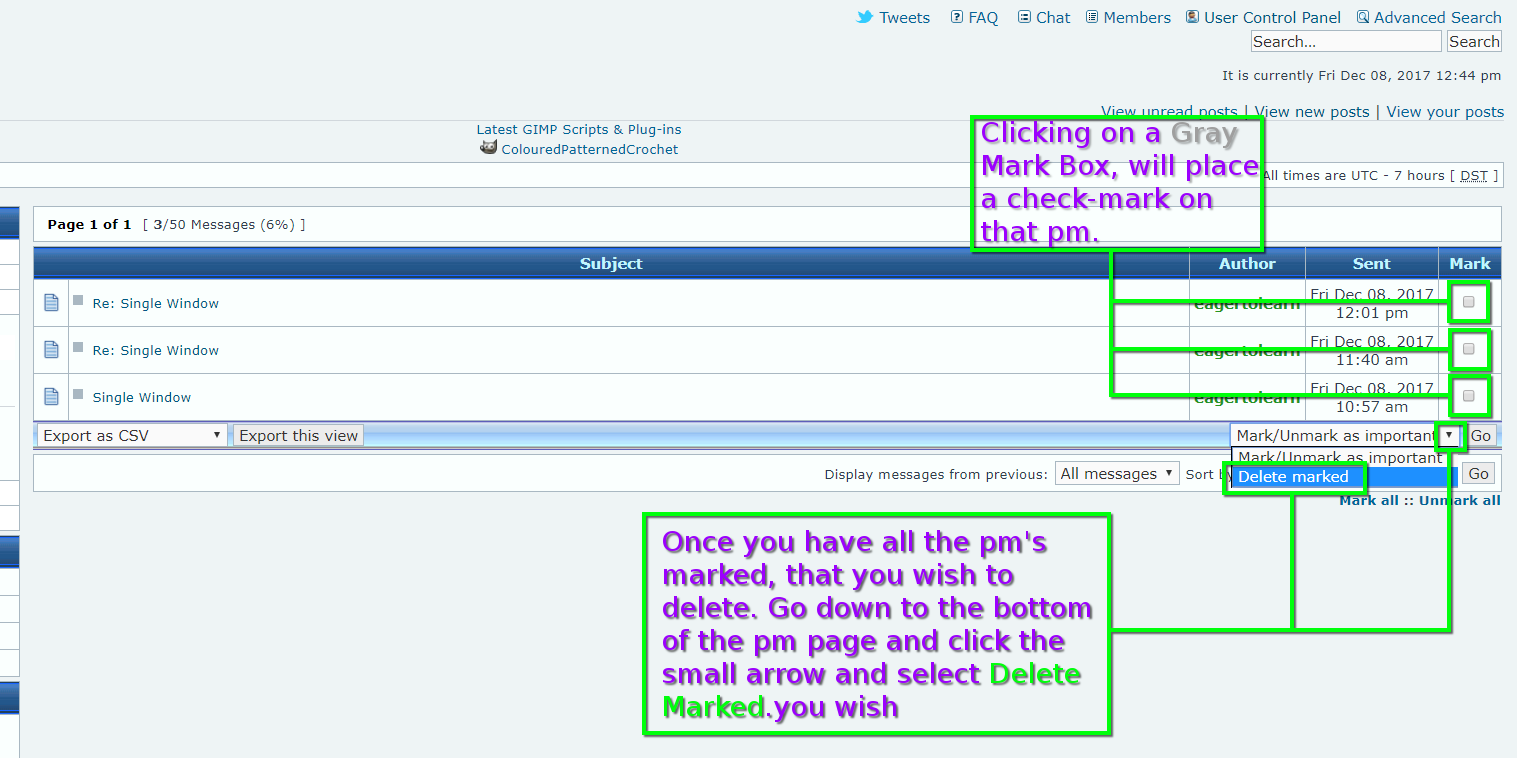
I don't see a Delete feature - how do I delete PM messages?

Thank you.


Top
 Post subject: Re: Add Text to a jpg - GIMP 2.8.2 – Text tiny
PostPosted: Fri Dec 08, 2017 2:07 pm  (#16) 
Offline
Administrator
User avatar

Joined: Aug 10, 2012
Posts: 14078
Location: Native to NYC living in Arizona, Gimp 2.8 - 3.0, Win 11 PC.
eagertolearn wrote:
I don't see a Delete feature - how do I delete PM messages?

Thank you.


Put a checkmark in the small gray box in the Mark column.
Go down to the bottom of the page.
Where it says Mark/Unmark as important and expand this dialog,
by clicking on the small arrow and select Delete.


Image

_________________
Image
"A wise man learns more from a foolish question than a fool can learn from a wise answer"
Image


Top
Post new topic Reply to topic  [ 16 posts ] 

All times are UTC - 5 hours [ DST ]


* Login  


Powered by phpBB3 © phpBB Group