It is currently Wed Nov 18, 2026 6:08 pm


All times are UTC - 5 hours [ DST ]


Post new topic Reply to topic  [ 42 posts ]  Go to page Previous  1, 2, 3  Next
Author Message
 Post subject: Re: Augment Color to a faded color in subject in a jpg photo
PostPosted: Tue Nov 28, 2017 1:07 pm  (#21) 
Offline
Administrator
User avatar

Joined: Aug 10, 2012
Posts: 14277
Location: Native to NYC living in Arizona, Gimp 2.8 - 3.0, Win 11 PC.
eagertolearn wrote:
That's great!

Can you possibly share how you did that?

Thank you!

It's done using the Perspective Tool.
To match the angle of the siding,
on the image of some clapboard siding and layer masking out the parts of the siding not wanted.
I know that this really doesn't explain exactly what was done,
but that's basically how I did it.

_________________
Image
"A wise man learns more from a foolish question than a fool can learn from a wise answer"
Image


Top
 Post subject: Re: Augment Color to a faded color in subject in a jpg photo
PostPosted: Tue Nov 28, 2017 1:24 pm  (#22) 
Offline
GimpChat Member

Joined: Feb 26, 2014
Posts: 248
Are you aware of any YouTube or other videos showing a novice how to use this Perspective Tool?

I'd really like to learn this skill set for many small projects.

Thank you!


Top
 Post subject: Re: Augment Color to a faded color in subject in a jpg photo
PostPosted: Tue Nov 28, 2017 1:28 pm  (#23) 
Offline
Administrator
User avatar

Joined: Aug 10, 2012
Posts: 14277
Location: Native to NYC living in Arizona, Gimp 2.8 - 3.0, Win 11 PC.
eagertolearn wrote:
Are you aware of any YouTube or other videos showing a novice how to use this Perspective Tool?

I'd really like to learn this skill set for many small projects.

Thank you!

I can make a video about this.
If you're willing to wait,
it shouldn't take but a few minutes to do.
I can also use your image and show you exactly what I did.
Is it okay if I use your image for the video,
that is if you're willing to wait?

_________________
Image
"A wise man learns more from a foolish question than a fool can learn from a wise answer"
Image


Top
 Post subject: Re: Augment Color to a faded color in subject in a jpg photo
PostPosted: Tue Nov 28, 2017 1:51 pm  (#24) 
Offline
GimpChat Member

Joined: Feb 26, 2014
Posts: 248
Is there another graphic we could please possibly use for the video?

Should I find another photo and upload that to you tomorrow?

Thanks so much!


Top
 Post subject: Re: Augment Color to a faded color in subject in a jpg photo
PostPosted: Tue Nov 28, 2017 1:55 pm  (#25) 
Offline
Administrator
User avatar

Joined: Aug 10, 2012
Posts: 14277
Location: Native to NYC living in Arizona, Gimp 2.8 - 3.0, Win 11 PC.
eagertolearn wrote:
Is there another graphic we could please possibly use for the video?

Should I find another photo and upload that to you tomorrow?

Thanks so much!

It's not necessary for me to use your image.
I can use my own image for the video.
Would you like me to create a video about using the perspective tool?

_________________
Image
"A wise man learns more from a foolish question than a fool can learn from a wise answer"
Image


Top
 Post subject: Re: Augment Color to a faded color in subject in a jpg photo
PostPosted: Tue Nov 28, 2017 2:20 pm  (#26) 
Offline
GimpChat Member

Joined: Feb 26, 2014
Posts: 248
I would so love that!

Thank you ever so much!


Top
 Post subject: Re: Augment Color to a faded color in subject in a jpg photo
PostPosted: Tue Nov 28, 2017 2:22 pm  (#27) 
Offline
Administrator
User avatar

Joined: Aug 10, 2012
Posts: 14277
Location: Native to NYC living in Arizona, Gimp 2.8 - 3.0, Win 11 PC.
eagertolearn wrote:
I would so love that!

Thank you ever so much!

Okay.
I'll get on that asap.
When the video is done I'll post it here and on YouTube.

_________________
Image
"A wise man learns more from a foolish question than a fool can learn from a wise answer"
Image


Top
 Post subject: Re: Augment Color to a faded color in subject in a jpg photo
PostPosted: Tue Nov 28, 2017 2:31 pm  (#28) 
Offline
GimpChat Member

Joined: Feb 26, 2014
Posts: 248
Thank you!!!


Top
 Post subject: Re: Augment Color to a faded color in subject in a jpg photo
PostPosted: Tue Nov 28, 2017 2:44 pm  (#29) 
Offline
Administrator
User avatar

Joined: Aug 10, 2012
Posts: 14277
Location: Native to NYC living in Arizona, Gimp 2.8 - 3.0, Win 11 PC.
eagertolearn wrote:
Thank you!!!

No problem.
Image

_________________
Image
"A wise man learns more from a foolish question than a fool can learn from a wise answer"
Image


Top
 Post subject: Re: Augment Color to a faded color in subject in a jpg photo
PostPosted: Tue Nov 28, 2017 4:37 pm  (#30) 
Offline
GimpChat Member
User avatar

Joined: Mar 28, 2016
Posts: 312
Location: Netherlands
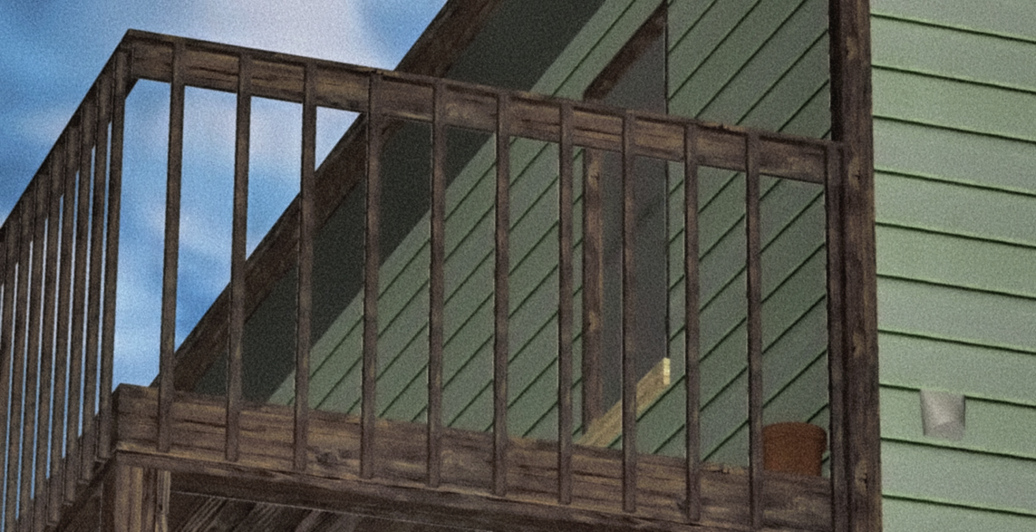
My try, :cool

Do not take this too seriously, but I had fun:

Image


Top
 Post subject: Re: Augment Color to a faded color in subject in a jpg photo
PostPosted: Tue Nov 28, 2017 4:45 pm  (#31) 
Offline
GimpChat Member

Joined: Feb 26, 2014
Posts: 248
Hi iarga,

How did you get the wooden rail to be so detailed?

Also, how did you choose that sea green color?

Thank you!!!


Top
 Post subject: Re: Augment Color to a faded color in subject in a jpg photo
PostPosted: Tue Nov 28, 2017 5:02 pm  (#32) 
Offline
GimpChat Member
User avatar

Joined: Mar 28, 2016
Posts: 312
Location: Netherlands
Please forgive me eagertolearn.

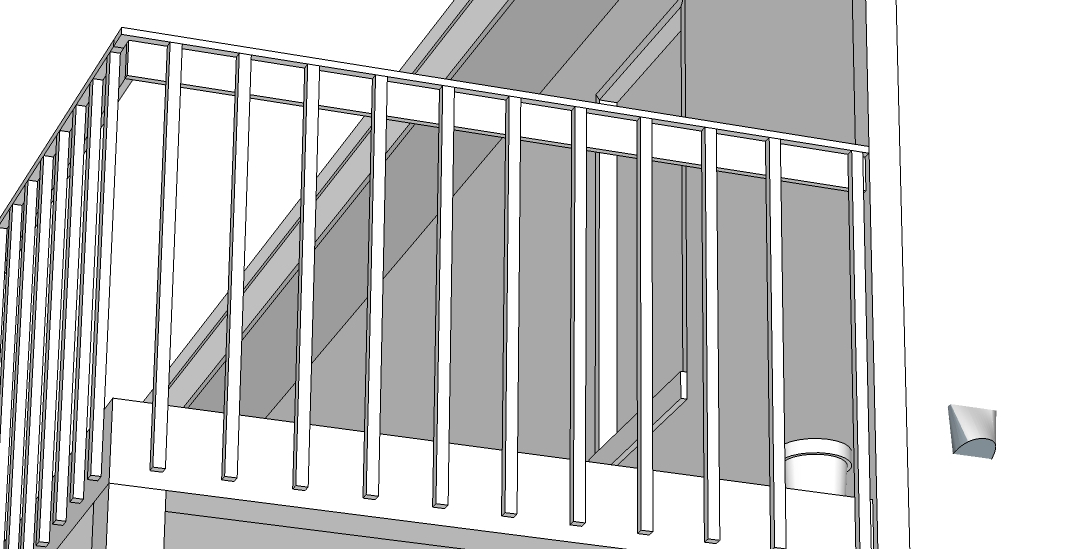
I did model your photo in 3d with SketchUp Make, with textures from that software. So, this is not GIMP. Thereafter I did use GIMP (filters to blur, tone and a little bit matching the colors. Also lots of grain. Then scaled down). So I can't give a good instruction here. I hope you are not upset. That's the reason I said not to take it too serious.

Edit2 (model):
Image

Please let Wallace be your instructor here. He knows his job.

Edit: I can even say that I can also learn a lot from Wallace here, which is why the video below will also be instructive for me. (for me modelling is easier, so I cheated ;) )


Last edited by iarga on Tue Nov 28, 2017 5:19 pm, edited 2 times in total.

Top
 Post subject: Re: Augment Color to a faded color in subject in a jpg photo
PostPosted: Tue Nov 28, 2017 5:03 pm  (#33) 
Offline
Administrator
User avatar

Joined: Aug 10, 2012
Posts: 14277
Location: Native to NYC living in Arizona, Gimp 2.8 - 3.0, Win 11 PC.
Here's that video...


www.youtube.com Video from : www.youtube.com


This may not be a totally comprehensive video on the subject of the perspective tool,
however,
it covers some of the "how-to" aspects of this tool's usage.

_________________
Image
"A wise man learns more from a foolish question than a fool can learn from a wise answer"
Image


Top
 Post subject: Re: Augment Color to a faded color in subject in a jpg photo
PostPosted: Wed Nov 29, 2017 12:18 pm  (#34) 
Offline
GimpChat Member

Joined: Feb 26, 2014
Posts: 248
Hi iarga,

Yes, Wallace is most excellent and I look forward to learning from his video.

But, you've shared something I've been trying to find for years - good illustration software.

Did you create your masterpiece here with the pro version?

Can you use the pro version offline?

I see with the free version you must be online :(

How fun is all this?????!

Thank you!!!

iarga wrote:
Please forgive me eagertolearn.

I did model your photo in 3d with SketchUp Make, with textures from that software. So, this is not GIMP. Thereafter I did use GIMP (filters to blur, tone and a little bit matching the colors. Also lots of grain. Then scaled down). So I can't give a good instruction here. I hope you are not upset. That's the reason I said not to take it too serious.

Edit2 (model):
[ Image ]

Please let Wallace be your instructor here. He knows his job.

Edit: I can even say that I can also learn a lot from Wallace here, which is why the video below will also be instructive for me. (for me modelling is easier, so I cheated ;) )


Top
 Post subject: Re: Augment Color to a faded color in subject in a jpg photo
PostPosted: Wed Nov 29, 2017 12:19 pm  (#35) 
Offline
GimpChat Member

Joined: Feb 26, 2014
Posts: 248
You're a champ!!

I plan on downloading the video tomorrow, if possible.

Thank you ever so very much!!!

Wallace wrote:
Here's that video...


www.youtube.com Video from : www.youtube.com


This may not be a totally comprehensive video on the subject of the perspective tool,
however,
it covers some of the "how-to" aspects of this tool's usage.


Top
 Post subject: Re: Augment Color to a faded color in subject in a jpg photo
PostPosted: Wed Nov 29, 2017 12:30 pm  (#36) 
Offline
Administrator
User avatar

Joined: Aug 10, 2012
Posts: 14277
Location: Native to NYC living in Arizona, Gimp 2.8 - 3.0, Win 11 PC.
eagertolearn wrote:
You're a champ!!

I plan on downloading the video tomorrow, if possible.

Thank you ever so very much!!!


If you're unable to download the video.
Let me know and I can arrange something to get it to you.

Below is a link to my Dropbox account,
where I believe you'll be able to download the video from.
Image
GIMP Perspective Tool Video Download Link @ Dropbox.com


Let me know if you can't download the video.
;)

_________________
Image
"A wise man learns more from a foolish question than a fool can learn from a wise answer"
Image


Top
 Post subject: Re: Augment Color to a faded color in subject in a jpg photo
PostPosted: Wed Nov 29, 2017 1:48 pm  (#37) 
Offline
GimpChat Member
User avatar

Joined: Mar 28, 2016
Posts: 312
Location: Netherlands
eagertolearn,

If you are looking for illustration software, perhaps you can also consider Krita and Inkscape. But of course you can do a lot in GIMP. all software has a learning curve.

I made a 3d model with 3d modelling software SketchUp Make (not Pro) 2015. I think you can still download the software, but then the 2017 version.

But.........!!!!!!!

The Make version is discontinued, so no SketchUp Make 2018, only Pro. The free-online cloud-based version doesn't have the functionality of the Make versions (yet).

The best advice I can give you, if you are really interested in 3d modelling:

Learn Blender!

This is and will continue to be free and open source software.

I'm learning it now, step by step. But I'm not so fast at it yet. I have to say that it is very difficult sometimes. Since I am not used to that way of modelling. Maybe in half a year, I can model and texture the simple model I showed you above, in the same time. But at this moment it would be much more work for me, mainly because of the textures to be applied.

But that's a nice thing in life. That we can learn and experience new stuff.


Top
 Post subject: Re: Augment Color to a faded color in subject in a jpg photo
PostPosted: Wed Nov 29, 2017 2:05 pm  (#38) 
Offline
GimpChat Member

Joined: Feb 26, 2014
Posts: 248
Hi iarga,

You're reading my mind! :)

About a month ago I looked at Blender to try to teach myself (ask novice questions in their forum) basic animation (I'm not looking to become an Oscar winner) just to be able to create simple animations - like Christmas greetings for friends.

I had no idea Bender would do illustrations. Thank you for informing me.

Bender looks like it has a steep learning curve so I placed that on hold as I'm still learning GIMP features (thanks to the good people on this list).

I'm grateful to the Bender developers for offering a free version you can use it offline (as I'm sooooooo grateful to the GIMP developers who've already made my life easier being able to modify graphics.)

Any quick insights you can share re: using Blender for illustrations?

Fun conversation!

Thank you so much!

iarga wrote:
eagertolearn,

If you are looking for illustration software, perhaps you can also consider Krita and Inkscape. But of course you can do a lot in GIMP. all software has a learning curve.

I made a 3d model with 3d modelling software SketchUp Make (not Pro) 2015. I think you can still download the software, but then the 2017 version.

But.........!!!!!!!

The Make version is discontinued, so no SketchUp Make 2018, only Pro. The free-online cloud-based version doesn't have the functionality of the Make versions (yet).

The best advice I can give you, if you are really interested in 3d modelling:

Learn Blender!

This is and will continue to be free and open source software.

I'm learning it now, step by step. But I'm not so fast at it yet. I have to say that it is very difficult sometimes. Since I am not used to that way of modelling. Maybe in half a year, I can model and texture the simple model I showed you above, in the same time. But at this moment it would be much more work for me, mainly because of the textures to be applied.

But that's a nice thing in life. That we can learn and experience new stuff.


Top
 Post subject: Re: Augment Color to a faded color in subject in a jpg photo
PostPosted: Wed Nov 29, 2017 3:13 pm  (#39) 
Offline
GimpChat Member
User avatar

Joined: Mar 28, 2016
Posts: 312
Location: Netherlands
eagertolearn,

For 2d illustrations: Krita, GIMP or/and Inkscape. You will draw on a flat 2d surface.

For 3d modelling and 3d animation: Blender.

These (in this reply) are all free and open source software.

I didn't inform you about Blender for illustrations, but for 3d modelling. Although some people can make very nice artwork in 3d with blender. The renderings of this nice 3d artwork from this artists can be used as illustrations.

Learning Krita, GIMP or Inkscape for just working in 2d is easier.


Top
 Post subject: Re: Augment Color to a faded color in subject in a jpg photo
PostPosted: Wed Nov 29, 2017 4:23 pm  (#40) 
Offline
GimpChat Member

Joined: Feb 26, 2014
Posts: 248
iagra,

Great conversation!

Did you learn Krita, Inkscape or Blender though online courses like Coursera, etc.?

Or did you just download each program and through trial and error learn skills and post questions on their respective support forums (like this GIMPCHAT) when you got stuck?

Thanks so very much!


Top
Post new topic Reply to topic  [ 42 posts ]  Go to page Previous  1, 2, 3  Next

All times are UTC - 5 hours [ DST ]


* Login  


Powered by phpBB3 © phpBB Group